

ElasticSearch实战
一、es集群的搭建
1.集群相关概念
单节点故障问题
单台服务器,往往都有最大的负载能力,超过这个阈值,服务器性能就会大大降低甚至不可用。单点的elasticsearch也是一样那单点的es服务器存在哪些可能出现的问题呢?
单台机器存储容量有限
单服务器容易出现单点故障,无法实现高可用
单服务的并发处理能力有限
所以,为了应对这些问题,我们需要对elasticsearch搭建集群集群中节点数量没有限制,大于等于2个节点就可以看做是集群了。一般出于高性能及高可用方面来考虑集群中节点数量都是3个以上。
集群 cluster
一个集群就是由一个或多个节点组织在一起,它们共同持有整个的数据,并一起提供索引和搜索功能。一个集群由一个唯一的名字标识,这个名字默认就是“elasticsearch”。这个名字是重要的,因为一个节点只能通过指定某个集群的名字,来加入这个集群。
节点node
一个节点是集群中的一个服务器,作为集群的一部分,它存储数据,参与集群的索引和搜索功能。
一个节点也是由一个名字来标识的,默认情况下,这个名字是一个随机的漫威漫画角色的名字,这个名字会在启动的时候赋予节点。这个名字对于管理工作来说挺重要的,因为在这个管理过程中,你会去确定网络中的哪些服务器对应于ElasticSearch集群中的哪些节点。
一个节点可以通过配置集群名称的方式来加入一个指定的集群。默认情况下,每个节点都会被安排加入到一个叫做“elasticsearch”的集群中,这意味着,如果你在你的网络中启动了若干个节点,并假定它们能够相互发现彼此,它们将会自动地形成并加入到一个叫做“elasticsearch”的集群中。
在一个集群里,只要你想,可以拥有任意多个节点。而且,如果当前你的网络中没有运行任何Elasticsearch节点,这时启动一个节点,会默认创建并加入一个叫做“elasticsearch”的集群。
分片和复制 shards&replicas
一个索引可以存储超出单个节点硬件限制的大量数据。比如,一个具有10亿文档的索引占据1TB的磁盘空间,而任一节点都没有这样大的磁盘空间;或者单个节点处理搜索请求,响应太慢。为了解决这个问题,ElasticSearch提供了将索引划分成多份的能力,这些份就叫做分片。当你创建一个索引的时候,你可以指定你想要的分片的数量。每个分片本身也是一个功能完善并且独立的“索引”,这个“索引”可以被放置到集群中的任何节点上。
分片很重要,主要有两方面的原因:
1)允许你水平分割/扩展你的内容容量。
2)允许你在分片(潜在地,位于多个节点上)之上进行分布式的、并行的操作,进而提高性能/吞吐量。
至于一个分片怎样分布,它的文档怎样聚合回搜索请求,是完全由ElasticSearch管理的,对于作为用户的你来说,这些都是透明的。
在一个网络/云的环境里,失败随时都可能发生,在某个分片/节点不知怎么的就处于离线状态,或者由于任何原因消失了,这种情况下,有一个故障转移机制是非常有用并且是强烈推荐的。为此目的,ElasticSearch允许你创建分片的一份或多份拷贝,这些拷贝叫做复制分片( 副本)。
复制之所以重要,有两个主要原因: 在分片/节点失败的情况下,提供了高可用性。因为这个原因,注意到复制分片从不与原/主要(original/primary)分片置于同一节点上是非常重要的。扩展你的搜索量/吞吐量,因为搜索可以在所有的复制上并行运行。总之,每个索引可以被分成多个分片。一个索引也可以被复制0次(意思是没有复制)或多次。一旦复制了,每个索引就有了主分片(作为复制源的原来的分片)和复制分片(主分片的拷贝)之别。分片和复制的数量可以在索引创建的时候指定。在索引创建之后,你可以在任何时候动态地改变复制的数量,但是你事后不能改变分片的数量。
默认情况下,Elasticsearch中的每个索引被分片5个主分片和1个复制,这意味着,如果你的集群中至少有两个节点,你的索引将会有5个主分片和另外5个复制分片(1个完全拷贝),这样的话每个索引总共就有10个分片。
2.服务搭建
在usr/local/software目录下创建es-cluster文件夹
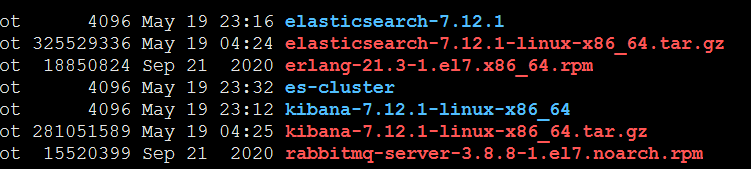
拷贝单机版的es到es-cluster目录下
cp -r elasticsearch-7.12.1 es-cluster
删除单机版es的数据

修改配置文件

cluster.name: my-es
cluster.routing.allocation.disk.threshold_enabled: false
node.name: node-1
network.host: 0.0.0.0
http.port: 9201
transport.tcp.port: 9301
discovery.zen.ping.unicast.hosts: ["10.211.55.95:9301","10.211.55.95:9302"]
cluster.initial_master_nodes: ["node-1"]
拷贝出两台节点

注意修改另外一台节点的配置信息
cluster.name: my-es
cluster.routing.allocation.disk.threshold_enabled: false
node.name: node-2
network.host: 0.0.0.0
http.port: 9202
transport.tcp.port: 9302
discovery.zen.ping.unicast.hosts: ["10.211.55.95:9301","10.211.55.95:9302"]
cluster.initial_master_nodes: ["node-1"]
配置文件的解释
#节点1的配置信息:
#集群名称,保证唯一
cluster.name: my-elasticsearch
#默认为true。设置为false禁用磁盘分配决定器。
cluster.routing.allocation.disk.threshold_enabled: false
#节点名称,必须不一样
node.name: node-1
#本机的ip地址
network.host: 127.0.0.1
#服务端口号,在同一机器下必须不一样
http.port: 9201
#集群间通信端口号,在同一机器下必须不一样
transport.tcp.port: 9301
#设置集群自动发现机器ip集合
discovery.zen.ping.unicast.hosts: ["127.0.0.1:9301","127.0.0.1:9302"]
分别启动节点1和节点2
更改es-cluster文件归属aqrlmy用户
chown -R aqrlmy es-cluster
bin/elasticsearch -d

3.安装ES插件ElasticSearch-head
拖拽插件
在Chrome浏览器地址栏中输入:chrome://extensions/,或按照下图打开“扩展程序”
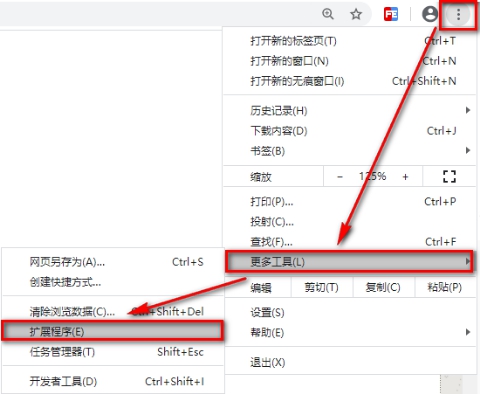
将资料中【ElasticSearch-head-Chrome-0.1.5-Crx4Chrome.crx】文件拖到扩展程序 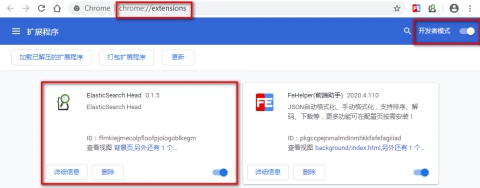
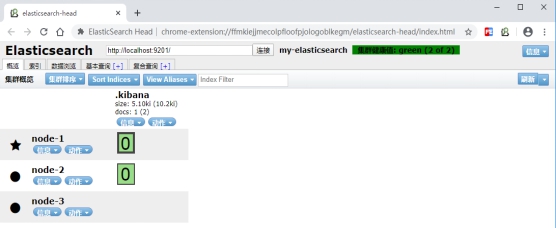
使用elasticsearch-head查看集群情况
没有创建任何索引前的情况,只有一个默认的索引.kibana
集群测试
创建索引及映射
# 请求方法:PUT
PUT /shopping
{"settings": {},"mappings": {"product":{"properties": {"title":{"type": "text","analyzer": "ik_max_word"},"subtitle":{"type": "text","analyzer": "ik_max_word"},"images":{"type": "keyword","index": false},"price":{"type": "float","index": true}}}}
}
添加文档
POST /shopping/product
{"title":"小米手机","images":"http://www.gulixueyuan.com/xm.jpg","price":3999.00
}
再次使用elasticsearch-head查看集群情况
命令查看:GET _cluster/health(待截图)
Elasticsearch-head查看:
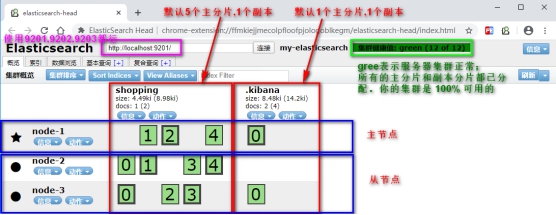
服务器运行状态
Green
所有的主分片和副本分片都已分配。你的集群是 100% 可用的。
yellow
所有的主分片已经分片了,但至少还有一个副本是缺失的。不会有数据丢失,所以搜索结果依然是完整的。不过,你的高可用性在某种程度上被弱化。如果 更多的 分片消失,你就会丢数据了。把 yellow 想象成一个需要及时调查的警告。
red
至少一个主分片(以及它的全部副本)都在缺失中。这意味着你在缺少数据:搜索只能返回部分数据,而分配到这个分片上的写入请求会返回一个异常。
二、项目的搭建
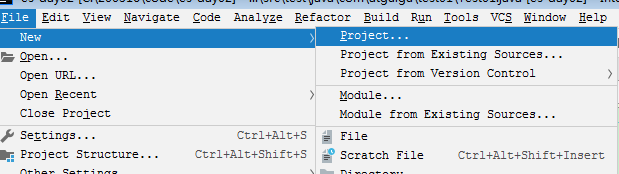
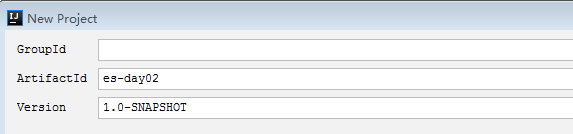
新建一个maven项目
修改pom文件
org.springframework.boot spring-boot-starter-parent 2.2.6.RELEASE org.springframework.boot spring-boot-starter-data-elasticsearch org.elasticsearch.client elasticsearch-rest-high-level-client 6.8.1 org.springframework.boot spring-boot-starter-test test org.springframework.boot spring-boot-configuration-processor true org.springframework.boot spring-boot-starter org.elasticsearch elasticsearch 6.8.1 org.elasticsearch.client transport 6.8.7 test com.fasterxml.jackson.core jackson-databind 2.10.3 org.projectlombok lombok true 三、API接口编写
1.原生接口编写
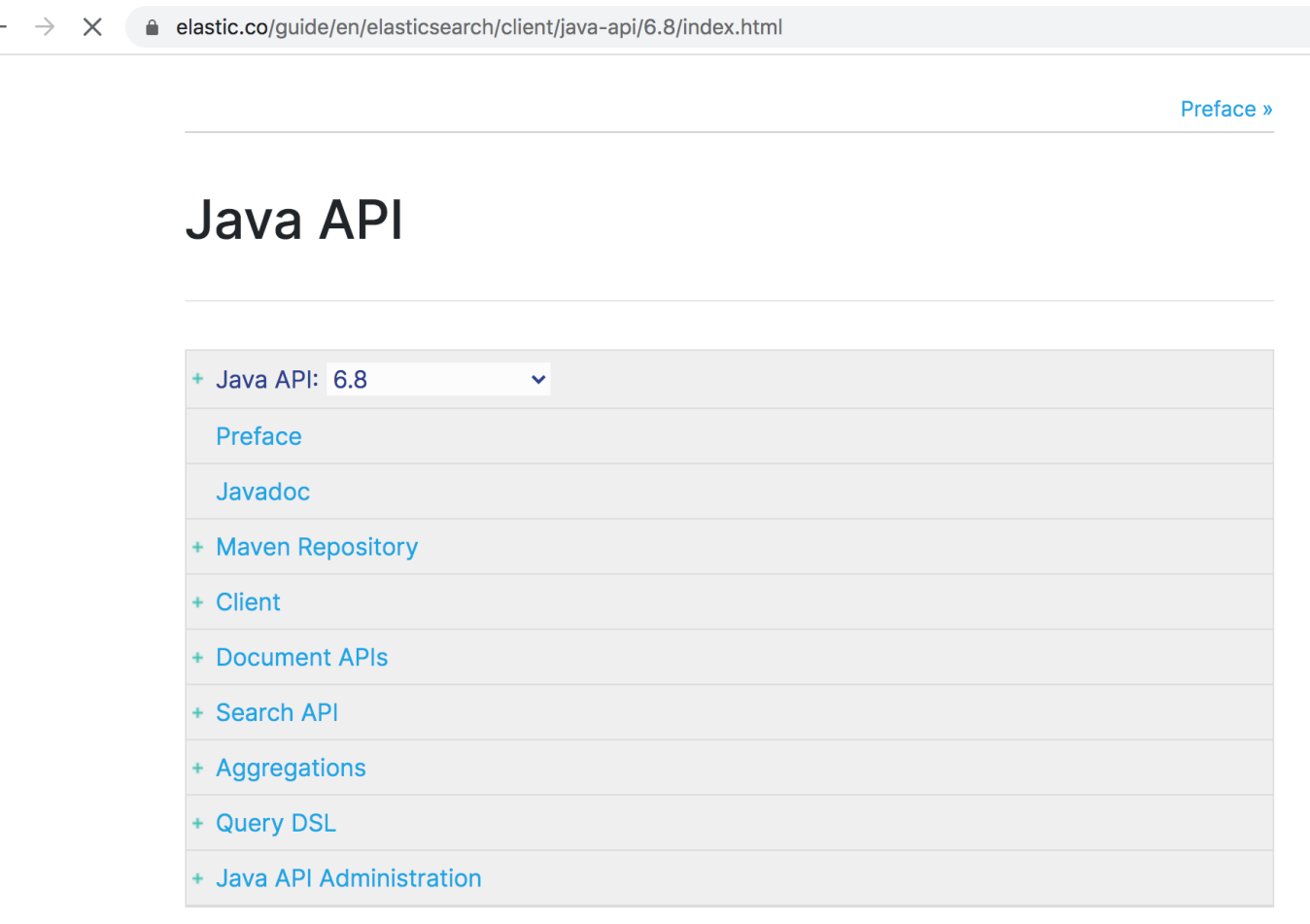
官网
https://www.elastic.co/guide/en/elasticsearch/client/java-api/6.8/index.html
构建初始化方法
PreBuiltTransportClient client = null;//执行测试之前做的事情@Beforepublic void getClient() {try {//1) 创建一个Settings对象,相当于配置信息,主要配置集群名称。Settings settings = Settings.builder().put("cluster.name", "my-es").build();//2) 创建一个客户端client对象client = new PreBuiltTransportClient(settings);client.addTransportAddress(new TransportAddress(InetAddress.getByName("182.92.234.71"), 9300));} catch (Exception e) {}}@Afterpublic void closeClient() {client.close();}
创建索引
@Test
public void testCreateIndex01(){// 创建指定索引client.admin().indices().prepareCreate("shop").get();
}
删除索引
@Test
public void testDeleteIndex02(){client.admin().indices().prepareDelete("blog").get();
}
创建映射方式一
@Test
public void testCreateMapping03() throws Exception{XContentBuilder builder = XContentFactory.jsonBuilder();builder.startObject()//对哪张表进行添加映射.startObject("properties").startObject("id").field("type","long").field("store", false).endObject().startObject("title").field("type", "text").field("store", false).field("analyzer", "ik_smart").endObject().startObject("content").field("type", "text").field("store", false).field("analyzer","ik_smart").endObject().endObject().endObject();PutMappingRequest mapping = Requests.putMappingRequest("blog").type("article").source(builder);client.admin().indices().putMapping(mapping);
}
创建映射方式二
@Test
public void testCreateMapping031() {String jsonData="{\"properties\":{\"title\":{\"type\":\"text\",\"analyzer\":\"ik_max_word\"},\"subtitle\":{\"type\":\"text\",\"analyzer\":\"ik_max_word\"},\"price\":{\"type\":\"float\"}," +"\"images\":{\"type\":\"keyword\",\"index\":false}}}";PutMappingRequest mapping = Requests.putMappingRequest("shop").type("article").source(jsonData,XContentType.JSON);client.admin().indices().putMapping(mapping);
}
创建索引数据
@Test
public void testPutIndexData04() {//通过XContentBuilder构建数据
//        XContentBuilder builder = XContentFactory.jsonBuilder();
//        builder.startObject();
//        builder.field("id",1);
//        builder.field("title","es是一个基于Lucene的搜索服务器!");
//        builder.field("content","它提供了一个分布式多用户能力的全文搜索引擎,基于RESTful web接口。");
//       builder.endObject();Map map = new HashMap();map.put("id","1");map.put("title","今日头条来啦");map.put("content","抖音是一个好app");//使用TransportClient对象增加数据client.prepareIndex("blog","article","1").setSource(map).get();//关闭资源}
以对象添加到索引
@Test
public void testPutBeanIndex05() throws Exception{//创建一个Article对象Article article = new Article();article.setId(2);article.setTitle("MH370坠毁在柬埔寨密林?中国一公司调十颗卫星去拍摄");article.setContent("警惕荒唐的死亡游戏!俄15岁少年输掉游戏后用电锯自杀");// json转换对象ObjectMapper objectMapper = new ObjectMapper();//把article对象转换成json格式的字符串。String json = objectMapper.writeValueAsString(article);System.out.println(json);//使用client对象把文档写入索引库client.prepareIndex("blog","article",article.getId().toString())//把article对象转换成json格式的字符串。.setSource(json.getBytes(), XContentType.JSON).get();
}
修改索引方式一
@Test
public void testUpdateIndexData06() throws Exception{//创建一个Article对象Article article = new Article();article.setId(2);article.setTitle("女美女路遇昏迷男子跪地抢救:救人是职责更是本能");article.setContent("江西变质营养餐事件已致24多名官员被调查");//json转换对象ObjectMapper objectMapper = new ObjectMapper();client.prepareUpdate("blog","article",article.getId().toString()).setDoc(objectMapper.writeValueAsString(article),XContentType.JSON).get();
}
修改索引方式二
@Test
public void testUpdateIndexData07() throws Exception{//创建一个Article对象Article article = new Article();article.setId(2);article.setTitle("团结是最好的良药");article.setContent("巴总理商务顾问 中巴经济走廊进展顺利");// json转换对象ObjectMapper objectMapper = new ObjectMapper();String s = objectMapper.writeValueAsString(article);// 创建索引数据client.update(new UpdateRequest("blog","article",article.getId().toString()).doc(s,XContentType.JSON)).get();
}
删除数据
@Test
public void testDeleteIndexData08() {client.prepareDelete("blog","article","2").get();
}
批量添加数据
@Test
public void testInsertBatchData09() throws Exception{// 批量增加数据构建对象BulkRequestBuilder prepareBulk = client.prepareBulk();// json转换对象ObjectMapper objectMapper = new ObjectMapper();for (int i = 0; i < 100; i++) {Article article = new Article();article.setId(i+1);article.setTitle("在这个日子中"+(i+1));article.setContent("巴总理商务顾问:中巴经济走廊进展顺利"+(i+1));// 增加数据IndexRequestBuilder requestBuilder = client.prepareIndex("blog", "article", article.getId().toString()).setSource(objectMapper.writeValueAsString(article), XContentType.JSON);// 将indexRequestBuilder添加到批量执行对象中prepareBulk.add(requestBuilder);}// 执行操作prepareBulk.get();
}
2.原生查询接口
根据id查询
@Test
public void testQueryById01() throws Exception {//查询数据GetResponse response = client.prepareGet("movie_index", "movie", "1").get();//获取结果集数据String result = response.getSourceAsString();System.out.println(result);
}
各种查询类型
@Test
public void testAllKindsOfQuery02() throws Exception {//1.查询name 分词后包含operation 的term的文档//QueryBuilder queryBuilder = QueryBuilders.termQuery("name", "river");//2.模糊匹配operation meigong river//QueryBuilder queryBuilder = QueryBuilders.wildcardQuery("name", "*eigon*");//3.找一个分词后 能和搜索内容相似的记录//QueryBuilder queryBuilder =QueryBuilders.fuzzyQuery("name","rad");//4.豆瓣评分在4到8分之间的结果//QueryBuilder queryBuilder =QueryBuilders.rangeQuery("doubanScore").from(4).to(8);//5.字符串查询QueryBuilder queryBuilder = QueryBuilders.queryStringQuery("peration meigong").field("name");printSearchResult(queryBuilder);
}
分页查询
@Test
public void testQueryPage03() throws Exception {SearchResponse response = client.prepareSearch("movie_index").setTypes("movie")// 设置查询条件.setQuery(QueryBuilders.matchAllQuery())// 0:表示第一条记录,0不是页码,是记录,N*SIZE.setFrom(0)// size:表示每页显示的条数.setSize(2).get();
}
高亮查询
@Test
public void testQueryHighlight04() throws Exception {SearchRequestBuilder searchRequestBuilder = client.prepareSearch("movie_index").setTypes("movie")// 设置查询条件 搜索 .setQuery(QueryBuilders.termQuery("name", "river")).setFrom(0) // 0:表示第一条记录,0不是页码,是记录,N*SIZE.setSize(2);// 开启高亮HighlightBuilder highlightBuilder = new HighlightBuilder();//高亮配置highlightBuilder.preTags("");      //前缀highlightBuilder.postTags("");// 指定高亮域 :用户搜索的关键词在指定域中出现,则添加高亮样式关键词highlightBuilder.field("name");// 设置高亮对象searchRequestBuilder.highlighter(highlightBuilder);SearchResponse response = searchRequestBuilder.get();//处理结果SearchHits hits = response.getHits();//总记录数long totalHits = hits.getTotalHits();//获取数据结果集Iterator iterator = hits.iterator();while (iterator.hasNext()) {//获取数据SearchHit hit = iterator.next();//获取所有数据,并转成JSON字符串String result = hit.getSourceAsString();// 获取高亮结果Text[] titles = hit.getHighlightFields().get("name").getFragments();String hitTitle = "";if (titles != null && titles.length > 0) {hitTitle = titles[0].toString();System.out.println(hitTitle);}}
}
3.Rest高级客户端
https://www.elastic.co/guide/en/elasticsearch/reference/6.8/query-dsl-range-query.html
修改pom依赖文件
org.springframework.boot spring-boot-starter-parent 2.2.6.RELEASE org.elasticsearch.client elasticsearch-rest-high-level-client 6.8.1 org.springframework.boot spring-boot-starter-test test org.springframework.boot spring-boot-configuration-processor true org.springframework.boot spring-boot-starter org.elasticsearch elasticsearch 6.8.1 org.elasticsearch.client transport 6.8.7 test com.fasterxml.jackson.core jackson-databind 2.10.3 org.projectlombok lombok true 添加配置文件
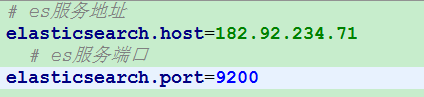
添加配置类
@Configuration
@ConfigurationProperties(prefix = "elasticsearch")
@Component
@Data
public class EsConfig {private String host ;private Integer port ;@Beanpublic RestHighLevelClient client(){RestClientBuilder builder = RestClient.builder(new HttpHost(host, port));RestHighLevelClient restHighLevelClient = new RestHighLevelClient(builder);return restHighLevelClient;}
}
编写主类
@SpringBootApplication
public class EsApplication {public static void main(String[] args) {SpringApplication.run(EsApplication.class);}
}
同步保存
@RunWith(SpringRunner.class)
@SpringBootTest
public class IndexTest {//@Autowired@Resourceprivate RestHighLevelClient client;//同步保存@Testpublic void testSave() throws Exception {Map data = new HashMap<>();data.put("id", 2003);data.put("title", "南京东路 二室一厅");data.put("price", 4000);IndexRequest indexRequest = new IndexRequest("shengzhen", "house").source(data);IndexResponse response = client.index(indexRequest, RequestOptions.DEFAULT);System.out.println("id -> " + response.getId());System.out.println("version -> " + response.getVersion());System.out.println("result -> " + response.getResult());}
}
异步保存
@Test
public void testCreateAsync() throws Exception {Map data = new HashMap<>();data.put("id", "2005");data.put("title", "南京东路2 最新房源 二室一厅");data.put("price", "5600");IndexRequest indexRequest = new IndexRequest("shengzhen", "house").source(data);client.indexAsync(indexRequest, RequestOptions.DEFAULT, newActionListener() {@Overridepublic void onResponse(IndexResponse indexResponse) {System.out.println(indexResponse);}@Overridepublic void onFailure(Exception e) {System.out.println(e);}});System.out.println("over");Thread.sleep(20000);
}
查询
@Test
public void testQuery() throws Exception {GetRequest getRequest = new GetRequest("shengzhen", "house", "wx0CuXMB_gs6qSBYMJgp");// 指定返回的字段String[] includes = new String[]{"title", "id"};//排除的字段String[] excludes = Strings.EMPTY_ARRAY;FetchSourceContext fetchSourceContext = new FetchSourceContext(true, includes, excludes);getRequest.fetchSourceContext(fetchSourceContext);GetResponse response = client.get(getRequest, RequestOptions.DEFAULT);System.out.println("数据 -> " + response.getSource());
}
判断是否存在
@Test
public void testExists() throws Exception {GetRequest getRequest = new GetRequest("shengzhen", "house", "wx0CuXMB_gs6qSBYMJgp");// 不返回的字段getRequest.fetchSourceContext(new FetchSourceContext(false));boolean exists = client.exists(getRequest, RequestOptions.DEFAULT);System.out.println("exists -> " + exists);
}
更新数据
@Test
public void testUpdate() throws Exception {UpdateRequest updateRequest = new UpdateRequest("shengzhen", "house", "wx0CuXMB_gs6qSBYMJgp");Map data = new HashMap<>();data.put("title", "南京西路2一室一厅2");data.put("price", "4000");updateRequest.doc(data);UpdateResponse response = client.update(updateRequest, RequestOptions.DEFAULT);System.out.println("version -> " + response.getVersion());
}
删除数据
@Test
public void testDelete() throws Exception {DeleteRequest deleteRequest = new DeleteRequest("shengzhen", "house", "wx0CuXMB_gs6qSBYMJgp");DeleteResponse response = client.delete(deleteRequest, RequestOptions.DEFAULT);System.out.println(response.status());// OK or NOT_FOUND
}
查询数据
@Test
public void testSearch() throws Exception {SearchRequest searchRequest = new SearchRequest("shengzhen");searchRequest.types("house");SearchSourceBuilder sourceBuilder = new SearchSourceBuilder();// 根据title进行查询sourceBuilder.query(QueryBuilders.matchAllQuery());// 分页sourceBuilder.from(0);sourceBuilder.size(5);// 设置超时时间sourceBuilder.timeout(new TimeValue(60, TimeUnit.SECONDS));searchRequest.source(sourceBuilder);SearchResponse search = client.search(searchRequest,RequestOptions.DEFAULT);System.out.println("搜索到 " + search.getHits().totalHits + " 条数据.");SearchHits hits = search.getHits();for (SearchHit hit : hits) {System.out.println(hit.getSourceAsString());}
}
四、Spring data
1.SpringData基础知识
概念
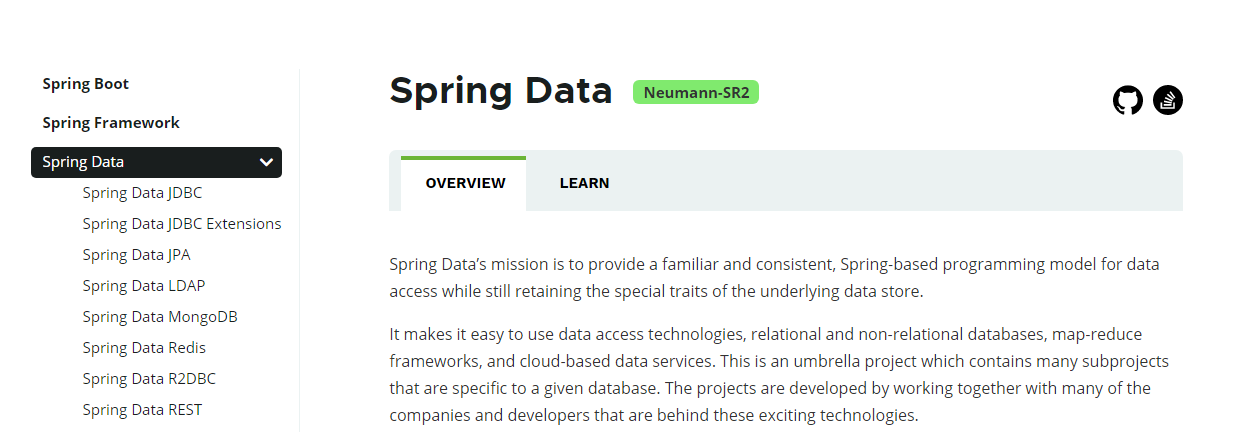
Spring Data是一个用于简化数据库、非关系型数据库、索引库访问,并支持云服务的开源框架。其主要目标是使得对数据的访问变得方便快捷,并支持map-reduce框架和云计算数据服务。 Spring Data可以极大的简化JPA(Elasticsearch…)的写法,可以在几乎不用写实现的情况下,实现对数据的访问和操作。除了CRUD外,还包括如分页、排序等一些常用的功能。
Spring Data的官网
http://projects.spring.io/spring-data/
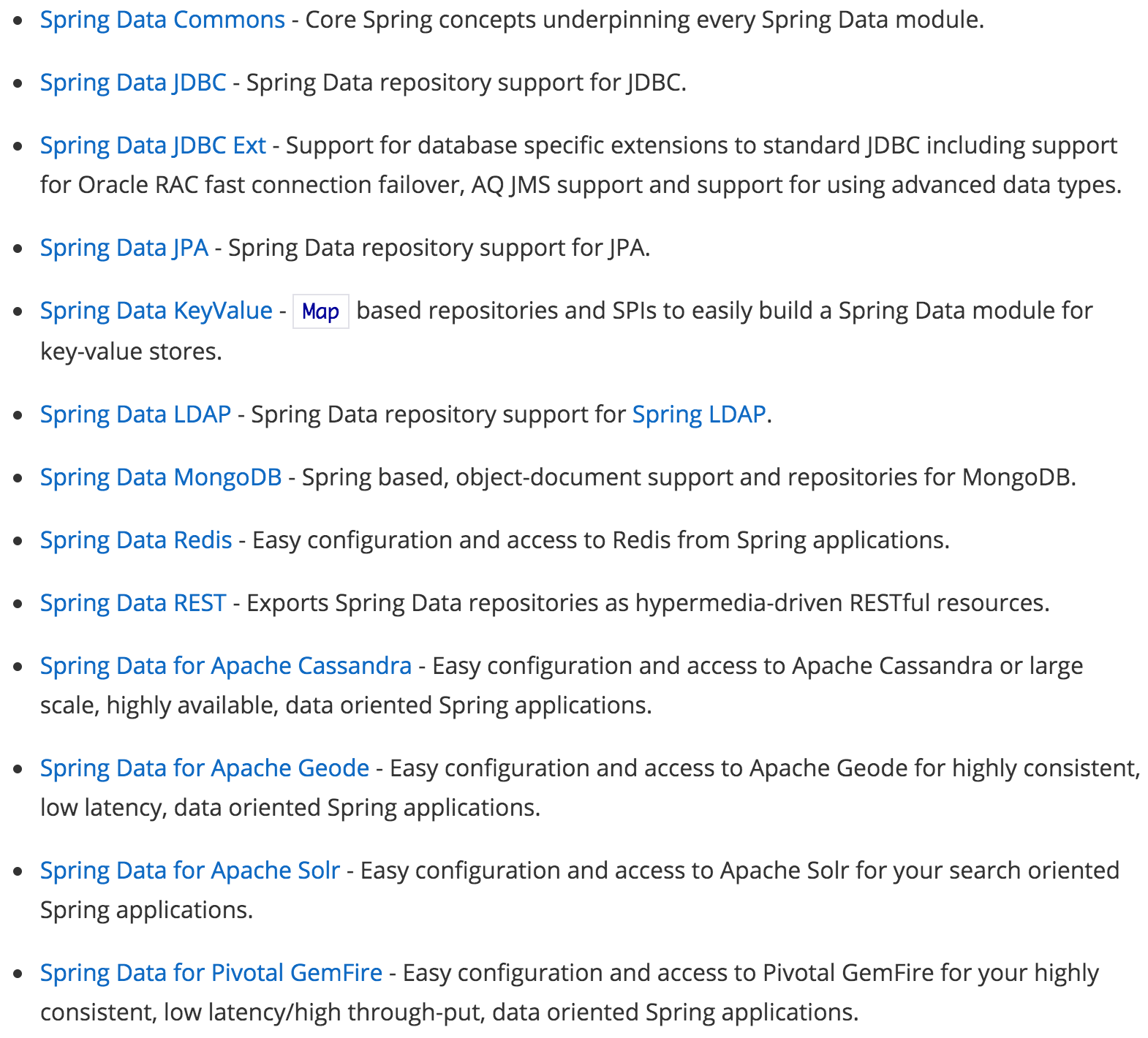
主要模块
2.SpringData Elasticsearch
概念
Spring Data ElasticSearch 基于 spring data API 简化 elasticSearch操作,将原始操作elasticSearch的客户端API 进行封装 。Spring Data为Elasticsearch项目提供集成搜索引擎。Spring Data Elasticsearch POJO的关键功能区域为中心的模型与Elastichsearch交互文档和轻松地编写一个存储索引库数据访问层。官方网站:http://projects.spring.io/spring-data-elasticsearch/
SpringData ES接口接入准备
org.springframework.boot spring-boot-starter-data-elasticsearch
SpringData ES索引操作
@RunWith(SpringRunner.class)
@SpringBootTest
public class Test01 {@Autowiredprivate ElasticsearchRestTemplate elasticsearchRestTemplate;//创建索引并增加映射配置@Testpublic void createIndex(){//创建索引boolean index = elasticsearchRestTemplate.createIndex(Product.class);System.out.println("index = " + index);index = elasticsearchRestTemplate.putMapping(Product.class);System.out.println("index = " + index);}//删除索引@Testpublic void deleteIndex(){boolean index = elasticsearchRestTemplate.deleteIndex(Product.class);System.out.println("index = " + index);}
}
3.SpringData ES数据操作
创建数据映射
@Data
@NoArgsConstructor
@AllArgsConstructor
@ToString
@Document(indexName = "shopping", type = "product", shards = 5, replicas = 1)
public class Product implements Serializable {//商品唯一标识@Idprivate Long id;//商品名称@Field(type = FieldType.Text, analyzer = "ik_max_word")private String title;//分类名称@Field(type = FieldType.Keyword)private String category;//商品价格@Field(type = FieldType.Double)private Double price;//图片地址@Field(type = FieldType.Keyword, index = false)private String images;
}
数据的增删改查
@RunWith(SpringRunner.class)
@SpringBootTest
public class Test02 {@Autowiredprivate ProductDao productDao;/*** 新增*/@Testpublic void save(){Product Product = new Product();Product.setId(1L);Product.setTitle("小米手机");Product.setCategory("手机");Product.setPrice(1999.0);Product.setImages("http://www.gulixueyuan/xm.jpg");productDao.save(Product);}//修改@Testpublic void update(){Product Product = new Product();Product.setId(1L);Product.setTitle("小米2手机");Product.setCategory("手机");Product.setPrice(9999.0);Product.setImages("http://www.gulixueyuan/xm.jpg");productDao.save(Product);}//根据id查询@Testpublic void findById(){Product Product = productDao.findById(1L).get();System.out.println(Product);}//查询所有@Testpublic void findAll(){Iterable products = productDao.findAll();for (Product product : products) {System.out.println(product);}}//删除@Testpublic void delete(){Product product = new Product();product.setId(1L);productDao.delete(product);}//批量新增@Testpublic void saveAll(){List productList = new ArrayList<>();for (int i = 0; i < 100; i++) {Product product = new Product();product.setId(Long.valueOf(i));product.setTitle("["+i+"]小米手机");product.setCategory("手机");product.setPrice(1999.0+i);product.setImages("http://www.gulixueyuan/xm.jpg");productList.add(product);}productDao.saveAll(productList);}//分页查询@Testpublic void findByPage(){//设置排序(排序方式,正序还是倒序,排序的id)Sort sort = Sort.by(Sort.Direction.DESC,"id");int currentPage=0;//当前页int pageSize = 20;//每页显示多少条//设置查询分页PageRequest pageRequest = PageRequest.of(currentPage, pageSize,sort);//分页查询Page productPage = productDao.findAll(pageRequest);for (Product product : productPage.getContent()) {System.out.println(product);}}
}
term查询
@RunWith(SpringRunner.class)
@SpringBootTest
public class Test03 {@Autowiredprivate ProductDao productDao;/*** term查询* search(termQueryBuilder) 调用搜索方法,参数查询构建器对象*/@Testpublic void termQuery(){TermQueryBuilder queryBuilder = QueryBuilders.termQuery("productName", "小米");Iterable products = productDao.search(queryBuilder);for (Product product : products) {System.out.println(product);}}/*** term查询加分页*/@Testpublic void termQueryByPage(){int currentPage= 0 ;int pageSize = 5;//设置查询分页PageRequest pageRequest = PageRequest.of(currentPage, pageSize);TermQueryBuilder termQueryBuilder = QueryBuilders.termQuery("productName", "小米");Iterable products = productDao.search(termQueryBuilder,pageRequest);for (Product product : products) {System.out.println(product);}}
}
4.自定义Dao查询方法
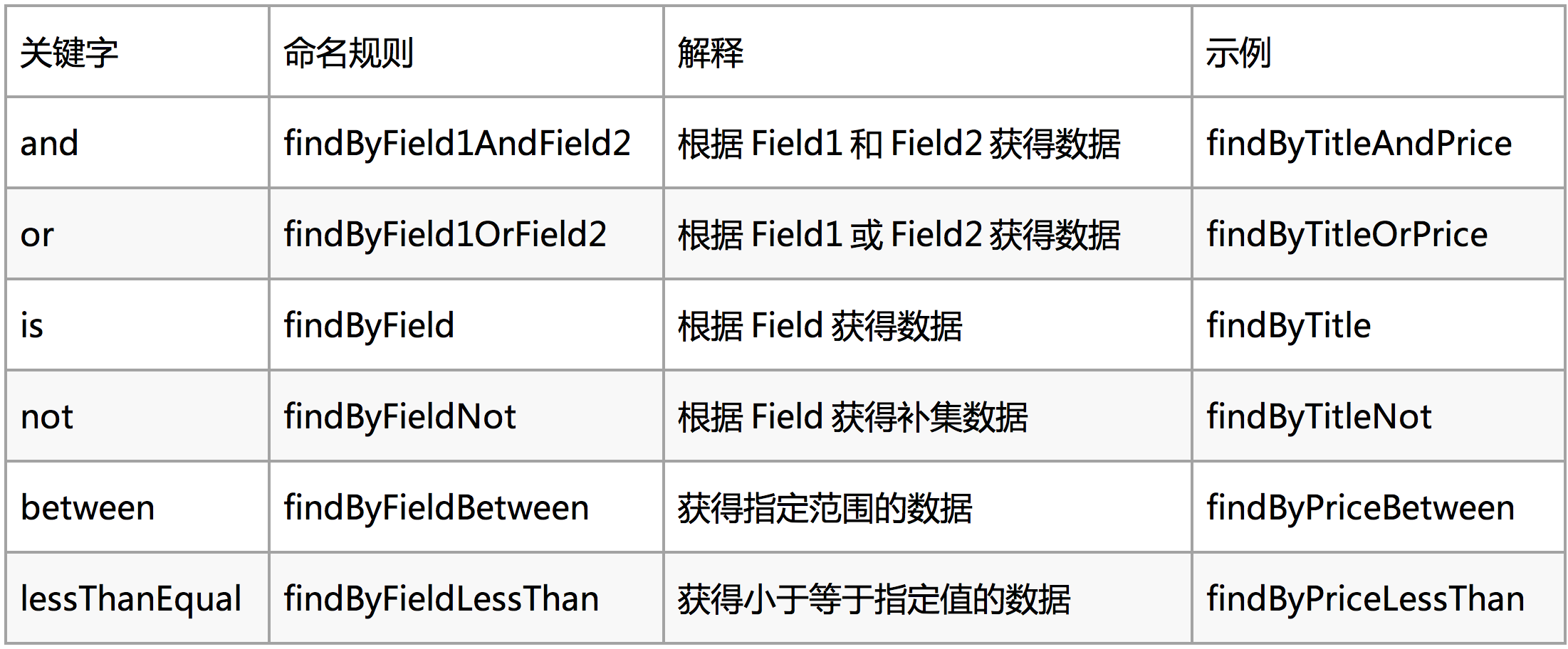
方法命名规则
持久化Dao接口
public interface ProductDao extends ElasticsearchRepository {//根据title和价格查询,and的关系List findAllByTitleAndPrice(String title, Double price);//根据商品价格范围查询 最低价格lowPrice 最高价格highPriceList findByPriceBetween(Double lowPrice, Double highPrice);
}
自定义Dao接口测试
@RunWith(SpringRunner.class)
@SpringBootTest
public class Test04 {@Autowiredprivate ProductDao productDao;/*** 根据标题及价格查询* 要求价格等于20050且标题的内容包含小米关键词*/@Testpublic void findAllByTitleAndPrice(){String title = "小米";Double price = 2050.0;List products = productDao.findAllByTitleAndPrice(title, price);for (Product product : products) {System.out.println(product);}}/*** 根据价格范围查询* 要求商品价格再2000,到2010之间*/@Testpublic void findPriceBetween(){double lowPrice = 2000.0;//最低价double highPrice = 2010.0;//最高价List products = productDao.findByPriceBetween(lowPrice, highPrice);for (Product product : products) {System.out.println(product);}}
}