

基础入门 - SpringBoot 底层注解
目录
1、SpringBoot特点
1.1、依赖管理
1.2、自动配置
2、容器功能
2.1、组件添加
1、@Configuration
Spring Boot 在底层 @Configuration 的两个配置
2、@Import
3、@Conditional
2.2、原生配置文件引入
1、@ImportResource
2.3、配置绑定
1、@ConfigurationProperties
2、@EnableConfigurationProperties + @ConfigurationProperties
3、@Component + @ConfigurationProperties
1、SpringBoot特点
1.1、依赖管理
- 父项目做依赖管理
依赖管理
org.springframework.boot spring-boot-starter-parent 2.3.4.RELEASE
org.springframework.boot spring-boot-dependencies 2.3.4.RELEASE - 开发导入starter场景启动器
1、见到很多 spring-boot-starter-* : *就某种场景
2、只要引入starter,这个场景的所有常规需要的依赖我们都自动引入
3、SpringBoot所有支持的场景
https://docs.spring.io/spring-boot/docs/current/reference/html/using-spring-boot.html#using-boot-starter
4、见到的 *-spring-boot-starter: 第三方为我们提供的简化开发的场景启动器。
5、所有场景启动器最底层的依赖
org.springframework.boot spring-boot-starter 2.3.4.RELEASE compile
- 无需关注版本号,自动版本仲裁
1、引入依赖默认都可以不写版本
2、引入非版本仲裁的jar,要写版本号。
- 可以修改默认版本号
1、查看spring-boot-dependencies里面规定当前依赖的版本 用的 key。
2、在当前项目里面重写配置5.1.43
1.2、自动配置
- 自动配好Tomcat
-
- 引入Tomcat依赖。
- 配置Tomcat
org.springframework.boot spring-boot-starter-tomcat 2.3.4.RELEASE compile - 自动配好SpringMVC
-
- 引入SpringMVC全套组件
- 自动配好SpringMVC常用组件(功能)
- 自动配好Web常见功能,如:字符编码问题
-
- SpringBoot帮我们配置好了所有web开发的常见场景
- 默认的包结构
-
- 主程序所在包及其下面的所有子包里面的组件都会被默认扫描进来
- 无需以前的包扫描配置
- 想要改变扫描路径,@SpringBootApplication(scanBasePackages="com.atguigu")
-
-
- 或者@ComponentScan 指定扫描路径
-
@SpringBootApplication
等同于
@SpringBootConfiguration
@EnableAutoConfiguration
@ComponentScan("com.atguigu.boot")
- 各种配置拥有默认值
- 默认配置最终都是映射到某个类上,如:MultipartProperties
- 配置文件的值最终会绑定每个类上,这个类会在容器中创建对象
- 按需加载所有自动配置项
- 非常多的starter
- 引入了哪些场景这个场景的自动配置才会开启
- SpringBoot所有的自动配置功能都在 spring-boot-autoconfigure 包里面
- ......
2、容器功能
2.1、组件添加
1、@Configuration
- 基本使用
- Full模式与Lite模式
-
- 示例
- 最佳实战
-
-
- 配置 类组件之间无依赖关系用Lite模式加速容器启动过程,减少判断
- 配置类组件之间有依赖关系,方法会被调用得到之前单实例组件,用Full模式
-
我们准备两个组件,将这两个组件添加到容器中
新建类 cn.xs.boot.bean.User
public class User {
/* 姓名 */
private String name;
/* 年龄 */
private Integer age;
/**
* 无参构造
*/
public User() {
}
/**
* 全参构造
*
* @param name
* @param age
*/
public User(String name, Integer age) {
this.name = name;
this.age = age;
}
public String getName() {
return name;
}
public void setName(String name) {
this.name = name;
}
public Integer getAge() {
return age;
}
public void setAge(Integer age) {
this.age = age;
}
@Override
public String toString() {
return "User{" +
"name='" + name + '\'' +
", age=" + age +
'}';
}
}
新建类 cn.xs.boot.bean.Pet
public class Pet {
/* 姓名 */
private String name;
public Pet(){
}
public Pet(String name){
this.name = name;
}
public String getName() {
return name;
}
public void setName(String name) {
this.name = name;
}
@Override
public String toString() {
return "Pet{" +
"name='" + name + '\'' +
'}';
}
}
如果是我们以前原生的 Spring ,想要把这两个组件添加到容器中,我们可以这样来做
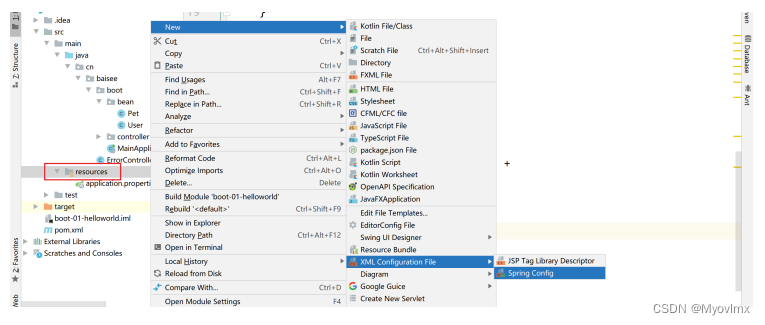
在 resources 资源包下新建配置文件 beans.xml
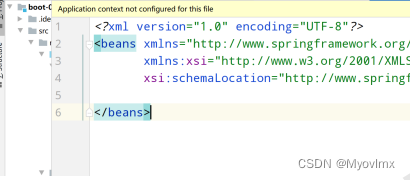
在 beans 标签中编写 bean 标签,将我们的组件添加到容器中
Spring Boot 可以不写这个配置文件,我们可以来编写配置类来添加我们的组件
新建配置类 cn.xs.boot.config.MyConfig
import org.springframework.context.annotation.Configuration;
/**
* @Description: 配置类
* @CreateDate: 2021/6/9 9:32
* @UpdateRemark: 修改内容
* @Version: 1.0
*/
// 告诉 spring boot 这是一个配置类
@Configuration
public class MyConfig {
}
这个配置类就等同于我们的 xml 配置文件
在配置类中添加组件
@Configuration
public class MyConfig {/**
* 添加 User 到 IOC 容器中
* Bean 的作用就是给容器中添加组件
* 以方法名作为我们的组件 id
* 返回值类型就是组件类型
* 返回的值就是在容器中保存的实例
*
* @return
*/
@Bean
public User user01() {
return new User("hereshui", 18);
}
/**
* 添加 Pet 到 IOC 容器
*
* @return
*/
@Bean
public Pet tomcat() {
return new Pet("tomcat");
}}
启动项目就可以看见,我们已经将组件添加到 IOC 容器中了
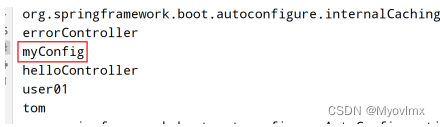
如果我们想给组件自定义一个 id 名字,我们可以在 Bean 注解中定义属性值

重启项目会发现修改成功
我们也可以咋启动类 main 方法中获取具体的组件对象
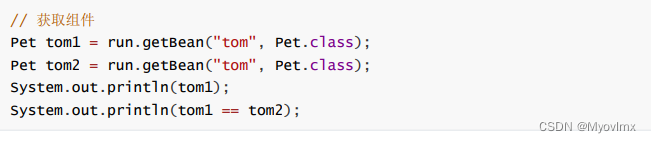
启动项目就可以发现可以成功拿到
我们拿到了组件,并且组件是默认单例的
配置类中使用 @Bean 标注在方法上,给容器注册主键,默认也是单例的
配置类本身也是组件
我们点进去 @Configuration 注解
Spring Boot 2.0 基于 Spring 5.2 以后,多了一个属性 proxyBeanMethods ,默认是 true,直译就是代 理 bean 的方法
来到我们的启动方法中编写代码
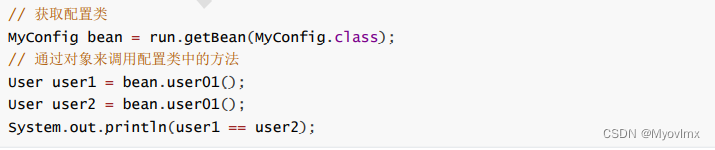
输出为 true,证明我们通过配置类对象来调用 user01 方法获取的对象,不管你调用几次方法,只会返 回给你容器中的实例,而不会执行 user01 方法中 new 对象的代码
外部无论对配置类中的这个组件注册方法调用多少次,获取的都是之前注册容器中的单例对象
原因就在于 proxyBeanMethods 属性默认为 true,意思就是是否来代理增强我们的注册 bean 的方 法,如果不代理,那外部访问方法,每调用一次,方法就会执行一次,如果代理了,那么外部来访问, 就会先走代理方法,然后再根据逻辑判断要不要再走我们的被代理的方法(这里演示的被代理的方法就 是 user01)
Spring Boot 在底层 @Configuration 的两个配置
Full(全配置):proxyBeanMethods = true 容器中会保存一个配置类的代理对象,每次调用配置类方法,都会去容器中来获取我们具体的 组件对象
Lite(轻量级配置):proxyBeanMethods = false 容器中不会保存配置类的代理对象,每次调用配置类方法,都会重新创建一个新的对象
这两个配置解决什么场景呐?(组件依赖)
我们来编写代码来理解
假设用户要养一个宠物,在 User 类中聚合一个 Pet 属性,生成 getter、setter 方法,重新重写 toString
我们给容器中注册了一个组件 user01 用户,这个用户想要用我们容器中的组件 tom 宠物
将 proxyBeanMethods 设置成 true

修改 user01 方法代码
@Bean
public User user01() {
User hereshui = new User("hereshui", 18);
// User 组件依赖了 Pet 组件
hereshui.setPet(tomcat());
return hereshui;
}
在启动方法中获取容器中的 User 组件和 Pet 组件,比较 user01 的宠物是不是容器中的宠物
// 获取 user01 组件
User user01 = run.getBean("user01", User.class);
Pet tom = run.getBean("tom", Pet.class);
System.out.println(user01.getPet() == tom);
重启项目,这里,我们在 user01 方法中调用了 tomcat 方法
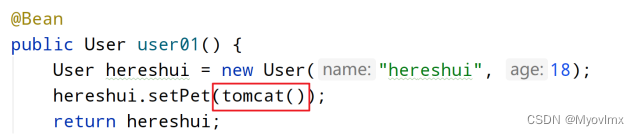
如果我们是 Full(全配置),那么调用此方法就会返回容器中的单例对象,所以用户的宠物就是我们容 器中的宠物,但是如果我们是 Lite(轻量级配置),那么调用此方法就会为返回创建的新的一个宠物对 象,它就不是容器中的对象了
我们修改为 Lite,发现调用 tomcat 方法会报错
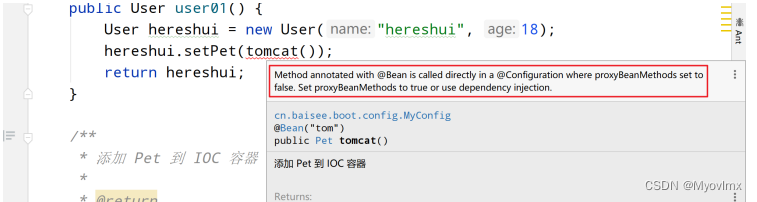
这就是我们的 Spring Boot 2 最大的一个跟新:配置类可以编写轻量级模式和全模式
轻量级模式优点:Spring Boot 会跳过检查容器中有没有该组件的对象,加快项目的运行速度,如果是全模式,外部每次调用方法,Spring Boot 都会来检查容器中的对象,消耗项目运行时间
使用场景:
如果我们编写的容器中的组件,并没有依赖于别的组件,我们就用 Lite 模式进行配置,这样项目启 动和加载速度都会提高
如果我们编写的容器中的组件,依赖于其他容器中的组件,我们就用 Full 模式进行配置,因为这样 才能保证我们的对象依赖的是容器中的组件,而不是每次调用方法,对象所依赖的组件就又重新创建一 个
除了编写配置类来注册组件之外,我们还可以使用原先的注解,将组件注册到 IOC 容器中 比如:@Component、@Controller、@Service、@Repository
我们的启动类也叫主配置类,也就是说,直接在我们的主程序类中来编写方法,标注 @Bean 注解来注 册组件,也是可以的
2、@Import
@Import 注解需要添加到容器中的组件的类上,比如 Controller,Service,Repository, Component,Configuration,还有主配置类等
 * 4、@Import({User.class, DBHelper.class})*      给容器中自动创建出这两个类型的组件、默认组件的名字就是全类名****/@Import({User.class, DBHelper.class})
@Configuration(proxyBeanMethods = false)
//告诉SpringBoot这是一个配置类 == 配置文件
public class MyConfig {
}
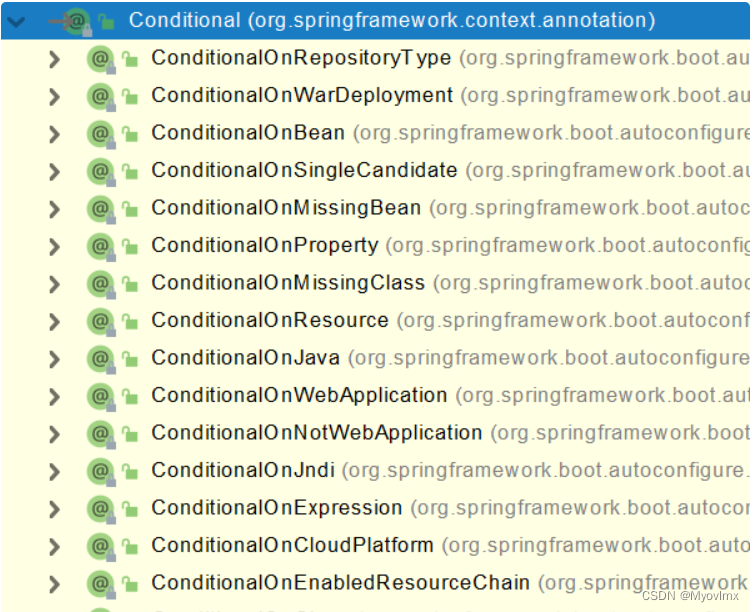
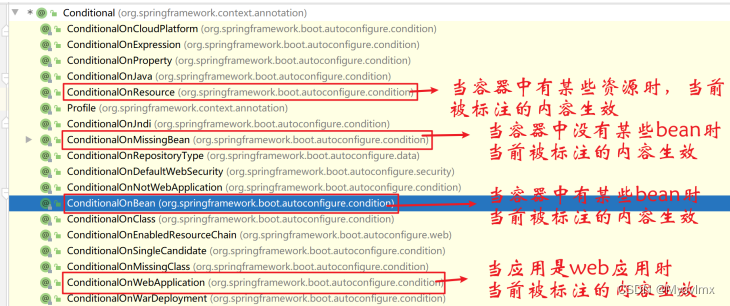
3、@Conditional
条件装配:满足Conditional指定的条件,则进行组件注入
=====================测试条件装配==========================
@Configuration(proxyBeanMethods = false) //告诉SpringBoot这是一个配置类 == 配置文件
//@ConditionalOnBean(name = "tom")
@ConditionalOnMissingBean(name = "tom")
public class MyConfig {/*** Full:外部无论对配置类中的这个组件注册方法调用多少次获取的都是之前注册容器中的单实例对象* @return*/@Bean //给容器中添加组件。以方法名作为组件的id。返回类型就是组件类型。返回的值,就是组件在容器中的实例public User user01(){User zhangsan = new User("zhangsan", 18);//user组件依赖了Pet组件zhangsan.setPet(tomcatPet());return zhangsan;}@Bean("tom22")public Pet tomcatPet(){return new Pet("tomcat");}
}public static void main(String[] args) {//1、返回我们IOC容器ConfigurableApplicationContext run = SpringApplication.run(MainApplication.class, args);//2、查看容器里面的组件String[] names = run.getBeanDefinitionNames();for (String name : names) {System.out.println(name);}boolean tom = run.containsBean("tom");System.out.println("容器中Tom组件:"+tom);boolean user01 = run.containsBean("user01");System.out.println("容器中user01组件:"+user01);boolean tom22 = run.containsBean("tom22");System.out.println("容器中tom22组件:"+tom22);}
在 spring ioc 的过程中,优先解析 @Component,@Service,@Controller 注解的类。其次解析配置 类,也就是 @Configuration 标注的类。最后开始解析配置类中定义的 bean 。
2.2、原生配置文件引入
1、@ImportResource
======================beans.xml=========================
@ImportResource("classpath:beans.xml")
public class MyConfig {}======================测试=================boolean haha = run.containsBean("haha");boolean hehe = run.containsBean("hehe");System.out.println("haha:"+haha);//trueSystem.out.println("hehe:"+hehe);//true
2.3、配置绑定
如何使用Java读取到properties文件中的内容,并且把它封装到JavaBean中,以供随时使用;
public class getProperties {public static void main(String[] args) throws FileNotFoundException, IOException {Properties pps = new Properties();pps.load(new FileInputStream("a.properties"));Enumeration enum1 = pps.propertyNames();//得到配置文件的名字while(enum1.hasMoreElements()) {String strKey = (String) enum1.nextElement();String strValue = pps.getProperty(strKey);System.out.println(strKey + "=" + strValue);//封装到JavaBean。}}}1、@ConfigurationProperties
/*** 只有在容器中的组件,才会拥有SpringBoot提供的强大功能*/
@Component
@ConfigurationProperties(prefix = "mycar")
public class Car {private String brand;private Integer price;public String getBrand() {return brand;}public void setBrand(String brand) {this.brand = brand;}public Integer getPrice() {return price;}public void setPrice(Integer price) {this.price = price;}@Overridepublic String toString() {return "Car{" +"brand='" + brand + '\'' +", price=" + price +'}';}
}
2、@EnableConfigurationProperties + @ConfigurationProperties
3、@Component + @ConfigurationProperties
@EnableConfigurationProperties(Car.class)
//1、开启Car配置绑定功能
//2、把这个Car这个组件自动注册到容器中
public class MyConfig {
}
上一篇:HDFS的概念及shell操作