

TH10-数据统计与内容审核
TH10-数据统计与内容审核
- 1、用户冻结解冻
- 1.1 用户冻结
- ManageController
- ManageService
- 1.2 用户解冻
- ManageController
- ManageService
- 1.3 查询数据列表
- UserInfo
- ManageService
- 1.4 探花系统修改
- UserFreezeService
- 2、数据统计
- 2.1 数据采集
- 2.1.1 部署RabbitMQ
- 2.1.2 消息类型说明
- 2.1.3 实体类对象
- Log
- Analysis
- 2.1.4 发送日志消息
- 2.1.5 监听器处理消息
- 2.1.6 消息发送工具类
- 2.2 AOP处理日志
- 2.2.1 自定义注解
- 2.2.2 切面
- 2.2.3 配置
- 2.3 定时任务
- 2.3.1 入门案例
- 开启定时任务
- 定时任务类
- 2.3.2 CRON表达式
- 2.3.3 定时统计
- AnalysisTask
- AnalysisService
- AnalysisMapper
- 测试数据
- 2.4 首页统计
- 2.4.1 vo对象
- 2.4.2 DashboardController
- 2.4.3 AnalysisService
- 2.4.4 AnalysisMapper
- 3、内容审核
- 3.1 阿里云内容审核
- 3.1.1 准备工作
- 3.1.2 文本内容垃圾检测
- 3.1.3 图片审核
- 3.1.4 抽取工具
- GreenProperties
- AliyunGreenTemplate
- TanhuaAutoConfiguration
- 配置文件
- 单元测试
- 3.2 动态审核
- 3.2.1 执行流程
- 3.2.2 发布消息
- 3.2.3 监听器
- 3.2.4 movementApi
1、用户冻结解冻
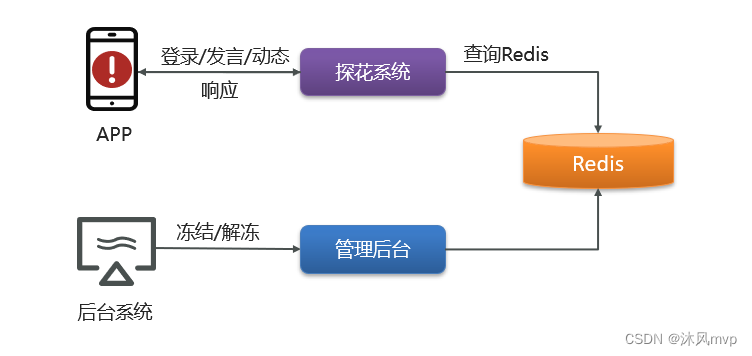
用户冻结/解冻使用管理员在后台系统对用户的惩罚措施。对于发布不当言论或者违法违规内容的用户,可以暂时、永久禁止其登录,评论,发布动态、
后台中解冻/冻结,就是将用户状态写入数据库中
APP端用户在进行登录,评论,发布动态时检测Redis中冻结状态
1.1 用户冻结
ManageController
//用户冻结
@PostMapping("/users/freeze")
public ResponseEntity freeze(@RequestBody Map params) {Map map =  managerService.userFreeze(params);return ResponseEntity.ok(map);
}
ManageService
//用户冻结
public Map userFreeze(Map params) {Integer freezingTime = (Integer) params.get("freezingTime");Long userId = (Long) params.get("userId");int days = 0;if (freezingTime == 1) {days = 3;}if (freezingTime == 2) {days = 7;}if (freezingTime == 3) {days = -1;}String value = JSON.toJSONString(params);redisTemplate.opsForValue().set(Constants.FREEZE_USER+userId,value,days, TimeUnit.MINUTES);Map map = new HashMap();map.put("message","冻结成功");return map;
}
1.2 用户解冻
ManageController
//用户解冻
@PostMapping("/users/unfreeze")
public ResponseEntity unfreeze(@RequestBody  Map params) {Map map =  managerService.userUnfreeze(params);return ResponseEntity.ok(map);
}
ManageService
//用户解冻
public Map userUnfreeze(Map params) {Long userId = (Long) params.get("userId");String reasonsForThawing = (String) params.get("reasonsForThawing");redisTemplate.delete(Constants.FREEZE_USER+userId);Map map = new HashMap();map.put("message","解冻成功");return map;
}
1.3 查询数据列表
UserInfo
添加字段
//用户状态,1为正常,2为冻结
@TableField(exist = false)
private String userStatus = "1";
ManageService
public ResponseEntity findById(Long userId) {UserInfo info = userInfoApi.findById(userId);if(redisTemplate.hasKey(Constants.FREEZE_USER+info.getId())) {info.setUserStatus("2");}return ResponseEntity.ok(info);
}
1.4 探花系统修改
UserFreezeService
@Service
public class UserFreezeService {@Autowiredprivate RedisTemplate redisTemplate;public void checkUserStatus(Integer state,Long userId) {String value = redisTemplate.opsForValue().get(Constants.FREEZE_USER + userId);if(!StringUtils.isEmpty(value)) {Map map = JSON.parseObject(value, Map.class);Integer freezingRange = (Integer) map.get("freezingRange");if(freezingRange == state) {throw new BusinessException(ErrorResult.builder().errMessage("您的账号被冻结!").build());}}}
}
2、数据统计
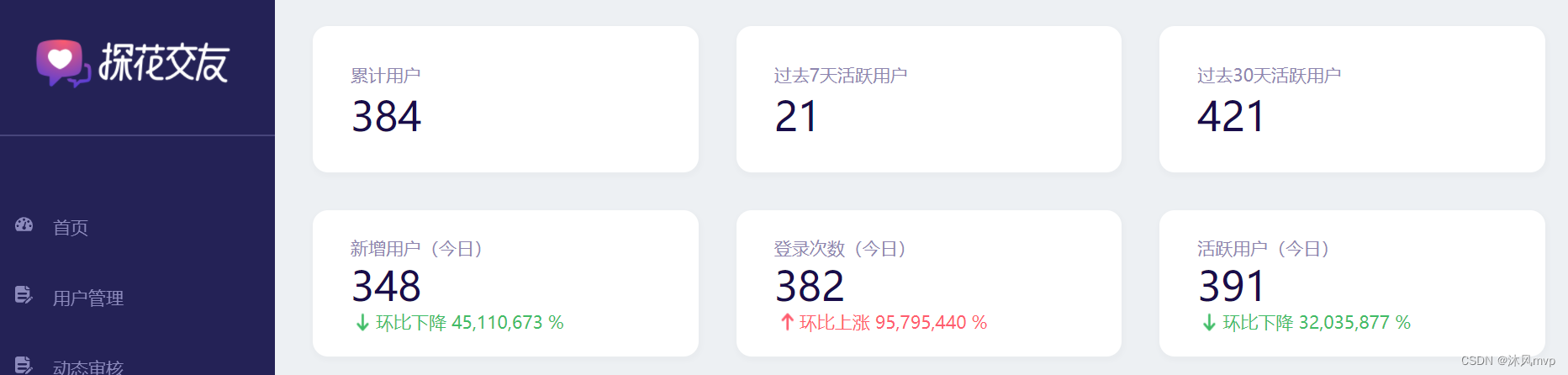
后台系统首页中,显示各种统计数据,比如:累计用户数、新增用户数、登录次数等内容。
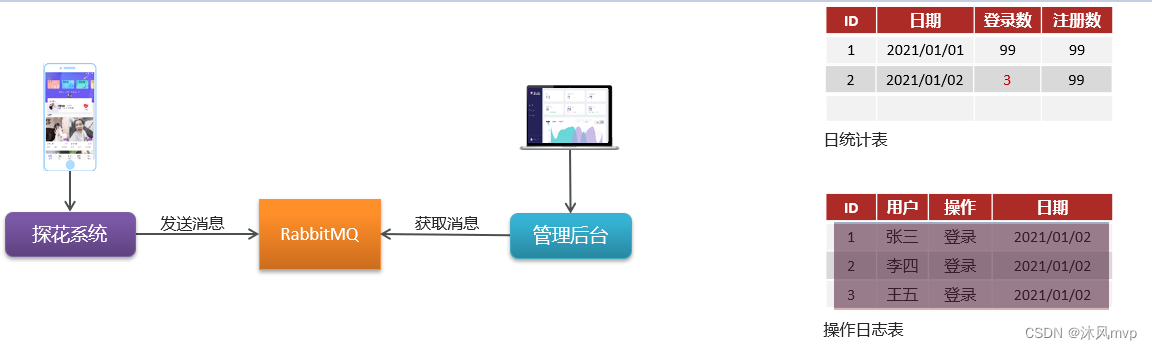
1、探花系统将用户操作日志写入RabbitMQ
2、管理后台获取最新消息,构造日志数据存入数据库
3、加入统计表,定时统计
2.1 数据采集
1、探花系统将用户操作日志写入RabbitMQ
2、管理后台获取最新消息,构造日志数据存入数据库
2.1.1 部署RabbitMQ
探花交友所需的第三方服务组件,已经以Docker-Compose准备好了。仅仅需要进入相关目录,以命令形式启动运行即可
#进入目录
cd /root/docker-file/rmq/
#创建容器并启动
docker-compose up –d
#查看容器
docker ps -a
服务地址:192.168.136.160:5672
管理后台:http://192.168.136.160:15672/
2.1.2 消息类型说明
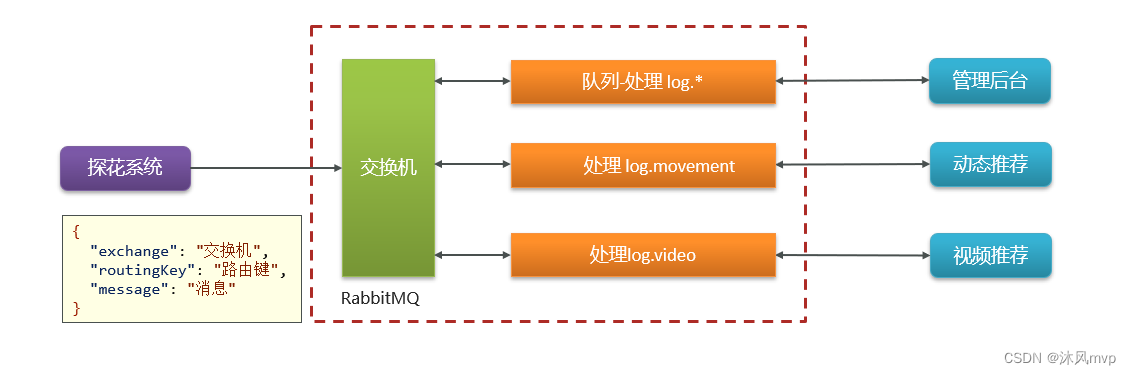
探花项目间使用RabbitMQ收发消息,这里采用topic类型消息
日志消息key规则:log.xxx
2.1.3 实体类对象
Log
package com.tanhua.model.domain;import lombok.AllArgsConstructor;
import lombok.Builder;
import lombok.Data;
import lombok.NoArgsConstructor;@Data
@Builder
@NoArgsConstructor
@AllArgsConstructor
public class Log {/*** id*/private Long id;/*** 用户id*/private Long userId;/*** 操作时间*/private String logTime;/*** 操作类型,* 0101为登录,0102为注册,* 0201为发动态,0202为浏览动态,0203为动态点赞,0204为动态喜欢,0205为评论,0206为动态取消点赞,0207为动态取消喜欢,* 0301为发小视频,0302为小视频点赞,0303为小视频取消点赞,0304为小视频评论*/private String type;/*** 登陆地点*/private String place;/*** 登陆设备*/private String equipment;public Log(Long userId, String logTime, String type) {this.userId = userId;this.logTime = logTime;this.type = type;}
}
Analysis
package com.tanhua.model.domain;import lombok.AllArgsConstructor;
import lombok.Builder;
import lombok.Data;
import lombok.NoArgsConstructor;import java.util.Date;@Data
@NoArgsConstructor
@AllArgsConstructor
@Builder
public class Analysis{private Long id;/*** 日期*/private Date recordDate;/*** 新注册用户数*/private Integer numRegistered = 0;/*** 活跃用户数*/private Integer numActive = 0;/*** 登陆次数*/private Integer numLogin = 0;/*** 次日留存用户数*/private Integer numRetention1d = 0;private Date created;
}
2.1.4 发送日志消息
@Autowired
private AmqpTemplate amqpTemplate;
public void login() {………    //构造Map集合   Map msg = new HashMap<>();   msg.put(“userId”, UserHolder.getUserId().toString());  msg.put(“date", System.currentTimeMillis());    msg.put("type", "0101",);   String message = JSON.toJSONString(msg);    //发送消息try {      amqpTemplate.convertSendAndReceive("tanhua.log.exchange","log.user",message);    }catch (Exception e) {e.printStackTrace();}  ………
}
2.1.5 监听器处理消息
@Component
public class LogListener {@Autowiredprivate LogMapper logMapper;@RabbitListener(bindings = @QueueBinding(value = @Queue(value = "tanhua.log.queue",durable = "true"),exchange = @Exchange(value = "tanhua.log.exchange",type = ExchangeTypes.TOPIC),key = {"log.*"}))public void listenCreate(String message) throws Exception {try {Map map = JSON.parseObject(message);//1、获取数据Long userId = (Long) map.get("userId");String date = (String) map.get("date");String objId = (String) map.get("objId");String type = (String) map.get("type");//2、保存到数据库Log log = new Log(userId,date,type);logMapper.insert(log);} catch (Exception e) {e.printStackTrace();}}
}
2.1.6 消息发送工具类
package com.tanhua.server.service;import com.alibaba.fastjson.JSON;
import org.springframework.amqp.AmqpException;
import org.springframework.amqp.core.AmqpTemplate;
import org.springframework.beans.factory.annotation.Autowired;
import org.springframework.stereotype.Service;import java.text.SimpleDateFormat;
import java.util.Date;
import java.util.HashMap;
import java.util.Map;@Service
public class MqMessageService {@Autowiredprivate AmqpTemplate amqpTemplate;//发送日志消息public void sendLogService(Long userId,String type,String key,String busId) {try {Map map = new HashMap();map.put("userId",userId.toString());map.put("type",type);map.put("logTime",new SimpleDateFormat("yyyy-MM-dd").format(new Date()));map.put("busId",busId);String message = JSON.toJSONString(map);amqpTemplate.convertAndSend("tanhua.log.exchange","log."+key,message);} catch (AmqpException e) {e.printStackTrace();}}//发送动态审核消息public void sendAudiService(String movementId) {try {amqpTemplate.convertAndSend("tanhua.audit.exchange","audit.movement",movementId);} catch (AmqpException e) {e.printStackTrace();}}
}
2.2 AOP处理日志
项目中大量方法需要改造,加入消息处理。
不易维护且存在耦合
解决方法:使用AOP + 自定义注解
2.2.1 自定义注解
@Target({ElementType.METHOD})
@Retention(RetentionPolicy.RUNTIME)
@Documented
public @interface LogConfig {//动态获取方法参数,支持SpringELString objId() default "";//路由的keyString key();//日志类型String type();
}
2.2.2 切面
@Component
@Aspect
public class LogAspect {@Autowiredprivate AmqpTemplate amqpTemplate;@Before(value="execution(* com.tanhua.server.service.*.*(..)) && @annotation(config)")public void checkUserState(JoinPoint pjp , LogConfig config) throws Throwable {//解析SpringEL获取动态参数MethodSignature signature = (MethodSignature) pjp.getSignature();String objId = parse(config.objId(), signature.getParameterNames(), pjp.getArgs());//构造Map集合Map msg = new HashMap<>();msg.put("userId", UserHolder.getUserId());msg.put("date", new SimpleDateFormat("yyyy-MM-dd").format(new Date()));msg.put("objId", objId);msg.put("type", config.type());String message = JSON.toJSONString(msg);//发送消息try {amqpTemplate.convertSendAndReceive("tanhua.log.exchange","log."+config.key(),message);}catch (Exception e) {e.printStackTrace();}}public String parse(String expression, String[] paraNames,Object [] paras) {if(StringUtils.isEmpty(expression)) return "";StandardEvaluationContext context = new StandardEvaluationContext();for(int i=0;icontext.setVariable(paraNames[i], paras[i]);}Expression exp = new SpelExpressionParser().parseExpression(expression);Object value = exp.getValue(context);return value == null ? "" : value.toString();}
}
2.2.3 配置
//根据id查询
@LogConfig(type = "0202",key = "movement",objId = "#movementId")
public MovementsVo findById(String movementId) {//1、调用api根据id查询动态详情Movement movement = movementApi.findById(movementId);//2、转化vo对象if(movement != null) {UserInfo userInfo = userInfoApi.findById(movement.getUserId());return MovementsVo.init(userInfo,movement);}else {return null;}
}
2.3 定时任务
在实际项目开发中,除了Web应用、SOA服务外,还有一类不可缺少的,那就是定时任务调度。定时任务的场景可以说非常广泛:
-
某些网站会定时发送优惠邮件;
-
银行系统还款日信用卡催收款;
-
某些应用的生日祝福短信等。
那究竟何为定时任务调度,一句话概括就是:基于给定的时间点、给定的时间间隔、自动执行的任务
2.3.1 入门案例
开启定时任务
@SpringBootApplication(exclude = {MongoAutoConfiguration.class, MongoDataAutoConfiguration.class})
@MapperScan("com.tanhua.admin.mapper")
@EnableScheduling //开启定时任务支持
public class AdminServerApplication {public static void main(String[] args) {SpringApplication.run(AdminServerApplication.class,args);}
}
定时任务类
@Component
public class AnalysisTask {/*** 配置时间规则*/@Scheduled( cron = "0/20 * * * * ? ")public void analysis() throws ParseException {//业务逻辑String time = new SimpleDateFormat("yyyy-MM-dd HH:mm:ss").format(new Date());System.out.println("当前时间:"+time);}
}
2.3.2 CRON表达式
对于定时任务,我们使用的时候主要是注重两个方面,一个是定时任务的业务,另一个就是Cron表达式。
**Cron 表达式支持到六个域 **
| 名称 | 是否必须 | 允许值 | 特殊字符 |
|---|---|---|---|
| 秒 | 是 | 0-59 | , - * / |
| 分 | 是 | 0-59 | , - * / |
| 时 | 是 | 0-23 | , - * / |
| 日 | 是 | 1-31 | , - * ? / L W C |
| 月 | 是 | 1-12 或 JAN-DEC | , - * / |
| 周 | 是 | 1-7 或 SUN-SAT | , - * ? / L C # |
月份和星期的名称是不区分大小写的。FRI 和 fri 是一样的。 域之间有空格分隔
2.3.3 定时统计
AnalysisTask
@Component
public class AnalysisTask {@Autowiredprivate AnalysisService analysisService;/*** 配置时间规则*/@Scheduled( cron = "0/20 * * * * ? ")public void analysis() throws ParseException {//业务逻辑String time = new SimpleDateFormat("yyyy-MM-dd HH:mm:ss").format(new Date());System.out.println("开始统计:"+time);//调logService完成日志统计analysisService.analysis();System.out.println("结束统计");}
}
AnalysisService
/*** 定时统计日志数据到统计表中*    1、查询tb_log表中的数 (每日注册用户数,每日登陆用户,活跃的用户数据,次日留存的用户)*    2、构造AnalysisByDay对象*    3、完成统计数据的更新或者保存*/
public void analysis() throws ParseException {String todayStr = new SimpleDateFormat("yyyy-MM-dd").format(new Date());String yestodayStr =  DateUtil.yesterday().toString("yyyy-MM-dd"); //工具类//1、统计每日注册用户数Integer numRegistered = logMapper.queryByTypeAndLogTime("0102",todayStr);//2、统计每日登陆用户Integer numLogin = logMapper.queryByTypeAndLogTime("0101",todayStr);//3、统计活跃的用户数Integer numActive = logMapper.queryByLogTime(todayStr);//4、统计次日留存的用户数Integer numRetention1d = logMapper.queryNumRetention1d(todayStr, yestodayStr);//5、根据当前时间查询AnalysisByDay数据QueryWrapper qw = new QueryWrapper<>();Date todatDate = new SimpleDateFormat("yyyy-MM-dd").parse(todayStr);qw.eq("record_date", todatDate);Analysis analysis = analysisMapper.selectOne(qw);if(analysis == null) {//7、如果不存在,保存analysis = new Analysis();analysis.setRecordDate(todatDate);analysis.setNumRegistered(numRegistered);analysis.setNumLogin(numLogin);analysis.setNumActive(numActive);analysis.setNumRetention1d(numRetention1d);analysis.setCreated(new Date());analysisMapper.insert(analysis);}else{//8、如果存在,更新analysis.setNumRegistered(numRegistered);analysis.setNumLogin(numLogin);analysis.setNumActive(numActive);analysis.setNumRetention1d(numRetention1d);analysisMapper.updateById(analysis);}}
AnalysisMapper
public interface LogMapper extends BaseMapper {@Select("SELECT COUNT(DISTINCT user_id) FROM tb_log WHERE TYPE=#{type} AND log_time=#{logTime}")Integer queryByTypeAndLogTime(@Param("type") String type, @Param("logTime") String logTime); //根据操作时间和类型@Select("SELECT COUNT(DISTINCT user_id) FROM tb_log WHERE log_time=#{logTime}")Integer queryByLogTime(String logTime); //展示记录时间查询@Select("SELECT COUNT(DISTINCT user_id)  FROM tb_log WHERE log_time=#{today} AND user_id IN (\n " +" SELECT user_id FROM tb_log WHERE TYPE=\"0102\" AND log_time=#{yestoday} \n " +")")Integer queryNumRetention1d(@Param("today")  String today,@Param("yestoday") String yestoday); //查询次日留存
}
测试数据
为了方便操作,可以通过以下单元测试方法。保存若干操作数据
package com.tanhua.manager.test;import com.tanhua.manager.domain.Log;
import com.tanhua.manager.mapper.LogMapper;
import org.junit.Test;
import org.junit.runner.RunWith;
import org.springframework.beans.factory.annotation.Autowired;
import org.springframework.boot.test.context.SpringBootTest;
import org.springframework.test.context.junit4.SpringRunner;import java.util.Random;@RunWith(SpringRunner.class)
@SpringBootTest
public class LogTest {@Autowiredprivate LogMapper logMapper;private String logTime = "";//模拟登录数据public void testInsertLoginLog() {for (int i = 0; i < 5; i++) {Log log = new Log();log.setUserId((long)(i+1));log.setLogTime(logTime);log.setType("0101");logMapper.insert(log);}}//模拟注册数据public void testInsertRegistLog() {for (int i = 0; i < 10; i++) {Log log = new Log();log.setUserId((long)(i+1));log.setLogTime(logTime);log.setType("0102");logMapper.insert(log);}}//模拟其他操作public void testInsertOtherLog() {String[] types = new String[]{"0201","0202","0203","0204","0205","0206","0207","0301","0302","0303","0304"};for (int i = 0; i < 10; i++) {Log log = new Log();log.setUserId((long)(i+1));log.setLogTime(logTime);int index = new Random().nextInt(10);log.setType(types[index]);logMapper.insert(log);}}@Testpublic void generData() {testInsertLoginLog();testInsertRegistLog();testInsertOtherLog();}
}
2.4 首页统计
2.4.1 vo对象
@Data
@AllArgsConstructor
@NoArgsConstructor
public class AnalysisSummaryVo {/*** 累计用户数*/private Long cumulativeUsers;/*** 过去30天活跃用户数*/private Long activePassMonth;/*** 过去7天活跃用户*/private Long activePassWeek;/*** 今日新增用户数量*/private Long newUsersToday;/*** 今日新增用户涨跌率,单位百分数,正数为涨,负数为跌*/private BigDecimal newUsersTodayRate;/*** 今日登录次数*/private Long loginTimesToday;/*** 今日登录次数涨跌率,单位百分数,正数为涨,负数为跌*/private BigDecimal loginTimesTodayRate;/*** 今日活跃用户数量*/private Long activeUsersToday;/*** 今日活跃用户涨跌率,单位百分数,正数为涨,负数为跌*/private BigDecimal activeUsersTodayRate;
}
2.4.2 DashboardController
@RestController
@RequestMapping("/dashboard")
public class DashboardController {@Autowiredprivate AnalysisService analysisService;/*** 概要统计信息*/@GetMapping("/dashboard/summary")public AnalysisSummaryVo getSummary() {AnalysisSummaryVo analysisSummaryVo = new AnalysisSummaryVo();DateTime dateTime = DateUtil.parseDate("2020-09-08");//累计用户数analysisSummaryVo.setCumulativeUsers(Long.valueOf(1000));//过去30天活跃用户analysisSummaryVo.setActivePassMonth(this.analysisService.queryActiveUserCount(dateTime, -30));//过去7天活跃用户analysisSummaryVo.setActivePassWeek(this.analysisService.queryActiveUserCount(dateTime, -7));//今日活跃用户analysisSummaryVo.setActiveUsersToday(this.analysisService.queryActiveUserCount(dateTime, 0));//今日新增用户analysisSummaryVo.setNewUsersToday(this.analysisService.queryRegisterUserCount(dateTime, 0));//今日新增用户涨跌率,单位百分数,正数为涨,负数为跌analysisSummaryVo.setNewUsersTodayRate(computeRate(analysisSummaryVo.getNewUsersToday(),this.analysisService.queryRegisterUserCount(dateTime, -1)));//今日登录次数analysisSummaryVo.setLoginTimesToday(this.analysisService.queryLoginUserCount(dateTime, 0));//今日登录次数涨跌率,单位百分数,正数为涨,负数为跌analysisSummaryVo.setLoginTimesTodayRate(computeRate(analysisSummaryVo.getLoginTimesToday(),this.analysisService.queryLoginUserCount(dateTime, -1)));return analysisSummaryVo;}private static BigDecimal computeRate(Long current, Long last) {BigDecimal result;if (last == 0) {// 当上一期计数为零时,此时环比增长为倍数增长result = new BigDecimal((current - last) * 100);} else {result = BigDecimal.valueOf((current - last) * 100).divide(BigDecimal.valueOf(last), 2, BigDecimal.ROUND_HALF_DOWN);}return result;}private static String offsetDay(Date date,int offSet) {return DateUtil.offsetDay(date,offSet).toDateStr();}
}
2.4.3 AnalysisService
/*** 查询活跃用户的数量*/
public Long queryActiveUserCount(DateTime today, int offset) {return this.queryUserCount(today, offset, "num_active");
}/*** 查询注册用户的数量*/
public Long queryRegisterUserCount(DateTime today, int offset) {return this.queryUserCount(today, offset, "num_registered");
}/*** 查询登录用户的数量*/
public Long queryLoginUserCount(DateTime today, int offset) {return this.queryUserCount(today, offset, "num_login");
}private Long queryAnalysisCount(String column,String today,String offset){return analysisMapper.sumAnalysisData(column,leDate,dtDate);
}
2.4.4 AnalysisMapper
public interface AnalysisMapper extends BaseMapper {@Select("select sum(${column}) from tb_analysis where record_date > #{leDate} and record_date < #{gtDate}")Long sumAnalysisData(@Param("column") String column, @Param("leDate") String leDate, @Param("gtDate") String gtDate);
}
3、内容审核
内容安全是识别服务,支持对图片、视频、文本、语音等对象进行多样化场景检测,有效降低内容违规风险。
目前很多平台都支持内容检测,如阿里云、腾讯云、百度AI、网易云等国内大型互联网公司都对外提供了API。
按照性能和收费来看,探花交友项目使用的就是阿里云的内容安全接口,使用到了图片和文本的审核。
3.1 阿里云内容审核
3.1.1 准备工作
1,前往阿里云官网注册账号
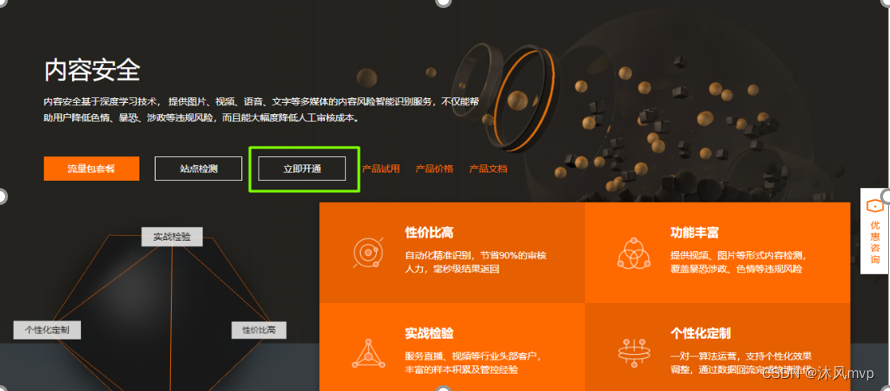
2,打开云盾内容安全产品试用页面,单击立即开通,正式开通服务
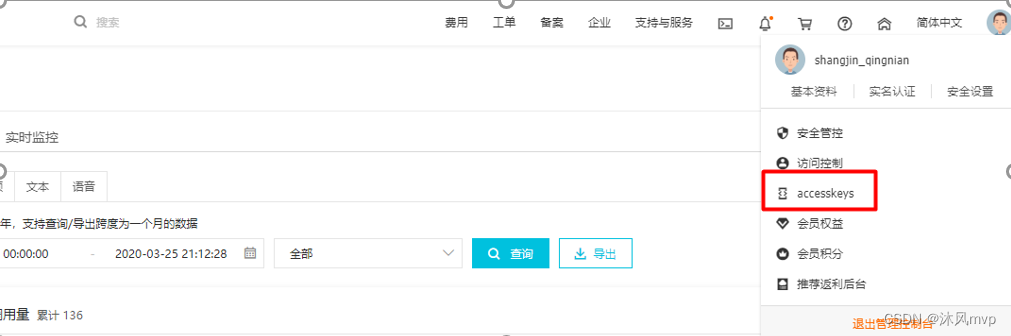
3,在AccessKey管理页面管理您的AccessKeyID和AccessKeySecret
3.1.2 文本内容垃圾检测
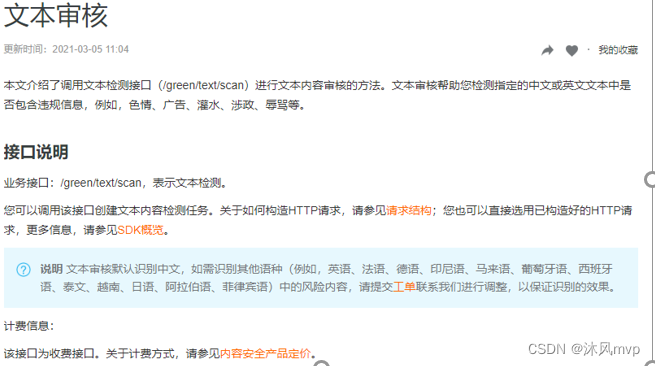
文本垃圾内容检测:点击访问
文本垃圾内容Java SDK: 点击访问
3.1.3 图片审核
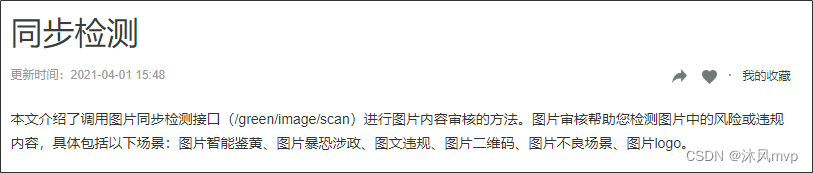
图片垃圾内容Java SDK: https://help.aliyun.com/document_detail/53424.html?spm=a2c4g.11186623.6.715.c8f69b12ey35j4
3.1.4 抽取工具
GreenProperties
@Data
@ConfigurationProperties("tanhua.green")
public class GreenProperties {/*** 账号*/String accessKeyID;/*** 密钥*/String accessKeySecret;/*** 场景*/String scenes;
}
AliyunGreenTemplate
package com.tanhua.autoconfig.template;import com.alibaba.fastjson.JSON;
import com.alibaba.fastjson.JSONArray;
import com.alibaba.fastjson.JSONObject;
import com.aliyuncs.DefaultAcsClient;
import com.aliyuncs.IAcsClient;
import com.aliyuncs.green.model.v20180509.ImageSyncScanRequest;
import com.aliyuncs.green.model.v20180509.TextScanRequest;
import com.aliyuncs.http.FormatType;
import com.aliyuncs.http.HttpResponse;
import com.aliyuncs.http.MethodType;
import com.aliyuncs.http.ProtocolType;
import com.aliyuncs.profile.DefaultProfile;
import com.aliyuncs.profile.IClientProfile;
import com.tanhua.autoconfig.properties.GreenProperties;
import lombok.extern.slf4j.Slf4j;import java.util.*;/*** @author: itheima* @create: 2021-05-31 00:46*/
@Slf4j
public class AliyunGreenTemplate {private IAcsClient client;private GreenProperties greenProperties;public AliyunGreenTemplate(GreenProperties greenProperties) {this.greenProperties = greenProperties;try {IClientProfile profile = DefaultProfile.getProfile("cn-shanghai", greenProperties.getAccessKeyID(), greenProperties.getAccessKeySecret());DefaultProfile.addEndpoint("cn-shanghai", "cn-shanghai", "Green", "green.cn-shanghai.aliyuncs.com");client = new DefaultAcsClient(profile);} catch (Exception e) {e.printStackTrace();log.error("Green配置缺失,请补充!");}}/*** 阿里云文本内容检查** @param content* @return map  key - suggestion内容* pass:文本正常,可以直接放行,* review:文本需要进一步人工审核,* block:文本违规,可以直接删除或者限制公开* value -   通过,或 出错原因* @throws Exception*/public Map greenTextScan(String content) throws Exception {TextScanRequest textScanRequest = new TextScanRequest();textScanRequest.setAcceptFormat(FormatType.JSON); // 指定api返回格式textScanRequest.setHttpContentType(FormatType.JSON);textScanRequest.setMethod(MethodType.POST); // 指定请求方法textScanRequest.setEncoding("UTF-8");textScanRequest.setRegionId("cn-shanghai");List> tasks = new ArrayList<>();Map task1 = new LinkedHashMap<>();task1.put("dataId", UUID.randomUUID().toString());/*** 待检测的文本,长度不超过10000个字符*/task1.put("content", content);tasks.add(task1);JSONObject data = new JSONObject();/*** 检测场景,文本垃圾检测传递:antispam**/data.put("scenes", Arrays.asList("antispam"));data.put("tasks", tasks);log.info("检测任务内容:{}", JSON.toJSONString(data, true));textScanRequest.setHttpContent(data.toJSONString().getBytes("UTF-8"), "UTF-8", FormatType.JSON);// 请务必设置超时时间textScanRequest.setConnectTimeout(3000);textScanRequest.setReadTimeout(6000);//        返回结果内容Map resultMap = new HashMap<>();try {HttpResponse httpResponse = client.doAction(textScanRequest);if (!httpResponse.isSuccess()) {new RuntimeException("阿里云文本内容检查出现异常!");}JSONObject scrResponse = JSON.parseObject(new String(httpResponse.getHttpContent(), "UTF-8"));log.info("检测结果内容:{}", JSON.toJSONString(scrResponse, true));if (200 != scrResponse.getInteger("code")) {new RuntimeException("阿里云文本内容检查出现异常!");}JSONArray taskResults = scrResponse.getJSONArray("data");for (Object taskResult : taskResults) {if (200 != ((JSONObject) taskResult).getInteger("code")) {new RuntimeException("阿里云文本内容检查出现异常!");}JSONArray sceneResults = ((JSONObject) taskResult).getJSONArray("results");for (Object sceneResult : sceneResults) {String scene = ((JSONObject) sceneResult).getString("scene");String label = ((JSONObject) sceneResult).getString("label");String suggestion = ((JSONObject) sceneResult).getString("suggestion");log.info("最终内容检测结果,suggestion = {},label={}", suggestion, label);
//                    设置默认错误返回内容resultMap.put("suggestion", suggestion);if (suggestion.equals("review")) {resultMap.put("reson", "文章内容中有不确定词汇");log.info("返回结果,resultMap={}", resultMap);return resultMap;} else if (suggestion.equals("block")) {String reson = "文章内容中有敏感词汇";if (label.equals("spam")) {reson = "文章内容中含垃圾信息";} else if (label.equals("ad")) {reson = "文章内容中含有广告";} else if (label.equals("politics")) {reson = "文章内容中含有涉政";} else if (label.equals("terrorism")) {reson = "文章内容中含有暴恐";} else if (label.equals("abuse")) {reson = "文章内容中含有辱骂";} else if (label.equals("porn")) {reson = "文章内容中含有色情";} else if (label.equals("flood")) {reson = "文章内容灌水";} else if (label.equals("contraband")) {reson = "文章内容违禁";} else if (label.equals("meaningless")) {reson = "文章内容无意义";}resultMap.put("reson", reson);log.info("返回结果,resultMap={}", resultMap);return resultMap;}}}resultMap.put("suggestion", "pass");resultMap.put("reson", "检测通过");} catch (Exception e) {log.error("阿里云文本内容检查出错!");e.printStackTrace();new RuntimeException("阿里云文本内容检查出错!");}log.info("返回结果,resultMap={}", resultMap);return resultMap;}/*** 阿里云图片内容安全*/public Map imageScan(List imageList) throws Exception {IClientProfile profile = DefaultProfile.getProfile("cn-shanghai", greenProperties.getAccessKeyID(), greenProperties.getAccessKeySecret());ImageSyncScanRequest imageSyncScanRequest = new ImageSyncScanRequest();// 指定api返回格式imageSyncScanRequest.setAcceptFormat(FormatType.JSON);// 指定请求方法imageSyncScanRequest.setMethod(MethodType.POST);imageSyncScanRequest.setEncoding("utf-8");//支持http和httpsimageSyncScanRequest.setProtocol(ProtocolType.HTTP);JSONObject httpBody = new JSONObject();/*** 设置要检测的场景, 计费是按照该处传递的场景进行* 一次请求中可以同时检测多张图片,每张图片可以同时检测多个风险场景,计费按照场景计算* 例如:检测2张图片,场景传递porn、terrorism,计费会按照2张图片鉴黄,2张图片暴恐检测计算* porn: porn表示色情场景检测*/httpBody.put("scenes", Arrays.asList(greenProperties.getScenes().split(",")));/*** 如果您要检测的文件存于本地服务器上,可以通过下述代码片生成url* 再将返回的url作为图片地址传递到服务端进行检测*//*** 设置待检测图片, 一张图片一个task* 多张图片同时检测时,处理的时间由最后一个处理完的图片决定* 通常情况下批量检测的平均rt比单张检测的要长, 一次批量提交的图片数越多,rt被拉长的概率越高* 这里以单张图片检测作为示例, 如果是批量图片检测,请自行构建多个task*/List list = new ArrayList();for (String imageUrl : imageList) {JSONObject task = new JSONObject();task.put("dataId", UUID.randomUUID().toString());// 设置图片链接。task.put("url", imageUrl);task.put("time", new Date());list.add(task);}httpBody.put("tasks",list);imageSyncScanRequest.setHttpContent(org.apache.commons.codec.binary.StringUtils.getBytesUtf8(httpBody.toJSONString()),"UTF-8", FormatType.JSON);/*** 请设置超时时间, 服务端全链路处理超时时间为10秒,请做相应设置* 如果您设置的ReadTimeout小于服务端处理的时间,程序中会获得一个read timeout异常*/imageSyncScanRequest.setConnectTimeout(3000);imageSyncScanRequest.setReadTimeout(10000);HttpResponse httpResponse = null;try {httpResponse = client.doAction(imageSyncScanRequest);} catch (Exception e) {e.printStackTrace();}Map resultMap = new HashMap<>();//服务端接收到请求,并完成处理返回的结果if (httpResponse != null && httpResponse.isSuccess()) {JSONObject scrResponse = JSON.parseObject(org.apache.commons.codec.binary.StringUtils.newStringUtf8(httpResponse.getHttpContent()));System.out.println(JSON.toJSONString(scrResponse, true));int requestCode = scrResponse.getIntValue("code");//每一张图片的检测结果JSONArray taskResults = scrResponse.getJSONArray("data");if (200 == requestCode) {for (Object taskResult : taskResults) {//单张图片的处理结果int taskCode = ((JSONObject) taskResult).getIntValue("code");//图片要检测的场景的处理结果, 如果是多个场景,则会有每个场景的结果JSONArray sceneResults = ((JSONObject) taskResult).getJSONArray("results");if (200 == taskCode) {for (Object sceneResult : sceneResults) {String scene = ((JSONObject) sceneResult).getString("scene");String label = ((JSONObject) sceneResult).getString("label");String suggestion = ((JSONObject) sceneResult).getString("suggestion");//根据scene和suggetion做相关处理//do somethingSystem.out.println("scene = [" + scene + "]");System.out.println("suggestion = [" + suggestion + "]");System.out.println("suggestion = [" + label + "]");if (!suggestion.equals("pass")) {resultMap.put("suggestion", suggestion);resultMap.put("label", label);return resultMap;}}} else {//单张图片处理失败, 原因视具体的情况详细分析log.error("task process fail. task response:" + JSON.toJSONString(taskResult));return null;}}resultMap.put("suggestion", "pass");return resultMap;} else {/*** 表明请求整体处理失败,原因视具体的情况详细分析*/log.error("the whole image scan request failed. response:" + JSON.toJSONString(scrResponse));return null;}}return null;}
}
TanhuaAutoConfiguration
@Bean
@ConditionalOnProperty(prefix = "tanhua.green",value = "enable", havingValue = "true")
public AliyunGreenTemplate aliyunGreenTemplate(GreenProperties properties) {return new AliyunGreenTemplate(properties);
}
配置文件
tanhua:green:enable: trueaccessKeyID: LTAI4GKgob9vZ53k2SZdyAC7accessKeySecret: LHLBvXmILRoyw0niRSBuXBZewQ30lascenes: porn,terrorism #色情,暴力
单元测试
    @Autowiredprivate AliyunGreenTemplate template;@Testpublic void test() throws Exception {
//        Long data = analysisMapper.sumAnalysisData("num_registered", "2020-09-14", "2020-09-18");
//        System.out.println(data);
//        Map map = template.greenTextScan("本校小额贷款,安全、快捷、方便、无抵押,随机随贷,当天放款,上门服务");
//        map.forEach((k,v)-> System.out.println(k +"--" + v));List list = new ArrayList<>();list.add("http://images.china.cn/site1000/2018-03/17/dfd4002e-f965-4e7c-9e04-6b72c601d952.jpg");Map map = template.imageScan(list);System.out.println("------------");map.forEach((k,v)-> System.out.println(k +"--" + v));}
3.2 动态审核
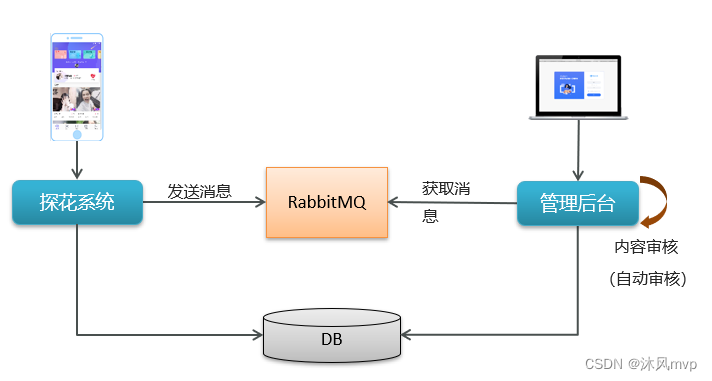
3.2.1 执行流程
为了解决程序间耦合关系,这里采用RabbitMQ + 阿里云完成内容审核
-
用户发布动态,保存到数据库
-
发送RabbitMQ消息
-
管理后台监听消息,对内容(文本、图片审核)
-
更新动态的状态
3.2.2 发布消息
public void publishMovement(Movement movement, MultipartFile[] imageContent) throws IOException {//1、判断发布动态的内容是否存在if(StringUtils.isEmpty(movement.getTextContent())) {throw new BusinessException(ErrorResult.contentError());}//2、获取当前登录的用户idLong userId = UserHolder.getUserId();//3、将文件内容上传到阿里云OSS,获取请求地址List medias = new ArrayList<>();for (MultipartFile multipartFile : imageContent) {String upload = ossTemplate.upload(multipartFile.getOriginalFilename(), multipartFile.getInputStream());medias.add(upload);}//4、将数据封装到Movement对象movement.setUserId(userId);movement.setMedias(medias);//5、调用API完成发布动态String movementId = movementApi.publish(movement);try {amqpTemplate.convertSendAndReceive("tanhua.audit.exchange","audit.movement",movementId);}catch (Exception e) {e.printStackTrace();}}
3.2.3 监听器
@Component
public class MovementListener {@DubboReferenceprivate MovementApi movementApi;@Autowiredprivate AliyunGreenTemplate aliyunGreenTemplate;@RabbitListener(bindings = @QueueBinding(value = @Queue(value = "tanhua.audit.queue",durable = "true"),exchange = @Exchange(value = "tanhua.audit.exchange",type = ExchangeTypes.TOPIC),key = {"audit.movement"}))public void listenCreate(String movementId) throws Exception {try {//1、根据动态id查询动态Movement movement = movementApi.findById(movementId);//对于RocketMQ消息有可能出现重复,解决方法判断 (幂等性)Integer state = 0;if(movement != null && movement.getState() == 0) {Map textScan = aliyunGreenTemplate.greenTextScan(movement.getTextContent());Map imageScan = aliyunGreenTemplate.imageScan(movement.getMedias());if(textScan != null && imageScan != null) {String textSuggestion = textScan.get("suggestion");String imageSuggestion = imageScan.get("suggestion");if ("block".equals(textSuggestion) || "block".equals(textSuggestion)){state = 2;}else if("pass".equals(textSuggestion) || "pass".equals(textSuggestion)) {state = 1;}}}movementApi.update(movementId,state);} catch (Exception e) {e.printStackTrace();}}
}
3.2.4 movementApi
@Override
public void update(String movementId, Integer state) {Query query = Query.query(Criteria.where("id").in(new ObjectId(movementId)));Update update = Update.update("state", state);mongoTemplate.updateFirst(query,update,Movement.class);
}