

Mybatis增删改查
Mybatis增删改查
1,配置文件实现CRUD
1.1 环境准备
-
数据库表(tb_brand)及数据准备
-- 删除tb_brand表 drop table if exists tb_brand; -- 创建tb_brand表 create table tb_brand (-- id 主键id int primary key auto_increment,-- 品牌名称brand_name varchar(20),-- 企业名称company_name varchar(20),-- 排序字段ordered int,-- 描述信息description varchar(100),-- 状态:0:禁用 1:启用status int ); -- 添加数据 insert into tb_brand (brand_name, company_name, ordered, description, status) values ('三只松鼠', '三只松鼠股份有限公司', 5, '好吃不上火', 0),('华为', '华为技术有限公司', 100, '华为致力于把数字世界带入每个人、每个家庭、每个组织,构建万物互联的智能世界', 1),('小米', '小米科技有限公司', 50, 'are you ok', 1); -
实体类 Brand
在
com.itheima.pojo包下创建 Brand 实体类。public class Brand {// id 主键private Integer id;// 品牌名称private String brandName;// 企业名称private String companyName;// 排序字段private Integer ordered;// 描述信息private String description;// 状态:0:禁用 1:启用private Integer status;//省略 setter and getter。自己写时要补全这部分代码 } -
编写测试用例
测试代码需要在
test/java目录下创建包及测试用例。 -
安装 MyBatisX 插件
-
MybatisX 是一款基于 IDEA 的快速开发插件,为效率而生。
-
主要功能
- XML映射配置文件 和 接口方法 间相互跳转
- 根据接口方法生成 statement
-
插件效果
- 红色头绳的表示映射配置文件,蓝色头绳的表示mapper接口。
- 在mapper接口点击红色头绳的小鸟图标会自动跳转到对应的映射配置文件,在映射配置文件中点击蓝色头绳的小鸟图标会自动跳转到对应的mapper接口。
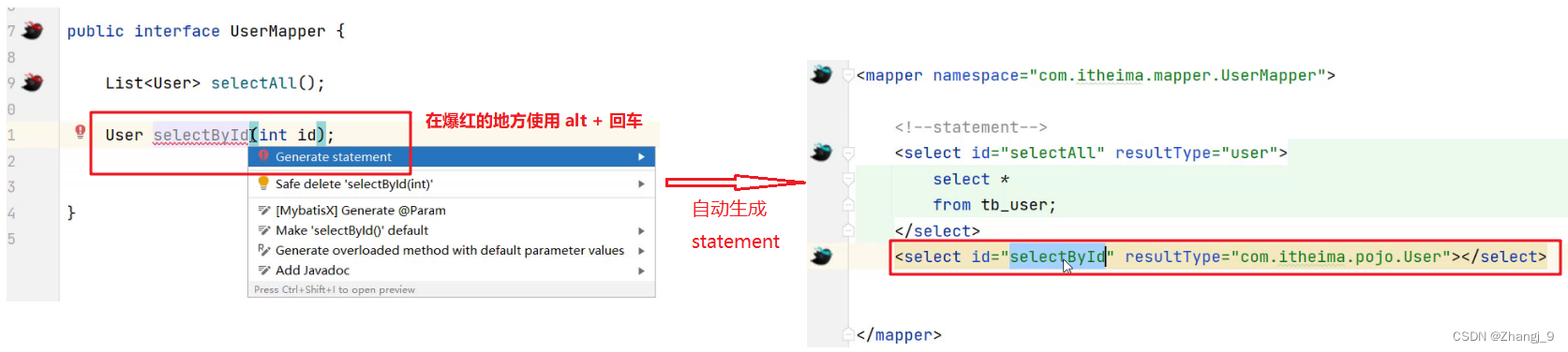
- 也可以在mapper接口中定义方法,自动生成映射配置文件中的
statement,如图所示
-
1.2 查询所有数据
1.2.1 编写接口方法
在 com.itheima.mapper 包写创建名为 BrandMapper 的接口。并在该接口中定义 List 方法。
public interface BrandMapper {/*** 查询所有*/List selectAll();
}
1.2.2 编写SQL语句
在 reources 下创建 com/itheima/mapper 目录结构,并在该目录下创建名为 BrandMapper.xml 的映射配置文件
1.2.3 编写测试方法
在 MybatisTest 类中编写测试查询所有的方法
@Test
public void testSelectAll() throws IOException {//1. 获取SqlSessionFactoryString resource = "mybatis-config.xml";InputStream inputStream = Resources.getResourceAsStream(resource);SqlSessionFactory sqlSessionFactory = new SqlSessionFactoryBuilder().build(inputStream);//2. 获取SqlSession对象SqlSession sqlSession = sqlSessionFactory.openSession();//3. 获取Mapper接口的代理对象BrandMapper brandMapper = sqlSession.getMapper(BrandMapper.class);//4. 执行方法List brands = brandMapper.selectAll();System.out.println(brands);//5. 释放资源sqlSession.close();}
执行测试方法结果如下:
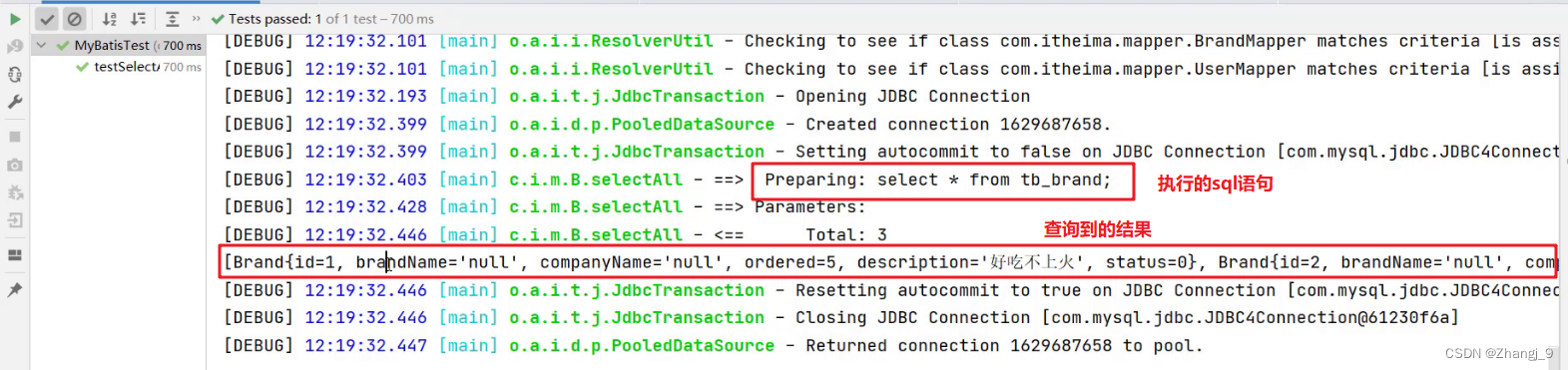
从上面结果我们看到了问题,有些数据封装成功了,而有些数据并没有封装成功。为什么这样呢?
这个问题可以通过两种方式进行解决:
- 给字段起别名
- 使用resultMap定义字段和属性的映射关系
1.2.4 起别名解决上述问题
从上面结果可以看到 brandName 和 companyName 这两个属性的数据没有封装成功,查询 实体类 和 表中的字段 发现,在实体类中属性名是 brandName 和 companyName ,而表中的字段名为 brand_name 和 company_name,如下图所示 。那么我们只需要保持这两部分的名称一致这个问题就迎刃而解。
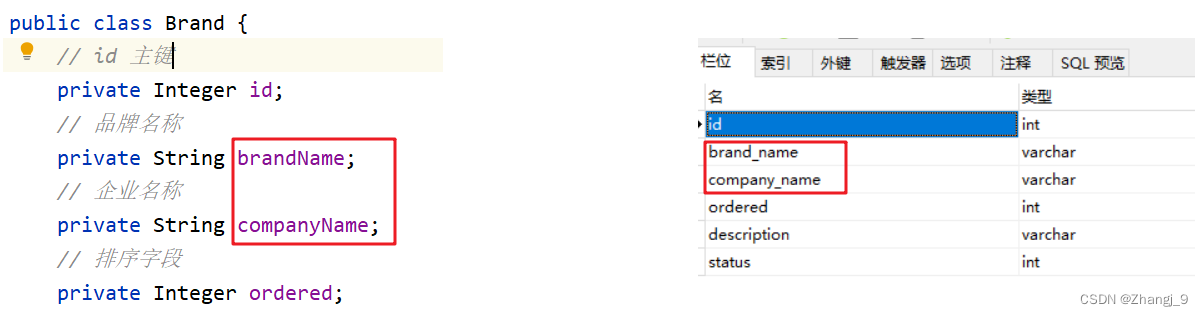
我们可以在写sql语句时给这两个字段起别名,将别名定义成和属性名一致即可。
而上面的SQL语句中的字段列表书写麻烦,如果表中还有更多的字段,同时其他的功能也需要查询这些字段时就显得我们的代码不够精炼。Mybatis提供了sql 片段可以提高sql的复用性。
SQL片段:
-
将需要复用的SQL片段抽取到
sql标签中id, brand_name as brandName, company_name as companyName, ordered, description, status id属性值是唯一标识,引用时也是通过该值进行引用。
-
在原sql语句中进行引用
使用
include标签引用上述的 SQL 片段,而refid指定上述 SQL 片段的id值。
1.2.5 使用resultMap解决上述问题
起别名 + sql片段的方式可以解决上述问题,但是它也存在问题。如果还有功能只需要查询部分字段,而不是查询所有字段,那么我们就需要再定义一个 SQL 片段,这就显得不是那么灵活。
那么我们也可以使用resultMap来定义字段和属性的映射关系的方式解决上述问题。
-
在映射配置文件中使用resultMap定义 字段 和 属性 的映射关系
注意:在上面只需要定义 字段名 和 属性名 不一样的映射,而一样的则不需要专门定义出来。
-
SQL语句正常编写
1.2.6 小结
实体类属性名 和 数据库表列名 不一致,不能自动封装数据
- ==起别名:==在SQL语句中,对不一样的列名起别名,别名和实体类属性名一样
- 可以定义 片段,提升复用性
- ==resultMap:==定义 完成不一致的属性名和列名的映射
1.3 查询详情
1.3.1 编写接口方法
在 BrandMapper 接口中定义根据id查询数据的方法
/*** 查看详情:根据Id查询*/
Brand selectById(int id);
1.3.2 编写SQL语句
在 BrandMapper.xml 映射配置文件中编写 statement,使用 resultMap 而不是使用 resultType
1.3.3 编写测试方法
在 test/java 下的 com.itheima.mapper 包下的 MybatisTest类中 定义测试方法
 @Test
public void testSelectById() throws IOException {//接收参数,该id以后需要传递过来int id = 1;//1. 获取SqlSessionFactoryString resource = "mybatis-config.xml";InputStream inputStream = Resources.getResourceAsStream(resource);SqlSessionFactory sqlSessionFactory = new SqlSessionFactoryBuilder().build(inputStream);//2. 获取SqlSession对象SqlSession sqlSession = sqlSessionFactory.openSession();//3. 获取Mapper接口的代理对象BrandMapper brandMapper = sqlSession.getMapper(BrandMapper.class);//4. 执行方法Brand brand = brandMapper.selectById(id);System.out.println(brand);//5. 释放资源sqlSession.close();
}
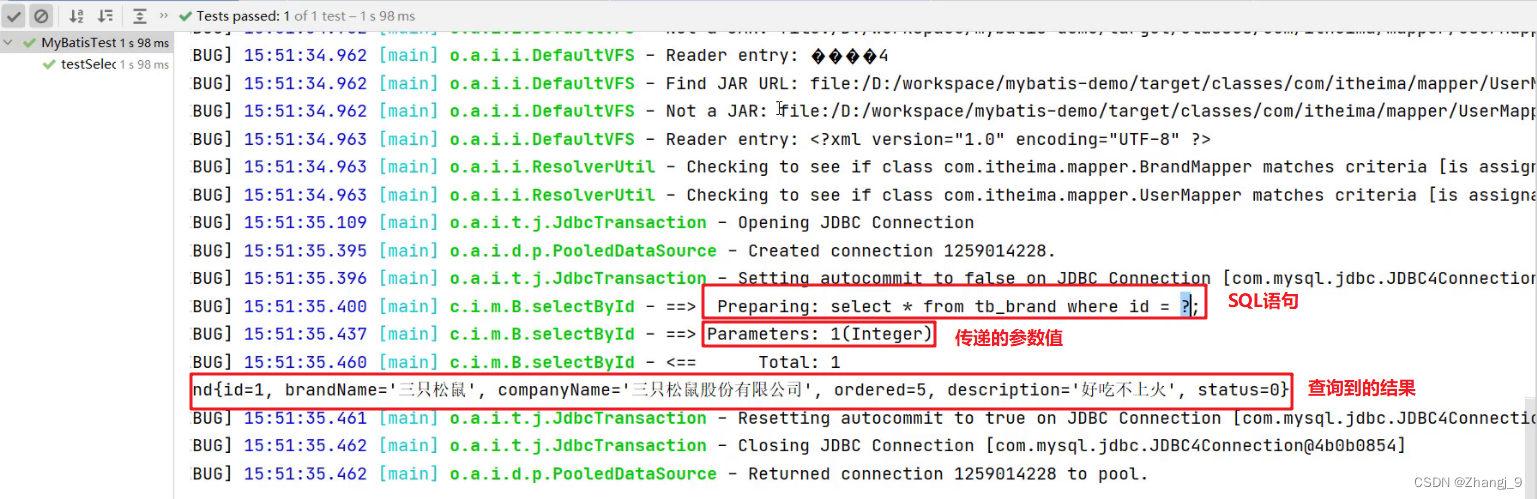
执行测试方法结果如下:
1.3.4 参数占位符
查询到的结果很好理解就是id为1的这行数据。而这里我们需要看控制台显示的SQL语句,能看到使用?进行占位。说明我们在映射配置文件中的写的 #{id} 最终会被?进行占位。
mybatis提供了两种参数占位符:
-
#{} :执行SQL时,会将 #{} 占位符替换为?,将来自动设置参数值。从上述例子可以看出使用#{} 底层使用的是
PreparedStatement -
${} :拼接SQL。底层使用的是
Statement,会存在SQL注入问题。如下图将 映射配置文件中的 #{} 替换成 ${} 来看效果重新运行查看结果如下:
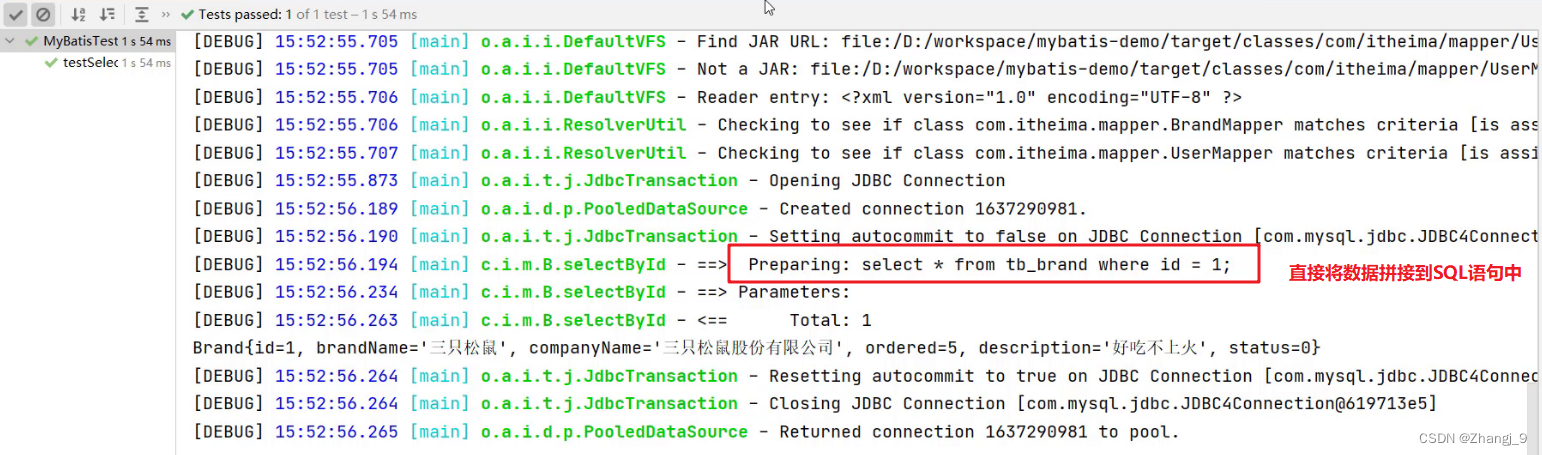
1.3.5 parameterType使用
对于有参数的mapper接口方法,我们在映射配置文件中应该配置 ParameterType 来指定参数类型。只不过该属性都可以省略。如下图:
1.3.6 SQL语句中特殊字段处理
以后肯定会在SQL语句中写一下特殊字符,比如某一个字段大于某个值,如下图

可以看出报错了,因为映射配置文件是xml类型的问题,而 > < 等这些字符在xml中有特殊含义,所以此时我们需要将这些符号进行转义,可以使用以下两种方式进行转义
-
转义字符
下图的
<就是<的转义字符。
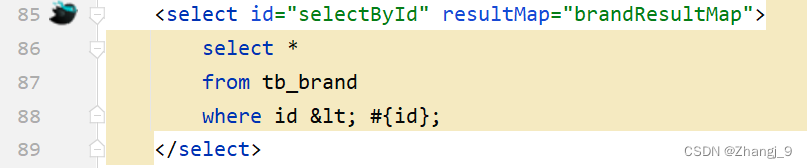
1.4 多条件查询
1.4.1 编写接口方法
在 BrandMapper 接口中定义多条件查询的方法。
而该功能有三个参数,我们就需要考虑定义接口时,参数应该如何定义。Mybatis针对多参数有多种实现
-
使用
@Param("参数名称")标记每一个参数,在映射配置文件中就需要使用#{参数名称}进行占位ListselectByCondition(@Param("status") int status, @Param("companyName") String companyName,@Param("brandName") String brandName); -
将多个参数封装成一个 实体对象 ,将该实体对象作为接口的方法参数。该方式要求在映射配置文件的SQL中使用
#{内容}时,里面的内容必须和实体类属性名保持一致。ListselectByCondition(Brand brand); -
将多个参数封装到map集合中,将map集合作为接口的方法参数。该方式要求在映射配置文件的SQL中使用
#{内容}时,里面的内容必须和map集合中键的名称一致。ListselectByCondition(Map map);
1.4.2 编写SQL语句
在 BrandMapper.xml 映射配置文件中编写 statement,使用 resultMap 而不是使用 resultType
1.4.3 编写测试方法
在 test/java 下的 com.itheima.mapper 包下的 MybatisTest类中 定义测试方法
@Test
public void testSelectByCondition() throws IOException {//接收参数int status = 1;String companyName = "华为";String brandName = "华为";// 处理参数companyName = "%" + companyName + "%";brandName = "%" + brandName + "%";//1. 获取SqlSessionFactoryString resource = "mybatis-config.xml";InputStream inputStream = Resources.getResourceAsStream(resource);SqlSessionFactory sqlSessionFactory = new SqlSessionFactoryBuilder().build(inputStream);//2. 获取SqlSession对象SqlSession sqlSession = sqlSessionFactory.openSession();//3. 获取Mapper接口的代理对象BrandMapper brandMapper = sqlSession.getMapper(BrandMapper.class);//4. 执行方法//方式一 :接口方法参数使用 @Param 方式调用的方法//List brands = brandMapper.selectByCondition(status, companyName, brandName);//方式二 :接口方法参数是 实体类对象 方式调用的方法//封装对象/* Brand brand = new Brand();brand.setStatus(status);brand.setCompanyName(companyName);brand.setBrandName(brandName);*///List brands = brandMapper.selectByCondition(brand);//方式三 :接口方法参数是 map集合对象 方式调用的方法Map map = new HashMap();map.put("status" , status);map.put("companyName", companyName);map.put("brandName" , brandName);List brands = brandMapper.selectByCondition(map);System.out.println(brands);//5. 释放资源sqlSession.close();
}
1.4.4 动态SQL
上述功能实现存在很大的问题。用户在输入条件时,肯定不会所有的条件都填写,这个时候我们的SQL语句就不能那样写的
例如用户只输入 当前状态 时,SQL语句就是
select * from tb_brand where status = #{status}
而用户如果只输入企业名称时,SQL语句就是
select * from tb_brand where company_name like #{companName}
而用户如果输入了 当前状态 和 企业名称 时,SQL语句又不一样
select * from tb_brand where status = #{status} and company_name like #{companName}
针对上述的需要,Mybatis对动态SQL有很强大的支撑:
- if
- choose (when, otherwise)
- trim (where, set)
- foreach
我们先学习 if 标签和 where 标签:
-
if 标签:条件判断
- test 属性:逻辑表达式
如上的这种SQL语句就会根据传递的参数值进行动态的拼接。如果此时status和companyName有值那么就会值拼接这两个条件。
执行结果如下:

但是它也存在问题,如果此时给的参数值是
Map map = new HashMap();
// map.put("status" , status);
map.put("companyName", companyName);
map.put("brandName" , brandName);
拼接的SQL语句就变成了
select * from tb_brand where and company_name like ? and brand_name like ?而上面的语句中 where 关键后直接跟 and 关键字,这就是一条错误的SQL语句。这个就可以使用 where 标签解决
-
where 标签
- 作用:
- 替换where关键字
- 会动态的去掉第一个条件前的 and
- 如果所有的参数没有值则不加where关键字
注意:需要给每个条件前都加上 and 关键字。
- 作用:
1.5 单个条件(动态SQL)
1.5.1 编写接口方法
在 BrandMapper 接口中定义单条件查询的方法。
/*** 单条件动态查询* @param brand* @return*/
List selectByConditionSingle(Brand brand);
1.5.2 编写SQL语句
在 BrandMapper.xml 映射配置文件中编写 statement,使用 resultMap 而不是使用 resultType
1.5.3 编写测试方法
在 test/java 下的 com.itheima.mapper 包下的 MybatisTest类中 定义测试方法
@Test
public void testSelectByConditionSingle() throws IOException {//接收参数int status = 1;String companyName = "华为";String brandName = "华为";// 处理参数companyName = "%" + companyName + "%";brandName = "%" + brandName + "%";//封装对象Brand brand = new Brand();//brand.setStatus(status);brand.setCompanyName(companyName);//brand.setBrandName(brandName);//1. 获取SqlSessionFactoryString resource = "mybatis-config.xml";InputStream inputStream = Resources.getResourceAsStream(resource);SqlSessionFactory sqlSessionFactory = new SqlSessionFactoryBuilder().build(inputStream);//2. 获取SqlSession对象SqlSession sqlSession = sqlSessionFactory.openSession();//3. 获取Mapper接口的代理对象BrandMapper brandMapper = sqlSession.getMapper(BrandMapper.class);//4. 执行方法List brands = brandMapper.selectByConditionSingle(brand);System.out.println(brands);//5. 释放资源sqlSession.close();
}
执行测试方法结果如下:
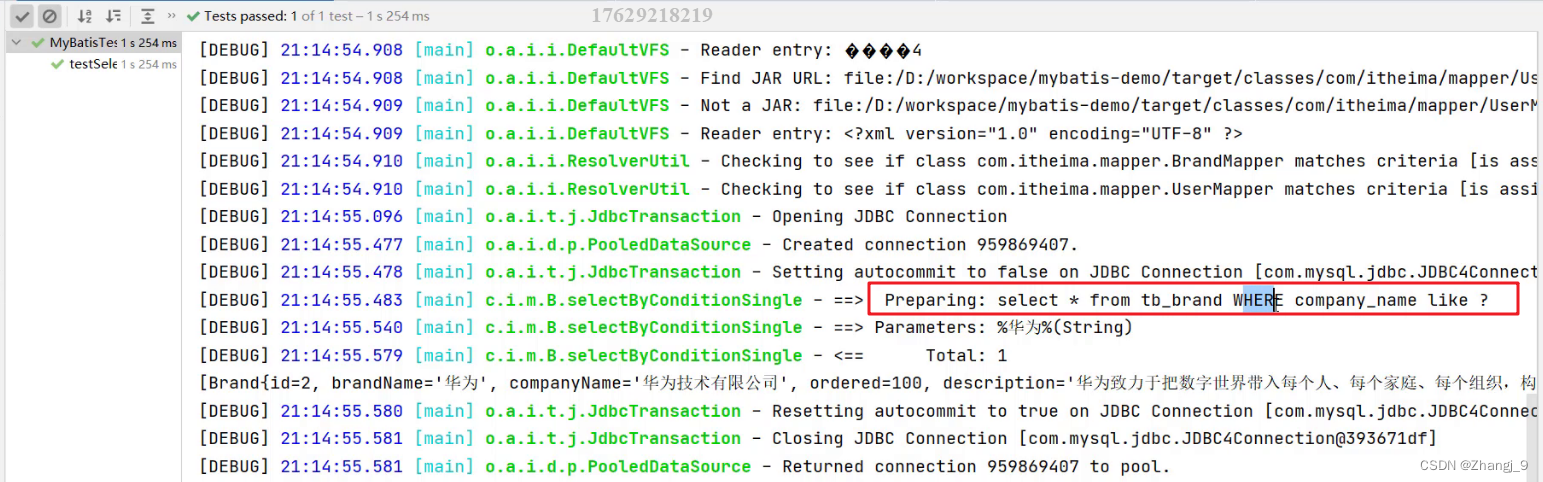
1.6 添加数据
1.6.1 编写接口方法
在 BrandMapper 接口中定义添加方法。
 /*** 添加*/
void add(Brand brand);
1.6.2 编写SQL语句
在 BrandMapper.xml 映射配置文件中编写添加数据的 statement
insert into tb_brand (brand_name, company_name, ordered, description, status)values (#{brandName}, #{companyName}, #{ordered}, #{description}, #{status});
1.6.3 编写测试方法
在 test/java 下的 com.itheima.mapper 包下的 MybatisTest类中 定义测试方法
@Test
public void testAdd() throws IOException {//接收参数int status = 1;String companyName = "波导手机";String brandName = "波导";String description = "手机中的战斗机";int ordered = 100;//封装对象Brand brand = new Brand();brand.setStatus(status);brand.setCompanyName(companyName);brand.setBrandName(brandName);brand.setDescription(description);brand.setOrdered(ordered);//1. 获取SqlSessionFactoryString resource = "mybatis-config.xml";InputStream inputStream = Resources.getResourceAsStream(resource);SqlSessionFactory sqlSessionFactory = new SqlSessionFactoryBuilder().build(inputStream);//2. 获取SqlSession对象SqlSession sqlSession = sqlSessionFactory.openSession();//SqlSession sqlSession = sqlSessionFactory.openSession(true); //设置自动提交事务,这种情况不需要手动提交事务了//3. 获取Mapper接口的代理对象BrandMapper brandMapper = sqlSession.getMapper(BrandMapper.class);//4. 执行方法brandMapper.add(brand);//提交事务sqlSession.commit();//5. 释放资源sqlSession.close();
}
执行结果如下:
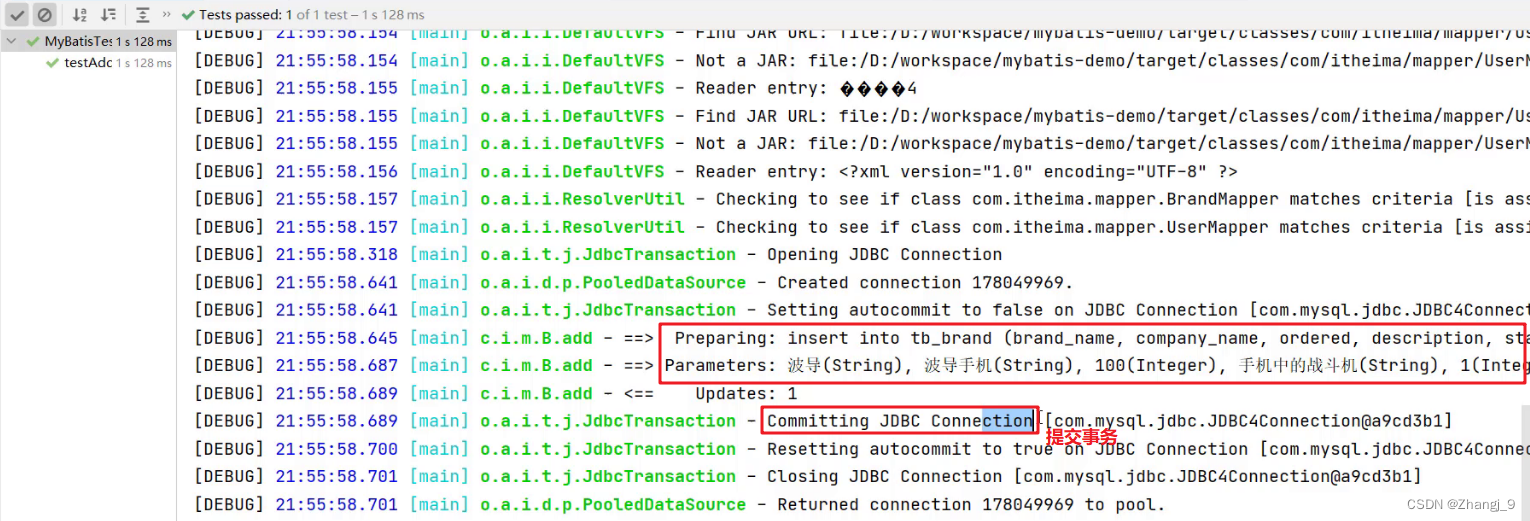
1.6.4 添加-主键返回
在数据添加成功后,有时候需要获取插入数据库数据的主键(主键是自增长)。
我们将上面添加品牌数据的案例中映射配置文件里 statement 进行修改,如下
insert into tb_brand (brand_name, company_name, ordered, description, status)values (#{brandName}, #{companyName}, #{ordered}, #{description}, #{status});
在 insert 标签上添加如下属性:
- useGeneratedKeys:是够获取自动增长的主键值。true表示获取
- keyProperty :指定将获取到的主键值封装到哪儿个属性里
1.7 修改
1.7.1 编写接口方法
在 BrandMapper 接口中定义修改方法。
 /*** 修改*/
void update(Brand brand);
上述方法参数 Brand 就是封装了需要修改的数据,而id肯定是有数据的,这也是和添加方法的区别。
1.7.2 编写SQL语句
在 BrandMapper.xml 映射配置文件中编写修改数据的 statement。
update tb_brandbrand_name = #{brandName}, company_name = #{companyName}, ordered = #{ordered}, description = #{description}, status = #{status}
set 标签可以用于动态包含需要更新的列,忽略其它不更新的列。
1.7.3 编写测试方法
在 test/java 下的 com.itheima.mapper 包下的 MybatisTest类中 定义测试方法
@Test
public void testUpdate() throws IOException {//接收参数int status = 0;String companyName = "波导手机";String brandName = "波导";String description = "波导手机,手机中的战斗机";int ordered = 200;int id = 6;//封装对象Brand brand = new Brand();brand.setStatus(status);//        brand.setCompanyName(companyName);//        brand.setBrandName(brandName);//        brand.setDescription(description);//        brand.setOrdered(ordered);brand.setId(id);//1. 获取SqlSessionFactoryString resource = "mybatis-config.xml";InputStream inputStream = Resources.getResourceAsStream(resource);SqlSessionFactory sqlSessionFactory = new SqlSessionFactoryBuilder().build(inputStream);//2. 获取SqlSession对象SqlSession sqlSession = sqlSessionFactory.openSession();//SqlSession sqlSession = sqlSessionFactory.openSession(true);//3. 获取Mapper接口的代理对象BrandMapper brandMapper = sqlSession.getMapper(BrandMapper.class);//4. 执行方法int count = brandMapper.update(brand);System.out.println(count);//提交事务sqlSession.commit();//5. 释放资源sqlSession.close();
}
执行测试方法结果如下:

从结果中SQL语句可以看出,只修改了 status 字段值,因为我们给的数据中只给Brand实体对象的 status 属性设置值了。这就是 set 标签的作用。
1.8 删除一行数据
1.8.1 编写接口方法
在 BrandMapper 接口中定义根据id删除方法。
/*** 根据id删除*/
void deleteById(int id);
1.8.2 编写SQL语句
在 BrandMapper.xml 映射配置文件中编写删除一行数据的 statement
delete from tb_brand where id = #{id};
1.8.3 编写测试方法
在 test/java 下的 com.itheima.mapper 包下的 MybatisTest类中 定义测试方法
 @Test
public void testDeleteById() throws IOException {//接收参数int id = 6;//1. 获取SqlSessionFactoryString resource = "mybatis-config.xml";InputStream inputStream = Resources.getResourceAsStream(resource);SqlSessionFactory sqlSessionFactory = new SqlSessionFactoryBuilder().build(inputStream);//2. 获取SqlSession对象SqlSession sqlSession = sqlSessionFactory.openSession();//SqlSession sqlSession = sqlSessionFactory.openSession(true);//3. 获取Mapper接口的代理对象BrandMapper brandMapper = sqlSession.getMapper(BrandMapper.class);//4. 执行方法brandMapper.deleteById(id);//提交事务sqlSession.commit();//5. 释放资源sqlSession.close();
}
运行过程只要没报错,直接到数据库查询数据是否还存在。
1.9 批量删除
1.9.1 编写接口方法
在 BrandMapper 接口中定义删除多行数据的方法。
/*** 批量删除*/
void deleteByIds(int[] ids);
参数是一个数组,数组中存储的是多条数据的id
1.9.2 编写SQL语句
在 BrandMapper.xml 映射配置文件中编写删除多条数据的 statement。
编写SQL时需要遍历数组来拼接SQL语句。Mybatis 提供了 foreach 标签供我们使用
foreach 标签
用来迭代任何可迭代的对象(如数组,集合)。
- collection 属性:
- mybatis会将数组参数,封装为一个Map集合。
- 默认:array = 数组
- 使用@Param注解改变map集合的默认key的名称
- mybatis会将数组参数,封装为一个Map集合。
- item 属性:本次迭代获取到的元素。
- separator 属性:集合项迭代之间的分隔符。
foreach标签不会错误地添加多余的分隔符。也就是最后一次迭代不会加分隔符。 - open 属性:该属性值是在拼接SQL语句之前拼接的语句,只会拼接一次
- close 属性:该属性值是在拼接SQL语句拼接后拼接的语句,只会拼接一次
delete from tb_brand where idin#{id} ;
假如数组中的id数据是{1,2,3},那么拼接后的sql语句就是:
delete from tb_brand where id in (1,2,3);
1.9.3 编写测试方法
在 test/java 下的 com.itheima.mapper 包下的 MybatisTest类中 定义测试方法
@Test
public void testDeleteByIds() throws IOException {//接收参数int[] ids = {5,7,8};//1. 获取SqlSessionFactoryString resource = "mybatis-config.xml";InputStream inputStream = Resources.getResourceAsStream(resource);SqlSessionFactory sqlSessionFactory = new SqlSessionFactoryBuilder().build(inputStream);//2. 获取SqlSession对象SqlSession sqlSession = sqlSessionFactory.openSession();//SqlSession sqlSession = sqlSessionFactory.openSession(true);//3. 获取Mapper接口的代理对象BrandMapper brandMapper = sqlSession.getMapper(BrandMapper.class);//4. 执行方法brandMapper.deleteByIds(ids);//提交事务sqlSession.commit();//5. 释放资源sqlSession.close();
}
1.10 Mybatis参数传递
Mybatis 接口方法中可以接收各种各样的参数,如下:
- 多个参数
- 单个参数:单个参数又可以是如下类型
- POJO 类型
- Map 集合类型
- Collection 集合类型
- List 集合类型
- Array 类型
- 其他类型
1.10.1 多个参数
如下面的代码,就是接收两个参数,而接收多个参数需要使用 @Param 注解,那么为什么要加该注解呢?这个问题要弄明白就必须来研究Mybatis 底层对于这些参数是如何处理的。
User select(@Param("username") String username,@Param("password") String password);
我们在接口方法中定义多个参数,Mybatis 会将这些参数封装成 Map 集合对象,值就是参数值,而键在没有使用 @Param 注解时有以下命名规则:
-
以 arg 开头 :第一个参数就叫 arg0,第二个参数就叫 arg1,以此类推。如:
map.put(“arg0”,参数值1);
map.put(“arg1”,参数值2);
-
以 param 开头 : 第一个参数就叫 param1,第二个参数就叫 param2,依次类推。如:
map.put(“param1”,参数值1);
map.put(“param2”,参数值2);
代码验证:
-
在
UserMapper接口中定义如下方法User select(String username,String password); -
在
UserMapper.xml映射配置文件中定义SQL或者
-
运行代码结果如下
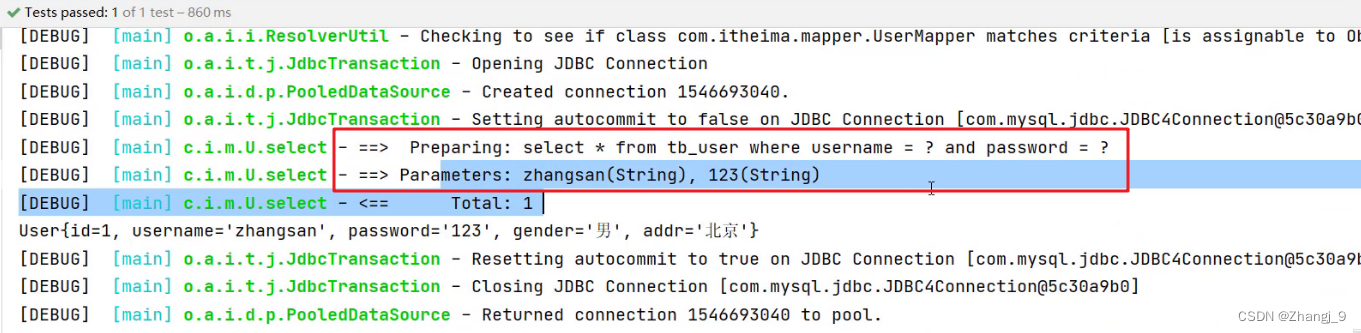
在映射配合文件的SQL语句中使用用
arg开头的和param书写,代码的可读性会变的特别差,此时可以使用@Param注解。
在接口方法参数上使用 @Param 注解,Mybatis 会将 arg 开头的键名替换为对应注解的属性值。
代码验证:
-
在
UserMapper接口中定义如下方法,在username参数前加上@Param注解User select(@Param("username") String username, String password);Mybatis 在封装 Map 集合时,键名就会变成如下:
map.put(“username”,参数值1);
map.put(“arg1”,参数值2);
map.put(“param1”,参数值1);
map.put(“param2”,参数值2);
-
在
UserMapper.xml映射配置文件中定义SQL -
运行程序结果没有报错。而如果将
#{}中的username还是写成arg0 -
运行程序则可以看到错误

结论:以后接口参数是多个时,在每个参数上都使用 @Param 注解。这样代码的可读性更高。
1.10.2 单个参数
-
POJO 类型
直接使用。要求
属性名和参数占位符名称一致 -
Map 集合类型
直接使用。要求
map集合的键名和参数占位符名称一致 -
Collection 集合类型
Mybatis 会将集合封装到 map 集合中,如下:
map.put(“arg0”,collection集合);
map.put(“collection”,collection集合;
可以使用
@Param注解替换map集合中默认的 arg 键名。 -
List 集合类型
Mybatis 会将集合封装到 map 集合中,如下:
map.put(“arg0”,list集合);
map.put(“collection”,list集合);
map.put(“list”,list集合);
可以使用
@Param注解替换map集合中默认的 arg 键名。 -
Array 类型
Mybatis 会将集合封装到 map 集合中,如下:
map.put(“arg0”,数组);
map.put(“array”,数组);
可以使用
@Param注解替换map集合中默认的 arg 键名。 -
其他类型
比如int类型,
参数占位符名称叫什么都可以。尽量做到见名知意
2,注解实现CRUD
使用注解开发会比配置文件开发更加方便。如下就是使用注解进行开发
@Select(value = "select * from tb_user where id = #{id}")
public User select(int id);
注意:
- 注解是用来替换映射配置文件方式配置的,所以使用了注解,就不需要再映射配置文件中书写对应的
statement
Mybatis 针对 CURD 操作都提供了对应的注解,已经做到见名知意。如下:
- 查询 :@Select
- 添加 :@Insert
- 修改 :@Update
- 删除 :@Delete
注意:在官方文档中 入门 中有这样的一段话:

所以,注解完成简单功能,配置文件完成复杂功能。
而我们之前写的动态 SQL 就是复杂的功能,如果用注解使用的话,就需要使用到 Mybatis 提供的SQL构建器来完成,而对应的代码如下:
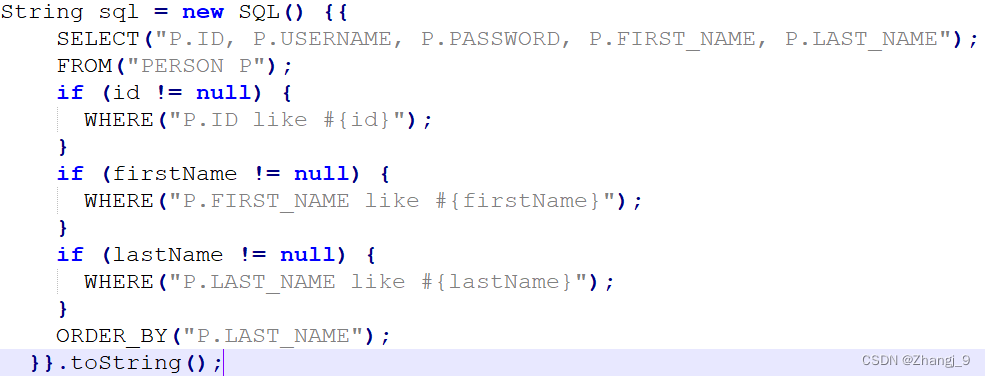
上述代码将java代码和SQL语句融到了一块,使得代码的可读性大幅度降低。