

UE多实例云渲染之Nginx代理
Nginx的Https代理
我们实现UE像素流时大部分使用的是http协议,但是某些时候前端由于某些功能问题需要使用https的协议(如前端调用本地摄像头)需要使用https协议。如果此时在内部使用http请求就会被block掉。其中一种简单的方案就是通过修改浏览器的安全设置。
1 修改chrome
- 点击chrome url左侧的图标,进入该https的设置(Site settings)
- 找到: Insecure content,将block改成Allow
- chrome会提醒需要reload,点击reload即可
2 通过Nginx代理解决
某些情况下,前端调用摄像头需要使用https协议,https通常无法发送http的请求(对于一些静态的资源可以,接口服务不行)。相应的websocket的ws请求也要转换为wss请求。
1. 配置SSL证书
直接使用像素流插件的https设置需要在每一台云渲染的服务器上申请一份SSL的证书(https://www.joyssl.com/certificate/),申请证书一般情况下是需要收费的,证书是绑定域名,不同的域名需要不同的证书(域名识别为唯一值)。但是对于UE的多实例云渲染,为每台服务器绑定一个域名是不现实的。因此需要nginx来实现对http的反向代理.
2. 配置nginx
nginx用于做是一个高性能的HTTP和反向代理web服务器。 nginx教程(https://zhuanlan.zhihu.com/p/435009231),以下是一份支持https的的UE云渲染的初始写法。
#user  nobody;
worker_processes  1;#error_log  logs/error.log;
#error_log  logs/error.log  notice;
#error_log  logs/error.log  info;#pid        logs/nginx.pid;events {worker_connections  1024;
}http {include       mime.types;default_type  application/octet-stream;#log_format  main  '$remote_addr - $remote_user [$time_local] "$request" '#                  '$status $body_bytes_sent "$http_referer" '#                  '"$http_user_agent" "$http_x_forwarded_for"';#access_log  logs/access.log  main;sendfile        on;#tcp_nopush     on;#keepalive_timeout  0;keepalive_timeout  65;#gzip  on;server {listen 80;listen 443 ssl;#配置HTTPS的默认访问端口为443。#如果未在此处配置HTTPS的默认访问端口,可能会造成Nginx无法启动。#如果您使用Nginx 1.15.0及以上版本,请使用listen 443 ssl代替listen 443和ssl on。server_name ue.hurrycloud.cn;  #服务器的访问名字;root html;index index.html index.htm;#设置SSL证书的地址,当前cert目录下;ssl_certificate cert/8892262_ue.hurrycloud.cn.pem;  ssl_certificate_key cert/8892262_ue.hurrycloud.cn.key; ssl_session_timeout 5m;ssl_ciphers ECDHE-RSA-AES128-GCM-SHA256:ECDHE:ECDH:AES:HIGH:!NULL:!aNULL:!MD5:!ADH:!RC4;#表示使用的加密套件的类型。ssl_protocols TLSv1.1 TLSv1.2 TLSv1.3; #表示使用的TLS协议的类型,您需要自行评估是否配置TLSv1.1协议。ssl_prefer_server_ciphers on;#location / {#	root html;  #Web网站程序存放目录。#	index index.html index.htm;#}location ^~/signallingserver/ {proxy_http_version 1.1;proxy_set_header Upgrade $http_upgrade;proxy_set_header Connection "upgrade";proxy_set_header Host $host;proxy_set_header X-Nginx-Proxy true;proxy_cache_bypass $http_upgrade;#以下三行用于解决跨域问题。add_header 'Access-Control-Allow-Origin' '*' always;add_header 'Access-Control-Allow-Methods' 'GET,POST,DELETE,OPTION';add_header 'Access-Control-Allow-Header' 'Content-Type,*';proxy_pass http://nodeapi; #反向代理}#wss的代理,解决websocket的代理问题。前端通过var weksocket=new WebkSocket("wss://ue.hurrycloud.cn/ws")创建连接。location /ws {proxy_pass http://websocket ; #//websocket的代理地址,如果要支持多个,可以通过设置负载均衡地址来解决多个服务器问题 如设置为proxy_redirect off;proxy_http_version 1.1; #下面三个用于防止websocket默认1一分钟之内断开websocket连接proxy_connect_timeout 4s; #配置点1proxy_read_timeout 600s; #配置点2,如果没效,可以考虑这个时间配置长一点proxy_send_timeout 12s; #配置点3#websocket的标记proxy_set_header Upgrade $http_upgrade; proxy_set_header Connection "Upgrade"; //websocket的代理标记,"Upgrade"是大小写区分的。proxy_set_header X-Real-IP $remote_addr;}            }upstream nodeapi {server 1.116.110.61:90;  //负载均衡地址服务器ip+端口#server 172.17.0.14:90;keepalive 64;}//websocket的负载均衡的地址。upstream websocket {server 1.116.110.61:801;  //负载均衡地址服务器ip+端口server 1.116.110.61:802;server 101.35.148.24:801;server 101.35.148.24:802;keepalive 64;}}
以上配置主要解决以下几个问题
- https代理http的请求(如上代理的的http://1.116.110.61:90 的请求)
- 解决跨域问题
add_header 'Access-Control-Allow-Origin' '*' always;
add_header 'Access-Control-Allow-Methods' 'GET,POST,DELETE,OPTION';
add_header 'Access-Control-Allow-Header' 'Content-Type,*';
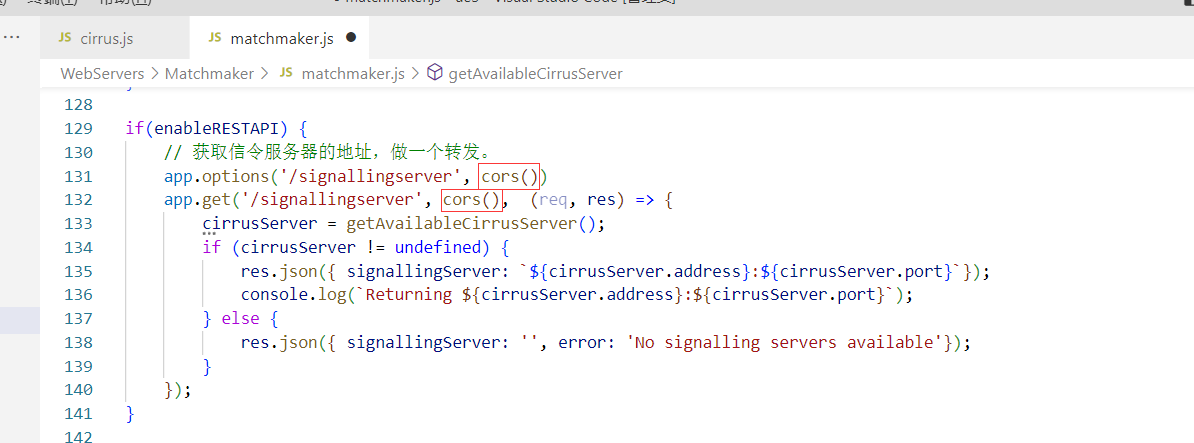
只是加以上代码是不能解决跨域问题的,在前端访问接口的时候会出现多个
Access-Control-Allow-Origin请求头。直接在nginx上删除又不行。最后是在UE的matchmaker里面删除跨域相关代码。如下直接删除即可。
- 防止websocket默认一分钟断开连接
proxy_connect_timeout 4s; #配置点1proxy_read_timeout 600s; #配置点2,如果没效,可以考虑这个时间配置长一点proxy_send_timeout 12s; #配置点3
以上实现有一个重要的问题,使用负载均衡的方式会出现在UE多实例中出现串流的现象(多个用户可能会同时进入一个websocket像素流)
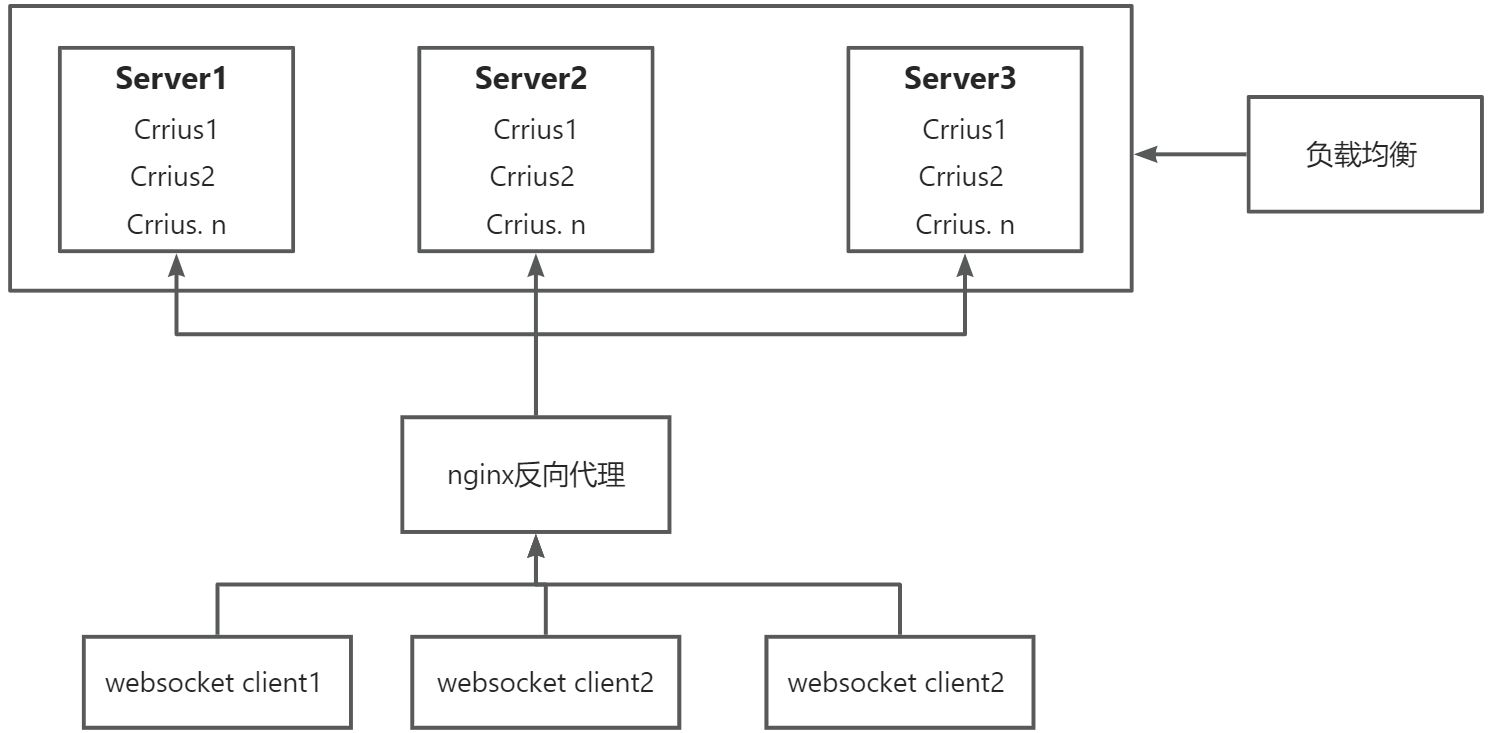
我们需要的的是一个 websocket client 对应一个crrius的信令服务器,当一个客户端连接到服务端时,其他的客户端不能再次连接到这个信令服务器,否则会出现串流问题。如果使用负载均衡的调度方式,目前是没有办法让客户端和服务端实现1对1的占用式匹配,那目前的思路就不能使用负载均衡方案,解决办法是通过websocket的路由地址来做反向代理。
3. 解决串流问题
要使用路由解决像素流中客户端与服务器的1:1问题,前端就需要有一个动态路由(每一个前端可以通过统一的地址自动获取到当前服务器中已经开启的像素流服务的路由),由于https的协议问题,那么wss协议的域名必须是SSL证书申请时候的域名。如我申请的域名是: ue.hurrycloud.cn
3.1 修改后端像素流代码
- 给信令服务器cirrus添加标记(一个服务器机器添加一个标记即可.如在参数输入的时候添加 --Flag=“ueone”)
//cirrus 入口处添加
var ue_flag=config.Flag;//设置连接matchmaker的地方添加一个flag标记传入到matchmarker中.
if (config.UseMatchmaker) {var matchmaker = new net.Socket();matchmaker.on('connect', function() {console.log(`Cirrus connected to Matchmaker ${matchmakerAddress}:${matchmakerPort}`);// message.playerConnected is a new variable sent from the SS to help track whether or not a player // is already connected when a 'connect' message is sent (i.e., reconnect). This happens when the MM// and the SS get disconnected unexpectedly (was happening often at scale for some reason).var playerConnected = false;// Set the playerConnected flag to tell the MM if there is already a player active (i.e., don't send a new one here)if( players && players.size > 0) {playerConnected = true;}// Add the new playerConnected flag to the message body to the MMmessage = {type: 'connect',address: typeof serverPublicIp === 'undefined' ? '127.0.0.1' : serverPublicIp,port: httpPort,flag: ue_flag,  //新增一行代码,添加一个flag标记,ue_flag是cirrus外部参数传进来的一个参数ready: streamer && streamer.readyState === 1,playerConnected: playerConnected};matchmaker.write(JSON.stringify(message));});....
}
- 在matchmarker连接中存储信令服务器标记
const matchmaker = net.createServer((connection) => {connection.on('data', (data) => {try {message = JSON.parse(data);if(message)console.log(`Message TYPE: ${message.type}`);} catch(e) {console.log(`ERROR (${e.toString()}): Failed to parse Cirrus information from data: ${data.toString()}`);disconnect(connection);return;}if (message.type === 'connect') {// A Cirrus server connects to this Matchmaker server.cirrusServer = {address: message.address,port: message.port,flag:message.flag,#获取标记,增加的代码numConnectedClients: 0,lastPingReceived: Date.now()};
...
}//在前端做重定向的地方
if(enableRESTAPI) {// Handle REST signalling server only request.app.options('/signallingserver')app.get('/signallingserver', (req, res) => {cirrusServer = getAvailableCirrusServer();if (cirrusServer != undefined) {//返回到前端的数据,也就是信令服务器的websocket路由,是标记加端口组成。flagPath参数是为了让前端不需要解析做的res.json({ signallingServer: `${cirrusServer.address}/${cirrusServer.flag}${cirrusServer.port}`,flagPath:`${cirrusServer.flag}${cirrusServer.port}`});console.log(`Returning ${cirrusServer.address}:${cirrusServer.port}`);} else {res.json({ signallingServer: '', error: 'No signalling servers available'});}});
}
- 前端websocket代码
//获取信令服务器地址的//创建websocket连接的地方
function connect() {// 建立长连接"use strict";window.WebSocket = window.WebSocket || window.MozWebSocket;if (!window.WebSocket) {alert('Your browser doesn\'t support WebSocket');return;}//  创建websocket的连接,域名加路由地址.ws = new WebSocket(`wss://ue.hurrycloud.cn/${flag_path}`);....
}//连接matchmarker的端口
function connectToMatchmakerServer(options, onConnect){//serverUrl的内容为 https://ue.hurrycloud.cn/signallingServer;let matchmakerServerAddr=options.serverUrl;//非信直连;if (matchmakerServerAddr.indexOf('signallingserver') != -1) {var xhr = new XMLHttpRequest();xhr.onreadystatechange = function(){if( xhr.readyState == 4){if( xhr.status >= 200 && xhr.status < 300 || xhr.status == 304){let jsonData = JSON.parse(xhr.response);console.log(jsonData.signallingServer);//获取flag_path标记;flag_path=jsonData.flagPath;if (jsonData.error) {console.log(jsonData.error);} else {console.log('ws to signal server: ', jsonData.signallingServer);onConnect(jsonData.signallingServer);}}}};xhr.open("get", matchmakerServerAddr, true);xhr.send(null);} else {matchmakerServerAddr=matchmakerServerAddr.replace('http://','');console.log('ws to server: ', matchmakerServerAddr);onConnect(matchmakerServerAddr);}
}
- nginx的配置
#user  nobody;
worker_processes  1;#error_log  logs/error.log;
#error_log  logs/error.log  notice;
#error_log  logs/error.log  info;#pid        logs/nginx.pid;events {worker_connections  1024;
}http {include       mime.types;default_type  application/octet-stream;#log_format  main  '$remote_addr - $remote_user [$time_local] "$request" '#                  '$status $body_bytes_sent "$http_referer" '#                  '"$http_user_agent" "$http_x_forwarded_for"';#access_log  logs/access.log  main;sendfile        on;#tcp_nopush     on;#keepalive_timeout  0;keepalive_timeout  65;#gzip  on;server {listen 80;listen 443 ssl;#配置HTTPS的默认访问端口为443。#如果未在此处配置HTTPS的默认访问端口,可能会造成Nginx无法启动。#如果您使用Nginx 1.15.0及以上版本,请使用listen 443 ssl代替listen 443和ssl on。server_name ue.hurrycloud.cn;root html;index index.html index.htm;ssl_certificate cert/8892262_ue.hurrycloud.cn.pem;  ssl_certificate_key cert/8892262_ue.hurrycloud.cn.key; ssl_session_timeout 5m;ssl_ciphers ECDHE-RSA-AES128-GCM-SHA256:ECDHE:ECDH:AES:HIGH:!NULL:!aNULL:!MD5:!ADH:!RC4;#表示使用的加密套件的类型。ssl_protocols TLSv1.1 TLSv1.2 TLSv1.3; #表示使用的TLS协议的类型,您需要自行评估是否配置TLSv1.1协议。ssl_prefer_server_ciphers on;#location / {#	root html;  #Web网站程序存放目录。#	index index.html index.htm;#}location ^~/signallingserver/ {  #http的服务地址路由proxy_http_version 1.1;proxy_set_header Upgrade $http_upgrade;proxy_set_header Connection "upgrade";proxy_set_header Host $host;proxy_set_header X-Nginx-Proxy true;proxy_cache_bypass $http_upgrade;add_header 'Access-Control-Allow-Origin' '*' always;add_header 'Access-Control-Allow-Methods' 'GET,POST,DELETE,OPTION';add_header 'Access-Control-Allow-Header' 'Content-Type,*';proxy_pass http://nodeapi; #反向代理}location /ueone801 {   #路由为标记+端口号如 之前的标记为ueone服务器,端口为801proxy_pass http://1.116.110.61:801; #真实的websocket地址proxy_redirect off;proxy_http_version 1.1; proxy_connect_timeout 4s; #配置点1proxy_read_timeout 600s; #配置点2,如果没效,可以考虑这个时间配置长一点proxy_send_timeout 12s; #配置点3proxy_set_header Upgrade $http_upgrade; proxy_set_header Connection "Upgrade"; proxy_set_header X-Real-IP $remote_addr;}            location /ueone802 {proxy_pass http://1.116.110.61:802;proxy_redirect off;proxy_http_version 1.1; proxy_connect_timeout 4s; #配置点1proxy_read_timeout 600s; #配置点2,如果没效,可以考虑这个时间配置长一点proxy_send_timeout 12s; #配置点3proxy_set_header Upgrade $http_upgrade; proxy_set_header Connection "Upgrade"; proxy_set_header X-Real-IP $remote_addr;}            }