

SpringBoot - WebSocket的使用和聊天室练习
创始人
2024-03-30 06:22:10
SpringBoot - WebSocket的使用和聊天室练习
- 前言
- 一. SpringBoot整合WebSocket
- 1.1 (插曲)SpringCloud网关服务接入WebSocket启动错误
- 二. 前端代码监听
- 2.1 模拟进入/离开聊天室
- 2.2 模拟聊天
前言
近期准备在我的个人云直播项目中,编写弹幕模块。前期我写的功能全都是在Egg当中完成的(整合了Socket功能),也留下了不少问题。后期准备对这块内容做一个系统性地升级。
- 还是准备把后端逻辑写到
Java里面,拓展性和相关的API比NodeJs要好一点。 - 每一个聊天室打开,就相当于
Egg服务器和Java服务器之间建立了一条长链接WebSocket。(可能后续也有所更改) Java这里,对弹幕数据丢到MQ中,做到削峰处理。消费对应的Q,做持久化、缓存处理。并将结果进行封装,分发给对应直播间的所有用户,- 前端则进行
Q的监听,监听的数据就是弹幕了。
上面都是个人的一些设想,本篇文章不涉及,先做Java和NodeJs之间的一个点对点的WebSocket服务。完成一个简单的聊天室功能。
前端有现成的架构:Egg源码gitee。
一. SpringBoot整合WebSocket
1.pom依赖:
org.springframework.boot spring-boot-starter-parent 2.3.12.RELEASE
org.springframework.boot spring-boot-starter-websocket org.projectlombok lombok 1.18.10 provided org.apache.commons commons-lang3 org.springframework.boot spring-boot-starter-web com.alibaba fastjson 1.2.83 2.配置一下WebSocket:
@Configuration
public class WebSocketConfig {@Beanpublic ServerEndpointExporter serverEndpointExporter(){return new ServerEndpointExporter();}
}
3.创建一个服务端发送给客户端的实体类对象SendMessageEntity :
@Data
@NoArgsConstructor
@AllArgsConstructor
public class SendMessageEntity {private String userId;private String message;private Long onLineCount;/** 1:初始化,2:弹幕发送 */private int operateType;
}
4.业务类代码BulletScreenService:本文案例中,使用本地缓存来保存WebSocket信息。
import com.alibaba.fastjson.JSONObject;
import com.model.SendMessageEntity;
import lombok.extern.slf4j.Slf4j;
import org.apache.commons.lang3.StringUtils;
import org.springframework.stereotype.Component;import javax.websocket.OnClose;
import javax.websocket.OnMessage;
import javax.websocket.OnOpen;
import javax.websocket.Session;
import javax.websocket.server.PathParam;
import javax.websocket.server.ServerEndpoint;
import java.util.Map;
import java.util.concurrent.ConcurrentHashMap;
import java.util.concurrent.atomic.AtomicLong;/*** @Date 2022/12/8 15:46* @Created by jj.lin*/
@Component
@ServerEndpoint("/live/{roomId}/{userId}")
@Slf4j
public class BulletScreenService {/*** 当前长连接的数量(在线人数的统计)* 也就是当前有多少客户端通过WebSocket连接到服务端*/private static final ConcurrentHashMap ONLINE_COUNT = new ConcurrentHashMap<>(1000);/*** 一个客户端(SessionID) 关联 一个 BulletScreenService* 如果页面关闭或者刷新,SessionID都会重新创建一个,默认单调递增的数字(String)* BulletScreenService包含了用户ID、直播间ID*/private static final ConcurrentHashMap WEBSOCKET_MAP = new ConcurrentHashMap<>(1000);private Session session;private String sessionId;private String userId;private String roomId;/*** 打开连接** @param session* @OnOpen 连接成功后会自动调用该方法* @PathParam("token") 获取 @ServerEndpoint("/imserver/{userId}") 后面的参数*/@OnOpenpublic void openConnection(Session session, @PathParam("roomId") String roomId, @PathParam("userId") String userId) {// 如果是游客观看视频,虽然有弹幕,但是没有用户信息,所以需要用trythis.userId = userId;this.roomId = roomId;// 保存session相关信息到本地this.sessionId = session.getId();this.session = session;// 判断WEBSOCKET_MAP 是否含有sessionId,有的话先删除再重新添加,一般不会重复if (WEBSOCKET_MAP.containsKey(sessionId)) {WEBSOCKET_MAP.remove(sessionId);WEBSOCKET_MAP.put(sessionId, this);} else { // 没有的话就直接新增WEBSOCKET_MAP.put(sessionId, this);// 在线人数加一addOnlineCount(roomId);log.info("*************WebSocket: {} 链接成功*************", this.sessionId);}// 发送消息,更新在线人数sendMessage("", 1);}public void addOnlineCount(String roomId) {AtomicLong count = ONLINE_COUNT.get(roomId);if (count == null) {AtomicLong atomicLong = new AtomicLong(1);ONLINE_COUNT.put(roomId, atomicLong);} else {count.incrementAndGet();}}public void decrementOnlineCount() {AtomicLong count = ONLINE_COUNT.get(this.roomId);if (count == null) {return;} else {count.getAndDecrement();}}/*** 客户端刷新页面,或者关闭页面,服务端断开连接等等操作,都需要关闭连接*/@OnClosepublic void closeConnection() {if (WEBSOCKET_MAP.containsKey(sessionId)) {WEBSOCKET_MAP.remove(sessionId);// 在线人数减一decrementOnlineCount();// 发送消息,更新在线人数sendMessage("", 1);log.info("*************WebSocket: {} 关闭成功*************", this.sessionId);}}/*** 客户端发送消息给服务端** @param message*/@OnMessagepublic void onMessage(String message) {if (StringUtils.isBlank(message)) {return;}// 发送消息,更新在线人数以及弹幕sendMessage(message, 2);}// 后端发送信息给前端void sendMessage(String message, int operateType) {try {for (Map.Entry entry : WEBSOCKET_MAP.entrySet()) {// 获取每一个和服务端连接的客户端BulletScreenService webSocketService = entry.getValue();// 过滤掉关闭状态的会话以及非同一个roomId的链接if (!webSocketService.session.isOpen()|| !StringUtils.equalsIgnoreCase(webSocketService.roomId, this.roomId)) {continue;}// 给同一个room下的所有连接发送信息SendMessageEntity sendMessageEntity = new SendMessageEntity();sendMessageEntity.setMessage(message);sendMessageEntity.setUserId(this.userId);AtomicLong count = ONLINE_COUNT.get(webSocketService.roomId);sendMessageEntity.setOnLineCount(count == null ? 0 : count.longValue());sendMessageEntity.setOperateType(operateType);webSocketService.session.getBasicRemote().sendText(JSONObject.toJSONString(sendMessageEntity));log.info("给客户端: {} 发送消息成功", webSocketService.session.getId());}} catch (Exception e) {log.error("sendMessage", e);}}
}
其中几种重要的注解:
@OnMessage:监听客户端发送到服务端的消息。@OnOpen:监听客户端和服务端之间建立新的链接。@OnClose:监听客户端和服务端之间的链接断开。
5.配置文件application.yml:
server:port: 8080
1.1 (插曲)SpringCloud网关服务接入WebSocket启动错误
如果在SpringCloud中的网关服务中,引用websocket,那么启动的时候可能会发生如下错误:

解决方案:在gateway依赖中,排除掉web以及webflux。
org.springframework.cloud spring-cloud-starter-gateway org.springframework.boot spring-boot-starter-web org.springframework.boot spring-boot-starter-webflux 二. 前端代码监听
1.写一个工具类pageHelper,获取URL上参数的:
代码如下:
export function getValueByParam(param: string): any {const url = window.location.href;const queryParams = url.split('?');if (queryParams?.length < 2) {return '';}const queryList = queryParams[1].split('&');for (const key of queryList) {if (key.split('=')[0] === param) {return key.split('=')[1];}}return '';
}
2.修改前端页面index.tsx:
import React, { useEffect, useState } from 'react';
import { Button, Row, Col, Input } from 'antd';
import { getValueByParam } from '../utils/pageHelper';const ws = new WebSocket(`ws://localhost:8080/live/${getValueByParam('roomId')}/${getValueByParam('userId')}`);const UserPage = () => {const [ message, setMessage ] = useState('');const [ bulletList, setBulletList ] = useState([]);const [ onlineCount, setOnlineCount ] = useState(0);useEffect(() => {ws.onopen = () => {ws.onmessage = (msg: any) => {const entity: any = JSON.parse(msg.data);if (entity?.operateType === 2) {const arr :any = [ `用户[${entity.userId}]: ${entity.message}` ];setBulletList((pre: any[]) => [].concat(...pre, ...arr));}setOnlineCount(entity?.onLineCount ?? 0);};};ws.onclose = () => {console.log('断开连接');};}, []);const sendMsg = () => {ws?.send(message);};return <>{ width: 2000, marginTop: 200 }}>sendMsg}type='primary'>发送弹幕index}>{item}
;})}
;
};export default UserPage;
然后可以运行项目了,npm run dev,打开以下地址:
http://localhost:4396/zong/?userId=10086&roomId=1http://localhost:4396/zong/?userId=10010&roomId=1
你会发现服务器中输出以下日志:
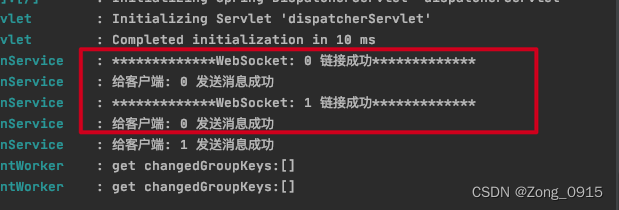
2.1 模拟进入/离开聊天室
目前有两个窗口,在线人数应该是2,如果再打开一个窗口,roomId是同一个,看看会发生什么?如果rommId不是同一个,数量还会加1吗?
可见:
- 当有新的用户进入相同的直播间的时候,直播在线人数会+1。
- 用户进入不同的直播间,直播在线人数也是独立开的。
2.2 模拟聊天
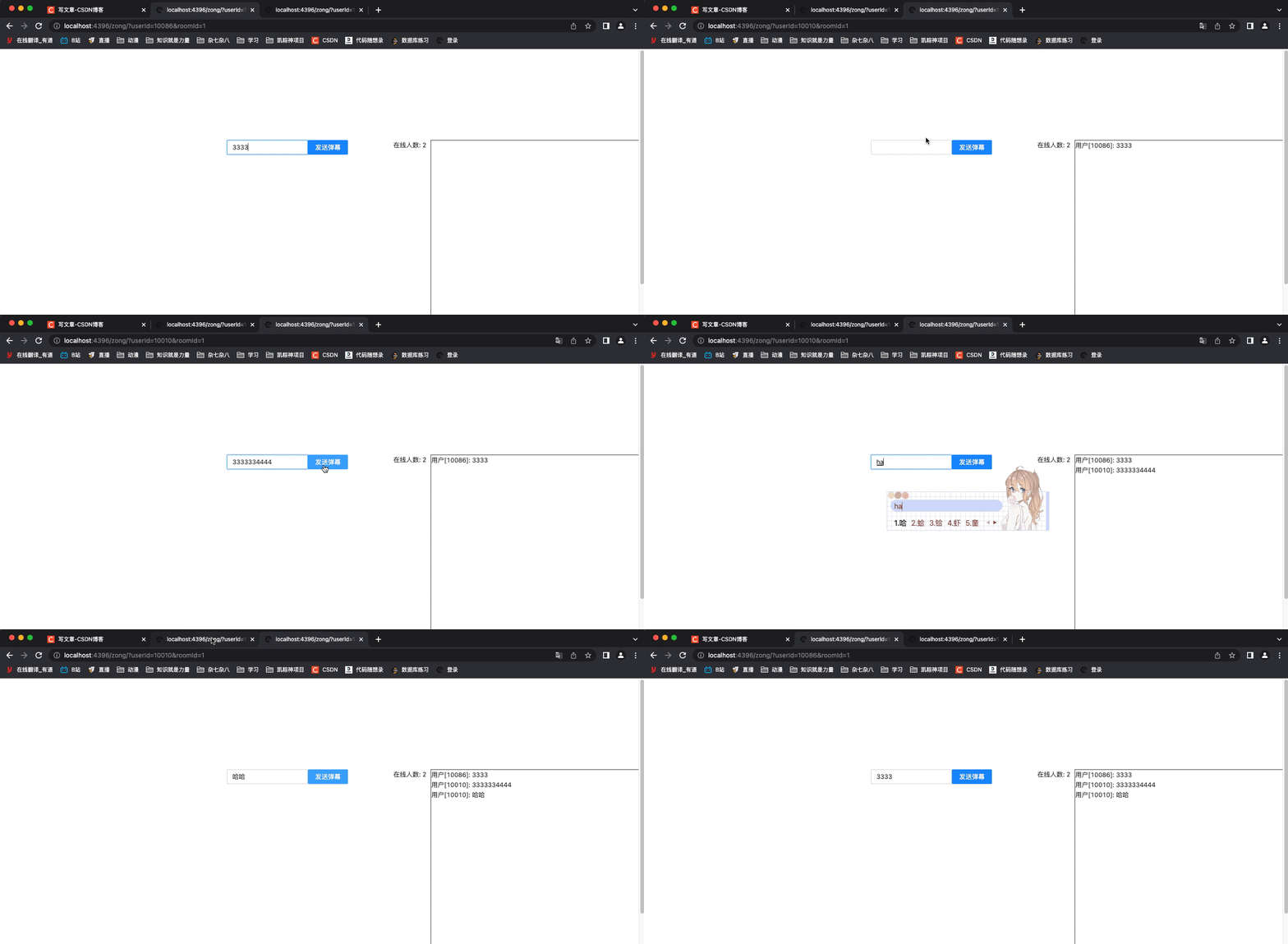
文章到这里就结束了。案例很简单。但是有几个问题值得思考。
- 案例是使用本地缓存来存储
WebSocket的,一个真实的直播系统,往往在线人数可能有几百万的时候,难不成在HashMap中存几百万的数据吗?而且还不考虑到其扩容带来的性能消耗。我们应该使用第三方库去存储这种信息。 - 弹幕流量很高的时候,就是高并发。使用
WebSocket去传输信息还能顶得住吗? - 案例中向同一个直播间的人发送消息,采取的是
for循环发送的。如果后续还需要对消息进行持久化、过滤操作等处理,这样写就不合适了。
持续更新。
上一篇:UE5笔记【五】操作细节——光源、光线参数配置、光照图修复
下一篇:去水印小程序
相关内容
热门资讯
埃菲尔铁塔在哪 中国仿建埃菲尔...
2019年4月26日,广西南宁市,街头惊现一座巨型山寨版埃菲尔铁塔,高约20米,白色塔身,造型逼真,...
苗族的传统节日 贵州苗族节日有...
【岜沙苗族芦笙节】岜沙,苗语叫“分送”,距从江县城7.5公里,是世界上最崇拜树木并以树为神的枪手部落...
北京的名胜古迹 北京最著名的景...
北京从元代开始,逐渐走上帝国首都的道路,先是成为大辽朝五大首都之一的南京城,随着金灭辽,金代从海陵王...
长白山自助游攻略 吉林长白山游...
昨天介绍了西坡的景点详细请看链接:一个人的旅行,据说能看到长白山天池全凭运气,您的运气如何?今日介绍...
世界上最漂亮的人 世界上最漂亮...
此前在某网上,选出了全球265万颜值姣好的女性。从这些数量庞大的女性群体中,人们投票选出了心目中最美...
应用未安装解决办法 平板应用未...
---IT小技术,每天Get一个小技能!一、前言描述苹果IPad2居然不能安装怎么办?与此IPad不...
脚上的穴位图 脚面经络图对应的...
人体穴位作用图解大全更清晰直观的标注了各个人体穴位的作用,包括头部穴位图、胸部穴位图、背部穴位图、胳...
猫咪吃了塑料袋怎么办 猫咪误食...
你知道吗?塑料袋放久了会长猫哦!要说猫咪对塑料袋的喜爱程度完完全全可以媲美纸箱家里只要一有塑料袋的响...
demo什么意思 demo版本...
618快到了,各位的小金库大概也在准备开闸放水了吧。没有小金库的,也该向老婆撒娇卖萌服个软了,一切只...
埃菲尔铁塔在哪 中国仿建埃菲尔...
2019年4月26日,广西南宁市,街头惊现一座巨型山寨版埃菲尔铁塔,高约20米,白色塔身,造型逼真,...
苗族的传统节日 贵州苗族节日有...
【岜沙苗族芦笙节】岜沙,苗语叫“分送”,距从江县城7.5公里,是世界上最崇拜树木并以树为神的枪手部落...
北京的名胜古迹 北京最著名的景...
北京从元代开始,逐渐走上帝国首都的道路,先是成为大辽朝五大首都之一的南京城,随着金灭辽,金代从海陵王...
世界上最漂亮的人 世界上最漂亮...
此前在某网上,选出了全球265万颜值姣好的女性。从这些数量庞大的女性群体中,人们投票选出了心目中最美...
长白山自助游攻略 吉林长白山游...
昨天介绍了西坡的景点详细请看链接:一个人的旅行,据说能看到长白山天池全凭运气,您的运气如何?今日介绍...
应用未安装解决办法 平板应用未...
---IT小技术,每天Get一个小技能!一、前言描述苹果IPad2居然不能安装怎么办?与此IPad不...
脚上的穴位图 脚面经络图对应的...
人体穴位作用图解大全更清晰直观的标注了各个人体穴位的作用,包括头部穴位图、胸部穴位图、背部穴位图、胳...
猫咪吃了塑料袋怎么办 猫咪误食...
你知道吗?塑料袋放久了会长猫哦!要说猫咪对塑料袋的喜爱程度完完全全可以媲美纸箱家里只要一有塑料袋的响...
demo什么意思 demo版本...
618快到了,各位的小金库大概也在准备开闸放水了吧。没有小金库的,也该向老婆撒娇卖萌服个软了,一切只...