

Qt-第一个HelloWorld界面
创始人
2024-04-04 20:46:39
Qt-第一个HelloWorld界面
- 一、Qt简介
- 二、QtCreator简介
- 三、第一个HelloWorld程序以及Qt项目
- 四、.pro文件介绍
- 五、Qt命名规范和QtCreator常用快捷键
- 六、帮助文档的使用
- 七、父子关系
- 八、Qt坐标系
- 九、Qt常用API
- 十、对象树
- 十一、点击按钮关闭窗口
一、Qt简介
Qt是一个跨平台的C++图形用户界面应用程序框架。他为应用程序开发者提供建立图形界面所需的所有功能。它是完全面向对象的,很容易进行扩展,并且允许真正的组件编程。
二、QtCreator简介
Qt Creator是跨平台的 Qt IDE, Qt Creator 是 Qt 被 Nokia 收购后推出的一款新的轻量级集成开发环境(IDE)。此 IDE 能够跨平台运行,支持的系统包括 Linux(32 位及 64 位)、Mac OS X 以及 Windows。根据官方描述,Qt Creator 的设计目标是使开发人员能够利用 Qt 这个应用程序框架更加快速及轻易的完成开发任务。
三、第一个HelloWorld程序以及Qt项目
- 首先创建一个项目
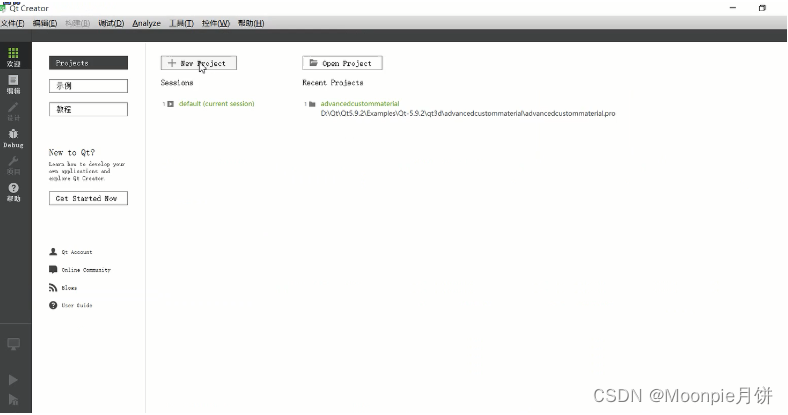
-
选择第一个 Qt Widgets Application
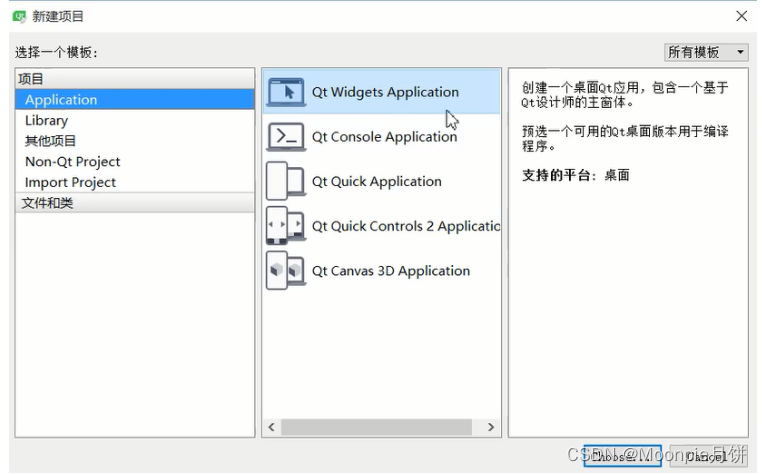
-
填写名称和路径
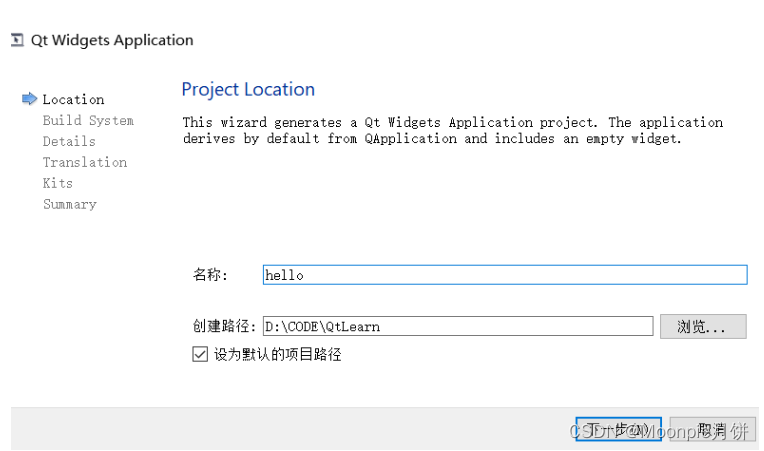
-
选择编译器
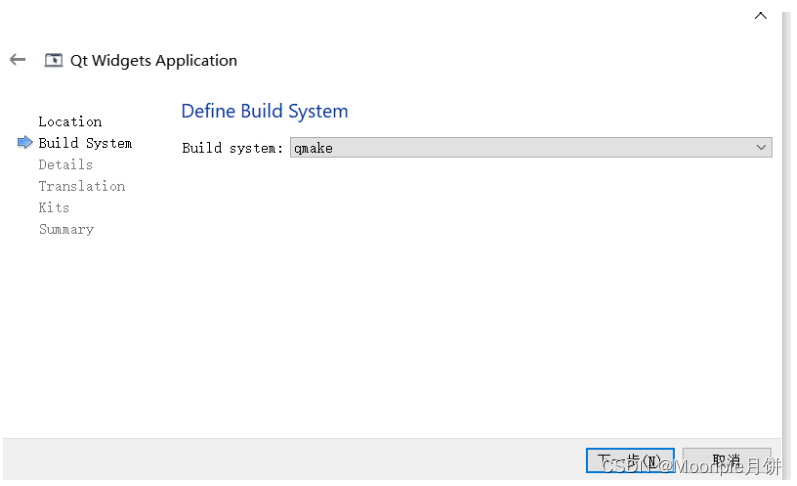
- 选择QMWidget即可
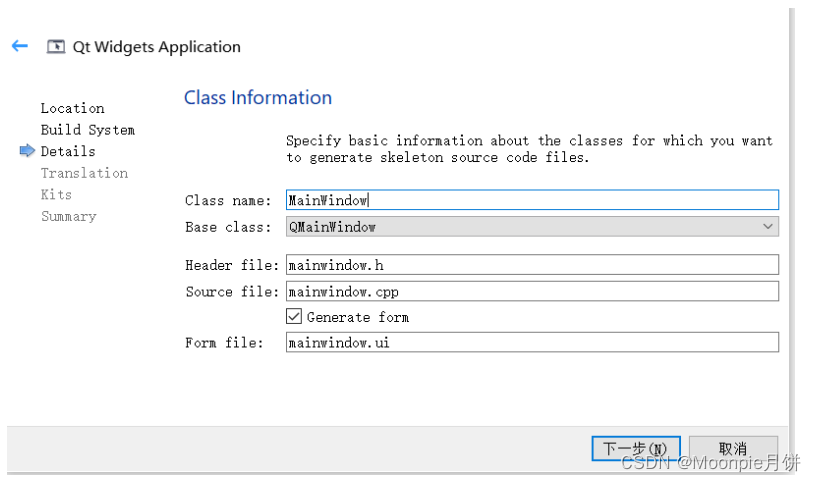
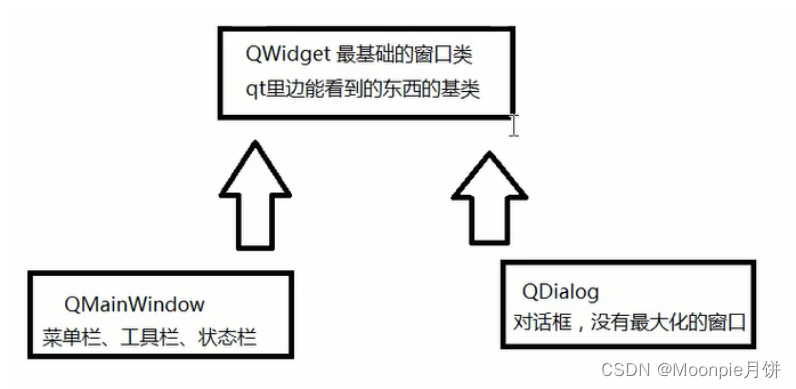
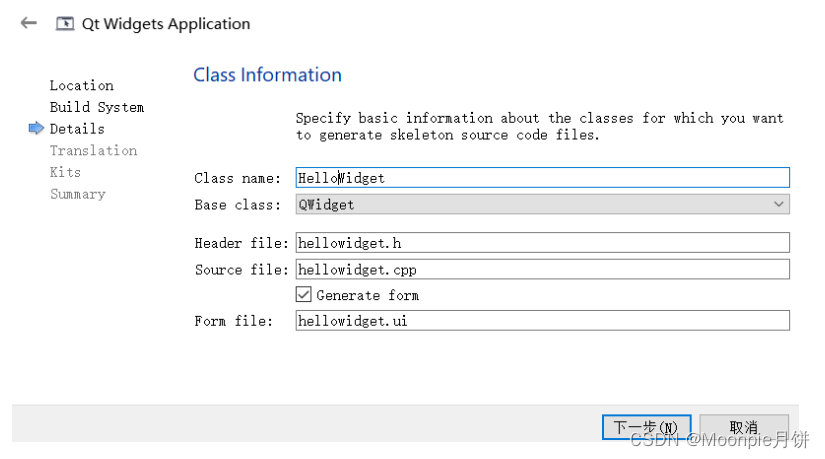
-
选择组件
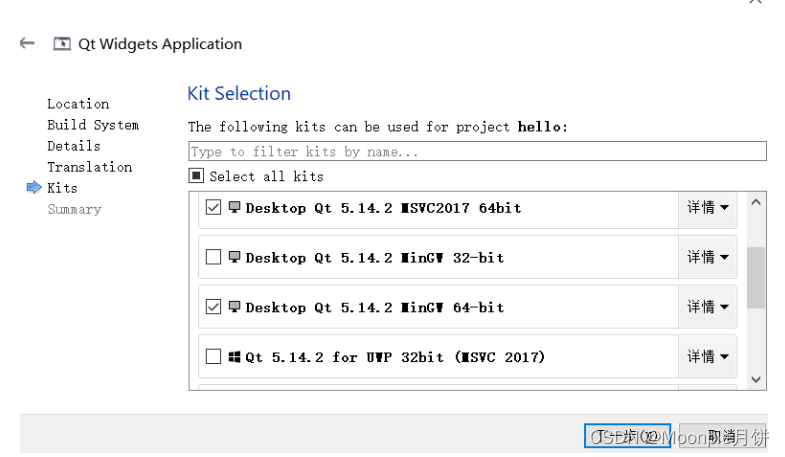
-
点击按钮 运行
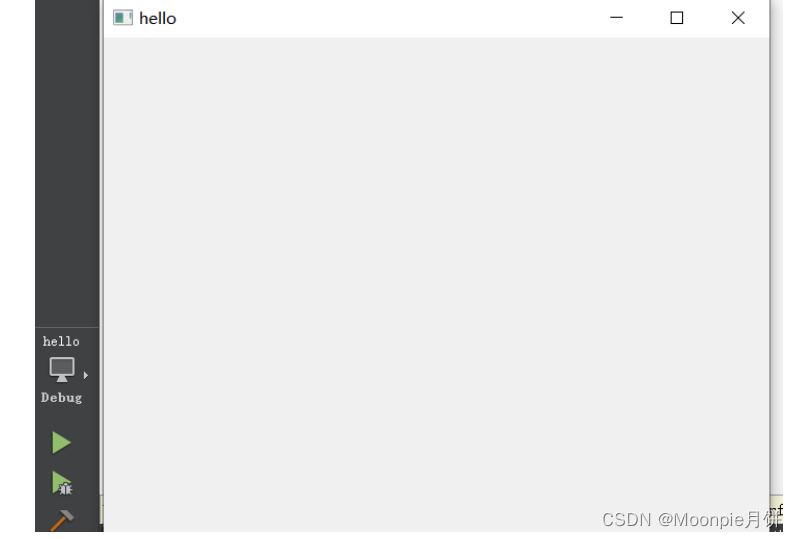
-
文件结构
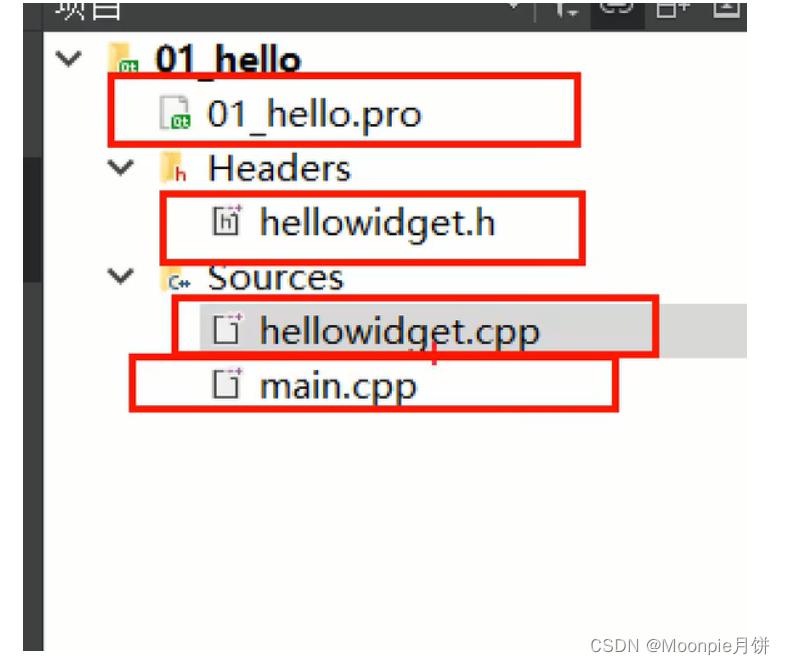
main.cpp
#include "hellowidget.h"
#include
#include
using namespace  std;int main(int argc, char *argv[])
{// 创建一个应用程序对象// 维护qt应用程序生命的一个对象  每个Qt有且仅有一个的对象QApplication a(argc, argv);// 窗口类的一个对象HelloWidget w;// 显示窗口w.show();cout<<"before exec"<
hellowidget.h
#ifndef HELLOWIDGET_H
#define HELLOWIDGET_H#include class HelloWidget : public QWidget
{// 宏  引入qt信号和槽的一个宏Q_OBJECTpublic:// 构造函数 parent窗口指针 父窗口对象的指针// 如果parent为0 或者NULL 表示当前窗口对象是个顶层窗口// 顶层窗口就是可以在任务栏找到的窗口HelloWidget(QWidget *parent = nullptr);~HelloWidget();
};
#endif // HELLOWIDGET_H
helloWidget.cpp
#include "hellowidget.h"HelloWidget::HelloWidget(QWidget *parent): QWidget(parent)
{
}HelloWidget::~HelloWidget()
{
}
项目结构总结:
-
创建项目的时候 QWidget QApplication QDialog 都继承来自QWidget
-
main函数 QApplication就是QT里面每一个应用程序有且仅有一个应用程序对象
-
QAppliction::exec() 程序的生命循环、消息循环
-
Widget头文件总结
- Q_OBJECT:宏,引入Qt信号和槽的一个宏
- HelloWidget(QWidget *parent = 0),parent是窗口指针,父窗口对象的指针,如果parent是0 或者NULL,表示当前窗口对象是一个顶层窗口,顶层窗口就是在任务栏可以找到的窗口
四、.pro文件介绍
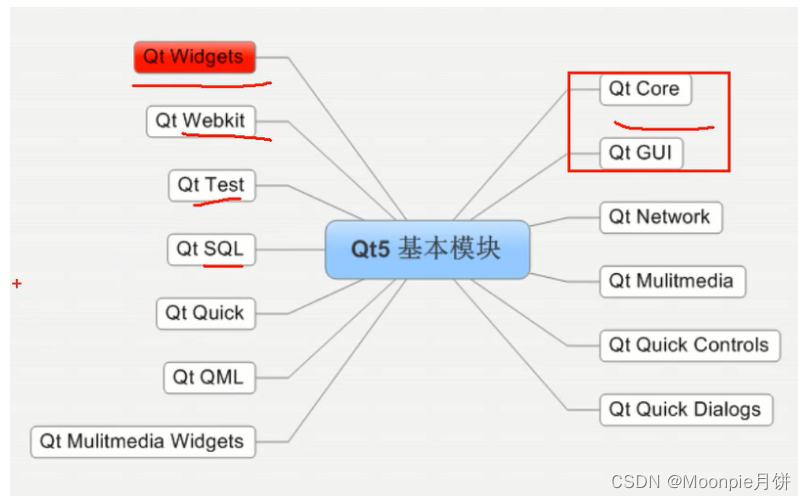
# Qt是工程模块变量 引入了Qt的core和gui模块
QT       += core gui# 如果QT版本号大于4 就引入widgets模块
greaterThan(QT_MAJOR_VERSION, 4): QT += widgetsCONFIG += c++11# The following define makes your compiler emit warnings if you use
# any Qt feature that has been marked deprecated (the exact warnings
# depend on your compiler). Please consult the documentation of the
# deprecated API in order to know how to port your code away from it.
DEFINES += QT_DEPRECATED_WARNINGS# You can also make your code fail to compile if it uses deprecated APIs.
# In order to do so, uncomment the following line.
# You can also select to disable deprecated APIs only up to a certain version of Qt.
#DEFINES += QT_DISABLE_DEPRECATED_BEFORE=0x060000    # disables all the APIs deprecated before Qt 6.0.0SOURCES += \main.cpp \hellowidget.cppHEADERS += \hellowidget.h# 指定目标 生成可执行文件的名字
# 模板,生成什么文件,app表示应用程序exe lib就是生成库
# Default rules for deployment.
qnx: target.path = /tmp/$${TARGET}/bin
else: unix:!android: target.path = /opt/$${TARGET}/bin
!isEmpty(target.path): INSTALLS += target
五、Qt命名规范和QtCreator常用快捷键
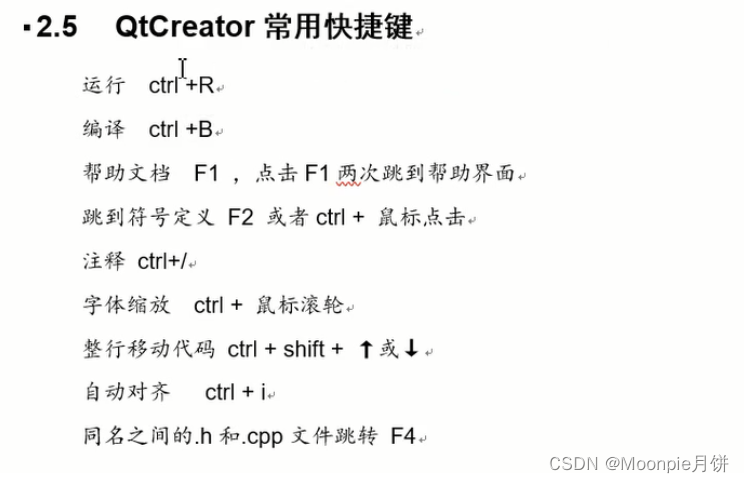
六、帮助文档的使用
七、父子关系
- setParent
#include "hellowidget.h"
#include
#include
#include
using namespace  std;int main(int argc, char *argv[])
{// 创建一个应用程序对象// 维护qt应用程序生命的一个对象  每个Qt有且仅有一个的对象QApplication a(argc, argv);// 窗口类的一个对象HelloWidget w;// 默认情况下没有建立父子关系 现实的都是顶层窗口// 使用setParent函数QPushButton btn;btn.setText("aniu1");
//    btn.show();btn.setParent(&w);// 显示窗口w.show();a.exec();return 0;
}
- 使用构造函数传参
#include "hellowidget.h"
#include
#include
#include
using namespace  std;int main(int argc, char *argv[])
{// 创建一个应用程序对象// 维护qt应用程序生命的一个对象  每个Qt有且仅有一个的对象QApplication a(argc, argv);// 窗口类的一个对象HelloWidget w;// 默认情况下没有建立父子关系 现实的都是顶层窗口// 使用setParent函数QPushButton btn;btn.setText("aniu1");
//    btn.show();btn.setParent(&w);// 构造函数传参QPushButton btn2("按钮2",&w);// 移动以下按钮位置btn2.move(100,100);// 显示窗口w.show();a.exec();return 0;
}
八、Qt坐标系
#include "hellowidget.h"
#include
#include
#include
using namespace  std;int main(int argc, char *argv[])
{// 创建一个应用程序对象// 维护qt应用程序生命的一个对象  每个Qt有且仅有一个的对象QApplication a(argc, argv);// 窗口类的一个对象HelloWidget w;// 默认情况下没有建立父子关系 现实的都是顶层窗口// 使用setParent函数QPushButton btn;btn.setText("aniu1");
//    btn.show();btn.setParent(&w);// 构造函数传参QPushButton btn2("按钮2",&w);// 移动以下按钮位置btn2.move(100,100);// 相对于父窗口 进行移动坐标btn2.resize(500,500);//按钮3  和按钮2建立父子关系QPushButton btn3("按钮3",&btn2);btn3.move(100,100);// 相对于父窗口 移动坐标// 显示窗口w.show();a.exec();return 0;
}
- 是以父窗口的左上角为0,0
- 以向右的方向为x的正方向
- 以向下的方向为y的正方向
- 顶层窗口就是以屏幕左上角为0,0
九、Qt常用API
- move 移动窗口到父窗口的某个坐标
- resize 重新设置窗口的大小
- setFixedSize 设置窗口的固定大小
- setWindowTitle 设置窗口的标题
- setGeometry 同时设置窗口位置和大小 相当于Move和resize的结合体
十、对象树
- 概念:各个窗口对象通过建立父子关系构造对的一个关系树
- 内存管理:父对象释放的时候会自动释放各个子对象(使用children列表)
- 以后基本都是使用New方式来创建窗口对象
- 父对象能够被释放
- 父对象、子对象 直接或者简介继承自QObject
MyPushButton.h
#ifndef MYPUSHBUTTON_H
#define MYPUSHBUTTON_H#include
#includeclass MyPushButton : public QPushButton
{Q_OBJECT
public:// 构造函数只传入了一个地址explicit MyPushButton(QWidget *parent = nullptr);~MyPushButton();signals:};#endif // MYPUSHBUTTON_H
MyPushButton.cpp
#include "mypushbutton.h"
#includeMyPushButton::MyPushButton(QWidget *parent) : QPushButton(parent)
{}// 析构函数
MyPushButton::~MyPushButton()
{qDebug()<<"MyPushButton Destroyed";
}
十一、点击按钮关闭窗口
#include "widget.h"
#include
#include"mypushbutton.h"Widget::Widget(QWidget *parent): QWidget(parent)
{QPushButton *btn = new QPushButton("按钮1",this);// 按钮// 被点击// 窗口// 关闭// 建立四者的关系 按钮  被点击  窗口 关闭connect(btn,&QPushButton::clicked,this,&Widget::close);}Widget::~Widget()
{
}
上一篇:矩阵理论复习(二)
相关内容
热门资讯
埃菲尔铁塔在哪 中国仿建埃菲尔...
2019年4月26日,广西南宁市,街头惊现一座巨型山寨版埃菲尔铁塔,高约20米,白色塔身,造型逼真,...
苗族的传统节日 贵州苗族节日有...
【岜沙苗族芦笙节】岜沙,苗语叫“分送”,距从江县城7.5公里,是世界上最崇拜树木并以树为神的枪手部落...
北京的名胜古迹 北京最著名的景...
北京从元代开始,逐渐走上帝国首都的道路,先是成为大辽朝五大首都之一的南京城,随着金灭辽,金代从海陵王...
长白山自助游攻略 吉林长白山游...
昨天介绍了西坡的景点详细请看链接:一个人的旅行,据说能看到长白山天池全凭运气,您的运气如何?今日介绍...
应用未安装解决办法 平板应用未...
---IT小技术,每天Get一个小技能!一、前言描述苹果IPad2居然不能安装怎么办?与此IPad不...
脚上的穴位图 脚面经络图对应的...
人体穴位作用图解大全更清晰直观的标注了各个人体穴位的作用,包括头部穴位图、胸部穴位图、背部穴位图、胳...
猫咪吃了塑料袋怎么办 猫咪误食...
你知道吗?塑料袋放久了会长猫哦!要说猫咪对塑料袋的喜爱程度完完全全可以媲美纸箱家里只要一有塑料袋的响...
demo什么意思 demo版本...
618快到了,各位的小金库大概也在准备开闸放水了吧。没有小金库的,也该向老婆撒娇卖萌服个软了,一切只...
世界上最漂亮的人 世界上最漂亮...
此前在某网上,选出了全球265万颜值姣好的女性。从这些数量庞大的女性群体中,人们投票选出了心目中最美...
埃菲尔铁塔在哪 中国仿建埃菲尔...
2019年4月26日,广西南宁市,街头惊现一座巨型山寨版埃菲尔铁塔,高约20米,白色塔身,造型逼真,...
苗族的传统节日 贵州苗族节日有...
【岜沙苗族芦笙节】岜沙,苗语叫“分送”,距从江县城7.5公里,是世界上最崇拜树木并以树为神的枪手部落...
北京的名胜古迹 北京最著名的景...
北京从元代开始,逐渐走上帝国首都的道路,先是成为大辽朝五大首都之一的南京城,随着金灭辽,金代从海陵王...
长白山自助游攻略 吉林长白山游...
昨天介绍了西坡的景点详细请看链接:一个人的旅行,据说能看到长白山天池全凭运气,您的运气如何?今日介绍...
世界上最漂亮的人 世界上最漂亮...
此前在某网上,选出了全球265万颜值姣好的女性。从这些数量庞大的女性群体中,人们投票选出了心目中最美...
应用未安装解决办法 平板应用未...
---IT小技术,每天Get一个小技能!一、前言描述苹果IPad2居然不能安装怎么办?与此IPad不...
脚上的穴位图 脚面经络图对应的...
人体穴位作用图解大全更清晰直观的标注了各个人体穴位的作用,包括头部穴位图、胸部穴位图、背部穴位图、胳...
demo什么意思 demo版本...
618快到了,各位的小金库大概也在准备开闸放水了吧。没有小金库的,也该向老婆撒娇卖萌服个软了,一切只...
猫咪吃了塑料袋怎么办 猫咪误食...
你知道吗?塑料袋放久了会长猫哦!要说猫咪对塑料袋的喜爱程度完完全全可以媲美纸箱家里只要一有塑料袋的响...