

MyBatis 增删改查操作
什么是 MyBatis?
mybatis 是一款优秀的持久层框架,用于简化 JDBC 开发
MyBatis 本是 Apach 的一个开源项目 iBatis,2021 年这个项目由 apach software foundation 迁移到了 google code,并且改名为 MyBatis。2013 年 11 月迁移到 GitHub
官网:https://mybatis.org/mybatis-3/zh/index.html
持久层
1.负责将数据保存到数据库的那一层代码
2.JavaEE 三层架构:表现层、业务层、持久层
框架
1.框架就是一个半成品软件,是一套可重用的、通用的、软件基础代码模型
2.在框架的基础之上构建软件编写更加高效、规范、通用、可扩展
JDBC 缺点
JDBC 可参考:https://blog.csdn.net/weixin_46665411/article/details/122346809
1.硬编码
-
注册驱动,获取连接
-
SQL 语句
2.操作繁琐
-
手动设置参数
-
手动封装结果集
MyBatis 快速入门
查询 User 表中,所有数据
1.创建 user 表,添加数据
创建 tb_user
CREATE DATABASE mybatis;
USE mybatis;DROP table if EXISTS tb_user;CREATE TABLE tb_user(id INT PRIMARY KEY auto_increment,username VARCHAR(20),`password` VARCHAR(20),gender CHAR(1),addr VARCHAR(30)
);INSERT INTO tb_user VALUES(1,'zhangsan','123','男','北京');
INSERT INTO tb_user VALUES(2,'李四','234','女','天津');
INSERT INTO tb_user VALUES(3,'王五','11','男','西安');
2.创建模块,导入模块
3.编写 MyBatis 核心配置文件–>替换连接信息,解决硬编码问题
mybatis-config.xml
4.编写 SQL 映射文件–>统一管理 sql 语句,解决硬编码问题
映射文件 userMapper.xml
5.编码
- 定义 POJO 类
@Data
@NoArgsConstructor
@AllArgsConstructor
public class User {private Integer id;private String userName;private String password;private String gender;private String addr;
}
- 加载核心配置文件,获取 SqlSessionFactory 对象
//1.加载mybatis的核心配置文件,获取SqlSessionFactoryString resource = "mybatis-config.xml";InputStream inputStream;SqlSessionFactory sqlSessionFactory = null;{try {inputStream = Resources.getResourceAsStream(resource);sqlSessionFactory = new SqlSessionFactoryBuilder().build(inputStream);} catch (IOException e) {e.printStackTrace();}}
- 获取 SqlSession 对象,执行 SQL 语句
//2.获取SqlSession对象,用来执行SQLSqlSession sqlSession = sqlSessionFactory.openSession();//3.执行sqlList users = sqlSession.selectList("test.selectAll");
- 释放资源
//4.释放资源sqlSession.close();
Mapper 代理开发
1.定义与 SQL 映射文件同命的 Mapper 接口,并且将 Mapper 接口和 SQL 映射文件放置在同一目录下
2.设置 SQL 映射文件的 nameSpace 属性为 Mapper 接口全限定类名
3.在 Mapper 接口中定义方法,方法名就是 SQL 映射文件中 sql 语句中的 id,并保持参数类型和返回值类型一致
4.编码
-
通过 SqlSession 的 getMapper 方法获取 Mapper 接口的代理对象
-
调用对应方法完成 sql 的执行
//3.执行sql//List users = sqlSession.selectList("test.selectAll");//3.1获取UserMapper接口的代理对象UserMapper mapper = sqlSession.getMapper(UserMapper.class);List users = mapper.selectAll();
细节:如果 Mapper 接口名称和 SQL 映射文件名称相同,并在同一目录下,则可以使用包扫描的方式简化 SQL 映射文件的加载
MyBatis 核心配置文件
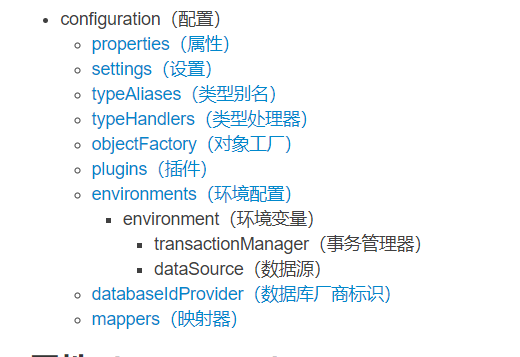
类型别名
配置各个标签时,需要遵循前后顺序
配置文件完成增删改查
1.创建表 tb_brand
-- 删除tb_brand表
DROP TABLE
IFEXISTS tb_brand;-- 创建tb_brand表
CREATE TABLE tb_brand (-- id主键id INT PRIMARY KEY auto_increment,-- 品牌名称brand_name VARCHAR ( 20 ),-- 企业名称company_name VARCHAR ( 20 ),-- 排序字段ordered INT,-- 排序字段description VARCHAR ( 100 ),-- 描述信息`status` INT -- 状态:0:禁用 1启用);-- 添加数据
INSERT INTO tb_brand ( brand_name, company_name, ordered, description, `status` )
VALUES( '三只松鼠', '三只松鼠股份有限公司', 5, '好吃不上火', 0 ),
( '华为', '华为技术有限公司', 100, '华为致力于把数字世界带给每个人、每个家庭、每个组织、构建万物互联的智能世界', 1 ),
( '小米', '小米科技有限公司', 50, 'are you ok', 0 )
2.查询所有数据
① 编写接口方法:Mapper 接口
public interface BrandMapper {/*** 查询所有* @return*/List selectAll();
}
-
参数:无
-
结果:List
② 编写 SQL 语句:SQL 映射文件
③ 执行方法,测试
@Testpublic void TestSelectAll() throws IOException {//1.获取SqlSessionFactoryString resources = "mybatis-config.xml";InputStream inputStream = Resources.getResourceAsStream(resources);SqlSessionFactory sqlSessionFactory = new SqlSessionFactoryBuilder().build(inputStream);//2.获取SqlSession对象SqlSession sqlSession = sqlSessionFactory.openSession();//3.获取mapper接口的代理对象BrandMapper mapper = sqlSession.getMapper(BrandMapper.class);//4.执行方法List brands = mapper.selectAll();for (Brand brand : brands) {System.out.println(brand);}//5.释放资源sqlSession.close();}
实体类属性名和数据库名不一致,不能自动封装数据
① 起别名:对不一样的列名起别名,让别名和实体类的属性名一致
- 缺点:每次查询都要定义一次别名
- sql 片段:不灵活
② resultMap
-
定义标签
-
在< select>标签中使用 resultMap 属性替换 resultType 属性
3.查看详情
① 编写接口方法:Mapper 接口
Brand selectById(int id);
-
参数:id
-
结果:Brand
② 编写 SQL 语句:SQL 映射文件
③ 执行方法,测试
  BrandMapper mapper = sqlSession.getMapper(BrandMapper.class);
//4.执行方法Brand brand = mapper.selectById(id);
参数占位符
① #{}:会将其替换为?,为了防止 SQL 注入
② ${}: 拼接 sql,会存在 SQL 注入问题
③ 使用时机
-
参数传递的时候:#{}
-
表名或者列名不固定的情况下:${} 会存在 SQL 注入问题
参数类型: parameterType:可以省略
特殊字符处理:
① 转义字符
② CDATA 区
4.条件查询
① 编写接口方法:Mapper 接口
/*** 条件查询* 参数类型* 1.散装参数:如果方法中有多个参数,需要使用@Param("SQL参数占位符名称")* 2.对象参数* 3.map集合参数* @param status* @param companyName* @param brandName* @return*/List selectByCondition(@Param("status") int status,@Param("companyName") String companyName,@Param("brandName") String brandName);List selectByCondition(Brand brand);List selectByCondition(Map map);
-
参数:所有查询条件
-
结果:List< Brand>
② 编写 SQL 语句:SQL 映射文件
③ 执行方法,测试
      @Testpublic void TestSelectByCondition() throws IOException {int status = 1;String companyName = "华为";String brandName = "华为";companyName = "%" + companyName + "%";brandName = "%" + brandName + "%";//1.获取SqlSessionFactory
//        Brand brand1 = new Brand();
//        brand1.setStatus(status);
//        brand1.setBrandName(brandName);
//        brand1.setCompanyName(companyName);Map map = new HashMap();map.put("status", status);map.put("companyName", companyName);map.put("brandName", brandName);String resources = "mybatis-config.xml";InputStream inputStream = Resources.getResourceAsStream(resources);SqlSessionFactory sqlSessionFactory = new SqlSessionFactoryBuilder().build(inputStream);//2.获取SqlSession对象SqlSession sqlSession = sqlSessionFactory.openSession();//3.获取mapper接口的代理对象BrandMapper mapper = sqlSession.getMapper(BrandMapper.class);//4.执行方法//List brands = mapper.selectByCondition(status,companyName,brandName);//List brand1 = mapper.selectByCondition(brand1);List brands = mapper.selectByCondition(map);for (Brand brand : brands) {System.out.println(brand);}//5.释放资源sqlSession.close();}
sql 语句设置多个参数有几种方式?
-
散装参数:需要使用@Param(“SQL 中的参数占位符名称”)
-
实体类封装参数:只需要保证 SQL 中的参数名和实体类属性名对应上,即可设置成功
-
map 集合:只需要保证 SQL 中参数名和 map 集合的键的名称对应上,即可设置成功
5.动态条件查询
SQL 语句会随着用户的输入或外部条件的变化而变化,我们称之为动态的 SQL
Mybatis 对动态 SQL 有很强大的支撑
if
choose(when,otherwise)
6.添加
① 编写接口方法:Mapper 接口
/*** 添加* @param brand*/void add(Brand brand);
-
参数:除了 id 之外的所有数据
-
结果:void
② 编写 SQL 语句:SQL 映射文件
insert into tb_brand(brand_name,company_name,ordered,description,status)values(#{brandName},#{companyName},#{ordered},#{description},#{status})
③ 执行方法,测试
@Testpublic void TestAdd() throws IOException {int status = 1;String companyName = "波导手机";String brandName = "波导";String description ="手机中的战斗机";int ordered = 100;//1.获取SqlSessionFactoryBrand brand1 = new Brand();brand1.setStatus(status);brand1.setBrandName(brandName);brand1.setCompanyName(companyName);brand1.setDescription(description);brand1.setOrdered(ordered);String resources = "mybatis-config.xml";InputStream inputStream = Resources.getResourceAsStream(resources);SqlSessionFactory sqlSessionFactory = new SqlSessionFactoryBuilder().build(inputStream);//2.获取SqlSession对象SqlSession sqlSession = sqlSessionFactory.openSession();//3.获取mapper接口的代理对象BrandMapper mapper = sqlSession.getMapper(BrandMapper.class);mapper.add(brand1);//提交事务sqlSession.commit();//5.释放资源sqlSession.close();}
mybatis 事务:
-
openSession():默认开启事务,进行增删改操作后需要使用 sqlSession.commit()手动提交事务
-
openSession(true):可以设置为自动提交事务(关闭事务)
7.添加-主键返回
在数据添加成功后需要获取插入数据库数据的主键的值
比如:添加订单和订单项
-
添加订单
-
添加订单项,订单中需要设置所属订单的 id
insert into tb_brand(brand_name,company_name,ordered,description,status)values(#{brandName},#{companyName},#{ordered},#{description},#{status})
测试
BrandMapper mapper = sqlSession.getMapper(BrandMapper.class);mapper.add(brand1);Integer id = brand1.getId();System.out.println(id);
8.修改-修改全部字段
① 编写接口方法:Mapper 接口
/*** 修改* @return*/int update(Brand brand);
-
参数:所有数据
-
结果:void
② 编写 SQL 语句:SQL 映射文件
update tb_brandsetbrand_name = #{brandName},company_name=#{companyName},ordered=#{ordered},description=#{description},status=#{status}where id =#{id}
③ 执行方法,测试
@Testpublic void TestUpdate() throws IOException {int status = 1;String companyName = "波导手机";String brandName = "波导plus";String description ="波导手机,手机中的战斗机";int ordered = 100;int id=4;//封装对象Brand brand1 = new Brand();brand1.setStatus(status);brand1.setBrandName(brandName);brand1.setCompanyName(companyName);brand1.setDescription(description);brand1.setOrdered(ordered);brand1.setId(id);//1.获取SqlSessionFactoryString resources = "mybatis-config.xml";InputStream inputStream = Resources.getResourceAsStream(resources);SqlSessionFactory sqlSessionFactory = new SqlSessionFactoryBuilder().build(inputStream);//2.获取SqlSession对象SqlSession sqlSession = sqlSessionFactory.openSession();//3.获取mapper接口的代理对象BrandMapper mapper = sqlSession.getMapper(BrandMapper.class);int count = mapper.update(brand1);System.out.println(count);//提交事务sqlSession.commit();//5.释放资源sqlSession.close();}
9.修改数据-修改动态字段
① 编写接口:Mapper 接口
-
参数:部分数据,封装到对象中
-
结果:void
② 编写 SQL 语句:SQL 映射文件
update tb_brandsetbrand_name = #{brandName}, company_name=#{companyName}, ordered=#{ordered}, description=#{description}, status=#{status} where id =#{id}
③ 执行方法,测试
  @Testpublic void TestUpdate() throws IOException {int status = 1;String companyName = "波导手机";String brandName = "波导plus2";String description ="波导手机,手机中的战斗机";int ordered = 103;int id=4;//封装对象Brand brand1 = new Brand();brand1.setStatus(status);brand1.setBrandName(brandName);
//        brand1.setCompanyName(companyName);
//        brand1.setDescription(description);brand1.setOrdered(ordered);brand1.setId(id);//1.获取SqlSessionFactoryString resources = "mybatis-config.xml";InputStream inputStream = Resources.getResourceAsStream(resources);SqlSessionFactory sqlSessionFactory = new SqlSessionFactoryBuilder().build(inputStream);//2.获取SqlSession对象SqlSession sqlSession = sqlSessionFactory.openSession();//3.获取mapper接口的代理对象BrandMapper mapper = sqlSession.getMapper(BrandMapper.class);int count = mapper.update(brand1);System.out.println(count);//提交事务sqlSession.commit();//5.释放资源sqlSession.close();}
10.删除一个
① 编写接口方法,Mapper 接口
/*** 删除一个* @param id*/void deleteById(int id);
-
参数:id
-
结果:void
② 编写 SQL 语句,SQl 映射文件
delete from tb_brand where id=#{id}
③ 执行方法,测试
@Testpublic void TestDeleteById() throws IOException {int id = 5;//1.获取SqlSessionFactoryString resources = "mybatis-config.xml";InputStream inputStream = Resources.getResourceAsStream(resources);SqlSessionFactory sqlSessionFactory = new SqlSessionFactoryBuilder().build(inputStream);//2.获取SqlSession对象SqlSession sqlSession = sqlSessionFactory.openSession();//3.获取mapper接口的代理对象BrandMapper mapper = sqlSession.getMapper(BrandMapper.class);mapper.deleteById(id);//提交事务sqlSession.commit();//5.释放资源sqlSession.close();}
11.批量删除
① 编写接口方法,Mapper 接口
/*** 批量删除*/void deleteByIds(@Param("ids") int[] ids);
-
参数:id 数组
-
结果:void
② 编写 SQL 语句,SQL 映射文件
delete from tb_brand where id=#{id} deletefrom tb_brand where id in#{id}
③ 执行方法,测试
@Testpublic void TestDeleteByIds() throws IOException {int ids[] = {9,10,11};//1.获取SqlSessionFactoryString resources = "mybatis-config.xml";InputStream inputStream = Resources.getResourceAsStream(resources);SqlSessionFactory sqlSessionFactory = new SqlSessionFactoryBuilder().build(inputStream);//2.获取SqlSession对象SqlSession sqlSession = sqlSessionFactory.openSession();//3.获取mapper接口的代理对象BrandMapper mapper = sqlSession.getMapper(BrandMapper.class);mapper.deleteByIds(ids);//提交事务sqlSession.commit();//5.释放资源sqlSession.close();}