

DX12_Mesh Shader Instance
创始人
2024-04-20 16:15:27
之前我们介绍过DX12_Mesh Shaders Render,但是基于MeshShader我们能做的还很多,比如实例化和剔除(视锥与遮挡),这也就直接解决了现在主流的GPU-Driven管线方法,是不是一举两得了(毕竟MS就是变种的CS嘛)。那么我们一步步来,先来说一下Mesh Shader实例化如何实现吧。
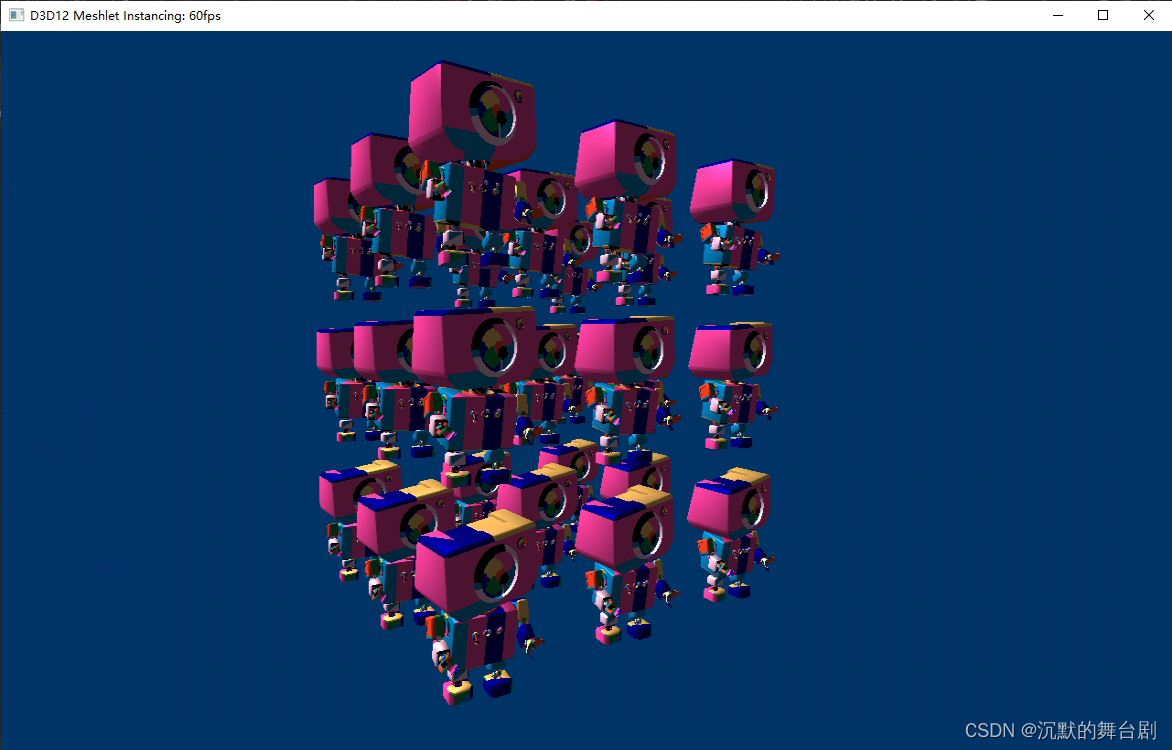
本部分主要基于之前文章拓展实例化部分的代码,具体流程想回顾的直接看以前文章即可。
一、实例化数据
传统实例化你肯定知道,
- 一种是将实例化数据放在与VertexBuffer绑定位同级的管线布局上并设置管线布局,之后调用DrawInstance即可;
- 另一种就是放到常量缓冲区上,调用DrawInstance后在Shader中使用SV_InstanceID/gl_InstanceIndex进行绘制即可。
其实Mesh Shader的实例化就是和第二种方式一样,使用实例化的数据直接在MS中生成对应的Meshlet数据使用PS接上即可,当然了这种方式和传统API的实例化还是有区别的:
- 效率比传统实例化快(MS->PS > VS->PS,更不说把臃肿的TS与GS加上了),原因是Mesh Shader的数据量更适合硬件并行计算,充分发挥了GPU算力
- 更加灵活,可拓展完全GPU-Driven的算法实现
说了这么多还是上代码把,这样更直观:
这一步很简单,就是的在CPU端创建实例化的SRV,然后更新数据
void D3D12MeshletInstancing::RegenerateInstances()
{m_updateInstances = true;const float radius = m_model.GetBoundingSphere().Radius;const float padding = 0.0f;const float spacing = (1.0f + padding) * radius * 2.0f;const uint32_t width = m_instanceLevel * 2 + 1;const float extents = spacing * m_instanceLevel;m_instanceCount = width * width * width;const uint32_t instanceBufferSize = (uint32_t)GetAlignedSize(m_instanceCount * sizeof(Instance));// 实例化数量改变时重新创建默认堆数据if (!m_instanceBuffer || m_instanceBuffer->GetDesc().Width < instanceBufferSize){WaitForGpu();const CD3DX12_HEAP_PROPERTIES instanceBufferDefaultHeapProps(D3D12_HEAP_TYPE_DEFAULT);const CD3DX12_RESOURCE_DESC instanceBufferDesc = CD3DX12_RESOURCE_DESC::Buffer(instanceBufferSize);// 创建Buffer(常变数据,所以放共享显存中,最后析构再UnMap)ThrowIfFailed(m_device->CreateCommittedResource(&instanceBufferDefaultHeapProps,D3D12_HEAP_FLAG_NONE,&instanceBufferDesc,D3D12_RESOURCE_STATE_GENERIC_READ,nullptr,IID_PPV_ARGS(&m_instanceBuffer)));const CD3DX12_HEAP_PROPERTIES instanceBufferUploadHeapProps(D3D12_HEAP_TYPE_UPLOAD);// 创建上传堆ThrowIfFailed(m_device->CreateCommittedResource(&instanceBufferUploadHeapProps,D3D12_HEAP_FLAG_NONE,&instanceBufferDesc,D3D12_RESOURCE_STATE_GENERIC_READ,nullptr,IID_PPV_ARGS(&m_instanceUpload)));m_instanceUpload->Map(0, nullptr, reinterpret_cast(&m_instanceData));}// CPU更新实例化数据for (uint32_t i = 0; i < m_instanceCount; ++i){XMVECTOR index = XMVectorSet(float(i % width), float((i / width) % width), float(i / (width * width)), 0);XMVECTOR location = index * spacing - XMVectorReplicate(extents);XMMATRIX world = XMMatrixTranslationFromVector(location);auto& inst = m_instanceData[i];XMStoreFloat4x4(&inst.World, XMMatrixTranspose(world));XMStoreFloat4x4(&inst.WorldInvTranspose, XMMatrixTranspose(XMMatrixInverse(nullptr, XMMatrixTranspose(world))));}
}
因DX12使用命令队列录制,我们还必须保证实例化数据在使用之前已经被正确的拷贝完毕,因此在绘制之前,需要使用屏障来同步显存数据:
// 仅实例化场景变更时更新if (m_updateInstances){const auto toCopyBarrier = CD3DX12_RESOURCE_BARRIER::Transition(m_instanceBuffer.Get(), D3D12_RESOURCE_STATE_GENERIC_READ, D3D12_RESOURCE_STATE_COPY_DEST);m_commandList->ResourceBarrier(1, &toCopyBarrier);m_commandList->CopyResource(m_instanceBuffer.Get(), m_instanceUpload.Get());const auto toGenericBarrier = CD3DX12_RESOURCE_BARRIER::Transition(m_instanceBuffer.Get(), D3D12_RESOURCE_STATE_COPY_DEST, D3D12_RESOURCE_STATE_GENERIC_READ);m_commandList->ResourceBarrier(1, &toGenericBarrier);m_updateInstances = false;}
二、Instance Mesh Shader实现
主要就是加了SRV(t4),大家可以自定对比之前MS与本部分实例化的MS,主要就是布局和main中的实现,具体流程见注释。
#define ROOT_SIG "CBV(b0), \RootConstants(b1, num32bitconstants=2), \RootConstants(b2, num32bitconstants=3), \SRV(t0), \SRV(t1), \SRV(t2), \SRV(t3), \SRV(t4)"struct Constants
{float4x4 World;float4x4 WorldView;float4x4 WorldViewProj;uint     DrawMeshlets;
};struct Instance
{float4x4 World;float4x4 WorldInvTranspose;
};struct DrawParams
{uint InstanceCount;uint InstanceOffset;
};struct MeshInfo
{uint IndexBytes;uint MeshletCount;uint MeshletOffset;
};struct Vertex
{float3 Position;float3 Normal;
};struct VertexOut
{float4 PositionHS   : SV_Position;float3 PositionVS   : POSITION0;float3 Normal       : NORMAL0;uint   MeshletIndex : COLOR0;
};//此处可拓展做剔除等操作
struct Meshlet
{uint VertCount;uint VertOffset;uint PrimCount;uint PrimOffset;
};ConstantBuffer Globals             : register(b0);
ConstantBuffer DrawParams          : register(b1);
ConstantBuffer  MeshInfo            : register(b2);StructuredBuffer  Vertices            : register(t0);
StructuredBuffer Meshlets            : register(t1);
ByteAddressBuffer         UniqueVertexIndices : register(t2);
StructuredBuffer    PrimitiveIndices    : register(t3);
StructuredBuffer Instances           : register(t4);// Data Loaders
uint3 UnpackPrimitive(uint primitive)
{// 从32位的uint数据中解压三角形(10 bit)return uint3(primitive & 0x3FF, (primitive >> 10) & 0x3FF, (primitive >> 20) & 0x3FF);
}//获取三角形索引
uint3 GetPrimitive(Meshlet m, uint index)
{return UnpackPrimitive(PrimitiveIndices[m.PrimOffset + index]);
}//获取顶点数组的索引,以便后续获取顶点属性数据
uint GetVertexIndex(Meshlet m, uint localIndex)
{localIndex = m.VertOffset + localIndex;if (MeshInfo.IndexBytes == 4) // 32-bit Vertex Indices{return UniqueVertexIndices.Load(localIndex * 4);}else // 16-bit Vertex Indices{// Byte address must be 4-byte aligned.uint wordOffset = (localIndex & 0x1);uint byteOffset = (localIndex / 2) * 4;// Grab the pair of 16-bit indices, shift & mask off proper 16-bits.uint indexPair = UniqueVertexIndices.Load(byteOffset);uint index = (indexPair >> (wordOffset * 16)) & 0xffff;return index;}
}//顶点属性输出数据(类似VS输出)
VertexOut GetVertexAttributes(uint meshletIndex, uint vertexIndex)
{Vertex v = Vertices[vertexIndex];VertexOut vout;vout.PositionVS = mul(float4(v.Position, 1), Globals.WorldView).xyz;vout.PositionHS = mul(float4(v.Position, 1), Globals.WorldViewProj);vout.Normal = mul(float4(v.Normal, 0), Globals.World).xyz;vout.MeshletIndex = meshletIndex;return vout;
}//MS函数主入口
[RootSignature(ROOT_SIG)]
[NumThreads(128, 1, 1)]
[OutputTopology("triangle")]
void main(uint gtid : SV_GroupThreadID,uint gid : SV_GroupID,out indices uint3 tris[126],out vertices VertexOut verts[64]
)
{//--------------------------------------------------------------------uint meshletIndex = gid / DrawParams.InstanceCount;Meshlet m = Meshlets[meshletIndex];// 实例数确定:一般情况下每个线程组只有一个实例uint startInstance = gid % DrawParams.InstanceCount;uint instanceCount = 1;// 最后一个Meshlet单独处理- 由一个线程组提交的多个实例if (meshletIndex == MeshInfo.MeshletCount - 1){const uint instancesPerGroup = min(MAX_VERTS / m.VertCount, MAX_PRIMS / m.PrimCount);// 确定这个组中有多少个实例uint unpackedGroupCount = (MeshInfo.MeshletCount - 1) * DrawParams.InstanceCount;uint packedIndex = gid - unpackedGroupCount;startInstance = packedIndex * instancesPerGroup;instanceCount = min(DrawParams.InstanceCount - startInstance, instancesPerGroup);}// 计算我们的需要输出的顶点与索引数uint vertCount = m.VertCount * instanceCount;uint primCount = m.PrimCount * instanceCount;SetMeshOutputCounts(vertCount, primCount);//--------------------------------------------------------------------// 数据导出if (gtid < vertCount){uint readIndex = gtid % m.VertCount;  // Wrap our reads for packed instancing.uint instanceId = gtid / m.VertCount; // Instance index into this threadgroup's instances (only non-zero for packed threadgroups.)uint vertexIndex = GetVertexIndex(m, readIndex);uint instanceIndex = startInstance + instanceId;verts[gtid] = GetVertexAttributes(meshletIndex, vertexIndex, instanceIndex);}if (gtid < primCount){uint readIndex = gtid % m.PrimCount;  // Wrap our reads for packed instancing.uint instanceId = gtid / m.PrimCount; // Instance index within this threadgroup (only non-zero in last meshlet threadgroups.)// Must offset the vertex indices to this thread's instanced vertstris[gtid] = GetPrimitive(m, readIndex) + (m.VertCount * instanceId);}
}
PS就不再赘述了
struct Constants
{float4x4 World;float4x4 WorldView;float4x4 WorldViewProj;uint     DrawMeshlets;
};struct VertexOut
{float4 PositionHS   : SV_Position;float3 PositionVS   : POSITION0;float3 Normal       : NORMAL0;uint   MeshletIndex : COLOR0;
};ConstantBuffer Globals : register(b0);float4 main(VertexOut input) : SV_TARGET
{float ambientIntensity = 0.1;float3 lightColor = float3(1, 1, 1);float3 lightDir = -normalize(float3(1, -1, 1));float3 diffuseColor;float shininess;if (Globals.DrawMeshlets){uint meshletIndex = input.MeshletIndex;diffuseColor = float3(float(meshletIndex & 1),float(meshletIndex & 3) / 4,float(meshletIndex & 7) / 8);shininess = 16.0;}else{diffuseColor = 0.8;shininess = 64.0;}float3 normal = normalize(input.Normal);// Do some fancy Blinn-Phong shading!float cosAngle = saturate(dot(normal, lightDir));float3 viewDir = -normalize(input.PositionVS);float3 halfAngle = normalize(lightDir + viewDir);float blinnTerm = saturate(dot(normal, halfAngle));blinnTerm = cosAngle != 0.0 ? blinnTerm : 0.0;blinnTerm = pow(blinnTerm, shininess);float3 finalColor = (cosAngle + blinnTerm + ambientIntensity) * diffuseColor;return float4(finalColor, 1);
} 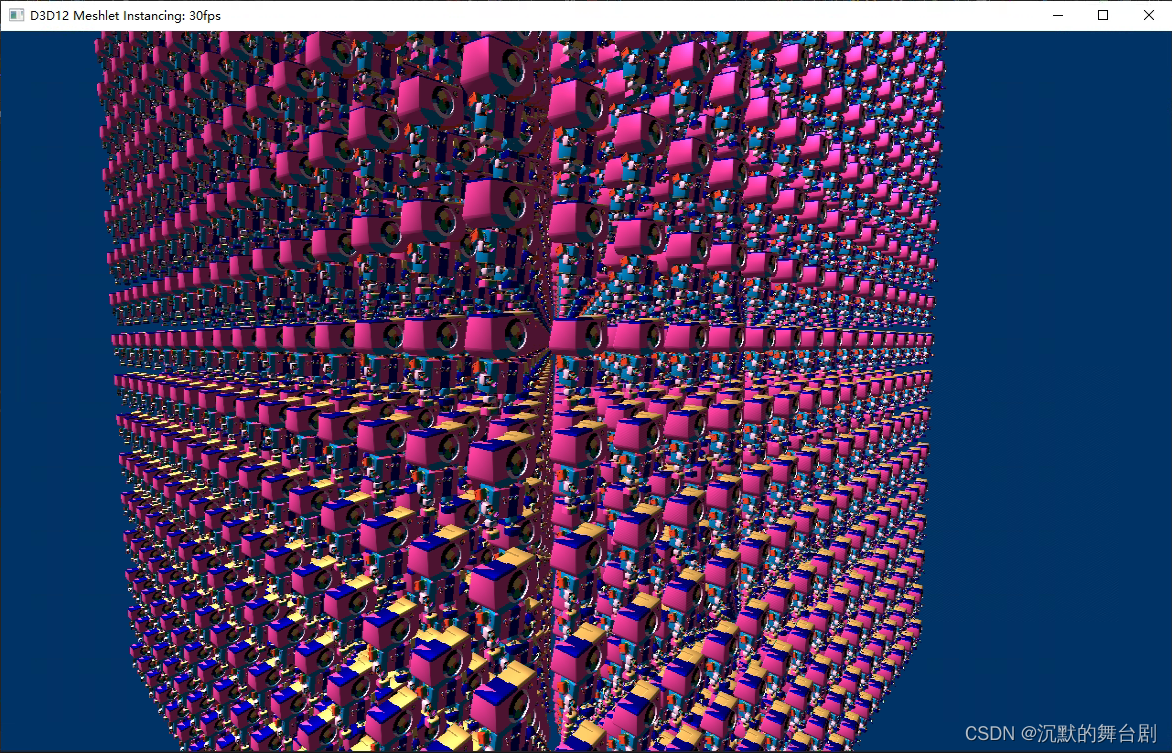
当然了这是全绘制的效果,后续我们继续跟一下MeshShader的遮挡剔除与LOD来优化效率。
相关内容
热门资讯
埃菲尔铁塔在哪 中国仿建埃菲尔...
2019年4月26日,广西南宁市,街头惊现一座巨型山寨版埃菲尔铁塔,高约20米,白色塔身,造型逼真,...
苗族的传统节日 贵州苗族节日有...
【岜沙苗族芦笙节】岜沙,苗语叫“分送”,距从江县城7.5公里,是世界上最崇拜树木并以树为神的枪手部落...
北京的名胜古迹 北京最著名的景...
北京从元代开始,逐渐走上帝国首都的道路,先是成为大辽朝五大首都之一的南京城,随着金灭辽,金代从海陵王...
长白山自助游攻略 吉林长白山游...
昨天介绍了西坡的景点详细请看链接:一个人的旅行,据说能看到长白山天池全凭运气,您的运气如何?今日介绍...
应用未安装解决办法 平板应用未...
---IT小技术,每天Get一个小技能!一、前言描述苹果IPad2居然不能安装怎么办?与此IPad不...
脚上的穴位图 脚面经络图对应的...
人体穴位作用图解大全更清晰直观的标注了各个人体穴位的作用,包括头部穴位图、胸部穴位图、背部穴位图、胳...
猫咪吃了塑料袋怎么办 猫咪误食...
你知道吗?塑料袋放久了会长猫哦!要说猫咪对塑料袋的喜爱程度完完全全可以媲美纸箱家里只要一有塑料袋的响...
demo什么意思 demo版本...
618快到了,各位的小金库大概也在准备开闸放水了吧。没有小金库的,也该向老婆撒娇卖萌服个软了,一切只...
世界上最漂亮的人 世界上最漂亮...
此前在某网上,选出了全球265万颜值姣好的女性。从这些数量庞大的女性群体中,人们投票选出了心目中最美...
埃菲尔铁塔在哪 中国仿建埃菲尔...
2019年4月26日,广西南宁市,街头惊现一座巨型山寨版埃菲尔铁塔,高约20米,白色塔身,造型逼真,...
苗族的传统节日 贵州苗族节日有...
【岜沙苗族芦笙节】岜沙,苗语叫“分送”,距从江县城7.5公里,是世界上最崇拜树木并以树为神的枪手部落...
北京的名胜古迹 北京最著名的景...
北京从元代开始,逐渐走上帝国首都的道路,先是成为大辽朝五大首都之一的南京城,随着金灭辽,金代从海陵王...
长白山自助游攻略 吉林长白山游...
昨天介绍了西坡的景点详细请看链接:一个人的旅行,据说能看到长白山天池全凭运气,您的运气如何?今日介绍...
世界上最漂亮的人 世界上最漂亮...
此前在某网上,选出了全球265万颜值姣好的女性。从这些数量庞大的女性群体中,人们投票选出了心目中最美...
应用未安装解决办法 平板应用未...
---IT小技术,每天Get一个小技能!一、前言描述苹果IPad2居然不能安装怎么办?与此IPad不...
脚上的穴位图 脚面经络图对应的...
人体穴位作用图解大全更清晰直观的标注了各个人体穴位的作用,包括头部穴位图、胸部穴位图、背部穴位图、胳...
demo什么意思 demo版本...
618快到了,各位的小金库大概也在准备开闸放水了吧。没有小金库的,也该向老婆撒娇卖萌服个软了,一切只...
猫咪吃了塑料袋怎么办 猫咪误食...
你知道吗?塑料袋放久了会长猫哦!要说猫咪对塑料袋的喜爱程度完完全全可以媲美纸箱家里只要一有塑料袋的响...