

【人脸识别】人脸实时检测与跟踪【含GUI Matlab源码 673期】
⛄一、简介
如何在视频流中检测到人脸以及人脸追踪。对象检测和跟踪在许多计算机视觉应用中都很重要,包括活动识别,汽车安全和监视。所以这篇主要总结MATLAB的人脸检测和跟踪。
首先看一下流程。检测人脸——>面部特征提取——>脸部追踪。
⛄二、部分源代码
unction varargout = facedetecion(varargin)
% FACEDETECION MATLAB code for facedetecion.fig
% FACEDETECION, by itself, creates a new FACEDETECION or raises the existing
% singleton*.
%
% H = FACEDETECION returns the handle to a new FACEDETECION or the handle to
% the existing singleton*.
%
% FACEDETECION(‘CALLBACK’,hObject,eventData,handles,…) calls the local
% function named CALLBACK in FACEDETECION.M with the given input arguments.
%
% FACEDETECION(‘Property’,‘Value’,…) creates a new FACEDETECION or raises the
% existing singleton*. Starting from the left, property value pairs are
% applied to the GUI before facedetecion_OpeningFcn gets called. An
% unrecognized property name or invalid value makes property application
% stop. All inputs are passed to facedetecion_OpeningFcn via varargin.
%
% *See GUI Options on GUIDE’s Tools menu. Choose “GUI allows only one
% instance to run (singleton)”.
%
% See also: GUIDE, GUIDATA, GUIHANDLES
% Edit the above text to modify the response to help facedetecion
% Last Modified by GUIDE v2.5 01-May-2017 19:18:42
% Begin initialization code - DO NOT EDIT
gui_Singleton = 1;
gui_State = struct(‘gui_Name’, mfilename, …
‘gui_Singleton’, gui_Singleton, …
‘gui_OpeningFcn’, @facedetecion_OpeningFcn, …
‘gui_OutputFcn’, @facedetecion_OutputFcn, …
‘gui_LayoutFcn’, [] , …
‘gui_Callback’, []);
if nargin && ischar(varargin{1})
gui_State.gui_Callback = str2func(varargin{1});
end
if nargout
[varargout{1:nargout}] = gui_mainfcn(gui_State, varargin{:});
else
gui_mainfcn(gui_State, varargin{:});
end
% End initialization code - DO NOT EDIT
% — Executes just before facedetecion is made visible.
function facedetecion_OpeningFcn(hObject, eventdata, handles, varargin)
% This function has no output args, see OutputFcn.
% hObject handle to figure
% eventdata reserved - to be defined in a future version of MATLAB
% handles structure with handles and user data (see GUIDATA)
% varargin command line arguments to facedetecion (see VARARGIN)
% Choose default command line output for facedetecion
handles.output = hObject;
% Update handles structure
guidata(hObject, handles);
% UIWAIT makes facedetecion wait for user response (see UIRESUME)
% uiwait(handles.figure1);
% — Outputs from this function are returned to the command line.
function varargout = facedetecion_OutputFcn(hObject, eventdata, handles)
% varargout cell array for returning output args (see VARARGOUT);
% hObject handle to figure
% eventdata reserved - to be defined in a future version of MATLAB
% handles structure with handles and user data (see GUIDATA)
% Get default command line output from handles structure
varargout{1} = handles.output;
% — Executes on button press in pushbutton1.
function pushbutton1_Callback(hObject, eventdata, handles)
% hObject handle to pushbutton1 (see GCBO)
% eventdata reserved - to be defined in a future version of MATLAB
% handles structure with handles and user data (see GUIDATA)
global myvideo myvideo1;
[fileName,pathName] = uigetfile(‘.’,‘Please select an video’);%文件筐,选择文件
if(fileName)
fileName = strcat(pathName,fileName);
fileName = lower(fileName);%一致的小写字母形式
else
% J = 0;%记录区域生长所分割得到的区域
msgbox(‘Please select an video’);
return; %退出程序
end
% boxlnserter = vision.ShapeInserter(‘BorderColor’,‘Custom’,‘CustomBorderColor’,[255 0 0]);
% videoOut = step(boxlnserter,videoFrame,bbox);
myvideo = VideoReader(fileName);
nFrames = myvideo.NumberOfFrames
vidHeight = myvideo.Height
vidWidth = myvideo.Width
mov(1:nFrames) = struct(‘cdata’,zeros(vidHeight,vidWidth,3,‘uint8’),‘colormap’,[]);
B_K = read(myvideo,1);
axes(handles.axes1);
imshow(B_K);
% myvideo = VideoReader(fileName);
% nFrames = myvideo.NumberOfFrames
% vidHeight = myvideo.Height
% vidWidth = myvideo.Width
% mov(1:nFrames) = struct(‘cdata’,zeros(vidHeight,vidWidth,3,‘uint8’),‘colormap’,[]);
% B_K = read(myvideo,1);
% axes(handles.axes1);
% imshow(B_K);
% — Executes on button press in pushbutton2.
function pushbutton2_Callback(hObject, eventdata, handles)
% hObject handle to pushbutton2 (see GCBO)
% eventdata reserved - to be defined in a future version of MATLAB
% handles structure with handles and user data (see GUIDATA)
global myvideo myvideo1;
nFrames = myvideo.NumberOfFrames
vidHeight = myvideo.Height
vidWidth = myvideo.Width
mov(1:nFrames) = struct(‘cdata’,zeros(vidHeight,vidWidth,3,‘uint8’),‘colormap’,[]);
faceDetector = vision.CascadeObjectDetector();
% videoFileReader = vision.VideoFileReader(fileName);
% videoFrame = step(videoFileReader);
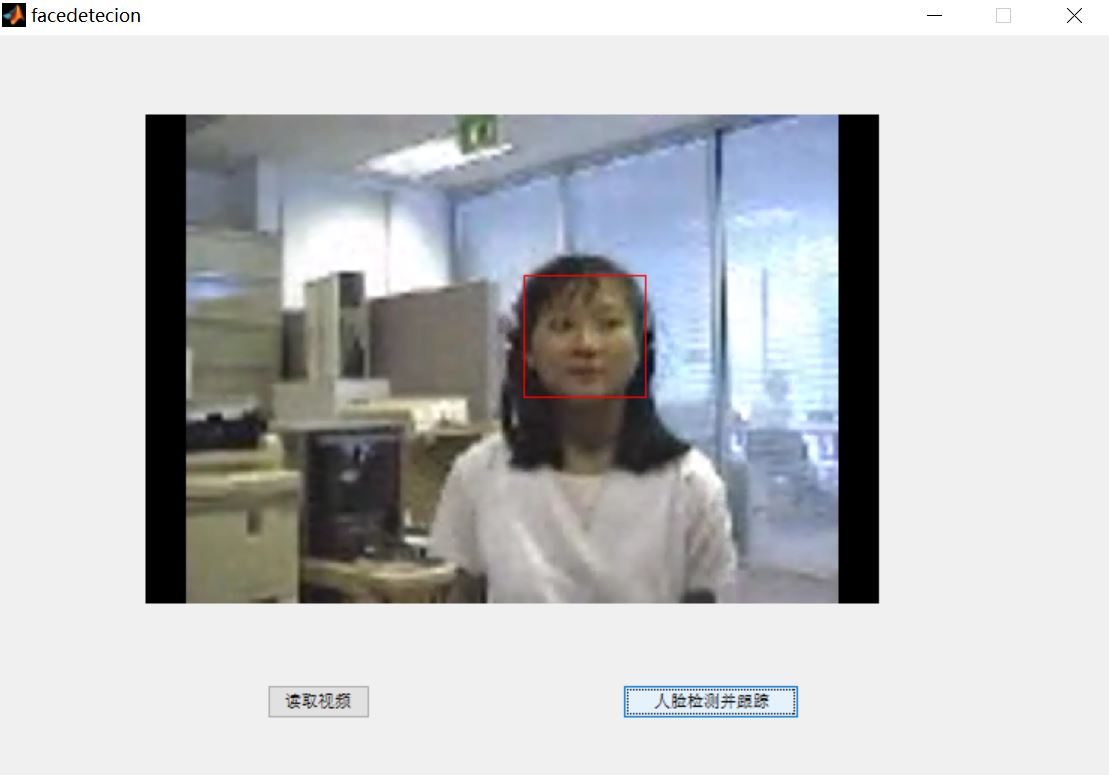
⛄三、运行结果
⛄四、matlab版本及参考文献
1 matlab版本
2014a
2 参考文献
[1]戴骊融,陈万米,郭盛.基于肤色模型和SURF算法的人脸识别研究[J].工业控制计算机. 2014,27(02)
3 备注
简介此部分摘自互联网,仅供参考,若侵权,联系删除