

java对接阿里云短信服务详解(验证码,推广短信,通知短信)
前言
小前提:
- java:springboot框架,maven版本管理。
- 阿里云:有账号,已经进行实名认证。
java对接阿里云短信服务详解(验证码,推广短信,通知短信)
- 前言
- 1. 登录阿里云进入控制台
- 2. 创建用户和用户组
- 3. 开通阿里云短信服务
- 4. 代码整合阿里云SMS短信服务
- 4.1 pom.xml 中引入SDK依赖
- 4.2 测试官方提供的实例Demo
- 4.3 继承到springboot项目当中
- 4.3.1 配置文件
- 4.3.2 controller
- 4.3.3 service
- 4 启动项目测试发送
1. 登录阿里云进入控制台
阿里云登录地址:https://account.aliyun.com/login/login.htm

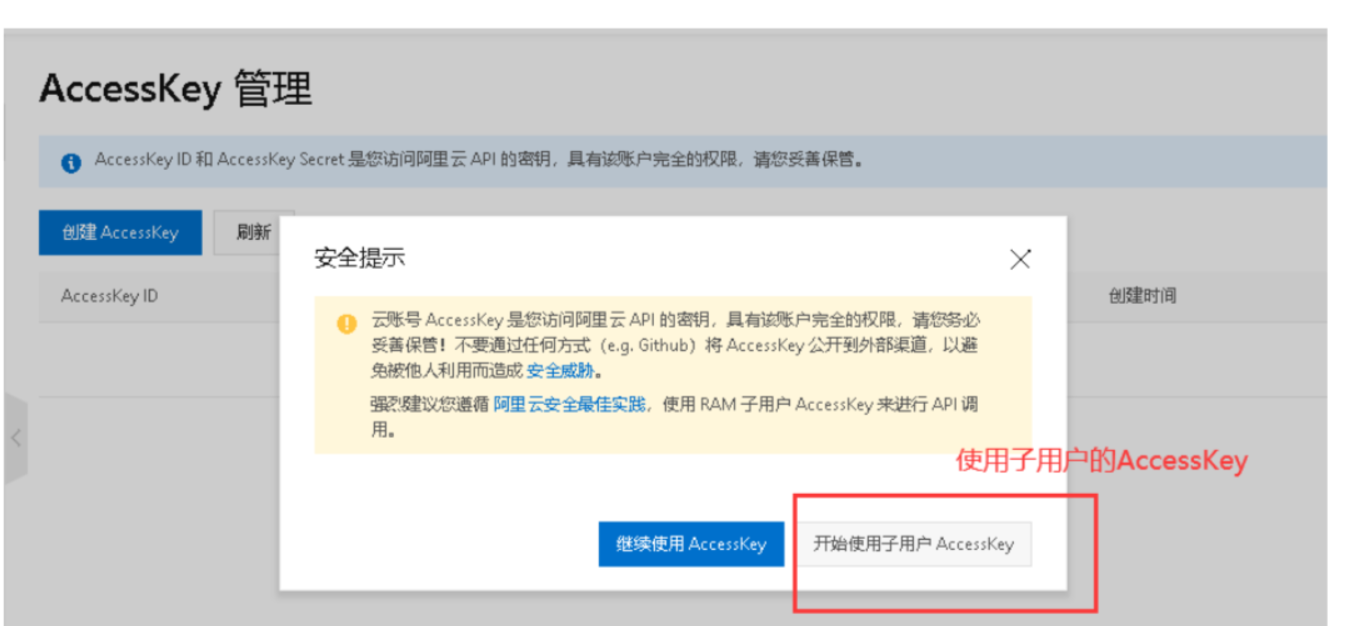
2. 创建用户和用户组
创建用户组
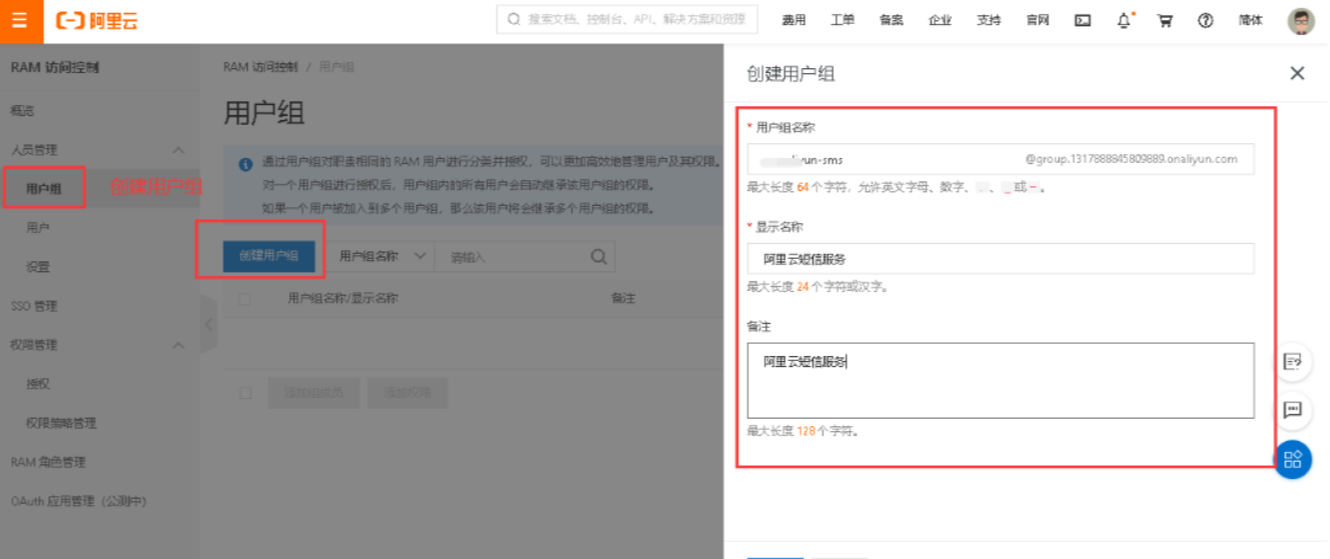
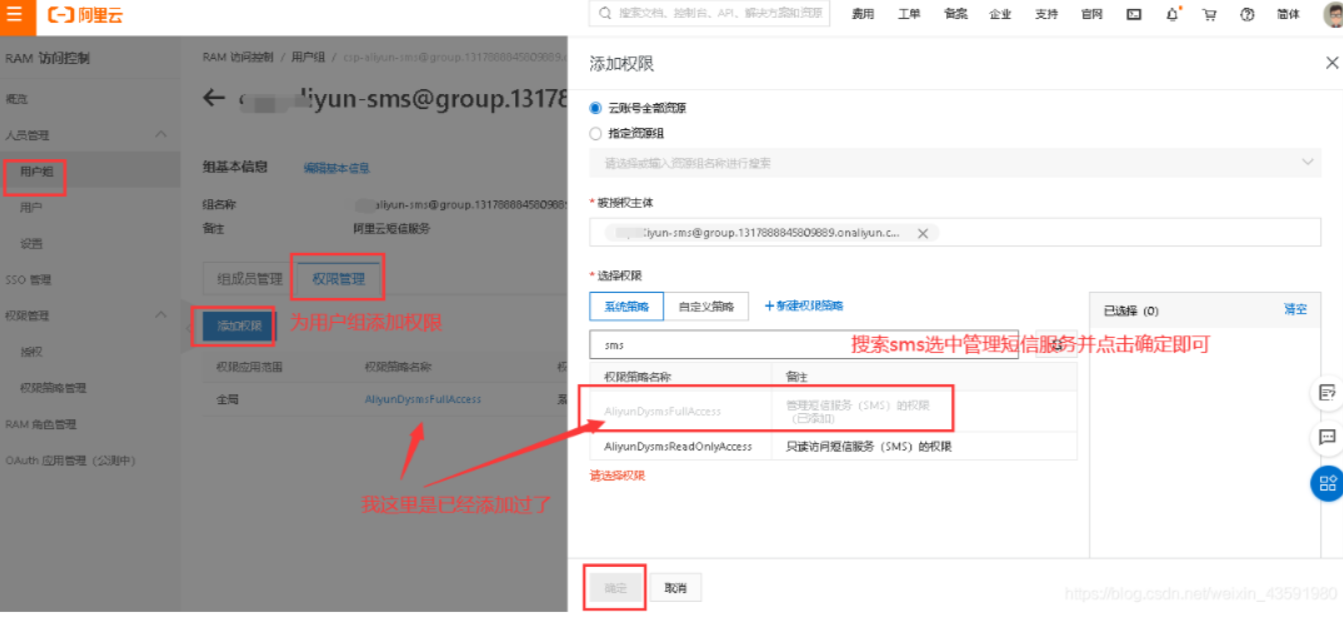
添加完成后进入用户组,并为其添加权限:
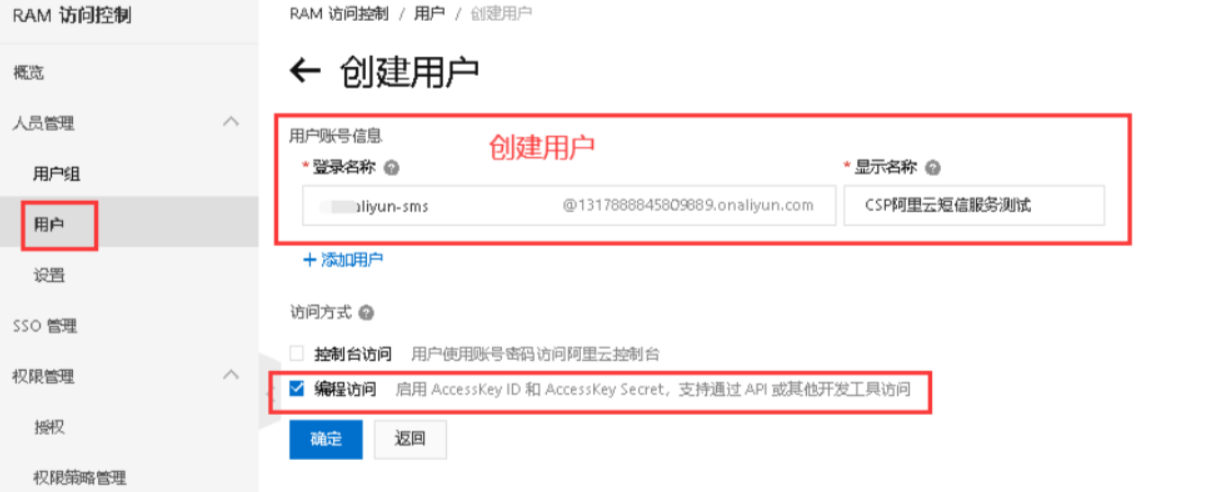
创建用户
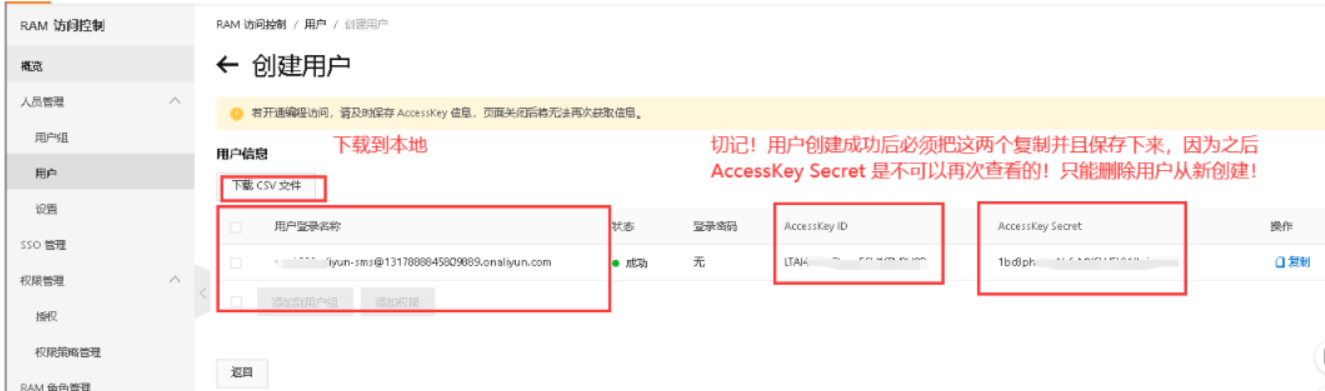
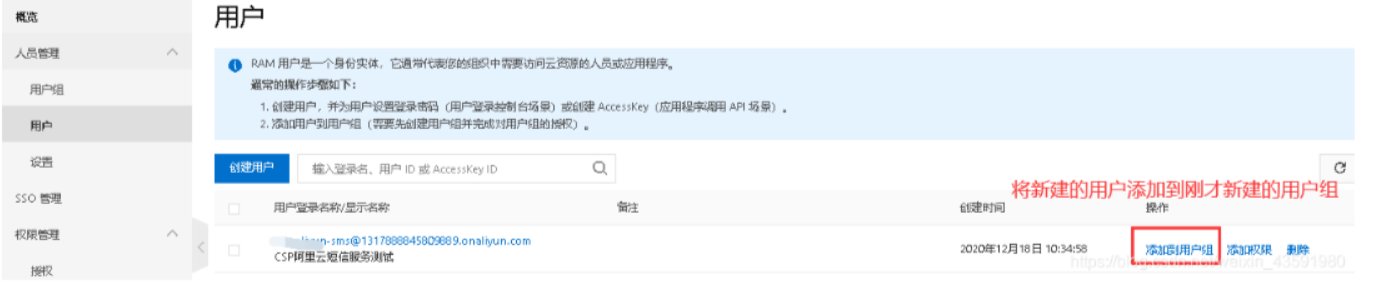
3. 开通阿里云短信服务
阿里云短信服务地址:https://dysms.console.aliyun.com/dysms.htm
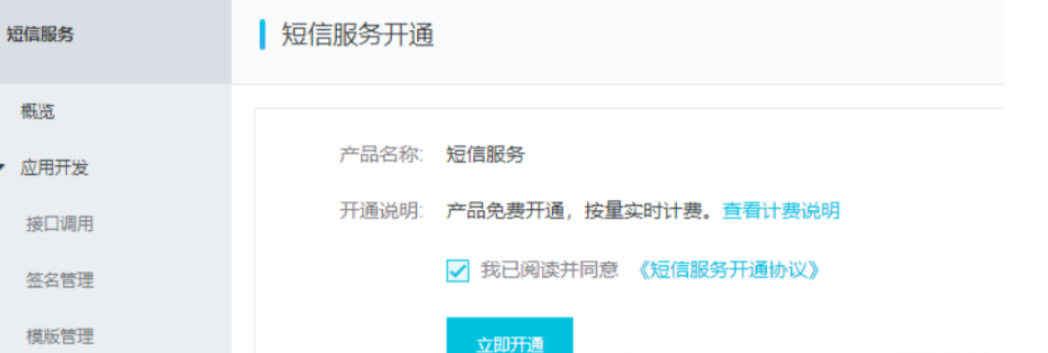
在概览中直接点击立即开通短信服务!接下来点击快速学习:
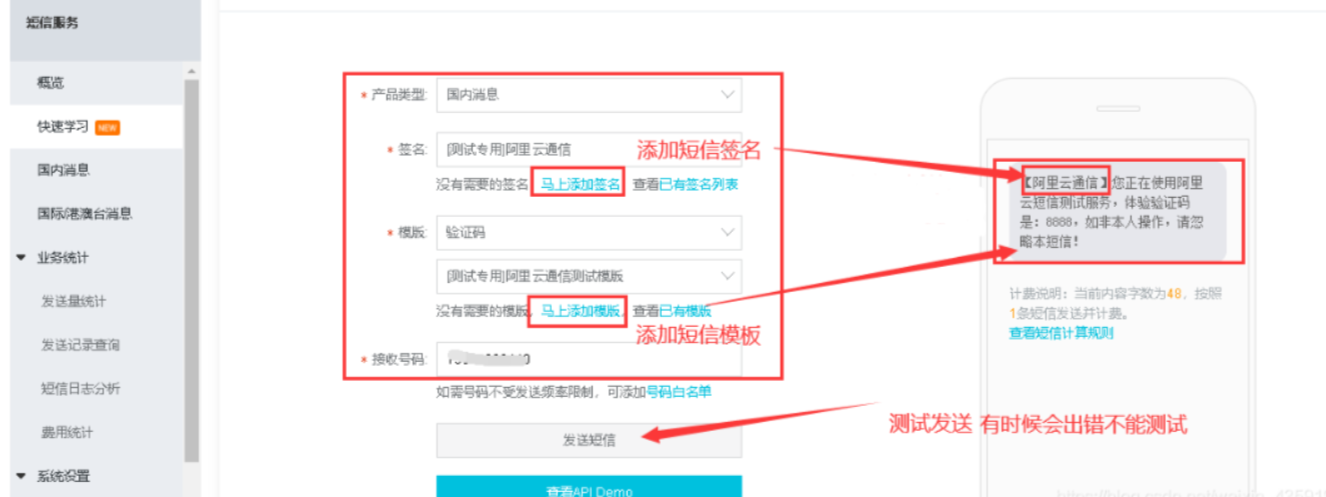
点击添加签名,添加模板,去向阿里云申请自己定义的签名和短信模板!
打个时间戳 2023-1-13 ,我在写这篇文章的时候正在申请,现在的要求已经相当严格了,我被驳回好几次,所以填写相关信息的时候还是要认真一些哦
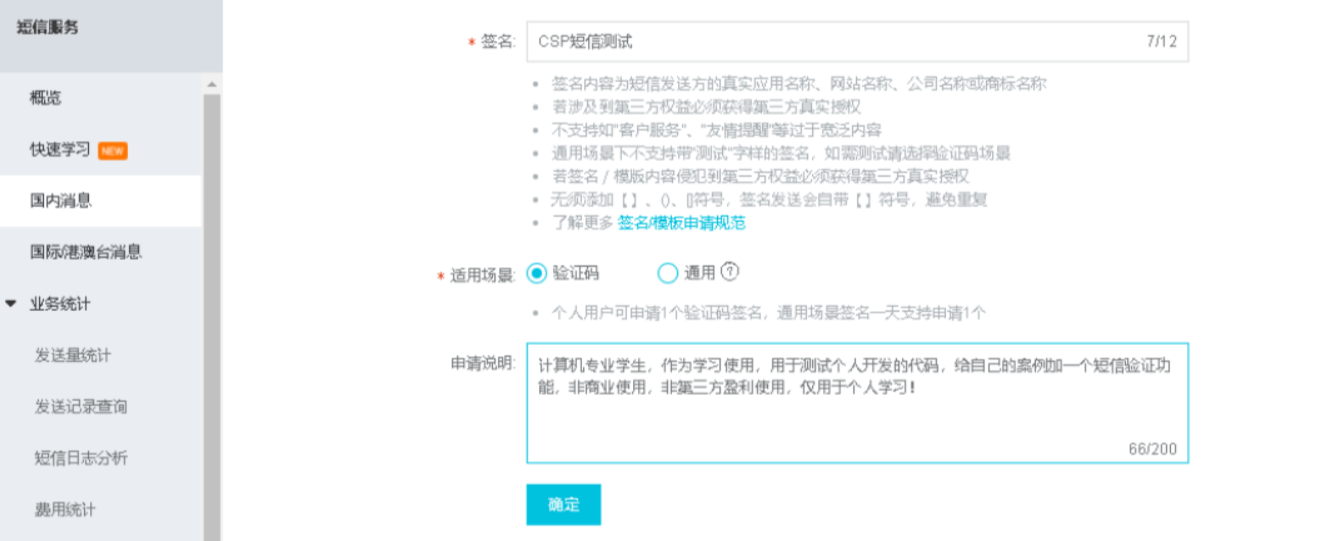
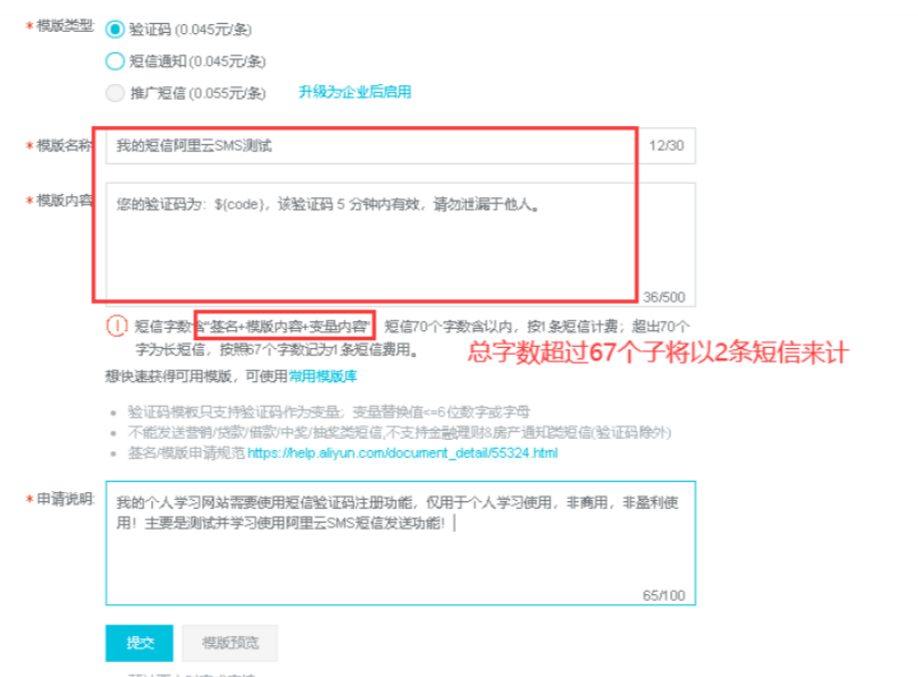
模板和签名申请提交后等待申请结果通过即可!
(可能是快过年了,审核超级慢,一般三个小时还没好,好了又驳回,
一次是官网没有体现出哪里需要用短信验证,
一次是应用商店没有搜索到app
祝大家申请的时候最好写好一遍过吧)
呃 写这边文章的时候又失败一次。

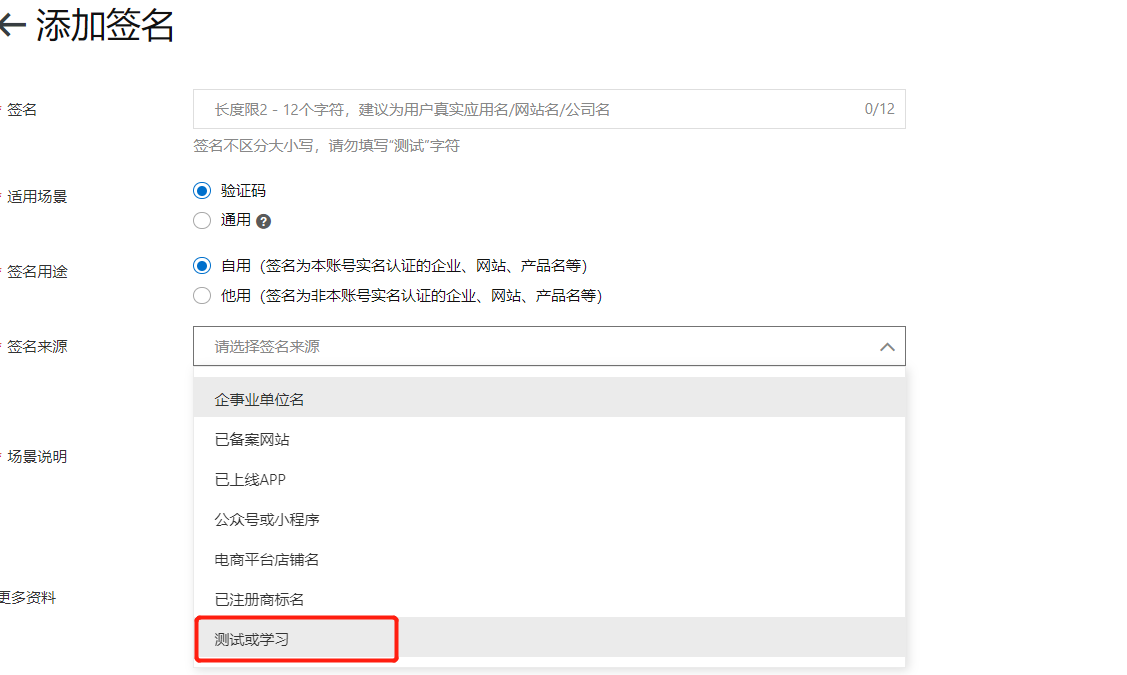
我签名是选的测试或学习,
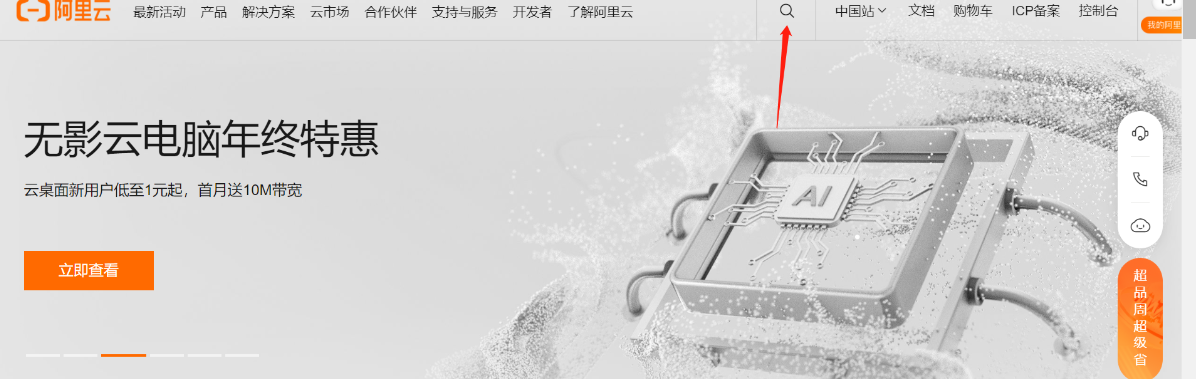
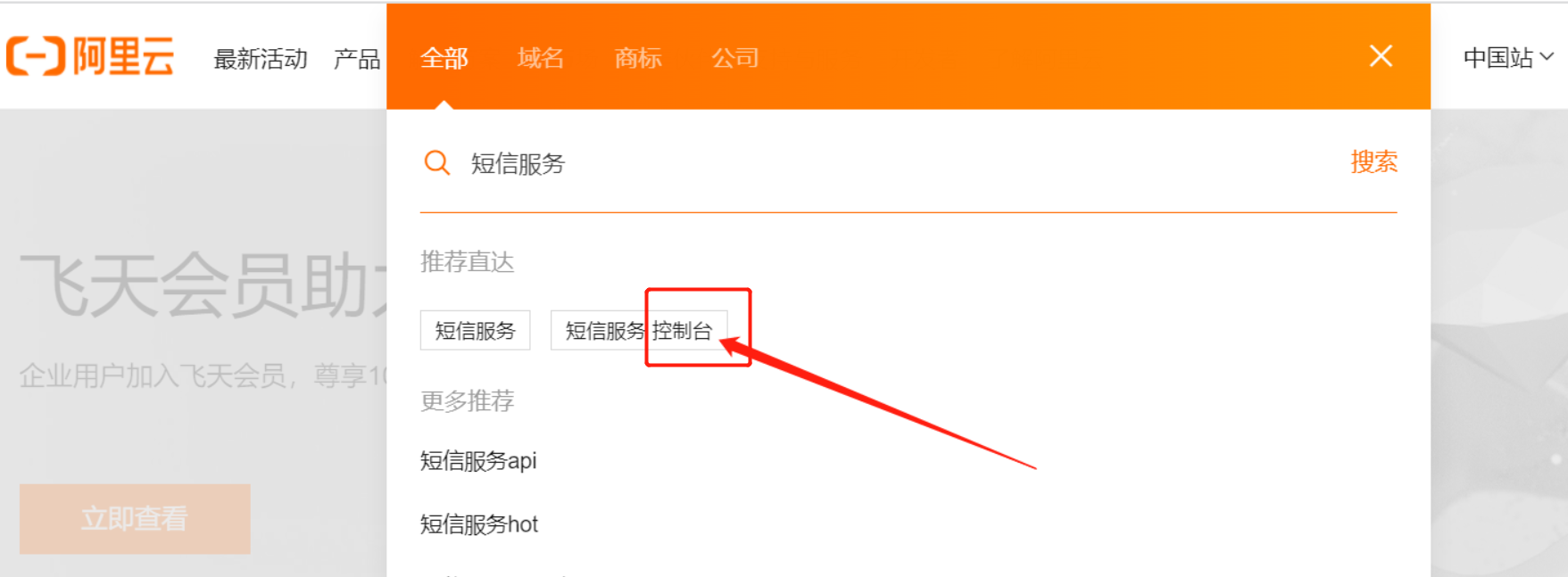
点击 短信服务 控制台
点击 国内消息 我们需要添加一个签名和模板
签名和模板需要审核,一般两小时内审核。
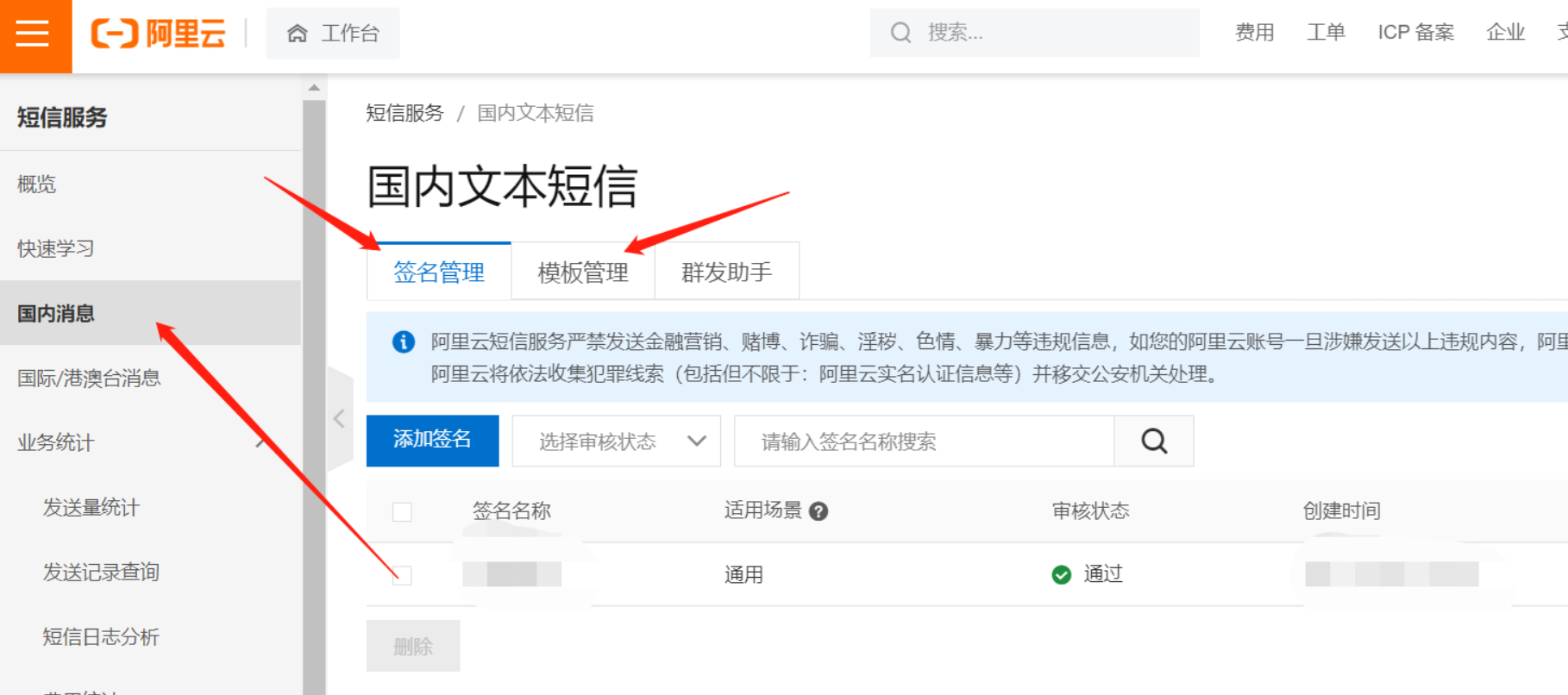
ok 这里先审核。小编审核的时候特别慢,而且被打回好几次,所以大家填写资料的时候尽量详细吧。
这里审核这 我们去配置一下项目。
4. 代码整合阿里云SMS短信服务
4.1 pom.xml 中引入SDK依赖
Spring Boot版本我使用的是2.3.x:
com.aliyun aliyun-java-sdk-core 4.5.3
com.alibaba fastjson 1.2.68
org.springframework.boot spring-boot-starter-data-redis
4.2 测试官方提供的实例Demo
@SpringBootTest
class AliyunSmsDemoApplicationTests {@Testvoid contextLoads() {/*** 连接阿里云:** 三个参数:* regionId 不要动,默认使用官方的* accessKeyId 自己的用户accessKeyId* accessSecret 自己的用户accessSecret*/DefaultProfile profile = DefaultProfile.getProfile("cn-hu", "LTAI4GKDXXXXXB", "1bc8pXXXXXXXXXXXXXXctBMMCI");IAcsClient client = new DefaultAcsClient(profile);// 构建请求:CommonRequest request = new CommonRequest();request.setSysMethod(MethodType.POST);request.setSysDomain("dysmsapi.aliyuncs.com");request.setSysVersion("2019-05-25");request.setSysAction("SendSms");// 自定义参数:request.putQueryParameter("PhoneNumbers", "xxxxx0441");// 接收短信的手机号request.putQueryParameter("SignName", "C上商城");// 短信签名request.putQueryParameter("TemplateCode", "SMS_20xxxxx74");// 短信模版CODE// 构建短信验证码Map map = new HashMap<>();map.put("code",1234);// 这里仅用于测试,所以验证码写死request.putQueryParameter("TemplateParam", JSONObject.toJSONString(map));try {CommonResponse response = client.getCommonResponse(request);System.out.println(response.getData());} catch (ServerException e) {e.printStackTrace();} catch (ClientException e) {e.printStackTrace();}}
}
4.3 继承到springboot项目当中
4.3.1 配置文件
application.yml和application.properties是同一个作用的文件,有些小白可能不太理解,这里看一下项目里使用的是那个后缀的配置文件,将内容复制进去即可。
application.yml
server:port: 8080# spring相关配置
spring:redis:# Redis数据库索引(默认为0)database: 0# Redis服务器地址host: 8.xxx.xx.xx6# Redis服务器连接端口port: 6379# Redis服务器连接密码(默认为空)password: cspxxxxxxxjedis:pool:# 连接池最大连接数(使用负值表示没有限制)max-active: 8# 连接池最大阻塞等待时间(使用负值表示没有限制)max-wait: -1# 连接池中的最大空闲连接max-idle: 8# 连接池中的最小空闲连接min-idle: 0# 连接超时时间(毫秒)timeout: 8000
application.properties
# accessKeyId
aliyun.sms.accessKeyId=LTAI4xxxxxxxxxxV9B
# accessKeySecret
aliyun.sms.accessKeySecret=LTAI4xxxxxxxxxxV8V9B
# 短信模板Code
aliyun.sms.templateCode=SMS_xxxxx74
4.3.2 controller
@RestController
public class AliyunSmsApiController {@Autowiredprivate AliyunSendSmsService aliyunSendSmsService;@Autowiredprivate RedisTemplate redisTemplate;@Value("${aliyun.sms.templateCode}")private String templateCode;/*** 短信发送** @param phone* @return*/@GetMapping("/send/{phone}")public String sendCode(@PathVariable("phone") String phone) {// 根据手机号从redis中拿验证码String code = redisTemplate.opsForValue().get(phone);if (!StringUtils.isEmpty(code)) {return phone + " : " + code + "已经存在,还没有过期!";}// 如果redis 中根据手机号拿不到验证码,则生成4位随机验证码code = UUID.randomUUID().toString().substring(0, 4);// 验证码存入codeMapMap codeMap = new HashMap<>();codeMap.put("code", code);// 调用aliyunSendSmsService发送短信Boolean bool = aliyunSendSmsService.sendMessage(phone, templateCode, codeMap);if (bool) {// 如果发送成功,则将生成的4位随机验证码存入redis缓存,5分钟后过期redisTemplate.opsForValue().set(phone, code, 5, TimeUnit.MINUTES);return phone + " : " + code + "发送成功!";} else {return phone + " : " + code + "发送失败!";}}
}
4.3.3 service
@Service
public class AliyunSendSmsService {@Value("${aliyun.sms.accessKeyId}")private String accessKeyId;@Value("${aliyun.sms.accessKeySecret}")private String accessKeySecret;/*** 发送短信验证码** @param phone        接收短信的手机号* @param templateCode 短信模板CODE* @param codeMap      验证码map 集合* @return*/public Boolean sendMessage(String phone, String templateCode, Map codeMap) {/*** 连接阿里云:** 三个参数:* regionId 不要动,默认使用官方的* accessKeyId 自己的用户accessKeyId* accessSecret 自己的用户accessSecret*/DefaultProfile profile = DefaultProfile.getProfile("cn-hangzhou", accessKeyId, accessKeySecret);IAcsClient client = new DefaultAcsClient(profile);// 构建请求:CommonRequest request = new CommonRequest();request.setSysMethod(MethodType.POST);request.setSysDomain("dysmsapi.aliyuncs.com");request.setSysVersion("2017-05-25");request.setSysAction("SendSms");// 自定义参数:request.putQueryParameter("PhoneNumbers", phone);// 手机号request.putQueryParameter("SignName", "CSP网上商城");// 短信签名request.putQueryParameter("TemplateCode", templateCode);// 短信模版CODE// 构建短信验证码request.putQueryParameter("TemplateParam", JSONObject.toJSONString(codeMap));try {CommonResponse response = client.getCommonResponse(request);System.out.println(response.getData());return response.getHttpResponse().isSuccess();} catch (ServerException e) {e.printStackTrace();} catch (ClientException e) {e.printStackTrace();}return false;}
}
4 启动项目测试发送
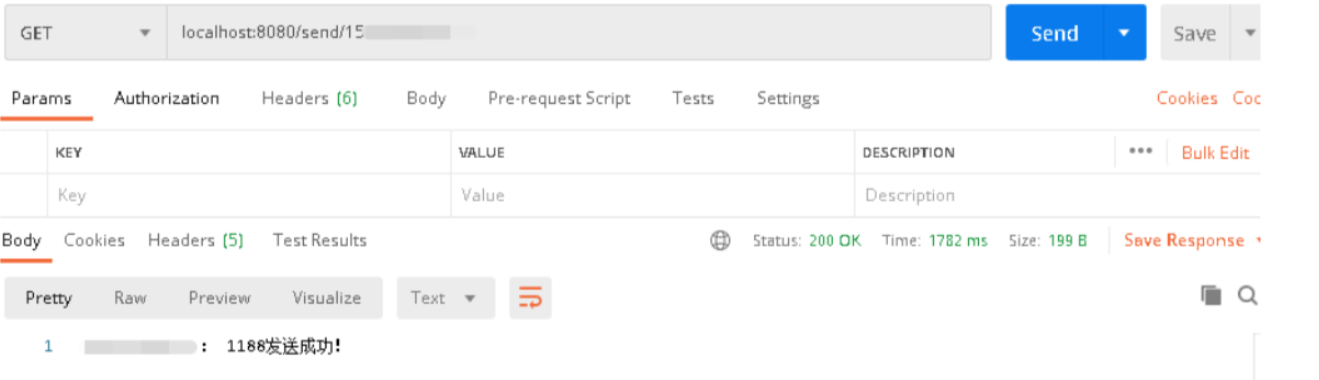
手机收到短信验证码!
上一篇:OpenCV众筹了一款ROS2机器人rae,开源、功能强、上手简单。来瞅瞅~
下一篇:Elasticsearch:关于在 Python 中使用 Elasticsearch 你需要知道的一切 - 8.x