学习笔记:Java 并发编程⑥_线程池
若文章内容或图片失效,请留言反馈。
部分素材来自网络,若不小心影响到您的利益,请联系博主删除。
- 视频链接:https://www.bilibili.com/video/av81461839
- 配套资料:https://pan.baidu.com/s/1lSDty6-hzCWTXFYuqThRPw( 提取码:5xiu)
写这篇博客旨在制作笔记,方便个人在线阅览,巩固知识。无他用。
博客的内容主要来自上述视频中的内容和其资料中提供的学习笔记。当然,我在此基础之上也增删了一些内容。
参考书籍:
- 《实战 JAVA 高并发程序设计》 葛一鸣 著
- 《JAVA 并发编程实战》 Brian Goetz 等 著
参考文章:
- Java 并发编程深入学习之线程池 超详细笔记
- Java 线程池详解
参考视频链接:https://www.bilibili.com/video/av333957679/
系列目录
- 学习笔记:Java 并发编程①_基础知识入门
- 学习笔记:Java 并发编程②_共享模型之管程
- 学习笔记:Java 并发编程③_共享模型之内存
- 学习笔记:Java 并发编程④_共享模型之无锁
- 学习笔记:Java 并发编程⑤_共享模型之不可变
- 学习笔记:Java 并发编程⑥_共享模型之并发工具_线程池
- 学习笔记:Java 并发编程⑥_共享模型之并发工具_JUC
本章内容概览
线程池
- ThreadPoolExecutor
- Fork/Join
JUC
- Lock
- Semaphore
- CountdownLatch
- CyclicBarrier
- ConcurrentHashMap
- ConcurrentLinkedQueue
- BlockingQueue
- CopyOnWriteArrayList
1.基本概念
我们都知道,线程是一种系统资源。每每创建一个新的线程,系统都要给它分配栈内存。在高并发的场景下,如果同时来了很多任务,每个任务都分配一个新的线程的话,那占用的内存资源是非常大的,甚至可能出现 OOM。还有一个问题,线程是创建的越多越好吗?当然不是。来的线程太多了,CPU 也应付不过来,获取不到 CPU 时间片的线程会陷入阻塞,这就必然会引起线程的上下文切换的问题,上下文切换的越频繁,对性能的损耗越大。所以线程的创建数量必须控制在一个度内。
相关视频链接:https://www.bilibili.com/video/BV1Kw411Z7dF?p=36
线程池(thread pool)的基本概念:一种线程使用模式。线程过多会带来调度开销,进而影响缓存局部性和整体性能。而线程池维护着多个线程,等待着监督管理者分配可并发执行的任务。这避免了在处理短时间任务时创建与销毁线程的代价。线程池不仅能够保证内核的充分利用,还能防止过分调度。
线程池的优势:线程池做的工作只要是控制运行的线程数量,处理过程中将任务放入队列,然后在线程创建后启动这些任务,如果线程数量超过了最大数量,超出数量的线程排队等候,等其他线程执行完毕,再从队列中取出任务来执行。
线程池中的特征:线程处于一定的量,可以很好的控制线程的并发量线程可以重复被使用,在显示关闭之前,都将一直存在,超出一定量的线程被提交时候需在队列中等待。
参考书籍:《实战 JAVA 高并发程序设计》 葛一鸣 著
虽然与进程相比,线程是一种轻量级的工具,但其创建和关闭依然需要花费时间,如果为每一个小的任务都创建一个线程,很有可能出现创建和销毁线程所占用的时间大于该线程真实工作所消耗的时间的情况,反而会得不偿失。
此外,线程本身也是要占用内存空间的,大量的线程会抢占宝贵的内存资源,如果处理不当,可能会导致 Out of Memory 异常。即便没有,大量的线程回收也会给 GC 带来很大的压力,延长 GC 的停顿时间。
因此,对线程的使用必须掌握一个度,在有限的范围内,增加线程的数量可以明显提高系统的吞吐量,但一旦超出了这个范围,大量的线程只会拖垮应用系统。因此,在生产环境中使用线程,必须对其加以控制和管理。
注意:在实际生产环境中,线程的数量必须得到控制。盲目的大量创建线程对系统性能是有伤害的。
为了避免系统频繁地创建和销毁线程,我们可以让创建的线程进行复用。
如果大家进行过数据库开发,对数据库连接池应该不会陌生。为了避免每次数据库查询都重新建立和销毁数据库连接,我们可以使用数据库连接池维护一些数据厍连接,让他们长期保持在一个激活状态。当系统需要使用数据库时,并不是创建一个新的连接,而是从连接池中获何一个可用的连接即可。反之,当需要关闭连接时,并不真的把连接关闭,而是将这个连接 “还” 给连接池即可。通过这种方式,可以节约不少创建和销毁对象的时间。
线程池也是类似的概念。线程池中,总有那么几个活跃线程。当你需要使用线程时,可以从池子中随便拿一个空闲线程,当完成工作时,并不急着关闭线程,而是将这个线程退回到池子,方便其他人使用。
简而言之,在使用线程池后,创建线程变成了从线程池获得空闲线程,关闭线程变成了向池子归还线程。
参考文章链接:Java 线程池详解
使用线程池的好处
- 降低资源消耗。通过重复利用已创建的线程降低线程创建和销毁造成的消耗。
- 提高响应速度。当任务到达时,任务可以不需要等到线程创建就能立即执行。
- 提高线程的可管理性。线程是稀缺资源,如果无限制的创建,不仅会消耗系统资源,还会降低系统的稳定性,使用线程池可以进行统一的分配,调优和监控。
2.自定义线程池
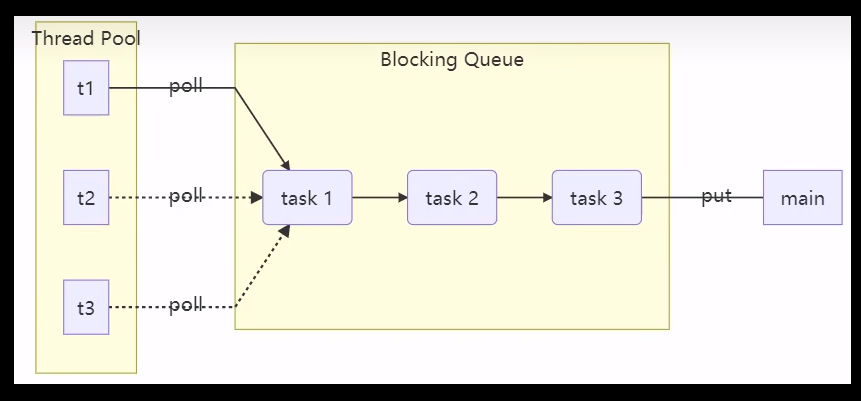
自定义线程池的步骤
- 步骤一:自定义拒绝策略接口
- 步骤二:自定义任务队列
- 步骤三:自定义线程池
- 步骤四:测试
2.1.自定义拒绝策略接口
@FunctionalInterface // 拒绝策略
public interface RejectPolicy {void reject(BlockingQueue queue, T task);
}
2.2.自定义任务队列
// 自定义阻塞队列
@Slf4j(topic = "c.BlockingQueue")
public class BlockingQueue {// 1.任务队列private Deque queue = new ArrayDeque<>();// 2.锁private ReentrantLock lock = new ReentrantLock();// 3.生产者条件变量private Condition fullWaitSet = lock.newCondition();// 4.消费者条件变量private Condition emptyWaitSet = lock.newCondition();// 5.容量private int capacity;public BlockingQueue(int capacity) {this.capacity = capacity;}// 阻塞获取(带超时时间)public T poll(long timeout, TimeUnit unit) {lock.lock();try {// 将 timeout 转换为纳秒long nanos = unit.toNanos(timeout);while (queue.isEmpty()) {try {// 返回的是剩余时间if (nanos <= 0) {return null;}nanos = emptyWaitSet.awaitNanos(nanos);} catch (InterruptedException e) {e.printStackTrace();}}T t = queue.removeFirst();fullWaitSet.signal();return t;} finally {lock.unlock();}}// 阻塞获取public T take() {lock.lock();try {while (queue.isEmpty()) {try {emptyWaitSet.await();} catch (InterruptedException e) {e.printStackTrace();}}T t = queue.removeFirst();fullWaitSet.signal();return t;} finally {lock.unlock();}}// 阻塞添加(带超时时间)public boolean offer(T task, long timeout, TimeUnit timeUnit) {lock.lock();try {long nanos = timeUnit.toNanos(timeout);while (queue.size() == capacity) {try {log.debug("等待加入任务队列的 task ...({})", task);if (nanos <= 0) {return false;}nanos = fullWaitSet.awaitNanos(nanos);} catch (InterruptedException e) {e.printStackTrace();}}log.debug("task 加入任务队列({})", task);queue.addLast(task);emptyWaitSet.signal();return true;} finally {lock.unlock();}}// 阻塞添加public void put(T element) {lock.lock();try {while (queue.size() == capacity) {try {log.debug("等待加入任务队列的 task ...({})", element);fullWaitSet.await();} catch (InterruptedException e) {e.printStackTrace();}}log.debug("task 加入任务队列({})", element);queue.addLast(element);emptyWaitSet.signal();} finally {lock.unlock();}}// 获取大小public int size() {lock.lock();try {return queue.size();} finally {lock.unlock();}}// 拒绝策略public void tryPut(RejectPolicy rejectPolicy, T task) {lock.lock();try {// 判断队列是否已满if (queue.size() == capacity) {rejectPolicy.reject(this, task);} else { // 有空闲log.debug("task 加入任务队列({})", task);queue.addLast(task);emptyWaitSet.signal();}} finally {lock.unlock();}}
}
2.3.自定义线程池
/* 自定义线程池 */
@Slf4j(topic = "c.ThreadPool")
public class ThreadPool {// 任务队列private BlockingQueue taskQueue;// 线程集合private HashSet workers = new HashSet<>();// 核心线程数private int coreSize;// 获取任务的超时时间private long timeout;private TimeUnit timeUnit;// 拒绝策略private RejectPolicy rejectPolicy;// 构造方法public ThreadPool(int coreSize, long timeout, TimeUnit timeUnit, int queueCapcity, RejectPolicy rejectPolicy) {this.coreSize = coreSize;this.timeout = timeout;this.timeUnit = timeUnit;this.taskQueue = new BlockingQueue<>(queueCapcity);this.rejectPolicy = rejectPolicy;}// 执行任务public void execute(Runnable task) {// 当任务数没有超过 coreSize 时,直接交给 Worker 对象时// 如果任务数超过了 coreSize 时,加入任务队列暂存synchronized (workers) {if (workers.size() < coreSize) {Worker worker = new Worker(task);log.debug("新增 worker、task({}、{})", worker, task);workers.add(worker);worker.start();} else {// taskQueue.put(task);// 队列满了之后的策略:// 1.死等、2.带超时等待、3.让调用者线程放弃任务的执行// 4.让调用者线程抛出异常,放弃任务执行、5.让调用者自己去执行任务// 但是这样会把线程池的代码写死,不如直接全部交给线程池的使用者,让他自己来选择// 此即策略模式(整体 替换 算法的实现部分)StrategytaskQueue.tryPut(rejectPolicy, task);}}}class Worker extends Thread {private Runnable task;public Worker(Runnable task) {this.task = task;}@Overridepublic void run() {// 执行任务// 1. 当 task 不为空的时候,直接执行任务// 2. 当 task 执行完毕,再接着从任务队列获取任务并执行while (task != null || ((task = taskQueue.poll(timeout, timeUnit)) != null)) {try {log.debug("task 正在执行 ... ({})", task);task.run();} catch (Exception e) {e.printStackTrace();} finally {task = null;}}synchronized (workers) {log.debug("workers 被移除 ({})", this);workers.remove(this);}}}
}
2.4.测试
@Slf4j(topic = "c.TestPool")
public class TestPool {public static void main(String[] args) {ThreadPool threadPool = new ThreadPool(1, 1000, TimeUnit.MILLISECONDS, 1,(queue, task) -> {// 1. 死等// queue.put(task);// 2.超时等待// queue.offer(task, 1500, TimeUnit.SECONDS);// 3.让调用者线程放弃任务执行// log.debug("放弃 task({})", task);// 4.让调用者抛出异常// throw new RuntimeException("任务执行失败" + task);//5. 让调用者自己去执行任务task.run();});for (int i = 0; i < 3; i++) {int j = i;threadPool.execute(() -> {try {// Thread.sleep(1000_000L);Thread.sleep(1000L);} catch (InterruptedException e) {e.printStackTrace();}log.debug("{}", j);});}}
}
3.ThreadPoolExecutor
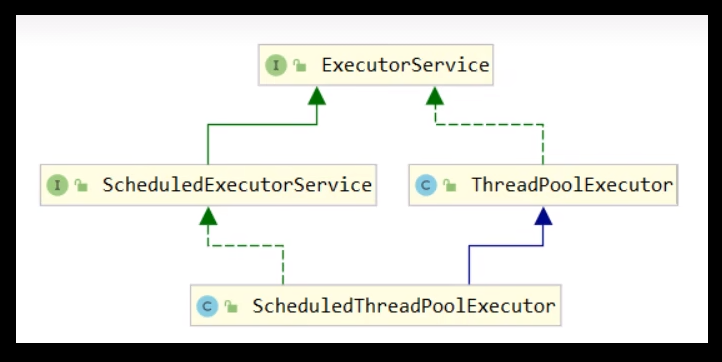
3.1.线程池状态
ThreadPoolExecutor 使用 int 的高 3 位来表示线程池状态,低 29 位表示线程数量
| 状态名 | 高 3 位 | 接收新任务 | 处理阻塞队列任务 | 说明 |
|---|---|---|---|---|
| RUNNING | 111 | Y | Y | |
| SHUTDOWN | 000 | N | Y | 不会接收新任务,但会处理阻塞队列剩余任务 |
| STOP | 001 | N | N | 会中断正在执行的任务,并抛弃阻塞队列任务 |
| TIDYING | 010 | - | - | 任务全执行完毕,活动线程为 0 即将进入终结 |
| TERMINATED | 011 | - | - | 终结状态 |
从数字上比较,TERMINATED > TIDYING > STOP > SHUTDOWN > RUNNING
这些信息存储在一个原子变量 ctl 中,目的是将线程池状态与线程个数合二为一,这样就可以用一次 CAS 原子操作进行赋值
// c 为旧值, ctlOf 返回结果为新值
ctl.compareAndSet(c, ctlOf(targetState, workerCountOf(c))));
// rs 为高 3 位代表线程池状态, wc 为低 29 位代表线程个数,ctl 是合并它们
private static int ctlOf(int rs, int wc) { return rs | wc; }
3.2.构造方法
public ThreadPoolExecutor(int corePoolSize,int maximumPoolSize,long keepAliveTime,TimeUnit unit,BlockingQueue workQueue,ThreadFactory threadFactory,RejectedExecutionHandler handler)
根据这个构造方法,JDK 中的 Executors 类中提供了众多工厂方法来创建各种用途的线程池。
3.2.1.参数介绍
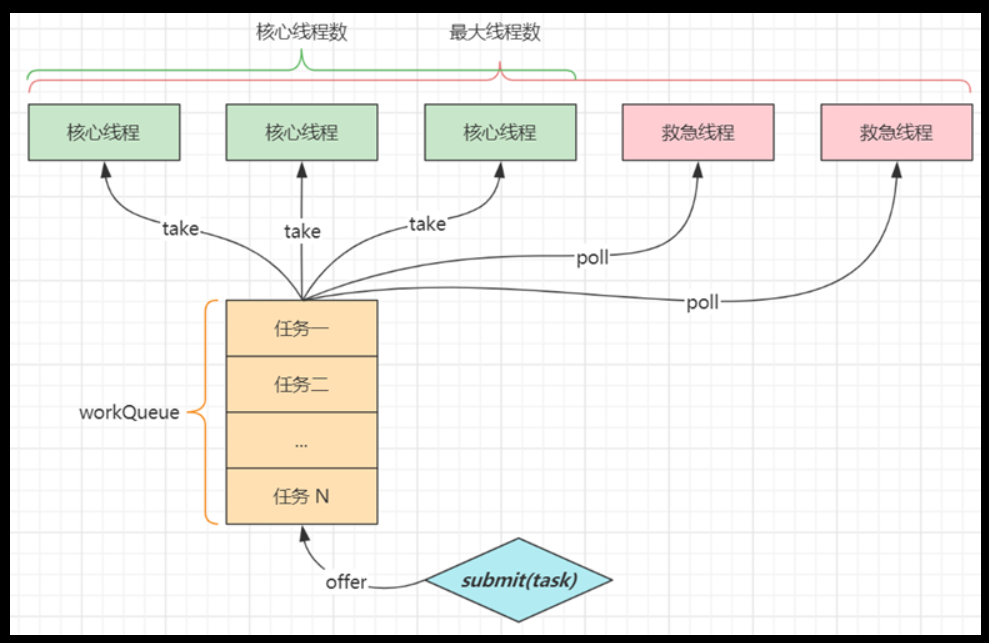
- corePoolSize:核心线程数目(最多保留的线程数)
- maximumPoolSize:最大线程数目 = 核心线程 + 救急线程的最大数目
- keepAliveTime:救急线程的生存时间。生存时间内没有新任务,此线程资源会释放
- unit:救急线程的生存时间单位,如秒、毫秒等
- workQueue:阻塞队列(其实你叫它任务队列也没啥问题)
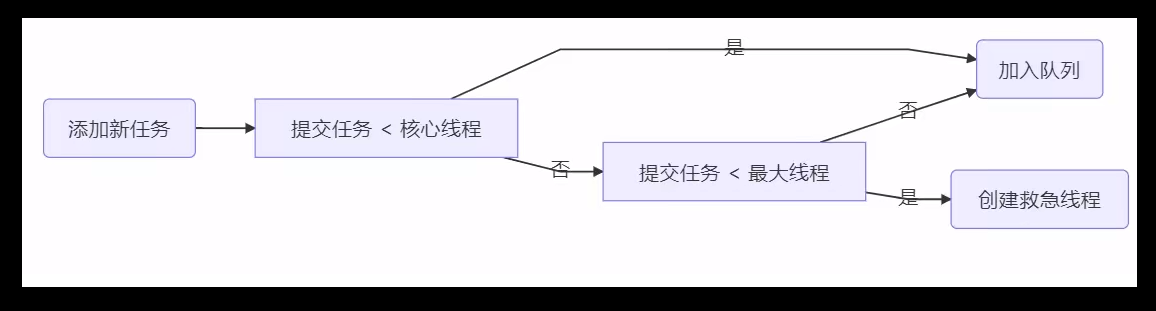
当没有空闲核心线程时,新来的任务会加入到此队列,排队。在这个队列满了之后,会有创建救急线程执行任务。
这个队列里的任务,其实就是被提交了的,但是尚未被执行的任务。 - threadFactory:线程工厂
可以定制线程对象的创建,例如设置线程名字、是否是守护线程等 - handler:拒绝策略。当所有线程都在繁忙,workQueue 也放满时,会触发拒绝策略
- 抛异常
java.util.concurrent.ThreadPoolExecutor.AbortPolicy - 由调用者执行任务
java.util.concurrent.ThreadPoolExecutor.CallerRunsPolicy - 丢弃任务
java.util.concurrent.ThreadPoolExecutor.DiscardPolicy - 丢弃最早排队任务
java.util.concurrent.ThreadPoolExecutor.DiscardOldestPolicy
- 抛异常
参考书籍:《实战 JAVA 高并发程序设计》 葛一鸣 著
参数 workQueue 指被提交但未执行的任务队列,它是一个 BlockingQueue 接口的对象,仅用于存放 Runnable 对象。
根据队列功能分类,在 ThreadPoolExecutor 的构造函数中可使用以下几种 BlockingQueue:
- 直接提交的队列(通过 SynchronousQueue 类实现)
- 有界的任务队列(通过 ArrayBlockingQueue 类实现)
- 无界的任务队列(通过 LinkedBlockingQueue 类实现)
- 优先任务队列(通过 PriorityBlockingQueue 类实现)
3.2.2.工作方式
线程池中刚开始没有线程,当一个任务提交给线程池后,线程池会创建一个新线程来执行任务。
当线程数达到 corePoolSize,就没有线程是空闲的了。这时再加入任务,新加的任务会被加入workQueue 队列排队,直到有空闲的线程。
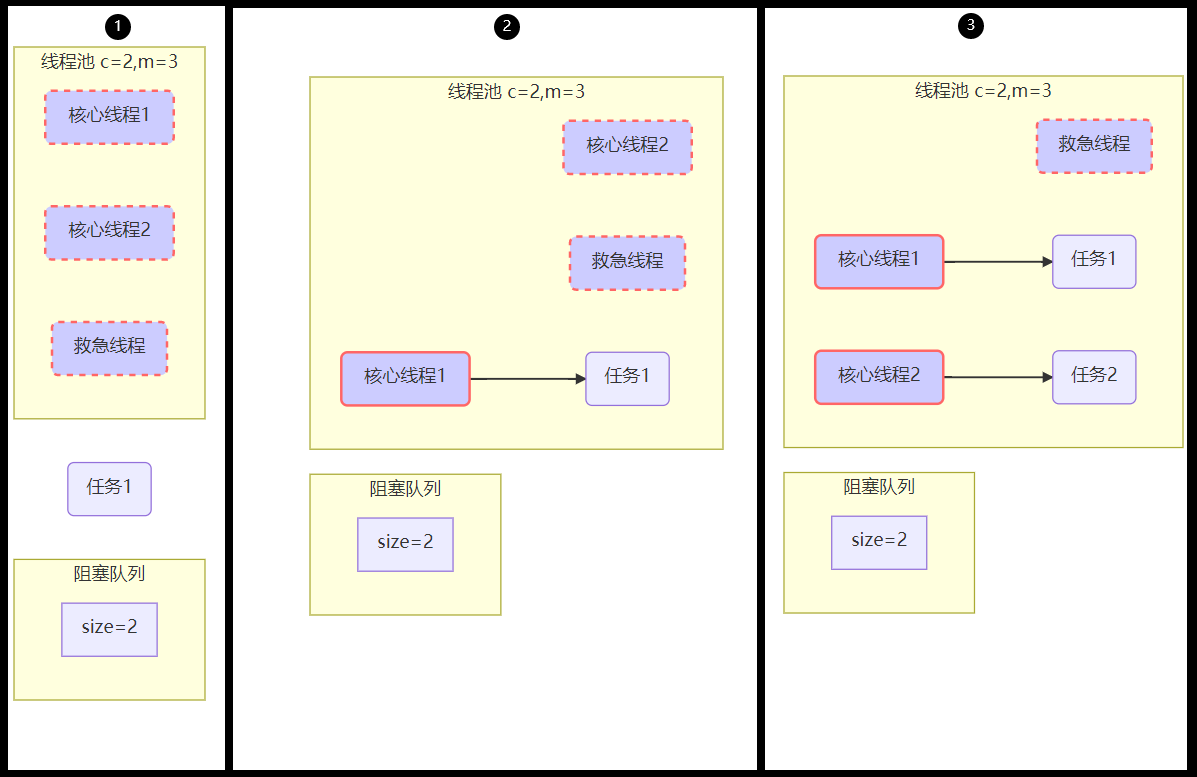
如果我们使用的是有界队列,那么当任务超过了队列的大小时,会创建 maximumPoolSize - corePoolSize 数目的线程来救急。当系统繁忙的高峰结束后,超过 corePoolSize 的救急线程,如果它们一段时间没有任务做,则需要结束,以此来节省资源。这个时间是由 keepAliveTime 和 unit 控制的。
另外这里要提一句:如果我们选择的是无界队列,就不会有救急线程了。救急线程是一定要配合有界队列来使用的。
如果线程数到达了 maximumPoolSize,仍然有新任务,这个时候会执行拒绝策略。
3.2.3.拒绝策略
JDK 提供了 4 种实现
- AbortPolicy:让调用者抛出 RejectedExecutionException 异常,这是默认策略
- CallerRunsPolicy:让调用者运行任务
- DiscardPolicy:放弃当前任务
- DiscardOldestPolicy:放弃队列中最早的任务,让当前的任务取而代之

其它著名框架也提供了实现
- Dubbo 的实现,在抛出 RejectedExecutionException 异常之前会记录日志,并
dump线程栈信息,方便定位问题 - Netty 的实现,是创建一个新线程来执行任务
- ActiveMQ 的实现,带超时等待(60s)尝试放入队列,类似我们之前自定义的拒绝策略
- PinPoint 的实现,它使用了一个拒绝策略链,会逐一尝试策略链中每种拒绝策略
3.3.Executors类提供的工厂方法
Executor 框架提供了各种类型的线程池,主要有以下工厂方法
public static ExecutorService newFixedThreadPool(int nThreads)public static ExecutorService newSingleThreadExecutor()public static ExecutorService newCachedThreadPool()public static ScheduledExecutorService newSingleThreadScheduledExecutor()public static ScheduledExecutorService newScheduledThreadPool(int corePoolSize)
最后两个方法,我们之后再讲。
3.3.1.newFixedThreadPool
该方法返回一个固定数量的线程池。
public static ExecutorService newFixedThreadPool(int nThreads) {return new ThreadPoolExecutor(nThreads, nThreads,0L, TimeUnit.MILLISECONDS,new LinkedBlockingQueue());
}
特点 1:核心线程数 == 最大线程数(没有救急线程被创建),因此也无需超时时间
特点 2:阻塞队列是无界的,可以放任意数量的任务
参考书籍:《实战 JAVA 高并发程序设计》 葛一鸣 著
无界的任务队列:无界任务队列可以通过 LinkedBlockingQueue 类实现。与有界队列相比,除非系统资源耗尽,否则无界的任务队列不存在任务入队失败的情况。当有新的任务到来,系统的线程数小于 corePoolSize 时,线程池会生成新的线程执行任务,但当系统的线程数达到 corePoolSize 后,就不会继续增加。若后续仍有新的任务加入,而又没有空闲的线程资源,则任务直接进入队列等待。若任务创建和处理的速度差异很大,无界队列会保持快速增长,直到耗尽系统内存。
评价:适用于任务量已知,相对耗时的任务
示例代码
// 创建一个固定数量是 2 的线程池,并自定义线程名称
@Slf4j(topic = "c.TestThreadPoolExecutors")
public class TestThreadPoolExecutors {public static void main(String[] args) {ExecutorService pool = Executors.newFixedThreadPool(2, new ThreadFactory() {private AtomicInteger t = new AtomicInteger(1);@Overridepublic Thread newThread(Runnable r) {return new Thread(r, "myPool_t" + t.getAndIncrement());}});pool.execute(() -> { log.debug("1"); });pool.execute(() -> { log.debug("2"); });pool.execute(() -> { log.debug("3"); });}
}
控制台输出
17:41:40.710 [myPool_t2] DEBUG c.TestThreadPoolExecutors - 2
17:41:40.710 [myPool_t1] DEBUG c.TestThreadPoolExecutors - 1
17:41:40.720 [myPool_t1] DEBUG c.TestThreadPoolExecutors - 3
3.3.2.newCachedThreadPool
字面翻译就是带缓冲功能的线程池
该方法返回一个可以根据实际情况调整线程数量的线程池
public static ExecutorService newCachedThreadPool() {return new ThreadPoolExecutor(0, Integer.MAX_VALUE,60L, TimeUnit.SECONDS,new SynchronousQueue());
}
特点
- 核心线程数是 0, 最大线程数是
Integer.MAX_VALUE,救急线程的空闲生存时间是 60s,这意味着所有线程都可以是救急线程(60s 后可以回收),而且救急线程可以无限创建。 - 队列采用了 SynchronousQueue,它的实现特点是:它没有容量,没有线程来取是放不进去的(一手交钱、一手交货)
参考书籍:《实战 JAVA 高并发程序设计》 葛一鸣 著
直接提交的队列:该功能由 SynchronousQueue 对象提供。SynchronousQueue 是一个特殊的 BlockingQueue。SynchronousQueue 没有容量,每一个插入操作都要等待一个相应的删除操作,反之,每一个删除操作都要等待对应的插入操作。如果使用SynchronousQueue,提交的任务不会被真实的保存,而总是将新任务提交给线程执行,如果没有空闲的进程,则尝试创建新的进程,如果进程数量已经达到最大值,则执行拒绝策略。因此,使用 SynchronousQueue 队列,通常要设置很大的 maximumPoolSize 值,否则很容易执行拒绝策略。
评价
- 整个线程池表现为线程数会根据任务量不断增长,没有上限,当任务执行完毕,空闲 1分钟后释放线程。
适合任务数比较密集,但每个任务执行时间较短的情况
示例代码
@Slf4j(topic = "c.TestSynchronousQueue")
public class TestSynchronousQueue {public static void main(String[] args) {SynchronousQueue integers = new SynchronousQueue<>();new Thread(() -> {try {log.debug("putting {} ", 1);integers.put(1);log.debug("{} putted...", 1);log.debug("putting...{} ", 2);integers.put(2);log.debug("{} putted...", 2);} catch (InterruptedException e) {e.printStackTrace();}}, "t1").start();sleep(1);new Thread(() -> {try {log.debug("taking {}", 1);integers.take();} catch (InterruptedException e) {e.printStackTrace();}}, "t2").start();sleep(1);new Thread(() -> {try {log.debug("taking {}", 2);integers.take();} catch (InterruptedException e) {e.printStackTrace();}}, "t3").start();}
}
控制台输出
19:21:24.988 [t1] DEBUG c.TestSynchronousQueue - putting 1
19:21:25.996 [t2] DEBUG c.TestSynchronousQueue - taking 1
19:21:25.996 [t1] DEBUG c.TestSynchronousQueue - 1 putted...
19:21:25.996 [t1] DEBUG c.TestSynchronousQueue - putting...2
19:21:27.000 [t3] DEBUG c.TestSynchronousQueue - taking 2
19:21:27.000 [t1] DEBUG c.TestSynchronousQueue - 2 putted...
3.3.3.newSingleThreadExecutor
该方法返回一个只有一个线程的线程池
public static ExecutorService newSingleThreadExecutor() {return new FinalizableDelegatedExecutorService(new ThreadPoolExecutor(1, 1,0L, TimeUnit.MILLISECONDS,new LinkedBlockingQueue()));
}
使用场景: 希望多个任务排队执行。线程数固定为 1,任务数多于 1 时,会放入无界队列排队。任务执行完毕,这唯一的线程也不会被释放。
区别:
- 自己创建一个单线程串行执行任务,如果任务执行失败而终止那么没有任何补救措施,而线程池还会新建一个线程,保证池的正常工作
Executors.newSingleThreadExecutor()线程个数始终为 1,不能修改- FinalizableDelegatedExecutorService 应用的是装饰器模式
只对外暴露了 ExecutorService 接口,因此不能调用 ThreadPoolExecutor 中特有的方法
- FinalizableDelegatedExecutorService 应用的是装饰器模式
Executors.newFixedThreadPool(1)初始时为 1,以后还可以修改- 对外暴露的是 ThreadPoolExecutor 对象,可以强转后调用 setCorePoolSize 等方法进行修改
3.4.提交任务
下面列举的是在线程池中提交任务的相关方法
// 执行任务
void execute(Runnable command);// 提交任务 task,用返回值 Future 获得任务执行结果
// Callable 与 Runnable 相比,就是多了一个返回的结果
 Future submit(Callable task);// 提交 tasks 中所有任务
 List> invokeAll(Collection> tasks)throws InterruptedException;// 提交 tasks 中所有任务,带超时时间。如果在一定时间内,集合内的任务不能执行完,会放弃执行后面的任务
 List> invokeAll(Collection> tasks,long timeout, TimeUnit unit)throws InterruptedException;// 提交 tasks 中所有任务,哪个任务先成功执行完毕,返回此任务执行结果,其它任务取消
 T invokeAny(Collection> tasks)throws InterruptedException, ExecutionException;// 提交 tasks 中所有任务,哪个任务先成功执行完毕,返回此任务执行结果,其它任务取消,带超时时间
 T invokeAny(Collection> tasks,long timeout, TimeUnit unit)throws InterruptedException, ExecutionException, TimeoutException;
3.4.1.submit
示例代码
@Slf4j(topic = "c.TestSubmit")
public class TestSubmit {public static void main(String[] args) throws ExecutionException, InterruptedException {ExecutorService pool = Executors.newFixedThreadPool(2);Future future = pool.submit(new Callable() {@Overridepublic String call() throws Exception {log.debug("Running...");Thread.sleep(1000);return "ok";}});log.debug("{}" + future.get());}
}
控制台输出
21:48:23.530 [pool-1-thread-1] DEBUG c.TestSubmit - Running...
21:48:24.541 [main] DEBUG c.TestSubmit - {}ok
3.4.2.invokeAll
示例代码
@Slf4j(topic = "c.TestSubmit")
public class TestSubmit {public static void main(String[] args) throws ExecutionException, InterruptedException {ExecutorService pool = Executors.newFixedThreadPool(2);method_2(pool);}private static void method_2(ExecutorService pool) throws InterruptedException {List> futures = pool.invokeAll(Arrays.asList(() -> {log.debug("begin");Thread.sleep(1000);return "1";},() -> {log.debug("begin");Thread.sleep(500);return "1";},() -> {log.debug("begin");Thread.sleep(2000);return "1";}));futures.forEach(f -> {try {log.debug("{}", f.get());} catch (InterruptedException | ExecutionException e) {e.printStackTrace();}});}
}
控制台输出
22:33:59.331 [pool-1-thread-1] DEBUG c.TestSubmit - begin
22:33:59.331 [pool-1-thread-2] DEBUG c.TestSubmit - begin
22:33:59.855 [pool-1-thread-2] DEBUG c.TestSubmit - begin
22:34:01.861 [main] DEBUG c.TestSubmit - 1
22:34:01.862 [main] DEBUG c.TestSubmit - 2
22:34:01.862 [main] DEBUG c.TestSubmit - 3
3.4.3.invokeAny
示例代码
@Slf4j(topic = "c.TestSubmit")
public class TestSubmit {public static void main(String[] args) throws ExecutionException, InterruptedException {ExecutorService pool = Executors.newFixedThreadPool(2);method_3(pool);}private static void method_3(ExecutorService pool) throws InterruptedException, ExecutionException {String result = pool.invokeAny(Arrays.asList(() -> {log.debug("begin 1");Thread.sleep(1000);log.debug("end 1");return "1";},() -> {log.debug("begin 2");Thread.sleep(500);log.debug("end 2");return "2";},() -> {log.debug("begin 3");Thread.sleep(2000);log.debug("end 3");return "3";}));log.debug("{}", result);}}
控制台输出
22:36:50.439 [pool-1-thread-2] DEBUG c.TestSubmit - begin 2
22:36:50.439 [pool-1-thread-1] DEBUG c.TestSubmit - begin 1
22:36:50.957 [pool-1-thread-2] DEBUG c.TestSubmit - end 2
22:36:50.957 [pool-1-thread-2] DEBUG c.TestSubmit - begin 3
22:36:50.957 [main] DEBUG c.TestSubmit - 2
如果改为只有一个线程的线程池的话:ExecutorService pool = Executors.newFixedThreadPool(1);,则输出结果如下
22:38:55.325 [pool-1-thread-1] DEBUG c.TestSubmit - begin 1
22:38:56.339 [pool-1-thread-1] DEBUG c.TestSubmit - end 1
22:38:56.339 [pool-1-thread-1] DEBUG c.TestSubmit - begin 2
22:38:56.339 [main] DEBUG c.TestSubmit - 1
3.5.停止
3.5.1.shutdown
/** 线程池状态变为 SHUTDOWN* * 不会接收新任务* * 但已提交任务会执行完* * 此方法不会阻塞调用线程的执行*/
void shutdown();
public void shutdown() {final ReentrantLock mainLock = this.mainLock;mainLock.lock();try {checkShutdownAccess();// 修改线程池状态advanceRunState(SHUTDOWN);// 仅会打断空闲线程interruptIdleWorkers();onShutdown(); // 扩展点 ScheduledThreadPoolExecutor} finally {mainLock.unlock();}// 尝试终结(没有运行的线程可以立刻终结,如果还有运行的线程也不会等)tryTerminate();
}
3.5.2.shutdownNow
/** 线程池状态变为 STOP* * 不会接收新任务* * 会将队列中的任务返回* * 并用 interrupt 的方式中断正在执行的任务
*/
List shutdownNow();
public List shutdownNow() {List tasks;final ReentrantLock mainLock = this.mainLock;mainLock.lock();try {checkShutdownAccess();// 修改线程池状态advanceRunState(STOP);// 打断所有线程interruptWorkers();// 获取队列中剩余任务tasks = drainQueue();} finally {mainLock.unlock();}// 尝试终结tryTerminate();return tasks;
}
3.5.3.其他方法
// 不在 RUNNING 状态的线程池,此方法就返回 true
boolean isShutdown();
// 线程池状态是否是 TERMINATED
boolean isTerminated();
// 调用 shutdown 后,由于调用线程并不会等待所有任务运行结束,因此如果它想在线程池 TERMINATED 后做些事情,可以利用此方法等待
boolean awaitTermination(long timeout, TimeUnit unit) throws InterruptedException;
3.5.4.测试案例
视频链接:ThreadPoolExecutor-停止演示
测试代码
@Slf4j(topic = "c.TestShutdown")
public class TestShudown {public static void main(String[] args) throws ExecutionException, InterruptedException {ExecutorService pool = Executors.newFixedThreadPool(2);Future result1 = pool.submit(() -> {log.debug("task 1 running...");Thread.sleep(1000);log.debug("task 1 finish...");return 1;});Future result2 = pool.submit(() -> {log.debug("task 2 running...");Thread.sleep(1000);log.debug("task 2 finish...");return 2;});Future result3 = pool.submit(() -> {log.debug("task 3 running...");Thread.sleep(1000);log.debug("task 3 finish...");return 3;});log.debug("shutdown");pool.shutdown();pool.awaitTermination(3, TimeUnit.SECONDS);log.debug("other.... ");//List runnables = pool.shutdownNow();//log.debug("other.... {}", runnables);}
}
输出结果-1(shutdown())
23:04:30.930 [main] DEBUG c.TestShutdown - shutdown
23:04:30.930 [pool-1-thread-2] DEBUG c.TestShutdown - task 2 running...
23:04:30.930 [pool-1-thread-1] DEBUG c.TestShutdown - task 1 running...
23:04:31.941 [pool-1-thread-2] DEBUG c.TestShutdown - task 2 finish...
23:04:31.941 [pool-1-thread-1] DEBUG c.TestShutdown - task 1 finish...
23:04:31.941 [pool-1-thread-2] DEBUG c.TestShutdown - task 3 running...
23:04:32.944 [pool-1-thread-2] DEBUG c.TestShutdown - task 3 finish...
23:04:32.944 [main] DEBUG c.TestShutdown - other....
输出结果-2 (shutdownNow())
23:06:13.369 [main] DEBUG c.TestShutdown - shutdown
23:06:13.369 [pool-1-thread-2] DEBUG c.TestShutdown - task 2 running...
23:06:13.369 [pool-1-thread-1] DEBUG c.TestShutdown - task 1 running...
23:06:13.380 [main] DEBUG c.TestShutdown - other.... [java.util.concurrent.FutureTask@1a93a7ca]
4.设计模式之工作线程
4.1.定义
让有限的工作线程(Worker Thread)来轮流异步处理无限多的任务。也可以将其归类为分工模式,它的典型实现就是线程池,也体现了经典设计模式中的享元模式。
例如,海底捞的服务员(线程),轮流处理每位客人的点餐(任务),如果为每位客人都配一名专属的服务员,那么成本就太高了(对比另一种多线程设计模式:Thread-Per-Message)
注意:不同任务类型应该使用不同的线程池,这样能够避免饥饿,并能提升效率
例如,如果一个餐馆的工人既要招呼客人(任务类型 A),又要到后厨做菜(任务类型 B)显然效率不咋地,分成服务员(线程池 A)与厨师(线程池 B)更为合理
4.2.饥饿案例
固定大小线程池会有饥饿现象
- 两个工人是同一个线程池中的两个线程
- 他们要做的事情是:为客人点餐和到后厨做菜,这是两个阶段的工作
- 客人点餐:必须先点完餐,等菜做好,上菜,在此期间处理点餐的工人必须等待
- 后厨做菜:没啥说的,做就是了
- 比如工人 A 处理了点餐任务,接下来它要等着 工人 B 把菜做好,然后上菜,他俩也配合的蛮好
- 但现在同时来了两个客人,这个时候工人 A 和工人 B 都去处理点餐了,这时没人做饭了,饥饿
TestStravation.java
@Slf4j(topic = "c.TestStravation")
public class TestStarvation {static final List MENU = Arrays.asList("地三鲜", "宫保鸡丁", "辣子鸡丁", "烤鸡翅");static Random RANDOM = new Random();static String cooking() { return MENU.get(RANDOM.nextInt(MENU.size())); }public static void main(String[] args) {ExecutorService pool = Executors.newFixedThreadPool(2);pool.execute(() -> {log.debug("处理点餐");Future f = pool.submit(() -> {log.debug("做菜");return cooking();});try {log.debug("上菜:{}", f.get());} catch (InterruptedException | ExecutionException e) {e.printStackTrace();}});}
}
输出结果
11:20:25.579 [pool-1-thread-1] DEBUG c.TestStravation - 处理点餐
11:20:25.591 [pool-1-thread-2] DEBUG c.TestStravation - 做菜
11:20:25.591 [pool-1-thread-1] DEBUG c.TestStravation - 上菜:烤鸡翅
显然上方的代码是可以正常运行的(正常点菜)
如果我们再在主方法里加一个完全相同的 pool.execute(); 呢?
输出结果(有问题)
11:21:33.560 [pool-1-thread-1] DEBUG c.TestStravation - 处理点餐
11:21:33.560 [pool-1-thread-2] DEBUG c.TestStravation - 处理点餐
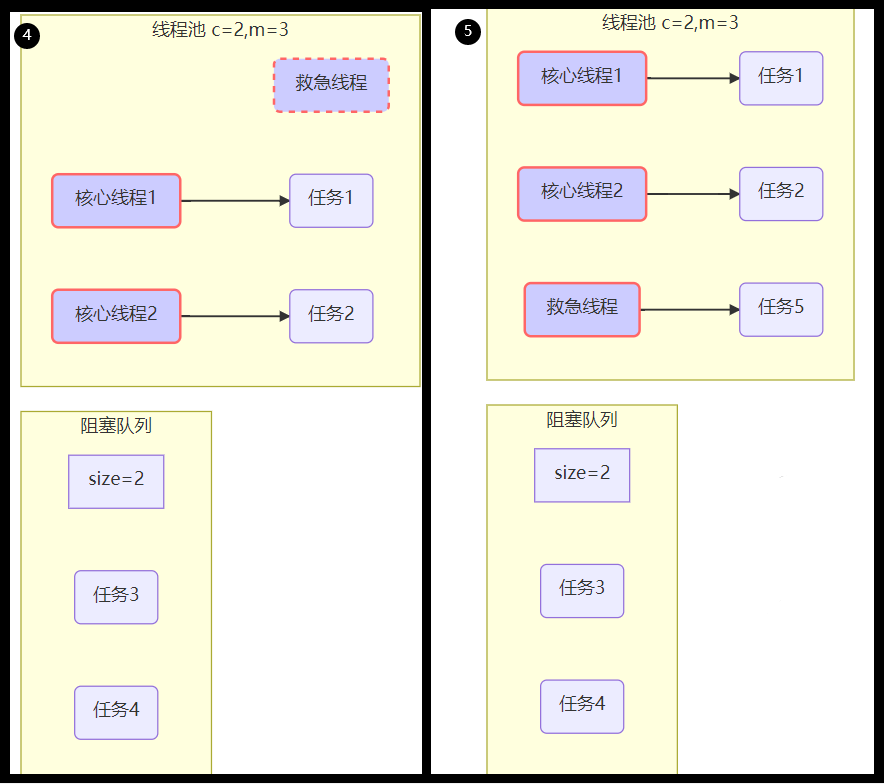
使用 jconsole 工具,我们可以看出,上面的问题并不是死锁造成的。
当两个 synchronized都互相持有对方锁的时候,就会发生死锁现象。
参考书籍:《JAVA 并发编程实战》 Brian Goetz 等 著
当一个线程永远的持有一个锁,并且其他线程都尝试获得这个锁的时候,它们将永远被阻塞。
这种情况就是最简单的 死锁 形式,其中多个线程由于存在环路的锁依赖关系而永远地等待下去。
上述的问题是线程数不足导致线程无法继续往下执行,是一种饥饿问题。
解决办法就是设置两个线程池,一个当服务员,一个当厨师
ExecutorService waitPool = Executors.newFixedThreadPool(1);
ExecutorService cookPool = Executors.newFixedThreadPool(1);
waitPool.execute(() -> {log.debug("处理点餐");Future f = cookPool.submit(() -> {log.debug("做菜");return cooking();});try {log.debug("上菜:{}", f.get());} catch (InterruptedException | ExecutionException e) {e.printStackTrace();}
});
再次运行代码时,就可以正常点菜上菜了
11:45:14.799 [pool-1-thread-1] DEBUG c.TestStravation - 处理点餐
11:45:14.811 [pool-2-thread-1] DEBUG c.TestStravation - 做菜
11:45:14.811 [pool-1-thread-1] DEBUG c.TestStravation - 上菜:地三鲜
11:45:14.812 [pool-1-thread-1] DEBUG c.TestStravation - 处理点餐
11:45:14.812 [pool-2-thread-1] DEBUG c.TestStravation - 做菜
11:45:14.812 [pool-1-thread-1] DEBUG c.TestStravation - 上菜:地三鲜
4.3.创建多少线程池合适
- 过小会导致程序不能充分地利用系统资源、容易导致饥饿
- 过大会导致更多的线程上下文切换,占用更多内存
4.3.1.CPU 密集型运算
通常采用 CPU 核数 + 1 能够实现最优的 CPU 利用率
CPU 核数 + 1 是保证当线程由于页缺失故障(操作系统)或其它原因导致暂停时,额外的这个线程就能顶上去,保证 CPU 时钟周期不被浪费
4.3.2.I/O 密集型运算
CPU 不总是处于繁忙状态
例:当你执行业务计算时,此时会使用 CPU 资源,但当你执行 I/O 操作时、远程 RPC 调用时,包括进行数据库操作时,此时 CPU 就闲下来了,你可以利用多线程提高它的利用率。
经验公式
线程数 = 核数 * 期望 CPU 利用率 * 总时间(CPU 计算时间 + 等待时间) / CPU 计算时间
例如 4 核 CPU 计算时间是 50% ,其它等待时间是 50%,期望 CPU 被 100% 利用
套用公式:4 * 100% * 100% / 50% = 8
例如 4 核 CPU 计算时间是 10% ,其它等待时间是 90%,期望 CPU 被 100% 利用
套用公式:4 * 100% * 100% / 10% = 40
5.任务调度线程池
5.1.Timer 存在的问题
在 『任务调度线程池』 功能加入之前,可以使用 java.util.Timer 来实现定时功能。
Timer 的优点在于简单易用,但由于所有任务都是由同一个线程来调度,因此所有任务都是串行执行的,同一时间只能有一个任务在执行,前一个任务的延迟或异常都将会影响到之后的任务。
TestTimer_1.java
@Slf4j(topic = "c.TestTimer_1")
public class TestTimer_1 {public static void main(String[] args) {Timer timer = new Timer();TimerTask task_1 = new TimerTask() {@Overridepublic void run() {log.debug("task_1 is running");// sleep(2);// int i = 1 / 0;}};TimerTask task_2 = new TimerTask() {@Overridepublic void run() {log.debug("task_2 is running");}};log.debug("Start ...");timer.schedule(task_1, 1000);timer.schedule(task_2, 1000);}
}
输出结果
12:12:48.984 [main] DEBUG c.TestTimer_1 - Start ...
12:12:50.000 [Timer-0] DEBUG c.TestTimer_1 - task_1 is running
12:12:50.000 [Timer-0] DEBUG c.TestTimer_1 - task_2 is running
使用 timer 添加两个任务,希望它们都在 1s 后执行。上述情况是符合期望情况的。
由于 timer 内只有一个线程来顺序执行队列中的任务,当 任务1 中有延时情况、或者 任务1 出现异常的时候,就都会影响到 任务2 的执行
输出结果(在 任务1 中加入了 sleep(2);) 显然 任务2 慢了 2 秒。
12:14:29.718 [main] DEBUG c.TestTimer_1 - Start ...
12:14:30.733 [Timer-0] DEBUG c.TestTimer_1 - task_1 is running
12:14:32.739 [Timer-0] DEBUG c.TestTimer_1 - task_2 is running
输出结果(在 任务1 中加入错误代码 int i = 1 / 0;),显然这里 任务2 直接没有运行了
12:19:09.332 [main] DEBUG c.TestTimer_1 - Start ...
12:19:10.350 [Timer-0] DEBUG c.TestTimer_1 - task_1 is running
Exception in thread "Timer-0" java.lang.ArithmeticException: / by zeroat org.example.chapter08.poolStudies.threadPoolExecutor.TestTimer_1$1.run(TestTimer_1.java:20)at java.util.TimerThread.mainLoop(Timer.java:555)at java.util.TimerThread.run(Timer.java:505)
5.2.ScheduledThreadPoolExecutor
参考书籍:《实战 JAVA 高并发程序设计》 葛一鸣 著
Executor 框架提供了各种类型的线程池,不同的工厂方法分别返回具有不同工作特性的线程池。
- newSingleThreadScheduledExecutor() 方法:该方法返回一个 ScheduledExecutorService 对象,线程池大小为 1。ScheduledExecutorService 接口在 ExecutorService 接口之上扩展了在给定时间执行某任务的功能,如在某个固定的延时之后执行,或者周期性执行某个任务。
- newScheduledThreadPool() 方法:该方法也返回一个 ScheduledExecutorService 对象,但该线程池可以指定线程数量。
5.2.1.延时执行
@Slf4j(topic = "c.TestTimer_2")
public class TestTimer_2 {public static void main(String[] args) {ScheduledExecutorService pool = Executors.newScheduledThreadPool(2);pool.schedule(() -> {log.debug("task_1");sleep(2);// int i = 1 / 0;}, 1, TimeUnit.SECONDS);pool.schedule(() -> {log.debug("task_2");}, 1, TimeUnit.SECONDS);}
}
输出结果(显然这里是并发执行的)
16:54:51.069 [pool-1-thread-1] DEBUG c.TestTimer_2 - task_1
16:54:51.069 [pool-1-thread-2] DEBUG c.TestTimer_2 - task_2
如果我们将线程池数量改为 1 的话,那还是会串行执行
Executors.newScheduledThreadPool(1);、sleep(2);
16:51:16.261 [pool-1-thread-1] DEBUG c.TestTimer_2 - task_1
16:51:18.288 [pool-1-thread-1] DEBUG c.TestTimer_2 - task_2
即使是任务 1 中有错误代码,任务 2 也可以被正常执行(但是这时控制台上是没有报错信息的)
Executors.newScheduledThreadPool(1);、int i = 1 / 0;
16:52:50.365 [pool-1-thread-1] DEBUG c.TestTimer_2 - task_1
16:52:50.377 [pool-1-thread-1] DEBUG c.TestTimer_2 - task_2
5.2.2.定时执行
参考书籍:《实战 JAVA 高并发程序设计》 葛一鸣 著
ScheduledExecutorService 并不一定会立即安排执行任务,它其实是起到了计划任务的作用。它会在指定的时间,对任务进行调度。
作为说明,这里给出了三个方法。
public ScheduledFuture schedule(Callable callable,long delay, TimeUnit unit);
public ScheduledFuture scheduleAtFixedRate(Runnable command,long initialDelay,long period,TimeUnit unit);
public ScheduledFuture scheduleWithFixedDelay(Runnable command,long initialDelay,long delay,TimeUnit unit);
方法 schedule() 会在给定时间,对任务进行一次调度。
方法 scheduleAtFixedRate() 和 scheduleWithFixedDelay() 会对任务进行周期性的调度。但是两者有一点小小的区别。
对于 FixedRate 方式来说,任务调度的频率是一定的。它是以上一个任务开始执行时间为起点,之后的 period 时间,调度下一次任务。
而 FixDelay 则是在上一个任务结束后,再经过 delay 时间进行任务调度。
scheduleAtFixedRate
@Slf4j(topic = "c.TestTimer_2")
public class TestTimer_2 {public static void main(String[] args) {ScheduledExecutorService pool = Executors.newScheduledThreadPool(2);log.debug("Start ... ...");pool.scheduleAtFixedRate(() -> {log.debug("Running ... ...");// sleep(2);}, 1, 1, TimeUnit.SECONDS);}
}
通过下面的输出信息可以看出,该任务每隔一秒,执行一次
17:03:57.336 [main] DEBUG c.TestTimer_2 - Start ... ...
17:03:58.398 [pool-1-thread-1] DEBUG c.TestTimer_2 - Running ... ...
17:03:59.393 [pool-1-thread-1] DEBUG c.TestTimer_2 - Running ... ...
17:04:00.394 [pool-1-thread-1] DEBUG c.TestTimer_2 - Running ... ...
17:04:01.397 [pool-1-thread-1] DEBUG c.TestTimer_2 - Running ... ...
17:04:02.385 [pool-1-thread-1] DEBUG c.TestTimer_2 - Running ... ...
17:04:03.393 [pool-1-thread-1] DEBUG c.TestTimer_2 - Running ... ...
17:04:04.388 [pool-1-thread-1] DEBUG c.TestTimer_2 - Running ... ...... ...
如果我们在代码中加入 sleep(2);,使得任务的执行时间过长的话(任务执行时间超过了间隔时间),它就会在上一个任务执行完成后立即被调用
输出分析:一开始,延时 1s,接下来,由于任务执行时间 > 间隔时间。间隔被撑到了 2s
17:05:41.515 [main] DEBUG c.TestTimer_2 - Start ... ...
17:05:42.569 [pool-1-thread-1] DEBUG c.TestTimer_2 - Running ... ...
17:05:44.576 [pool-1-thread-1] DEBUG c.TestTimer_2 - Running ... ...
17:05:46.587 [pool-1-thread-1] DEBUG c.TestTimer_2 - Running ... ...
17:05:48.589 [pool-1-thread-1] DEBUG c.TestTimer_2 - Running ... ...
17:05:50.598 [pool-1-thread-1] DEBUG c.TestTimer_2 - Running ... ...... ...
scheduleWithFixedDelay
@Slf4j(topic = "c.TestTimer_2")
public class TestTimer_2 {public static void main(String[] args) {ScheduledExecutorService pool = Executors.newScheduledThreadPool(2);log.debug("Start ... ...");pool.scheduleWithFixedDelay(() -> {log.debug("Running ... ...");sleep(2);}, 1, 1, TimeUnit.SECONDS);}
}
输出分析:一开始,延时 1s,scheduleWithFixedDelay 的间隔是 上一个任务结束 <-> 延时 <-> 下一个任务开始。所以间隔都是 3s
17:28:18.610 [main] DEBUG c.TestTimer_2 - Start ... ...
17:28:19.673 [pool-1-thread-1] DEBUG c.TestTimer_2 - Running ... ...
17:28:22.688 [pool-1-thread-1] DEBUG c.TestTimer_2 - Running ... ...
17:28:25.701 [pool-1-thread-1] DEBUG c.TestTimer_2 - Running ... ...
17:28:28.706 [pool-1-thread-1] DEBUG c.TestTimer_2 - Running ... ...
17:28:31.721 [pool-1-thread-1] DEBUG c.TestTimer_2 - Running ... ...
17:28:34.736 [pool-1-thread-1] DEBUG c.TestTimer_2 - Running ... ...
5.2.3.正确处理抛出异常
- 第一种方式:主动捕捉异常
@Slf4j(topic = "c.TestTimer_2")
public class TestTimer_2 {public static void main(String[] args) {ScheduledExecutorService pool = Executors.newScheduledThreadPool(2);method_2(pool);}private static void method_2(ScheduledExecutorService pool) {pool.schedule(() -> {log.debug("task_1");sleep(2);try {int i = 1 / 0;} catch (Exception e) {log.error("error:", e);}}, 1, TimeUnit.SECONDS);}
}
控制台输出
17:39:32.326 [pool-1-thread-1] DEBUG c.TestTimer_2 - task_1
17:39:34.357 [pool-1-thread-1] ERROR c.TestTimer_2 - error:
java.lang.ArithmeticException: / by zeroat org.example.chapter08.poolStudies.threadPoolExecutor.TestTimer_2.lambda$method_2$2(TestTimer_2.java:38)at java.util.concurrent.Executors$RunnableAdapter.call(Executors.java:511)at java.util.concurrent.FutureTask.run(FutureTask.java:266)at java.util.concurrent.ScheduledThreadPoolExecutor$ScheduledFutureTask.access$201(ScheduledThreadPoolExecutor.java:180)at java.util.concurrent.ScheduledThreadPoolExecutor$ScheduledFutureTask.run(ScheduledThreadPoolExecutor.java:293)at java.util.concurrent.ThreadPoolExecutor.runWorker(ThreadPoolExecutor.java:1149)at java.util.concurrent.ThreadPoolExecutor$Worker.run(ThreadPoolExecutor.java:624)at java.lang.Thread.run(Thread.java:748)
- 第二种处理方式:使用 Future
参考博客:https://blog.csdn.net/weixin_53142722/article/details/124655008
- Lambda 表达式内要有返回值,编译器才能将其识别为 Callable,否则将识别为 Runnable,也就不能使用 FutureTask
- 方法中如果出异常,
futuretask.get()会返回这个异常,否者正常返回。
@Slf4j(topic = "c.TestTimer_2")
public class TestTimer_2 {public static void main(String[] args) throws ExecutionException, InterruptedException {ExecutorService pool = Executors.newFixedThreadPool(1);Future future = pool.submit(() -> {log.debug("task_1");int i = 1 / 0;return true;});future.get();}
}
控制台输出
17:43:45.355 [pool-1-thread-1] DEBUG c.TestTimer_2 - task_1
Exception in thread "main" java.util.concurrent.ExecutionException: java.lang.ArithmeticException: / by zeroat java.util.concurrent.FutureTask.report(FutureTask.java:122)at java.util.concurrent.FutureTask.get(FutureTask.java:192)at org.example.chapter08.poolStudies.threadPoolExecutor.TestTimer_2.main(TestTimer_2.java:24)
Caused by: java.lang.ArithmeticException: / by zeroat org.example.chapter08.poolStudies.threadPoolExecutor.TestTimer_2.lambda$main$0(TestTimer_2.java:20)at java.util.concurrent.FutureTask.run(FutureTask.java:266)at java.util.concurrent.ThreadPoolExecutor.runWorker(ThreadPoolExecutor.java:1149)at java.util.concurrent.ThreadPoolExecutor$Worker.run(ThreadPoolExecutor.java:624)at java.lang.Thread.run(Thread.java:748)
6.Tomcat 线程池
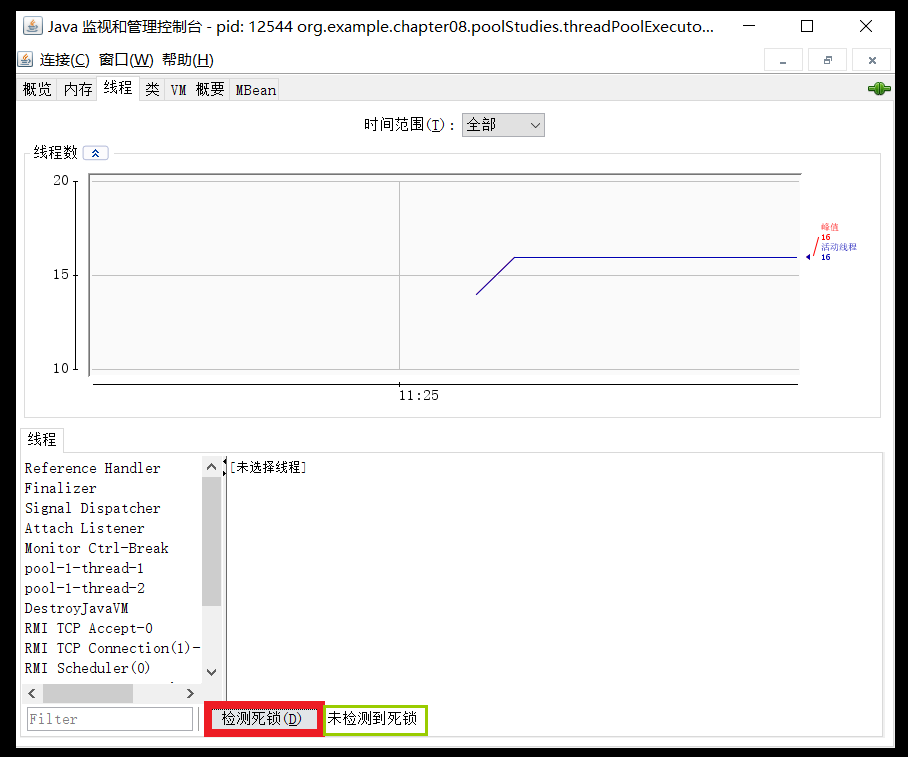
Tomcat 的连接器部分就用到了线程池
- LimitLatch 用来限流,可以控制最大连接个数,类似 J.U.C 中的 Semaphore
- Acceptor 只负责接收新的 socket 连接
- Poller 只负责监听 socket channel 是否有 可读的 I/O 事件
- 一旦可读,封装一个任务对象(socketProcessor),提交给 Executor 线程池处理
- Executor 线程池中的工作线程最终负责处理请求
Tomcat 线程池扩展了 ThreadPoolExecutor,行为稍有不同
- 如果总线程数达到 maximumPoolSize
- 这时不会立刻抛 RejectedExecutionException 异常
而是再次尝试将任务放入队列,如果还失败,才抛出 RejectedExecutionException 异常
- 这时不会立刻抛 RejectedExecutionException 异常
源码 Tomcat-7.0.42
public void execute(Runnable command, long timeout, TimeUnit unit) {submittedCount.incrementAndGet();try {super.execute(command);} catch (RejectedExecutionException rx) {if (super.getQueue() instanceof TaskQueue) {final TaskQueue queue = (TaskQueue) super.getQueue();try {if (!queue.force(command, timeout, unit)) {submittedCount.decrementAndGet();throw new RejectedExecutionException("Queue capacity is full.");}} catch (InterruptedException x) {submittedCount.decrementAndGet();Thread.interrupted();throw new RejectedExecutionException(x);}} else {submittedCount.decrementAndGet();throw rx;}}
}
TaskQueue.java
public boolean force(Runnable o, long timeout, TimeUnit unit) throws InterruptedException {if (parent.isShutdown())throw new RejectedExecutionException("Executor not running, can't force a command into the queue");return super.offer(o, timeout, unit); //forces the item onto the queue, to be used if the task is rejected
}
Connector 配置
| 配置项 | 默认值 | 说明 |
|---|---|---|
| acceptorThreadCount | 1 | acceptor 线程数量 |
| pollerThreadCount | 1 | poller 线程数量 |
| minSpareThreads | 10 | 核心线程数,即 corePoolSize |
| maxThreads | 200 | 最大线程数,即 maximumPoolSize |
| executor | - | Executor 名称,用来引用下面的 Executor |
Executor 线程配置
| 配置项 | 默认值 | 说明 |
|---|---|---|
| threadPriority | 5 | 线程优先级 |
| daemon | true | 是否守护线程 |
| minSpareThreads | 25 | 核心线程数,即 corePoolSize |
| maxThreads | 200 | 最大线程数,即 maximumPoolSize |
| maxIdleTime | 60000 | 线程生存时间,单位是毫秒,默认值即 1 分钟 |
| maxQueueSize | Integer.MAX_VALUE | 队列长度 |
| prestartminSpareThreads | false | 核心线程是否在服务器启动时启动 |
7.Fork/Join
7.1.概念
Fork/Join 是 JDK 1.7 加入的新的线程池实现,它体现的是一种分治思想,适用于能够进行任务拆分的 CPU 密集型运算
所谓的任务拆分,是将一个大任务拆分为算法上相同的小任务,直至不能拆分可以直接求解。
跟递归相关的一些计算,如归并排序、斐波那契数列、都可以用分治思想进行求解
Fork/Join 在分治的基础上加入了多线程,可以把每个任务的分解和合并交给不同的线程来完成,进一步提升了运算效率
Fork/Join 默认会创建与 CPU 核心数大小相同的线程池
7.2.使用
提交给 Fork/Join 线程池的任务需要继承 RecursiveTask(有返回值)或 RecursiveAction(没有返回值)。
例如下面就定义了一个对 1~n 之间的整数求和的任务
AddTask_1.java
@Slf4j(topic = "c.AddTask_1")
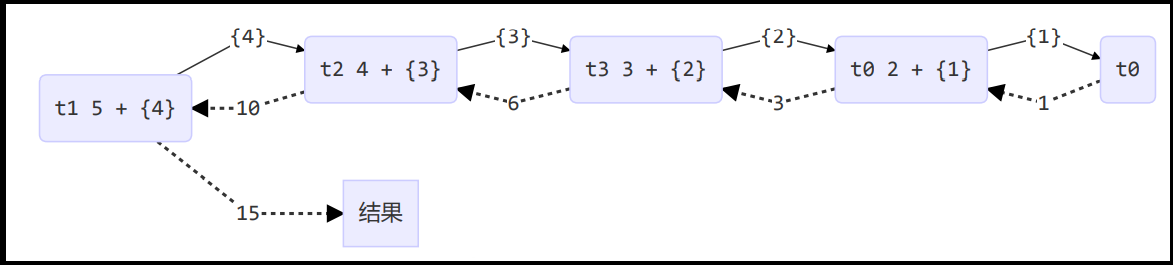
public class AddTask_1 extends RecursiveTask {int n;public AddTask_1(int n) {this.n = n;}@Overridepublic String toString() {return "{" + n + '}';}@Overrideprotected Integer compute() {// 如果 n 已经为 1,可以求得结果了if (n == 1) {log.debug("join() {}", n);return n;}// 将任务进行拆分(fork)AddTask_1 t1 = new AddTask_1(n - 1);t1.fork();log.debug("fork() {} + {}", n, t1);// 合并(join)结果int result = n + t1.join();log.debug("join() {} + {} = {}", n, t1, result);return result;}
}
TestForkJoinPool.java
public class TestForkJoinPool {public static void main(String[] args) {ForkJoinPool pool = new ForkJoinPool(4);System.out.println(pool.invoke(new AddTask_1(5)));}
}
控制台输出
19:26:52.899 [ForkJoinPool-1-worker-0] DEBUG c.AddTask_1 - fork() 2 + {1}
19:26:52.899 [ForkJoinPool-1-worker-1] DEBUG c.AddTask_1 - fork() 5 + {4}
19:26:52.899 [ForkJoinPool-1-worker-3] DEBUG c.AddTask_1 - fork() 3 + {2}
19:26:52.899 [ForkJoinPool-1-worker-2] DEBUG c.AddTask_1 - fork() 4 + {3}
19:26:52.912 [ForkJoinPool-1-worker-0] DEBUG c.AddTask_1 - join() 1
19:26:52.913 [ForkJoinPool-1-worker-0] DEBUG c.AddTask_1 - join() 2 + {1} = 3
19:26:52.913 [ForkJoinPool-1-worker-3] DEBUG c.AddTask_1 - join() 3 + {2} = 6
19:26:52.913 [ForkJoinPool-1-worker-2] DEBUG c.AddTask_1 - join() 4 + {3} = 10
19:26:52.913 [ForkJoinPool-1-worker-1] DEBUG c.AddTask_1 - join() 5 + {4} = 15
15
用图表示的话就是下面的情况
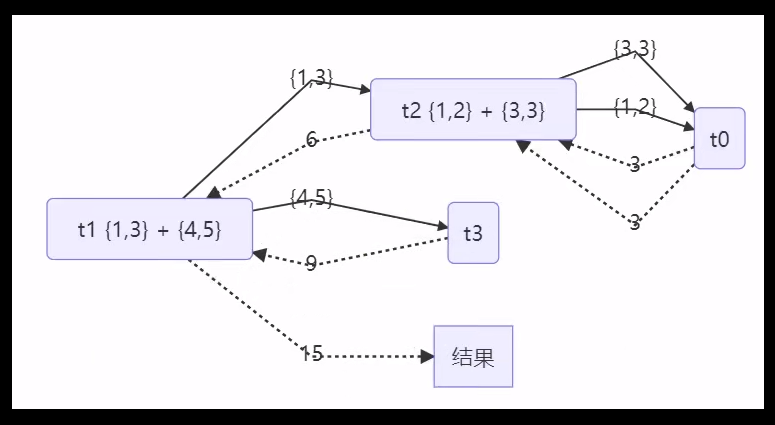
7.3.任务拆分优化
AddTask_3.java
@Slf4j(topic = "AddTask_3")
public class AddTask_3 extends RecursiveTask {int begin;int end;public AddTask_3(int begin, int end) {this.begin = begin;this.end = end;}@Overridepublic String toString() {return "{" + begin + "," + end + '}';}@Overrideprotected Integer compute() {// 5, 5if (begin == end) {log.debug("join() {}", begin);return begin;}// 4, 5if (end - begin == 1) {log.debug("join() {} + {} = {}", begin, end, end + begin);return end + begin;}// 1 5int mid = (end + begin) / 2; // 3AddTask_3 t1 = new AddTask_3(begin, mid); // 1,3t1.fork();AddTask_3 t2 = new AddTask_3(mid + 1, end); // 4,5t2.fork();log.debug("fork() {} + {} = ?", t1, t2);int result = t1.join() + t2.join();log.debug("join() {} + {} = {}", t1, t2, result);return result;}
}
TestForkJoinPool.java
public class TestForkJoinPool {public static void main(String[] args) {ForkJoinPool pool = new ForkJoinPool(4);System.out.println(pool.invoke(new AddTask_3(1, 5)));}
}
控制台输出
20:13:19.394 [ForkJoinPool-1-worker-3] DEBUG AddTask_3 - join() 4 + 5 = 9
20:13:19.394 [ForkJoinPool-1-worker-0] DEBUG AddTask_3 - join() 1 + 2 = 3
20:13:19.407 [ForkJoinPool-1-worker-3] DEBUG AddTask_3 - join() 3
20:13:19.394 [ForkJoinPool-1-worker-2] DEBUG AddTask_3 - fork() {1,2} + {3,3} = ?
20:13:19.394 [ForkJoinPool-1-worker-1] DEBUG AddTask_3 - fork() {1,3} + {4,5} = ?
20:13:19.407 [ForkJoinPool-1-worker-2] DEBUG AddTask_3 - join() {1,2} + {3,3} = 6
20:13:19.407 [ForkJoinPool-1-worker-1] DEBUG AddTask_3 - join() {1,3} + {4,5} = 15
15
用图来表示的话就是下面的情况