

【基于jeeSite框架】SpringBoot+poi+Layui自定义列表导出
文章目录
- 功能效果
- 思路
- 代码
- 前台
- 后台
- easyPoi,easyExcel,poi三者的区别
- poi
- poi依赖
- 导出Excel
- HSSF方式导出
- XSSF方式导出
- SXSSF方式导出
- 导入excel
- HSSF方式导入
- XSSF方式导入
- SXSSF方式导入
- easyPoi
- 依赖包
- 采用注解导出导入
- easyExcel
- 依赖
- 采用注解导出导入
- API文档
- easyPoi操作文档
- easyExcel操作文档
注:本文是基于jeeSite框架实现的导出,若没有使用过,代码可直接跳过,思路可以参考。
功能效果
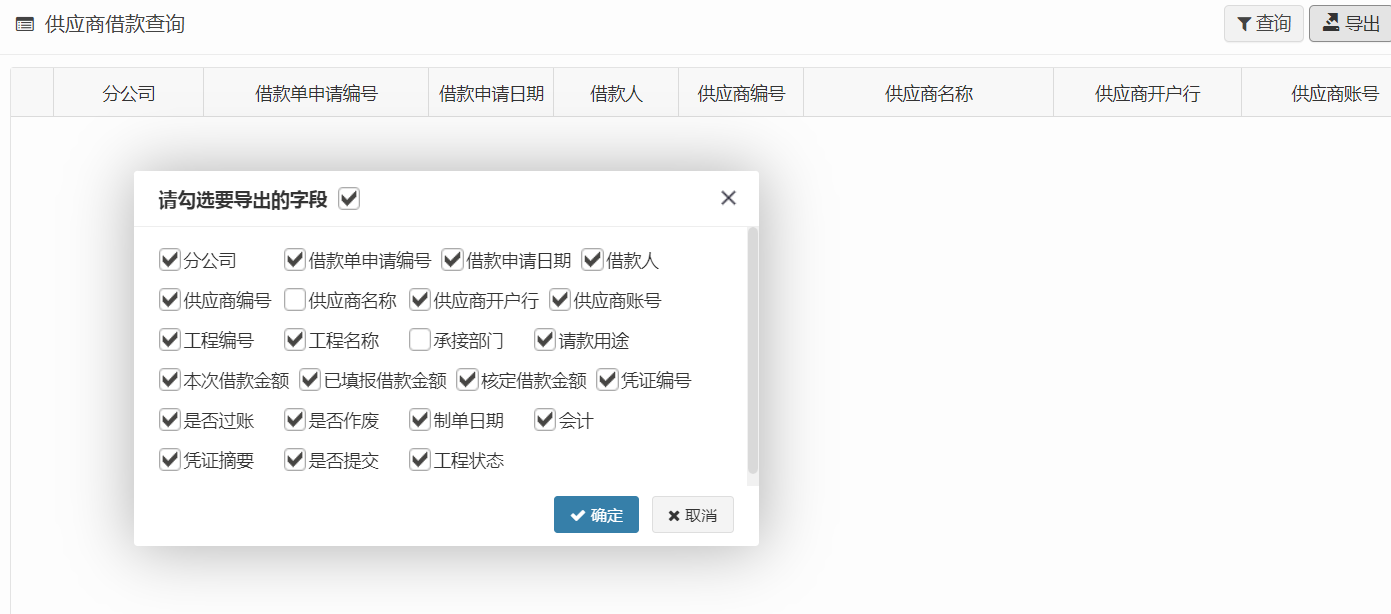
根据业务需要,自定义勾选需要导出的字段,并将其导出。
思路
就是把勾选到的字段对应的编码传到后台,如果还有顺序要求的话,那也需要把字段对应的名称按顺序传到后台。
代码
前台
exportFieldNames 是将已勾选的字段的编码拼接成字符串,去传送到后台。
columnModel 是一个数组,放的查询列表展示的字段
<#form:hidden name="exportFieldNames" />$('#btnExport').click(function(){js.layer.open({type: 1,shade: 0.01,shadeClose: true,area: ['500px', '300px'],title: '请勾选要导出的字段 ',scrollbar: true,id: "export-fields-popup",content: '',success: function(layero, index){if($(layer.window).width() < 500 || $(layer.window).height() < 300){layer.full(index);}var contentDiv = layero.find(".export-fields-content"),isAllChecked = true;$.each(columnModel, function() {if(!this.hidden && (this.hidedlg == null || !this.hidedlg)) {contentDiv.append('')}})// 初始化所有 'checkbox'layero.find(".icheck").iCheck();// 全选按钮默认勾选状态if(isAllChecked){layero.find(".check_all").iCheck("check");}// 全选按钮点击事件layero.find(".check_all").on("ifChecked", function() {layero.find(".icheck").iCheck("check")}).on("ifUnchecked", function() {layero.find(".icheck").iCheck("uncheck")});},btn: [' ${text("确定")}',' ${text("取消")}'],btn1: function(index, layero){var exportFieldNames = [];layero.find(".export-fields-content .icheck").each(function(i) {if($(this).find("input").is(":checked")){exportFieldNames.push($(this).data('name'));}});if(exportFieldNames.length == 0){js.showMessage("请先勾选要导出的字段");return false;}$("input[name='exportFieldNames']").val(exportFieldNames.join(","));js.ajaxSubmitForm($('#searchForm'), {url:'${ctx}/reporting/serpProjectReport/collaborationFeeExportData',downloadFile:true});}});
});
后台

主要是 ExcelExport 这个类,我们需要改写一下,对构造函数,新增exportFieldNames(导出字段) 属性
/**
* 导出字段
*/
private String[] exportFieldNames;/**
* 构造函数
* @param title 表格标题,传“空值”,表示无标题
* @param cls 实体对象,通过annotation.ExportField获取标题
* @param exportFieldNames 自定义要导出的字段名数组
*/
public ExcelExport(String title, Class cls, String[] exportFieldNames){this(null, null, title, cls, Type.EXPORT, false, exportFieldNames);
}/**
* 构造函数
* @param wb 指定现有工作簿对象
* @param sheetName 指定Sheet名称
* @param title 表格标题,传“空值”,表示无标题
* @param cls 实体对象,通过annotation.ExportField获取标题
* @param type 导出类型(1:导出数据;2:导出模板)
* @param isCustomImportTemplate 是否是自定义的导入模板(完全是一个没用的字段,专门用来区分调用我们自定义的这个构造函数,要不构造函数的最后一个参数是可变类型的 String,和我们的 exportFieldNames 重叠了)(v2.0将其改造为:我们自定义的导入模板)
* @param exportFieldNames 自定义要导出的字段名数组
* @param groups 导入分组
*/
public ExcelExport(Workbook wb, String sheetName, String title, Class cls, Type type, Boolean isCustomImportTemplate, String[] exportFieldNames, String... groups){this.isCustomImportTemplate = isCustomImportTemplate;this.exportFieldNames = exportFieldNames;if (wb != null){this.wb = wb;}else{this.wb = createWorkbook();}this.createSheet(sheetName, title, cls, type, groups);
}/*** 添加到 annotationList*/private void addAnnotation(List annotationList, ExcelField ef, Object fOrM, Type type, String... groups){
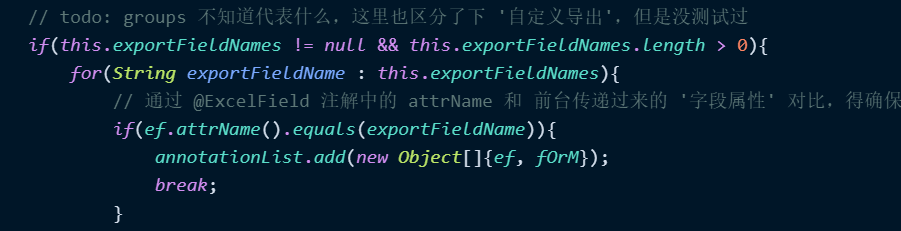
//		if (ef != null && (ef.type()==0 || ef.type()==type)){if (ef != null && (ef.type() == Type.ALL || ef.type() == type)){if (groups != null && groups.length > 0){boolean inGroup = false;for (String g : groups){if (inGroup){break;}for (String efg : ef.groups()){if (StringUtils.equals(g, efg)){inGroup = true;// todo: groups 不知道代表什么,这里也区分了下 '自定义导出',但是没测试过if(this.exportFieldNames != null && this.exportFieldNames.length > 0){for(String exportFieldName : this.exportFieldNames){// 通过 @ExcelField 注解中的 attrName 和 前台传递过来的 '字段属性' 对比,得确保这2者命名方式一致if(ef.attrName().equals(exportFieldName)){annotationList.add(new Object[]{ef, fOrM});break;}}}else {annotationList.add(new Object[]{ef, fOrM});}break;}}}}else{if(this.exportFieldNames != null && this.exportFieldNames.length > 0){for(String exportFieldName : this.exportFieldNames){// 通过 @ExcelField 注解中的 attrName 和 前台传递过来的 '字段属性' 对比,得确保这2者命名方式一致if(ef.attrName().equals(exportFieldName)){annotationList.add(new Object[]{ef, fOrM});break;}}}else {annotationList.add(new Object[]{ef, fOrM});}}}}
同时,将页面中的查询条件,也传入到后台,Service 层将查询条件带入到Dao 层,重新将需要导出的数据放到 list 中。
ProjectPayment.class 实体类,配置需要导出的@ExcelField 注解,设置顺序等。
List> list = this.projectReportService.getProjectReportDao().projectPayment(map);String fileName = "工程费支付查询" + DateUtils.getDate("yyyyMMddHHmmss")+ ".xlsx";;// 第一步是 创建工作簿以及Sheet页,还有title
try (ExcelExport ee = new ExcelExport("工程费支付查询", ProjectPayment.class, exportFieldNames)) {// 第二步 ,将数据装填,并生成Excel表格ee.setDataList(list).write(response, fileName);
}
以上是基于Jeesite 框架改造的,增加了自定义的字段这个参数,将前端传过来的字段与导出实体的字段匹配,存在就导出。
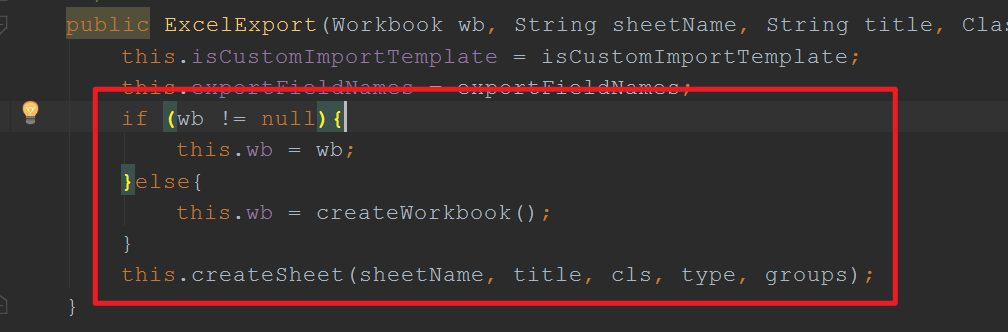
在调用ExcelExport 方法导出时,先创建工作簿,再创建Sheet表
它有个比较强大的地方,可以将字典数据正常转换,就是可以根据key,再导出的时候转换为正常的value。
我自己是比较好奇,它是怎么将字典数据?
// If is dict, get dict labelif (StringUtils.isNotBlank(ef.dictType())){Class dictUtils = Class.forName("com.jeesite.modules.sys.utils.DictUtils");val = dictUtils.getMethod("getDictLabels", String.class, String.class,String.class).invoke(null, ef.dictType(), val==null?"":val.toString(), "");//val = DictUtils.getDictLabel(val==null?"":val.toString(), ef.dictType(), "");}
easyPoi,easyExcel,poi三者的区别
接下来我们熟悉一下目前主流的关于Excel的技术。
apache 的 poi,其前身是 Jakarta 的 POI Project项目,之后将其开源给 apache 基金会。
easyPoi 的底层也是基于 apache poi 开发的,它主要的特点就是将更多重复的工作,全部简单化,避免编写重复的代码!
easyExcel 是阿里巴巴开源的一款 excel 解析工具,底层逻辑也是基于 apache poi 进行二次开发的。
poi 与 easyExcel区别:
- 03版的Excel最多可以放入65536条数据,但是新版的是没有条数限制的
- 03版的后缀是xls,07版是xlsx
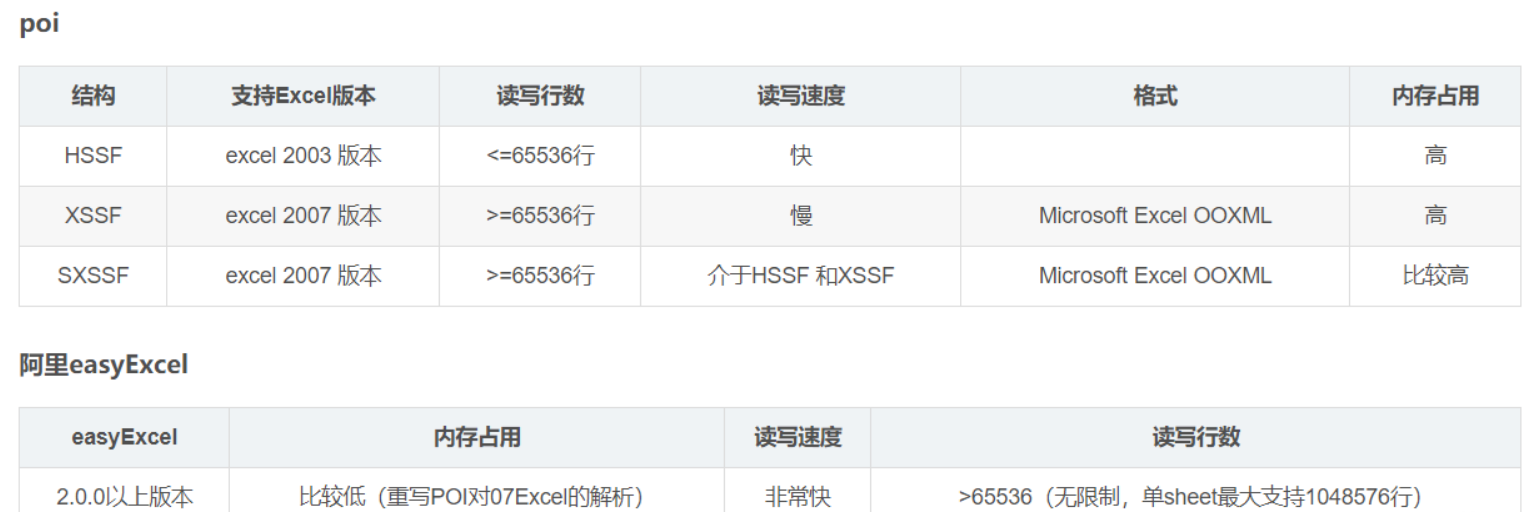
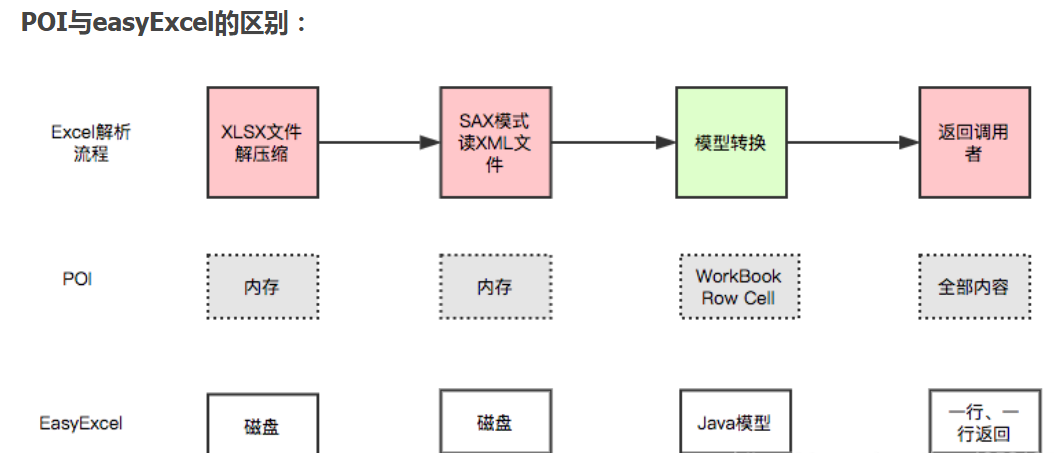
POI存在的问题:非常的消耗内存;
easyExcel 遇到再大的excel都不会出现内存溢出的问题,能够将一个原本3M的excel文件,POI来操作将会占用内存100M,使用easyExcel降低到几KB,使用起来更加简单。
poi读的顺序:
1、创建xsshworkbook/hssfworkbook (inputstream in)
2、读取sheet
3、拿到当前sheet所有行row
4、通过当前行去拿到对应的单元格的值。
而easyExcel能大大减少占用内存的主要原因是在解析Excel时没有将文件数据一次性全部加载到内存中,而是从磁盘上一行行读取数据,逐个解析。
easypoi 与 easyexcel 的区别:
1、easypoi 在读写数据的时候,优先是先将数据写入内存,优点是读写性能非常高,但是当数据量很大的时候,会出现oom,当然它也提供了 sax 模式的读写方式,需要调用特定的方法实现。
2、easyexcel 基于sax模式进行读写数据,不会出现oom情况,程序有过高并发场景的验证,因此程序运行比较稳定,相对于 easypoi 来说,读写性能稍慢!
easypoi 与 easyexcel 还有一点区别在于,easypoi 对定制化的导出支持非常的丰富,如果当前的项目需求,并发量不大、数据量也不大,但是需要导出 excel 的文件样式千差万别,那么我推荐你用 easypoi;反之,使用 easyexcel !
poi
poi依赖
org.apache.poi poi 4.1.2 org.apache.poi poi-ooxml 4.1.2 joda-time joda-time 2.10.6 导出Excel
导出操作,即使用 Java 写出数据到 Excel 中,常见场景是将页面上的数据导出,这些数据可能是财务数据,也可能是商品数据,生成 Excel 后返回给用户下载文件。
在 poi 工具库中,导出 api 可以分三种方式
- HSSF方式:这种方式导出的文件格式为office 2003专用格式,即.xls,优点是导出数据速度快,但是最多65536行数据
- XSSF方式:这种方式导出的文件格式为office 2007专用格式,即.xlsx,优点是导出的数据不受行数限制,缺点导出速度慢
- SXSSF方式:SXSSF 是 XSSF API的兼容流式扩展,主要解决当使用 XSSF 方式导出大数据量时,内存溢出的问题,支持导出大批量的excel数据
HSSF方式导出
HSSF方式,最多只支持65536条数据导出,超过这个条数会报错!
- 03版大数据写HSSF:
缺点:但是只能写入65535条数据
优点:过程中写入缓存,不操作磁盘,最后再一次性导入磁盘,速度快
public class ExcelWrite2003Test {public static String PATH = "/Users/hello/Desktop/";public static void main(String[] args) throws Exception {//时间long begin = System.currentTimeMillis();//创建一个工作簿Workbook workbook = new HSSFWorkbook();//创建表Sheet sheet = workbook.createSheet();//写入数据for (int rowNumber = 0; rowNumber < 65536; rowNumber++) {//创建行Row row = sheet.createRow(rowNumber);for (int cellNumber = 0; cellNumber < 10; cellNumber++) {//创建列Cell cell = row.createCell(cellNumber);cell.setCellValue(cellNumber);}}System.out.println("over");FileOutputStream fileOutputStream = new FileOutputStream(PATH + "用户信息表2003BigData.xls");workbook.write(fileOutputStream);fileOutputStream.close();long end = System.currentTimeMillis();System.out.println((double) (end - begin) / 1000);//4.29s}
}
XSSF方式导出
XSSF方式支持大批量数据导出,所有的数据先写入内存再导出,容易出现内存溢出!
- 07版大数据写XSSF:
缺点:写数据时速度非常慢,非常耗内存,容易内存溢出(OOM),如100万。
优点:可以写较大数据量,如20万。
public class ExcelWrite2007Test {public static String PATH = "/Users/hello/Desktop/";public static void main(String[] args) throws Exception {//时间long begin = System.currentTimeMillis();//创建一个工作簿Workbook workbook = new XSSFWorkbook();//创建表Sheet sheet = workbook.createSheet();//写入数据for (int rowNumber = 0; rowNumber < 65537; rowNumber++) {Row row = sheet.createRow(rowNumber);for (int cellNumber = 0; cellNumber < 10; cellNumber++) {Cell cell = row.createCell(cellNumber);cell.setCellValue(cellNumber);}}System.out.println("over");FileOutputStream fileOutputStream = new FileOutputStream(PATH + "用户信息表2007BigData.xlsx");workbook.write(fileOutputStream);fileOutputStream.close();long end = System.currentTimeMillis();System.out.println((double) (end - begin) / 1000);//15.87s}
}
SXSSF方式导出
SXSSF方式是XSSF方式的一种延伸,主要特性是低内存,导出的时候,先将数据写入磁盘再导出,避免报内存不足,导致程序运行异常,缺点是运行很慢!
优点:可以写非常大量的数据,如100万条甚至更多,写数据速度快,占用内存更少。
注意:
会产生临时文件,需要清理临时文件
默认先写100条记录保存在内存中,超过数量最前面的数据被写入临时文件,使用new SXSSFWorkbook(数量)可以自定义
public class ExcelWriteSXSSFTest {public static String PATH = "/Users/hello/Desktop/";public static void main(String[] args) throws Exception {//时间long begin = System.currentTimeMillis();//创建一个工作簿Workbook workbook = new SXSSFWorkbook();//创建表Sheet sheet = workbook.createSheet();//写入数据for (int rowNumber = 0; rowNumber < 100000; rowNumber++) {Row row = sheet.createRow(rowNumber);for (int cellNumber = 0; cellNumber < 10; cellNumber++) {Cell cell = row.createCell(cellNumber);cell.setCellValue(cellNumber);}}System.out.println("over");FileOutputStream fileOutputStream = new FileOutputStream(PATH + "用户信息表2007BigDataS.xlsx");workbook.write(fileOutputStream);fileOutputStream.close();long end = System.currentTimeMillis();System.out.println((double) (end - begin) / 1000);//6.39s}
}
导入excel
导入操作,即将 excel 中的数据采用java工具库将其解析出来,进而将 excel 数据写入数据库!
同样,在 poi 工具库中,导入 api 也分三种方式,与上面的导出一一对应!
HSSF方式导入
public class ExcelRead2003Test {public static String PATH = "/Users/hello/Desktop/";public static void main(String[] args) throws Exception {//获取文件流FileInputStream inputStream = new FileInputStream(PATH + "用户信息表BigData.xls");//1.创建工作簿,使用excel能操作的这边都看看操作Workbook workbook = new HSSFWorkbook(inputStream);//2.得到表Sheet sheet = workbook.getSheetAt(0);//3.得到行Row row = sheet.getRow(0);//4.得到列Cell cell = row.getCell(0);getValue(cell);inputStream.close();}public static void getValue(Cell cell){//匹配类型数据if (cell != null) {CellType cellType = cell.getCellType();String cellValue = "";switch (cellType) {case STRING: //字符串System.out.print("[String类型]");cellValue = cell.getStringCellValue();break;case BOOLEAN: //布尔类型System.out.print("[boolean类型]");cellValue = String.valueOf(cell.getBooleanCellValue());break;case BLANK: //空System.out.print("[BLANK类型]");break;case NUMERIC: //数字(日期、普通数字)System.out.print("[NUMERIC类型]");if (HSSFDateUtil.isCellDateFormatted(cell)) { //日期System.out.print("[日期]");Date date = cell.getDateCellValue();cellValue = new DateTime(date).toString("yyyy-MM-dd");} else {//不是日期格式,防止数字过长System.out.print("[转换为字符串输出]");cell.setCellType(CellType.STRING);cellValue = cell.toString();}break;case ERROR:System.out.print("[数据类型错误]");break;}System.out.println(cellValue);}}
}
XSSF方式导入
public class ExcelRead2007Test {public static String PATH = "/Users/hello/Desktop/";public static void main(String[] args) throws Exception {//获取文件流FileInputStream inputStream = new FileInputStream(PATH + "用户信息表2007BigData.xlsx");//1.创建工作簿,使用excel能操作的这边都看看操作Workbook workbook = new XSSFWorkbook(inputStream);//2.得到表Sheet sheet = workbook.getSheetAt(0);//3.得到行Row row = sheet.getRow(0);//4.得到列Cell cell = row.getCell(0);getValue(cell);inputStream.close();}public static void getValue(Cell cell){//匹配类型数据if (cell != null) {CellType cellType = cell.getCellType();String cellValue = "";switch (cellType) {case STRING: //字符串System.out.print("[String类型]");cellValue = cell.getStringCellValue();break;case BOOLEAN: //布尔类型System.out.print("[boolean类型]");cellValue = String.valueOf(cell.getBooleanCellValue());break;case BLANK: //空System.out.print("[BLANK类型]");break;case NUMERIC: //数字(日期、普通数字)System.out.print("[NUMERIC类型]");if (HSSFDateUtil.isCellDateFormatted(cell)) { //日期System.out.print("[日期]");Date date = cell.getDateCellValue();cellValue = new DateTime(date).toString("yyyy-MM-dd");} else {//不是日期格式,防止数字过长System.out.print("[转换为字符串输出]");cell.setCellType(CellType.STRING);cellValue = cell.toString();}break;case ERROR:System.out.print("[数据类型错误]");break;}System.out.println(cellValue);}}
}
SXSSF方式导入
public class ExcelReadSXSSFTest {public static String PATH = "/Users/hello/Desktop/";public static void main(String[] args) throws Exception {//获取文件流//1.创建工作簿,使用excel能操作的这边都看看操作OPCPackage opcPackage = OPCPackage.open(PATH + "用户信息表2007BigData.xlsx");XSSFReader xssfReader = new XSSFReader(opcPackage);StylesTable stylesTable = xssfReader.getStylesTable();ReadOnlySharedStringsTable sharedStringsTable = new ReadOnlySharedStringsTable(opcPackage);// 创建XMLReader,设置ContentHandlerXMLReader xmlReader = SAXHelper.newXMLReader();xmlReader.setContentHandler(new XSSFSheetXMLHandler(stylesTable, sharedStringsTable, new SimpleSheetContentsHandler(), false));// 解析每个Sheet数据Iterator sheetsData = xssfReader.getSheetsData();while (sheetsData.hasNext()) {try (InputStream inputStream = sheetsData.next();) {xmlReader.parse(new InputSource(inputStream));}}}/*** 内容处理器*/public static class SimpleSheetContentsHandler implements XSSFSheetXMLHandler.SheetContentsHandler {protected List row;/*** A row with the (zero based) row number has started** @param rowNum*/@Overridepublic void startRow(int rowNum) {row = new ArrayList<>();}/*** A row with the (zero based) row number has ended** @param rowNum*/@Overridepublic void endRow(int rowNum) {if (row.isEmpty()) {return;}// 处理数据System.out.println(row.stream().collect(Collectors.joining(" ")));}/*** A cell, with the given formatted value (may be null),* and possibly a comment (may be null), was encountered** @param cellReference* @param formattedValue* @param comment*/@Overridepublic void cell(String cellReference, String formattedValue, XSSFComment comment) {row.add(formattedValue);}/*** A header or footer has been encountered** @param text* @param isHeader* @param tagName*/@Overridepublic void headerFooter(String text, boolean isHeader, String tagName) {}}}
easyPoi
依赖包
cn.afterturn easypoi-base 4.1.0 cn.afterturn easypoi-web 4.1.0 cn.afterturn easypoi-annotation 4.1.0 采用注解导出导入
easypoi 最大的亮点就是基于注解实体类来导出、导入excel,使用起来非常简单!
public class UserEntity {@Excel(name = "姓名")private String name;@Excel(name = "年龄")private int age;@Excel(name = "操作时间",format="yyyy-MM-dd HH:mm:ss", width = 20.0)private Date time;//set、get省略
}
首先,我们创建一个实体类UserEntity,其中@Excel注解表示导出文件的头部信息。
接着,我们编写导出服务!
public static void main(String[] args) throws Exception {List dataList = new ArrayList<>();for (int i = 0; i < 10; i++) {UserEntity userEntity = new UserEntity();userEntity.setName("张三" + i);userEntity.setAge(20 + i);userEntity.setTime(new Date(System.currentTimeMillis() + i));dataList.add(userEntity);}//生成excel文档Workbook workbook = ExcelExportUtil.exportExcel(new ExportParams("用户","用户信息"),UserEntity.class, dataList);FileOutputStream fos = new FileOutputStream("/Users/hello/Documents/easypoi-user1.xls");workbook.write(fos);fos.close();
}
easyExcel
依赖
com.alibaba easyexcel 2.2.6 com.google.guava guava 29.0-jre 采用注解导出导入
easyexcel 同样也支持采用注解方式进行导出、导入!
首先,我们创建一个实体类UserEntity,其中@ExcelProperty注解表示导出文件的头部信息。
public class UserEntity {@ExcelProperty(value = "姓名")private String name;@ExcelProperty(value = "年龄")private int age;@DateTimeFormat("yyyy-MM-dd HH:mm:ss")@ExcelProperty(value = "操作时间")private Date time;//set、get省略
}
接着,我们来编写导出服务!
public static void main(String[] args) {List dataList = new ArrayList<>();for (int i = 0; i < 10; i++) {UserEntity userEntity = new UserEntity();userEntity.setName("张三" + i);userEntity.setAge(20 + i);userEntity.setTime(new Date(System.currentTimeMillis() + i));dataList.add(userEntity);}EasyExcel.write("/Users/hello/Documents/easyexcel-user1.xls", UserEntity.class).sheet("用户信息").doWrite(dataList);
}
public static void main(String[] args) {String filePath = "/Users/hello/Documents/easyexcel-user1.xls";List list = EasyExcel.read(filePath).head(UserEntity.class).sheet().doReadSync();System.out.println(JSONArray.toJSONString(list));
}