

JUnit5文档整理
1、Overview
1.1、Junit5是什么
与以前的JUnit版本不同,JUnit 5是由三个不同子项目的几个不同的模块组成。
JUnit 5 = JUnit Platform(基础平台) + JUnit Jupiter(核心程序) + JUnit Vintage(老版本的支持)
JUnit Platform:是在JVM上启动测试框架(launching testing frameworks)的基础。它还定义了用于开发平台
上运行的测试框架的测试引擎( TestEngine )API。此外,该平台还提供了一个控制台启动器(Console
Launcher),可以从命令行启动平台,并为 Gradle 和 Maven 构建插件,以及一个基于JUnit 4的运行器(JUnit 4
based Runner),用于在平台上运行任何 TestEngine 。
JUnit Jupiter:是在JUnit 5中编写测试和扩展的新编程模型( programming model )和扩展模型( extension
model )的组合。另外,Jupiter子项目还提供了一个TestEngine ,用于在平台上运行基于Jupiter的测试。
JUnit Vintage:提供了一个在平台上运行JUnit 3和JUnit 4的 TestEngine 。
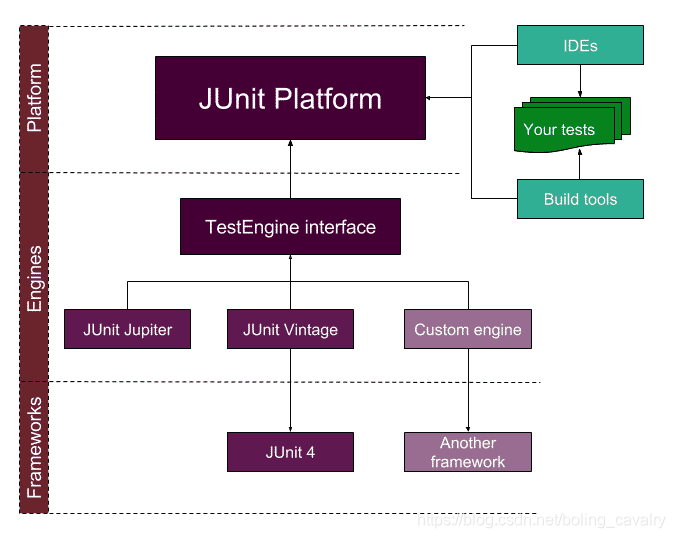
图片来自于网络
1.2、支持的java版本
JUnit 5在运行时需要Java 8(或更高版本)。但是,您仍然可以用老版本JDK编译的代码进行测试。
2、编写Tests
2.1、注解
所有注解在模块junit-jupiter-api的org.junit.jupiter.api包下。
| Annotation | Description |
|---|---|
@Test | 表示方法是一种测试方法。与JUnit 4的 @Test 注解不同,这个注解没有声明任何属性,因为JUnit Jupiter的测试扩展是基于它们自己的专用注解进行操作的。这些方法可以被继承,除非它们被重写。 |
@ParameterizedTest | 表示方法是 parameterized test(参数化测试)。这些方法可以被继承,除非它们被重写。 |
@RepeatedTest | 表示方法是 repeated test(重复测试)。这些方法可以被继承,除非它们被重写。 |
@TestFactory | 表示方法是用于dynamic tests(动态测试)的测试工厂。这些方法可以被继承,除非它们被重写。 |
@TestTemplate | 表示方法是用来根据注册providers(提供者)返回的调用上下文多次调用的templatefor test cases(测试用例的模板)。这些方法可以被继承,除非它们被重写。 |
@TestClassOrder | 配置 @Nested 测试类的执行顺序,可被继承 |
@TestMethodOrder | 配置类中测试方法的执行顺序,可被继承。 |
@TestInstance | 用于为带注解的测试类配置test instance lifecycle(测试实例生命周期)。这些注解可以被继承。 |
@DisplayName | 声明测试类或测试方法的自定义显示名称。这样的注解不能被继承。 |
@DisplayNameGeneration | 自定义DisplayName生成器 可被继承。 |
@BeforeEach | 表示在当前类中每个 @Test , @RepeatedTest , @ParameterizedTest 或@TestFactory 方法执行前都要执行这个方法;类似于JUnit 4的 @Before 。这些方法可以被继承,除非它们被重写。 |
@AfterEach | 表示在当前类中每个 @Test , @RepeatedTest , @ParameterizedTest 或@TestFactory 方法执行后都要执行这个方法;类似于JUnit 4的 @After 。这些方法可以被继承,除非它们被重写。 |
@BeforeAll | 表示在当前类中只运行一次,在所有@Test , @RepeatedTest ,@ParameterizedTest 或 @TestFactory 方法执行前运行;类似于JUnit 4的@BeforeClass 。这些方法可以被继承的(除非它们是隐藏的或覆盖的),并且必须是static 的(除非使用“per-class”test instance lifecycle (测试实例生命周期))。 |
@AfterAll | 表示在当前类中只运行一次,在所有@Test , @RepeatedTest ,@ParameterizedTest 或 @TestFactory 方法执行后运行;类似于JUnit 4的@AfterClass 。这些方法可以被继承的(除非它们是隐藏的或覆盖的),并且必须是static 的(除非使用“per-class”test instance lifecycle (测试实例生命周期))。 |
@Nested | 表示带注解的类是内嵌的非静态测试类。 @BeforeAll 和 @AfterAll 方法不能直接在 @Nested 测试类中使用,(除非使用“per-class”test instance lifecycle (测试实例生命周期))。这样的注解不能被继承。 |
@Tag | 用于在类或方法级别为过滤测试声明 tags ;类似于TestNG中的测试组或JUnit 4中的分类。此注解只能用于类级别不能用在方法级别。 |
@Disabled | 禁用测试类或测试方法;同 JUnit 4中的 @Ignore. 注解不能被继承。 |
@Timeout | 执行超时,则失败 test, test factory, test template, or lifecycle method . 注解可被集成 |
@ExtendWith | 用于注册声明式自定义 extensions (扩展)。注解不能被继承。 |
@RegisterExtension | 用于注册编程式自定义 extensions (扩展)。注解除非shadowed才能被继承。 |
@TempDir | 在一个声明周期方法或测试方法中通过字段注入或参数注入支持临时目录。在包org.junit.jupiter.api.io中 |
有些注解是实验性质的。Experimental APIs
2.1.1、元注解和注解组合
JUnit Jupiter注解可以用作元注解。这意味着您可以定义自己的组合注解,它将自动继承其元注解的语义。
import org.junit.jupiter.api.Tag;@Target({ ElementType.TYPE, ElementType.METHOD })
@Retention(RetentionPolicy.RUNTIME)
@Tag("fast")
public @interface Fast {
}@Fast    //自定义组合注解
@Test
void myFastTest() {// ...
}
类似于Spring的注解。
2.2、测试类和测试方法
测试类:任何包含至少一个方法的顶层类,静态成员类,@Nested类。测试类必须是非abstract的,并且有一个构造器。
测试方法:任何直接注解了或者元注解注解了 @Test, @RepeatedTest, @ParameterizedTest, @TestFactory, or @TestTemplate的实例方法。
生命周期(lifecycle)方法:任何直接注解了或者元注解注解了 @BeforeAll, @AfterAll, @BeforeEach, or @AfterEach的方法。
测试方法和生命周期方法可能定义在本类中,从超类继承或从接口继承。另外测试方法和生命周期方法必须是非abstract的,并且不能返回值(@TestFactory除外。)。
Test classes, test methods, and lifecycle methods 不必是
public, 但一定是非private.建议忽略
public,除非要让其他测试类访问。
标准测试类和测试方法
import static org.junit.jupiter.api.Assertions.fail;
import static org.junit.jupiter.api.Assumptions.assumeTrue;import org.junit.jupiter.api.AfterAll;
import org.junit.jupiter.api.AfterEach;
import org.junit.jupiter.api.BeforeAll;
import org.junit.jupiter.api.BeforeEach;
import org.junit.jupiter.api.Disabled;
import org.junit.jupiter.api.Test;class StandardTests {@BeforeAllstatic void initAll() {}@BeforeEachvoid init() {}@Testvoid succeedingTest() {}@Testvoid failingTest() {fail("a failing test");}@Test@Disabled("for demonstration purposes")void skippedTest() {// not executed}@Testvoid abortedTest() {assumeTrue("abc".contains("Z"));fail("test should have been aborted");}@AfterEachvoid tearDown() {}@AfterAllstatic void tearDownAll() {}}
2.3、显示名称
测试类和测试方法可以通过@DisplayName注解自定义DisplayName(显示名称)。“空格、特殊字符,甚至是表情符号”这些都可以在
测试运行器和测试报告显示出来。
2.3.1、DisplayName生成器
通过注解@DisplayNameGeneration自定义显示名生成器。
可以通过接口DisplayNameGenerator构造生成器。
默认提供的生成器。
| DisplayNameGenerator | Behavior |
|---|---|
Standard | 标准显示名 |
Simple | 移除无参数方法后面的括号 |
ReplaceUnderscores | 空格替换下划线 |
IndicativeSentences | 连接测试和类的名字构造一个句子 |
@DisplayNameGeneration(DisplayNameGenerator.ReplaceUnderscores.class)
@IndicativeSentencesGeneration(separator = " -> ", generator = DisplayNameGenerator.ReplaceUnderscores.class
2.3.2、设置默认Generator
可以在属性文件中通过配置参数junit.jupiter.displayname.generator.default 设置默认Generator,
junit.jupiter.displayname.generator.default = \org.junit.jupiter.api.DisplayNameGenerator$ReplaceUnderscores
优先规则
@DisplayName注解@DisplayNameGeneration注解- 默认
DisplayNameGenerator - 调用:org.junit.jupiter.api.DisplayNameGenerator.Standard
2.4、断言
JUnit Jupiter 附带了许多JUnit 4所拥有的断言方法,并添加了一些可以很好地使用Java 8 lambdas的方法。所有的JUnit Jupiter断言都是org.junit.jupiter.Assertions (断言类)中的静态方法。
org.junit.jupiter.api.Assertions.assertAll;
org.junit.jupiter.api.Assertions.assertEquals;
org.junit.jupiter.api.Assertions.assertNotNull;
org.junit.jupiter.api.Assertions.assertThrows;		//抛出异常
org.junit.jupiter.api.Assertions.assertTimeout;		//超时
org.junit.jupiter.api.Assertions.assertTimeoutPreemptively;
org.junit.jupiter.api.Assertions.assertTrue;
assertTimeout:Executable的execute方法执行完成后,再检查execute方法的耗时是否超过预期,这种方法的弊端是必须等待execute方法执行完成才知道是否超时
assertTimeoutPreemptively:方法也是用来检测代码执行是否超时的,但是避免了assertTimeout的必须等待execute执行完成的弊端,避免的方法是用一个新的线程来执行execute方法。假设是XXX线程,当等待时间超过入参timeout的值时,XXX线程就会被中断,并且测试结果是失败。
2.4.1、Kotlin Assertion Suppor
略
2.4.2、第三方断言库
AssertJ,
Hamcrest,
Truth
2.5、Assumptions
假设实际就是指定某个特定条件,假如不能满足假设条件,假设不会导致测试失败,只是终止当前测试。这也是假设与断言的最大区别,因为对于断言而言,会导致测试失败。
JUnit Jupiter 附带了JUnit 4提供的Assumptions(假设)方法的子集,并添加了一些可以很好地使用Java 8 lambdas的方法。所有的JUnit Jupiter假设都是 org.junit.jupiter.Assumptions 类的静态方法。
import static org.junit.jupiter.api.Assertions.assertEquals;
import static org.junit.jupiter.api.Assumptions.assumeTrue;
import static org.junit.jupiter.api.Assumptions.assumingThat;import example.util.Calculator;import org.junit.jupiter.api.Test;class AssumptionsDemo {private final Calculator calculator = new Calculator();@Testvoid testOnlyOnCiServer() {assumeTrue("CI".equals(System.getenv("ENV")));// remainder of test}@Testvoid testOnlyOnDeveloperWorkstation() {assumeTrue("DEV".equals(System.getenv("ENV")),() -> "Aborting test: not on developer workstation");// remainder of test}@Testvoid testInAllEnvironments() {//assumption 满足,则会执行后续的executable。assumingThat("CI".equals(System.getenv("ENV")),() -> {// perform these assertions only on the CI serverassertEquals(2, calculator.divide(4, 2));});// perform these assertions in all environmentsassertEquals(42, calculator.multiply(6, 7));}}
2.6、禁用测试
禁用测试类
@Disabled("Disabled until bug #99 has been fixed")
class DisabledClassDemo {@Testvoid testWillBeSkipped() {}}
禁用测试方法
class DisabledTestsDemo {@Disabled("Disabled until bug #42 has been resolved")@Testvoid testWillBeSkipped() {}@Testvoid testWillBeExecuted() {}}
2.7、条件测试执行
ExecutionCondition 扩展接口可以让developer根据条件启用或禁用测试。在包org.junit.jupiter.api.condition中定义了一些基于注解的条件。多个ExecutionCondition被注册,当其中一个返回disabled时,整个测试立即被disabled。每个注解都有disabledReason属性用于指示disabled的原因。
条件注解可以当做元注解。每种条件注解在一个测试上只能使用一次,不论是直接注解,间接注解,元注解。当有多次注解时,只有第一个生效。
2.7.1、Operating System Conditions
@EnabledOnOs、@DisabledOnOs
@Test
@EnabledOnOs(MAC)
void onlyOnMacOs() {// ...
}@TestOnMac
void testOnMac() {// ...
}@Test
@EnabledOnOs({ LINUX, MAC })
void onLinuxOrMac() {// ...
}@Test
@DisabledOnOs(WINDOWS)
void notOnWindows() {// ...
}@Target(ElementType.METHOD)
@Retention(RetentionPolicy.RUNTIME)
@Test
@EnabledOnOs(MAC)
@interface TestOnMac {
}
2.7.2、 Java Runtime Environment Conditions
@EnabledForJreRange、@EnabledOnJre、@DisabledOnJre、@DisabledForJreRange
@Test
@EnabledOnJre(JAVA_8)
void onlyOnJava8() {// ...
}@Test
@EnabledOnJre({ JAVA_9, JAVA_10 })
void onJava9Or10() {// ...
}@Test
@EnabledForJreRange(min = JAVA_9, max = JAVA_11)
void fromJava9to11() {// ...
}@Test
@DisabledOnJre(JAVA_9)
void notOnJava9() {// ...
}@Test
@DisabledForJreRange(min = JAVA_9)
void notFromJava9toCurrentJavaFeatureNumber() {// ...
}
2.7.3、System Property Conditions
@Test
@EnabledIfSystemProperty(named = "os.arch", matches = ".*64.*")
void onlyOn64BitArchitectures() {// ...
}@Test
@DisabledIfSystemProperty(named = "ci-server", matches = "true")
void notOnCiServer() {// ...
}
从 JUnit Jupiter 5.6,
@EnabledIfSystemProperty和@DisabledIfSystemProperty是可重复注解。
2.7.4、Environment Variable Conditions
@Test
@EnabledIfEnvironmentVariable(named = "ENV", matches = "staging-server")
void onlyOnStagingServer() {// ...
}@Test
@DisabledIfEnvironmentVariable(named = "ENV", matches = ".*development.*")
void notOnDeveloperWorkstation() {// ...
}
从 JUnit Jupiter 5.6,
@EnabledIfEnvironmentVariable和@DisabledIfEnvironmentVariable是可重复注解。
2.7.5、Custom Conditions
根据一个返回值为boolean的方法的返回值禁用或启用测试。
@Test
@EnabledIf("customCondition")
void enabled() {// ...
}@Test
@DisabledIf("customCondition")
void disabled() {// ...
}boolean customCondition() {return true;
}
也可以引用其他类的方法
class ExternalCustomConditionDemo {@Test@EnabledIf("example.ExternalCondition#customCondition")void enabled() {// ...}}class ExternalCondition {static boolean customCondition() {return true;}}
当
@EnabledIf,@DisabledIf注解在类上,引用的方法应该是static的。
2.8、Tagging and Filtering
可以对测试类和方法进行标记。这些标记稍后可以用于过滤 test discovery and execution(测试发现和执行)。
@Tag("fast")
@Tag("model")
class TaggingDemo {@Test@Tag("taxes")void testingTaxCalculation() {}}
2.9、测试执行顺序
在【单元测试的艺术】一书中,作者不建议单元测试之间有顺序依赖。
2.9.1、Method Order
虽然在真正的单元测试中,不建议测试之间有依赖,但是在一些场景需要强制顺序,例如集成测试,功能测试中测试顺序很重要,尤其是和@TestInstance(Lifecycle.PER_CLASS)结合在一起。
为了控制测试方法顺序,可以使用注解@TestMethodOrder或实现MethodOrder接口。
内部集成MethodOrderer实现。
MethodOrderer.DisplayName: 按DisplayName排序 (see display name generation precedence rules)MethodOrderer.MethodName:按方法名称加参数排序MethodOrderer.OrderAnnotation:@Order注解MethodOrderer.Random: 随机数值MethodOrderer.Alphanumeric: 同MethodOrderer.MethodName; deprecated in favor ofMethodOrderer.MethodName, to be removed in 6.0
@TestMethodOrder(OrderAnnotation.class)
class OrderedTestsDemo {@Test@Order(1)void nullValues() {// perform assertions against null values}@Test@Order(2)void emptyValues() {// perform assertions against empty values}@Test@Order(3)void validValues() {// perform assertions against valid values}}
设置默认MethodOrder
属性:junit.jupiter.testmethod.order.default
junit.jupiter.testmethod.order.default = \org.junit.jupiter.api.MethodOrderer$OrderAnnotation
2.9.2、Class Order
为了控制测试类顺序,可以使用注解@TestClassOrder或实现ClassOrder接口。
适用场景:
- “fail fast” 模式:前面失败的测试先执行
- “shortest test plan execution duration” 模式:执行时间长的先执行。
- 其他
内置ClassOrder
ClassOrderer.ClassName:类名排序ClassOrderer.DisplayName: DisplayName排序ClassOrderer.OrderAnnotation:@OrderannotationClassOrderer.Random: 随机排序
设置默认ClassOrder
属性:junit.jupiter.testclass.order.default
junit.jupiter.testclass.order.default = \org.junit.jupiter.api.ClassOrderer$OrderAnnotation
@TestClassOrder必须放在顶层类上,包括static 嵌套类,
@Nested测试类。顶层类的测试顺序是相对的。@Nested测试类是相对于在同一个封闭类中的测试类的。
@TestClassOrder(ClassOrderer.OrderAnnotation.class)
class OrderedNestedTestClassesDemo {@Nested@Order(1)class PrimaryTests {@Testvoid test1() {}}@Nested@Order(2)class SecondaryTests {@Testvoid test2() {}}
}
2.10、测试实例生命周期(Test Instance Lifecycle)
为了隔离地执行单独的测试方法,并且为了避免由于可变测试实例状态而产生的意外副作用,JUnit在执行每个测试方法之前创建了一个新的测试类的实例。这个“per-method”测试实例生命周期是JUnit Jupiter上的默认行为,类似于所有以前的JUnit版本。
如果您希望JUnit Jupiter在同一个测试实例上执行所有的测试方法,只需用@Testinstance(Lifecycle.PER_CLASS)注解您的测试类。当使用此模式时,每个测试类将创建一个新的测试实例。因此,如果您的测试方法依赖于实例变量存储的状态,那么您可能需要在@BeforeEach 或 @AfterEach 方法中重置该状态。
“per-class”模式在默认的“per-method”模式下有一些额外的好处。具体地说,在“per-class”模式下,可以在非静态方法和接口默认方法上声明@BeforeAll 和@AfterAll 。因此,“per-class”模式也使@BeforeAll 和@AfterAll 方法可以在@Nested 测试类中使用。
2.10.1、更改默认的测试实例生命周期(Changing the Default Test Instance Lifecycle)
如果测试类或测试接口没有用@TestInstance 进行注解,JUnit Jupiter 将使用默认的生命周期模式。标准的默认模式是PER_METHOD ;但是,可以更改整个测试计划执行的默认值。改变默认的测试实例的生命周期模式,只需将junit.jupiter.testinstance.lifecycle.default 配置参数设置为TestInstance.Lifecycle 中定义一个枚举常数的名称,名称忽略大小写的情况。这可以作为一个JVM系统属性,在LauncherDiscoveryRequest 中作为配置参数传递给 Launcher ,或者通过JUnit平台配置文件。
-Djunit.jupiter.testinstance.lifecycle.default=per_class
通过JUnit Platform 配置文件设置默认的测试实例生命周期模式是一个更健壮的解决方案,因为配置文件可以与您的项目一起被提交到版本控制系统,因此可以在IDE和您的构建软件中使用
junit.jupiter.testinstance.lifecycle.default = per_class
2.11、Nested Tests
嵌套测试赋予测试者更多的能力来表达几组测试之间的关系。示例:
@DisplayName("A stack")
class TestingAStackDemo {Stack只有非静态嵌套类(即内部类)可以充当
@Nested测试类。嵌套可以是任意深度的,而那些内部类被认为是测试类家族的完整成员,只有一个例外:@BeforeAll和@AfterAll方法在默认情况下不工作。原因是Java不允许内部类中的 static 成员。但是,可以通过使用TestInstance(Lifecycle.PER_CLASS)注解@Nested 的测试类来规避这个限制
2.12、方法和构造器的依赖注入
在所有以前的JUnit版本中,测试构造函数或方法都不允许有参数(至少不允许使用标准的Runner实现)。作为JUnit Jupiter的主要变化之一,测试构造函数和方法现在都允许有参数。这允许更大的灵活性,并支持构造函数和方法的依赖注入。
ParameterResolver (参数解析器)定义了用于测试扩展的API,它希望在运行时动态解析参数。如果测试构造函数或@Test, @TestFactory, @BeforeEach, @AfterEach, @BeforeAll 或者 @AfterAll方法接受一个参数,那么参数必须在运行时由注册的 ParameterResolver (参数解析器)解析。
目前有三个内置的解析器是自动注册的。
- TestInfoParameterResolver(测试信息参数解析器):
如果一个方法的参数类型是 TestInfo , TestInfoParameterResolver将提供TestInfo对应当前测试的实例作为参数的值。然后,TestInfo可以用来检索关于当前测试的信息,比如测试的显示名称、测试类、测试方法或相关的标记。显示名称是一个技术名称,例如测试类或测试方法的名称,或者通过@DisplayName配置的自定义名称。
TestInfo作为一个从JUnit 4中替代TestName规则的替代程序。以下演示了如何将TestInfo注入到测试构造函数、@BeforeEach方法和@Test方法中。
@DisplayName("TestInfo Demo")
class TestInfoDemo {//testInfo 传入的是 当前测试实例对应的TestInfoTestInfoDemo(TestInfo testInfo) {assertEquals("TestInfo Demo", testInfo.getDisplayName());}@BeforeEachvoid init(TestInfo testInfo) {String displayName = testInfo.getDisplayName();assertTrue(displayName.equals("TEST 1") || displayName.equals("test2()"));}@Test@DisplayName("TEST 1")@Tag("my-tag")void test1(TestInfo testInfo) {assertEquals("TEST 1", testInfo.getDisplayName());assertTrue(testInfo.getTags().contains("my-tag"));}@Testvoid test2() {}}
RepetitionInfoParameterResolver(重复信息参数解析器):
如果一个方法的参数是@RepeatedTest,@BeforeEach, 或 @AfterEach这种 RepetitionInfo(重复信息)类型的方法,RepetitionInfoParameterResolver将提供一个RepetitionInfo实例。然后可以使用重复信息检索关于当前重复的信息以及相应的@RepeatedTest的重复次数。但是请注意,RepetitionInfoParameterResolver不能在@RepeatedTest的上下文中以外注册。
TestReporterParameterResolver(测试报告参数解析器):
如果一个方法的参数类型是TestReporter, TestReporterParameterResolver将提供一个实例。可以使用TestReporter发布关于当前测试运行的额外数据。数据可以通过TestExecutionListener.reportingEntryPublished()消费,因此可以通过ide查看,也可以包括在报告中。
在JUnit Jupiter 中,您应该使用TestReporter。在JUnit 4中您可以将信息打印到stdout或stderr在。使用@RunWith(JUnitPlatform.class)将输出所有已报告的条目到stdout。
class TestReporterDemo {//TestReporter@Testvoid reportSingleValue(TestReporter testReporter) {testReporter.publishEntry("a status message");}@Testvoid reportKeyValuePair(TestReporter testReporter) {testReporter.publishEntry("a key", "a value");}@Testvoid reportMultipleKeyValuePairs(TestReporter testReporter) {Map values = new HashMap<>();values.put("user name", "dk38");values.put("award year", "1974");testReporter.publishEntry(values);}}
其他参数解析器必须通过通过
@ExtendWith注册适当的扩展(extensions)来显式启用。
@ExtendWith(RandomParametersExtension.class)
class MyRandomParametersTest {@Testvoid injectsInteger(@Random int i, @Random int j) {assertNotEquals(i, j);}@Testvoid injectsDouble(@Random double d) {assertEquals(0.0, d, 1.0);}}
public class SpringExtension implements BeforeAllCallback, AfterAllCallback, TestInstancePostProcessor,BeforeEachCallback, AfterEachCallback, BeforeTestExecutionCallback, AfterTestExecutionCallback,ParameterResolver {}
public class MockitoExtension implements TestInstancePostProcessor, BeforeEachCallback, AfterEachCallback, ParameterResolver {}//Mockito 注入
@ExtendWith(MockitoExtension.class)
class MyMockitoTest {@BeforeEachvoid init(@Mock Person person) {when(person.getName()).thenReturn("Dilbert");}@Testvoid simpleTestWithInjectedMock(@Mock Person person) {assertEquals("Dilbert", person.getName());}
}
2.13、测试接口和默认方法
JUnit Jupiter 允许@Test, @RepeatedTest, @ParameterizedTest, @TestFactory, @TestTemplate, @BeforeEach,@AfterEach在接口 default 方法上声明。如果测试接口或测试类被用@TestInstance(Lifecycle.PER_CLASS) 注解,@BeforeAll 和 @AfterAll可以在测试接口static 方法或接口default 方法中声明。
@TestInstance(Lifecycle.PER_CLASS)
interface TestLifecycleLogger {static final Logger logger = Logger.getLogger(TestLifecycleLogger.class.getName());@BeforeAlldefault void beforeAllTests() {logger.info("Before all tests");}@AfterAlldefault void afterAllTests() {logger.info("After all tests");}@BeforeEachdefault void beforeEachTest(TestInfo testInfo) {logger.info(() -> String.format("About to execute [%s]",testInfo.getDisplayName()));}@AfterEachdefault void afterEachTest(TestInfo testInfo) {logger.info(() -> String.format("Finished executing [%s]",testInfo.getDisplayName()));}}
@ExtendWith 和 @Tag可以在测试接口上声明,以便实现接口的类自动继承其标记和扩展。在测试执行回调之前和
之后。
@Tag("timed")
@ExtendWith(TimingExtension.class)
interface TimeExecutionLogger {
}
在您的测试类中,您可以实现这些测试接口以使它们应用。
class TestInterfaceDemo implements TestLifecycleLogger,TimeExecutionLogger, TestInterfaceDynamicTestsDemo {@Testvoid isEqualValue() {assertEquals(1, "a".length(), "is always equal");}}
这个特性的另一个可能的应用是编写接口契约的测试。即测试类实现多个测试接口。
测试类要override测试接口的非default方法。
2.14、Repeated Tests
JUnit Jupiter 通过使用 @RepeatedTest 来注解一个方法并指定所需重复的总数,从而提供了重复测试指定次数的能力。重复测试的每次调用行为都类似于执行常规的@Test 方法,完全支持相同的生命周期回调和扩展。
@RepeatedTest(10)
void repeatedTest() {// ...
}
除了指定重复次数之外,还可以通过@RepeatedTest 注解的name属性为每次重复配置一个自定义显示名称。此
外,显示名称可以是由静态文本和动态占位符组合而成的模式。目前支持以下占位符。
- {displayName}: 显示@RepeatedTest 方法的名称
- {currentRepetition}: 当前重复计数
- {totalRepetitions}: 重复的总数
一个给定的重复的默认显示名称是基于以下模式生成的:
"repetition {currentRepetition} of {totalRepetitions}"
class RepeatedTestsDemo {private Logger logger = // ...@BeforeEachvoid beforeEach(TestInfo testInfo, RepetitionInfo repetitionInfo) {int currentRepetition = repetitionInfo.getCurrentRepetition();int totalRepetitions = repetitionInfo.getTotalRepetitions();String methodName = testInfo.getTestMethod().get().getName();logger.info(String.format("About to execute repetition %d of %d for %s", //currentRepetition, totalRepetitions, methodName));}@RepeatedTest(10)void repeatedTest() {// ...}@RepeatedTest(5)void repeatedTestWithRepetitionInfo(RepetitionInfo repetitionInfo) {assertEquals(5, repetitionInfo.getTotalRepetitions());}//自定义name@RepeatedTest(value = 1, name = "{displayName} {currentRepetition}/{totalRepetitions}")@DisplayName("Repeat!")void customDisplayName(TestInfo testInfo) {assertEquals("Repeat! 1/1", testInfo.getDisplayName());}//name 长名称@RepeatedTest(value = 1, name = RepeatedTest.LONG_DISPLAY_NAME)@DisplayName("Details...")void customDisplayNameWithLongPattern(TestInfo testInfo) {assertEquals("Details... :: repetition 1 of 1", testInfo.getDisplayName());}@RepeatedTest(value = 5, name = "Wiederholung {currentRepetition} von {totalRepetitions}")void repeatedTestInGerman() {// ...}}
2.15、参数化测试(Parameterized Tests)
参数化测试可以用不同的参数 多次运行测试。它们像普通的@Test 方法一样被声明,但是使用@ParameterizedTest 注解。此外,您必须声明至少一个参数源,它将为每次调用提供参数。
警告:参数化测试目前是一个实验特性。
@ParameterizedTest
@ValueSource(strings = { "racecar", "radar", "able was I ere I saw elba" })
void palindromes(String candidate) {assertTrue(StringUtils.isPalindrome(candidate));
}
2.15.1、Required Setup
artifactId:junit-jupiter-params
2.15.2、使用参数
Parameterized 测试方法一般直接使用Source中配置的参数,一个对一个的在Source 索引与方法参数索引中匹配。也可以把多个参数集成在一个对象中作为参数。
规则:
- 定义0个或多个索引的参数
- 定义0个或多个aggregators
- 定义0个或多个ParameterResolver
2.15.3、参数的源(Sources of Arguments)
包:org.junit.jupiter.params.provider定义了很多Source。
@ValueSource
@ValueSource 可能是最简单的来源之一。它允许您指定一组原始类型的字面量(String、int、long或double),并且只能用于每次调用时提供一个参数。
shortbyteintlongfloatdoublecharbooleanjava.lang.Stringjava.lang.Class
@ParameterizedTest
@ValueSource(ints = { 1, 2, 3 })
void testWithValueSource(int argument) {assertTrue(argument > 0 && argument < 4);
}
Null and Empty Sources
@NullSource:提供null作为参数。不能用于primitive类型
@EmptySource:提供空值。适用类型:java.lang.String, java.util.List, java.util.Set, java.util.Map, primitive arrays (e.g., int[], char[][], etc.), object arrays (e.g.,String[], Integer[][], etc.).
@NullAndEmptySource:上面2个的组合
@EnumSource
@EnumSource 提供了一种方便的方法来使用Enum 常量。该注解提供了一个可选的names 参数,允许您指定使用
哪个常量。如果省略,所有的常量将在下面的例子中使用。
@ParameterizedTest
@EnumSource(ChronoUnit.class)
//所有ChronoUnit的实例
void testWithEnumSource(TemporalUnit unit) {assertNotNull(unit);
}@ParameterizedTest
@EnumSource
//不指定 是哪个枚举,则会failed。
void testWithEnumSourceWithAutoDetection(ChronoUnit unit) {assertNotNull(unit);
}@ParameterizedTest
//names,指定值
@EnumSource(names = { "DAYS", "HOURS" })
void testWithEnumSourceInclude(ChronoUnit unit) {assertTrue(EnumSet.of(ChronoUnit.DAYS, ChronoUnit.HOURS).contains(unit));
}
@EnumSource 注解还提供了一个可选的参数mode ,使细粒度的控制常数被传递到测试方法。例如,可以在枚举常
量池中排除名称,或者在以下示例中指定正则表达式。
@ParameterizedTest
//排除指定的2个值
@EnumSource(mode = EXCLUDE, names = { "ERAS", "FOREVER" })
void testWithEnumSourceExclude(ChronoUnit unit) {assertFalse(EnumSet.of(ChronoUnit.ERAS, ChronoUnit.FOREVER).contains(unit));
}
@ParameterizedTest
//包含匹配的值
@EnumSource(mode = MATCH_ALL, names = "^.*DAYS$")
void testWithEnumSourceRegex(ChronoUnit unit) {assertTrue(unit.name().endsWith("DAYS"));
}
@MethodSource
@MethodSource 允许引用测试类的一个或多个工厂方法。这些方法必须返回流( Stream )、迭代( Iterable )、迭代器( Iterator )或参数数组。此外,这些方法不能接受任何参数。默认情况下,这些方法必须是静态的( static ),除非测试类被@TestInstance(Lifecycle.PER_CLASS) 注解。
@ParameterizedTest
@MethodSource("stringProvider")
void testWithSimpleMethodSource(String argument) {assertNotNull(argument);
}
static Stream stringProvider() {return Stream.of("foo", "bar");
}
如果没有通过@MethodSource显示的指定一个工厂方法,则默认查找与@ParameterizedTest方法名称相同的工厂方法。
@ParameterizedTest
@MethodSource
void testWithDefaultLocalMethodSource(String argument) {assertNotNull(argument);
}static Stream testWithDefaultLocalMethodSource() {return Stream.of("apple", "banana");
}
如果一个测试方法声明多个参数,您则需要返回一个Arguments 实例的集合或流,如下所示。请注意, Arguments.of(Object…) 是在Arguments 接口中定义的静态工厂方法
@ParameterizedTest
@MethodSource("stringIntAndListProvider")
void testWithMultiArgMethodSource(String str, int num, List list) {assertEquals(5, str.length());assertTrue(num >=1 && num <=2);assertEquals(2, list.size());
}static Stream stringIntAndListProvider() {return Stream.of(//对应了testWithMultiArgMethodSource 方法的3个参数。arguments("apple", 1, Arrays.asList("a", "b")),arguments("lemon", 2, Arrays.asList("x", "y")));
}
静态方法需要用全限定名称
class ExternalMethodSourceDemo {@ParameterizedTest@MethodSource("example.StringsProviders#tinyStrings")void testWithExternalMethodSource(String tinyString) {// test with tiny string}
}class StringsProviders {static Stream tinyStrings() {return Stream.of(".", "oo", "OOO");}
}
@CsvSource
@CsvSource 允许以逗号分隔值来表达参数列表(即: String literals)。
@ParameterizedTest
@CsvSource({"apple,         1",   //第一次,参数用逗号分隔"banana,        2",   //第二次"'lemon, lime', 0xF1","strawberry,    700_000"
})
void testWithCsvSource(String fruit, int rank) {assertNotNull(fruit);assertNotEquals(0, rank);
}
如果语言支持文本块(java 15支持),则可以:
@ParameterizedTest
@CsvSource(textBlock = """apple,         1banana,        2'lemon, lime', 0xF1strawberry,    700_000
""")
void testWithCsvSource(String fruit, int rank) {// ...
}
可以使用属性:delimiterString指定分隔字符串
@CsvSource 使用单引号作(‘)为其引用字符。在上面的例子和下表中看到’baz,qux’ 的为字符串。一个空的’’ 引用的值结果为空字符串;然而,完全的空值被解释为null 引用。如果目标类型的空引用是原始类型,就会引发ArgumentConversionException 如表中的({ "foo, " }) 。通过指定nullValues,一个通用字符会被解释为null。
一个没有引起来的空值会被转换为
null无论是否设置nullValues属性.
| Example Input | Resulting Argument List |
|---|---|
@CsvSource({ "apple, banana" }) | "apple", "banana" |
@CsvSource({ "apple, 'lemon, lime'" }) | "apple", "lemon, lime" |
@CsvSource({ "apple, ''" }) | "apple", "" |
@CsvSource({ "apple, " }) | "apple", null |
@CsvSource(value = { "apple, banana, NIL" }, nullValues = "NIL") | "apple", "banana", null |
@CsvSource(value = { " apple , banana" }, ignoreLeadingAndTrailingWhitespace = false) | " apple ", " banana" |
@CsvFileSource
@CsvFileSource允许从类路径中使用CSV文件。CSV文件中的每一行都产生一个参数化测试的调用。
@ParameterizedTest
@CsvFileSource(resources = "/two-column.csv", numLinesToSkip = 1)
void testWithCsvFileSourceFromClasspath(String country, int reference) {assertNotNull(country);assertNotEquals(0, reference);
}@ParameterizedTest
@CsvFileSource(files = "src/test/resources/two-column.csv", numLinesToSkip = 1)
void testWithCsvFileSourceFromFile(String country, int reference) {assertNotNull(country);assertNotEquals(0, reference);
}
Country, reference
Sweden, 1
Poland, 2
"United States of America", 3
France, 700_000
与
@CsvSource中使用的语法相反,@CsvFileSource使用了双引号(“)作为引用字符
@ArgumentsSource
可以使用@ArgumentsSource 指定自定义、可重用的ArgumentsProvider 。
@ParameterizedTest
@ArgumentsSource(MyArgumentsProvider.class)
void testWithArgumentsSource(String argument) {assertNotNull(argument);
}
public class MyArgumentsProvider implements ArgumentsProvider {@Overridepublic Stream provideArguments(ExtensionContext context) {return Stream.of("apple", "banana").map(Arguments::of);}
}
2.15.4、参数转换(Argument Conversion)
拓宽转换(Widening Conversion)
@ValueSource(ints = { 1, 2, 3 }),不只用于int,也可以用于long,float,double。
隐式转换(Implicit Conversion)
为了支持像@CsvSource这样的用例,JUnit Jupiter 提供了一些内置隐式类型转换器。转换过程取决于每个方法参数的声明类型。
@ParameterizedTest
@ValueSource(strings = "SECONDS")  //自动转换为枚举
void testWithImplicitArgumentConversion(ChronoUnit argument) {assertNotNull(argument.name());
}
| Target Type | Example |
|---|---|
boolean/Boolean | "true" → true |
byte/Byte | "15", "0xF", or "017" → (byte) 15 |
char/Character | "o" → 'o' |
short/Short | "15", "0xF", or "017" → (short) 15 |
int/Integer | "15", "0xF", or "017" → 15 |
long/Long | "15", "0xF", or "017" → 15L |
float/Float | "1.0" → 1.0f |
double/Double | "1.0" → 1.0d |
Enum subclass | "SECONDS" → TimeUnit.SECONDS |
java.io.File | "/path/to/file" → new File("/path/to/file") |
java.lang.Class | "java.lang.Integer" → java.lang.Integer.class (use $ for nested classes, e.g. "java.lang.Thread$State") |
java.lang.Class | "byte" → byte.class (primitive types are supported) |
java.lang.Class | "char[]" → char[].class (array types are supported) |
java.math.BigDecimal | "123.456e789" → new BigDecimal("123.456e789") |
java.math.BigInteger | "1234567890123456789" → new BigInteger("1234567890123456789") |
java.net.URI | "https://junit.org/" → URI.create("https://junit.org/") |
java.net.URL | "https://junit.org/" → new URL("https://junit.org/") |
java.nio.charset.Charset | "UTF-8" → Charset.forName("UTF-8") |
java.nio.file.Path | "/path/to/file" → Paths.get("/path/to/file") |
java.time.Duration | "PT3S" → Duration.ofSeconds(3) |
java.time.Instant | "1970-01-01T00:00:00Z" → Instant.ofEpochMilli(0) |
java.time.LocalDateTime | "2017-03-14T12:34:56.789" → LocalDateTime.of(2017, 3, 14, 12, 34, 56, 789_000_000) |
java.time.LocalDate | "2017-03-14" → LocalDate.of(2017, 3, 14) |
java.time.LocalTime | "12:34:56.789" → LocalTime.of(12, 34, 56, 789_000_000) |
java.time.MonthDay | "--03-14" → MonthDay.of(3, 14) |
java.time.OffsetDateTime | "2017-03-14T12:34:56.789Z" → OffsetDateTime.of(2017, 3, 14, 12, 34, 56, 789_000_000, ZoneOffset.UTC) |
java.time.OffsetTime | "12:34:56.789Z" → OffsetTime.of(12, 34, 56, 789_000_000, ZoneOffset.UTC) |
java.time.Period | "P2M6D" → Period.of(0, 2, 6) |
java.time.YearMonth | "2017-03" → YearMonth.of(2017, 3) |
java.time.Year | "2017" → Year.of(2017) |
java.time.ZonedDateTime | "2017-03-14T12:34:56.789Z" → ZonedDateTime.of(2017, 3, 14, 12, 34, 56, 789_000_000, ZoneOffset.UTC) |
java.time.ZoneId | "Europe/Berlin" → ZoneId.of("Europe/Berlin") |
java.time.ZoneOffset | "+02:30" → ZoneOffset.ofHoursMinutes(2, 30) |
java.util.Currency | "JPY" → Currency.getInstance("JPY") |
java.util.Locale | "en" → new Locale("en") |
java.util.UUID | "d043e930-7b3b-48e3-bdbe-5a3ccfb833db" → UUID.fromString("d043e930-7b3b-48e3-bdbe-5a3ccfb833db") |
Fallback String-to-Object Conversion
String转对象,如果类提供了工厂方法或工厂构造器,则会自动调用
- 工厂方法:non-private,static,接收一个string作为参数,返回一个类的实例。
- 工厂构造器:non-private,static,接收一个string作为参数。
如果多个工厂方法被发现,则都被忽略。如果一个工厂方法和工厂构造器都存在,则工厂方法生效。
@ParameterizedTest
@ValueSource(strings = "42 Cats")
void testWithImplicitFallbackArgumentConversion(Book book) {assertEquals("42 Cats", book.getTitle());
}
public class Book {private final String title;//不是工厂构造器。private Book(String title) {this.title = title;}//工厂方法public static Book fromTitle(String title) {return new Book(title);}public String getTitle() {return this.title;}
}
显式转换(Explicit Conversion)
可以显式地指定一个ArgumentConverter 来使用@ConvertWith 注解来使用某个参数。
@ParameterizedTest
@EnumSource(ChronoUnit.class)
void testWithExplicitArgumentConversion(//指定转换器@ConvertWith(ToStringArgumentConverter.class) String argument) {assertNotNull(ChronoUnit.valueOf(argument));
}
public class ToStringArgumentConverter extends SimpleArgumentConverter {@Overrideprotected Object convert(Object source, Class targetType) {assertEquals(String.class, targetType, "Can only convert to String");//枚举类型if (source instanceof Enum) {return ((Enum) source).name();}//其他类型return String.valueOf(source);}
}
指定类型
public class ToLengthArgumentConverter extends TypedArgumentConverter {protected ToLengthArgumentConverter() {super(String.class, Integer.class);}@Overrideprotected Integer convert(String source) {return (source != null ? source.length() : 0);}}
内部转换器
JavaTimeArgumentConverter
@ParameterizedTest
@ValueSource(strings = { "01.01.2017", "31.12.2017" })
void testWithExplicitJavaTimeConverter(@JavaTimeConversionPattern("dd.MM.yyyy") LocalDate argument) {assertEquals(2017, argument.getYear());
}
2.15.5、参数聚合(Argument Aggregation)
默认,每个argument provider对于一个@ParameterizedTest方法返回单个方法参数。因此,argument sources提供参数个数与方法参数个数匹配。
在这种情况,ArgumentsAccessor代替了多个参数,可以通过一个参数获取提供的所有参数。
@ParameterizedTest
@CsvSource({"Jane, Doe, F, 1990-05-20","John, Doe, M, 1990-10-22"
})
void testWithArgumentsAccessor(ArgumentsAccessor arguments) {Person person = new Person(arguments.getString(0),arguments.getString(1),arguments.get(2, Gender.class),arguments.get(3, LocalDate.class));if (person.getFirstName().equals("Jane")) {assertEquals(Gender.F, person.getGender());}else {assertEquals(Gender.M, person.getGender());}assertEquals("Doe", person.getLastName());assertEquals(1990, person.getDateOfBirth().getYear());
}
Custom Aggregators
自定义Aggregator,需要实现接口ArgumentsAggregator ,并通过@AggregateWith注册。
@ParameterizedTest
@CsvSource({"Jane, Doe, F, 1990-05-20","John, Doe, M, 1990-10-22"
})
void testWithArgumentsAggregator(//参数聚合成了Person@AggregateWith(PersonAggregator.class) Person person) {// perform assertions against person
}
public class PersonAggregator implements ArgumentsAggregator {//返回Person@Overridepublic Person aggregateArguments(ArgumentsAccessor arguments, ParameterContext context) {return new Person(arguments.getString(0),arguments.getString(1),arguments.get(2, Gender.class),arguments.get(3, LocalDate.class));}
}
还可以使用元注解,来减少重复代码
@ParameterizedTest
@CsvSource({"Jane, Doe, F, 1990-05-20","John, Doe, M, 1990-10-22"
})
void testWithCustomAggregatorAnnotation(
//自定义的注解。
@CsvToPerson Person person) {// perform assertions against person
}
@Retention(RetentionPolicy.RUNTIME)
@Target(ElementType.PARAMETER)
@AggregateWith(PersonAggregator.class)  //元注解
public @interface CsvToPerson {
}
2.15.6、自定义显示名
默认情况下,参数化测试调用的显示名称包含调用索引和特定调用的所有参数的字符串表示。但是,可以通过@ParameterizedTest 注解的name 属性来定制调用显示名称。
@DisplayName("Display name of container")
@ParameterizedTest(name = "{index} ==> the rank of ''{0}'' is {1}")
@CsvSource({ "apple, 1", "banana, 2", "'lemon, lime', 3" })
void testWithCustomDisplayNames(String fruit, int rank) {
}
占位符
| Placeholder | Description |
|---|---|
{displayName} | the display name of the method |
{index} | the current invocation index (1-based) |
{arguments} | the complete, comma-separated arguments list |
{argumentsWithNames} | the complete, comma-separated arguments list with parameter names |
{0}, {1}, … | an individual argument |
当包含
{arguments}时,字符串可能被截断,可以通过junit.jupiter.params.displayname.argument.maxlength配置,默认是512.
当使用@MethodSource 或 @ArgumentSource,可以给参数设置name。
@DisplayName("A parameterized test with named arguments")
@ParameterizedTest(name = "{index}: {0}")
@MethodSource("namedArguments")
void testWithNamedArguments(File file) {
}static Stream namedArguments() {//设置参数的namereturn Stream.of(arguments(Named.of("An important file", new File("path1"))),arguments(Named.of("Another file", new File("path2"))));
}//
/*
A parameterized test with named arguments ✔
├─ 1: An important file ✔
└─ 2: Another file ✔
*/
设置默认name pattern:
junit.jupiter.params.displayname.default = {index}
优先规则:
@ParameterizedTest的name属性junit.jupiter.params.displayname.default值DEFAULT_DISPLAY_NAME常量
2.15.7、生命周期和互操作性(Lifecycle and Interoperability)
参数化测试的每次调用都有与常规的@Test 方法相同的生命周期。例如, @BeforeEach 方法将在每次调用之前执行。与动态测试(Dynamic Tests)类似,调用将在IDE的测试树中逐一显示。可以在同一个测试类中混合常规的@Test方法和@ParameterizedTest方法。
可以使用ParameterResolver 扩展@ParameterizedTest 方法。但是,由 参数源 解决的方法参数需要首先出现在参数列表中。由于测试类可能包含常规测试,以及带有不同参数列表的参数化测试,来自参数源的值不会解析为生命周期方法(例如@BeforeEach )和测试类构造函数。
@BeforeEach
void beforeEach(TestInfo testInfo) {// ...
}@ParameterizedTest
@ValueSource(strings = "apple")
void testWithRegularParameterResolver(String argument, TestReporter testReporter) {testReporter.publishEntry("argument", argument);
}@AfterEach
void afterEach(TestInfo testInfo) {// ...
}
2.16、测试模板(Test Templates)
@TestTemplate 方法不是常规的测试用例,而是测试用例的模板。因此,根据注册提供者返回的调用上下文的数量,它被设计为多次调用。因此,它必须与注册TestTemplateInvocationContextProvider 的扩展一起使用。测试模板方法的每次调用都像一个常规的@Test 方法的执行,完全支持相同的生命周期回调和扩展。
Repeated Tests 和 Parameterized Tests 是内置的测试模板。
2.17、动态测试(Dynamic Tests)
JUnit Jupiter 上的标准@Test 注解与JUnit 4中的@Test 注解非常相似。都描述了实现测试用例的方法。这些测试用例是静态的,它们在编译时被完全指定,而且它们的行为不能被运行时发生的任何事情改变。假设(Assumption)提供了一种基本形式的动态行为,但在他们的表现力上却被限制。
除了这些标准测试之外,JUnit Jupiter还引入了一种全新的测试编程模型。这种新的测试是一个动态测试,它是在运行时通过一个与@TestFactory 注解的工厂方法生成的。
与@Test 方法相比, @TestFactory 方法本身并不是一个测试用例,而是一个测试用例的工厂。因此,动态测试是工厂的产品。从技术上讲, @TestFactory 方法必须返回DynamicNode 实例,或者DynamicNode 实例的流( Stream )、集合( Collection )、迭代器( Iterable 、Iterator ), DynamicNode 的实例子类是DynamicContainer 和DynamicTest 。DynamicContainer 实例由一个显示名称和一个动态子节点列表组成,可以创建任意嵌套的动态节点层次结构。然后, DynamicTest 实例将被延迟执行,从而支持动态甚至不确定的测试用例生成。
@TestFactory 返回的任何流( Stream )都将通过调用stream.close() 来适当地关闭,这样就可以安全地使用诸如Files.lines() 这样的资源。
与@Test 方法一样, @TestFactory 方法不能是私有( private )的或静态的( static ),也可以选择性地声明由参数解析器( ParameterResolvers )解析的参数。
DynamicTest 是在运行时生成的测试用例。它由一个显示名称和Executable组成。Executable 是一个@FunctionalInterface ,这意味着动态测试的实现可以以lambda表达式或方法引用提供。
动态测试生命周期
动态测试的执行生命周期与标准
@Test用例的执行生命周期完全不同。具体地说,对于单个动态测试没有生命周期回调。这意味着@BeforeEach和@AfterEach方法及其相应的扩展回调是为@TestFactory方法执行的,而不是为每个动态测试执行的。换句话说,如果从测试实例中的一个lambda表达式中的测试实例中访问字段,那么这些字段将不会被相同的@TestFactory方法所生成的单个动态测试执行的回调方法或扩展所重置。
在JUnit Jupiter 5.0.2中,动态测试必须始终由工厂方法创建;然而,这可能会在稍后的版本中得到注册工具的补充。
2.17.1、动态测试的例子
class DynamicTestsDemo {private final Calculator calculator = new Calculator();// This will result in a JUnitException!//第一个方法返回无效的返回类型。由于在运行时无效的返回类型不会被检测到,因此在运行时检测到JUnitException@TestFactoryList dynamicTestsWithInvalidReturnType() {return Arrays.asList("Hello");}//DynamicTest的Collection@TestFactoryCollection dynamicTestsFromCollection() {return Arrays.asList(dynamicTest("1st dynamic test", () -> assertTrue(isPalindrome("madam"))),dynamicTest("2nd dynamic test", () -> assertEquals(4, calculator.multiply(2, 2))));}//DynamicTest的Iterable@TestFactoryIterable dynamicTestsFromIterable() {return Arrays.asList(dynamicTest("3rd dynamic test", () -> assertTrue(isPalindrome("madam"))),dynamicTest("4th dynamic test", () -> assertEquals(4, calculator.multiply(2, 2))));}//DynamicTest的Iterator@TestFactoryIterator dynamicTestsFromIterator() {return Arrays.asList(dynamicTest("5th dynamic test", () -> assertTrue(isPalindrome("madam"))),dynamicTest("6th dynamic test", () -> assertEquals(4, calculator.multiply(2, 2)))).iterator();}//DynamicTest的Array@TestFactoryDynamicTest[] dynamicTestsFromArray() {return new DynamicTest[] {dynamicTest("7th dynamic test", () -> assertTrue(isPalindrome("madam"))),dynamicTest("8th dynamic test", () -> assertEquals(4, calculator.multiply(2, 2)))};}//DynamicTest的Stream@TestFactoryStream dynamicTestsFromStream() {return Stream.of("racecar", "radar", "mom", "dad").map(text -> dynamicTest(text, () -> assertTrue(isPalindrome(text))));}//DynamicTest的Stream@TestFactoryStream dynamicTestsFromIntStream() {// Generates tests for the first 10 even integers.return IntStream.iterate(0, n -> n + 2).limit(10).mapToObj(n -> dynamicTest("test" + n, () -> assertTrue(n % 2 == 0)));}@TestFactoryStream generateRandomNumberOfTestsFromIterator() {// Generates random positive integers between 0 and 100 until// a number evenly divisible by 7 is encountered.Iterator inputGenerator = new Iterator() {Random random = new Random();int current;@Overridepublic boolean hasNext() {current = random.nextInt(100);return current % 7 != 0;}@Overridepublic Integer next() {return current;}};// Generates display names like: input:5, input:37, input:85, etc.Function displayNameGenerator = (input) -> "input:" + input;// Executes tests based on the current input value.ThrowingConsumer testExecutor = (input) -> assertTrue(input % 7 != 0);// Returns a stream of dynamic tests.return DynamicTest.stream(inputGenerator, displayNameGenerator, testExecutor);}@TestFactoryStream dynamicTestsFromStreamFactoryMethod() {// Stream of palindromes to checkStream inputStream = Stream.of("racecar", "radar", "mom", "dad");// Generates display names like: racecar is a palindromeFunction displayNameGenerator = text -> text + " is a palindrome";// Executes tests based on the current input value.ThrowingConsumer testExecutor = text -> assertTrue(isPalindrome(text));// Returns a stream of dynamic tests.return DynamicTest.stream(inputStream, displayNameGenerator, testExecutor);}@TestFactoryStream dynamicTestsFromStreamFactoryMethodWithNames() {// Stream of palindromes to checkStream> inputStream = Stream.of(named("racecar is a palindrome", "racecar"),named("radar is also a palindrome", "radar"),named("mom also seems to be a palindrome", "mom"),named("dad is yet another palindrome", "dad"));// Returns a stream of dynamic tests.return DynamicTest.stream(inputStream,text -> assertTrue(isPalindrome(text)));}@TestFactoryStream dynamicTestsWithContainers() {return Stream.of("A", "B", "C").map(input -> dynamicContainer("Container " + input, Stream.of(dynamicTest("not null", () -> assertNotNull(input)),dynamicContainer("properties", Stream.of(dynamicTest("length > 0", () -> assertTrue(input.length() > 0)),dynamicTest("not empty", () -> assertFalse(input.isEmpty())))))));}@TestFactoryDynamicNode dynamicNodeSingleTest() {return dynamicTest("'pop' is a palindrome", () -> assertTrue(isPalindrome("pop")));}@TestFactoryDynamicNode dynamicNodeSingleContainer() {return dynamicContainer("palindromes",Stream.of("racecar", "radar", "mom", "dad").map(text -> dynamicTest(text, () -> assertTrue(isPalindrome(text)))));}}
2.17.2、URI Test Sources for Dynamic Tests
TestSource可用于表示本地代码,
DynamicTest.dynamicTest(String, URI, Executable)
DynamicContainer.dynamicContainer(String, URI, Stream)
URI可以被转化为以下TestSource实现。
-
ClasspathResourceSource
classpath:/test/foo.xml?line=20,column=2. -
DirectorySource
-
FileSource
-
MethodSource
method:org.junit.Foo#bar(java.lang.String, java.lang.String[]). -
ClassSource
class:org.junit.Foo?line=42. -
UriSource
2.18、 Timeouts
@Timeout可以定义在test,factory test,test template, lifecycle method,如果执行超时就fail。默认单位是minute。可以指定。
class TimeoutDemo {@BeforeEach@Timeout(5)void setUp() {// fails if execution time exceeds 5 seconds}@Test@Timeout(value = 100, unit = TimeUnit.MILLISECONDS)void failsIfExecutionTimeExceeds100Milliseconds() {// fails if execution time exceeds 100 milliseconds}}
@Timeout用在@TestFactory表示工厂方法在指定时间返回,而不会应用在返回的动态测试上。
配置:
-
junit.jupiter.execution.timeout.defaultDefault timeout for all testable and lifecycle methods
-
junit.jupiter.execution.timeout.testable.method.defaultDefault timeout for all testable methods
-
junit.jupiter.execution.timeout.test.method.defaultDefault timeout for
@Testmethods -
junit.jupiter.execution.timeout.testtemplate.method.defaultDefault timeout for
@TestTemplatemethods -
junit.jupiter.execution.timeout.testfactory.method.defaultDefault timeout for
@TestFactorymethods -
junit.jupiter.execution.timeout.lifecycle.method.defaultDefault timeout for all lifecycle methods
-
junit.jupiter.execution.timeout.beforeall.method.defaultDefault timeout for
@BeforeAllmethods -
junit.jupiter.execution.timeout.beforeeach.method.defaultDefault timeout for
@BeforeEachmethods -
junit.jupiter.execution.timeout.aftereach.method.defaultDefault timeout for
@AfterEachmethods -
junit.jupiter.execution.timeout.afterall.method.defaultDefault timeout for
@AfterAllmethods
More specific configuration parameters override less specific ones. For example, junit.jupiter.execution.timeout.test.method.default overrides junit.jupiter.execution.timeout.testable.method.default which overrides junit.jupiter.execution.timeout.default.
| Parameter value | Equivalent annotation |
|---|---|
42 | @Timeout(42) |
42 ns | @Timeout(value = 42, unit = NANOSECONDS) |
42 μs | @Timeout(value = 42, unit = MICROSECONDS) |
42 ms | @Timeout(value = 42, unit = MILLISECONDS) |
42 s | @Timeout(value = 42, unit = SECONDS) |
42 m | @Timeout(value = 42, unit = MINUTES) |
42 h | @Timeout(value = 42, unit = HOURS) |
42 d | @Timeout(value = 42, unit = DAYS) |
2.18.1、Using @Timeout for Polling Tests
??
2.18.2、Disable @Timeout Globally
junit.jupiter.execution.timeout.mode = enabled(默认)|disabled|disabled_on_debug
2.19、并行执行
实验性质的特性
启用:
junit.jupiter.execution.parallel.enabled = true
junit.jupiter.execution.parallel.mode.default = concurrent
junit.jupiter.execution.parallel.mode.classes.default = concurrent
2.10、内置Extension
2.10.1、TempDirectory (实验性质)
@Test
void writeItemsToFile(@TempDir Path tempDir) throws IOException {Path file = tempDir.resolve("test.txt");new ListWriter(file).write("a", "b", "c");assertEquals(singletonList("a,b,c"), Files.readAllLines(file));
}@Test
void copyFileFromSourceToTarget(@TempDir Path source, @TempDir Path target) throws IOException {Path sourceFile = source.resolve("test.txt");new ListWriter(sourceFile).write("a", "b", "c");Path targetFile = Files.copy(sourceFile, target.resolve("test.txt"));assertNotEquals(sourceFile, targetFile);assertEquals(singletonList("a,b,c"), Files.readAllLines(targetFile));
}
3、从Junit4迁移
参考:https://junit.org/junit5/docs/current/user-guide/#migrating-from-junit4
4、运行测试
参考:https://junit.org/junit5/docs/current/user-guide/#running-tests
附录
参考
官网:https://junit.org/junit5/docs/current/user-guide/#overview
Stack Overflow:https://stackoverflow.com/questions/tagged/junit5
gitter:https://gitter.im/junit-team/junit5
SpringExtension:https://github.com/spring-projects/spring-framework/blob/c705e32a887b55a746afb4c93cb4c6a031eae4c5/spring-test/src/main/java/org/springframework/test/context/junit/jupiter/SpringExtension.java
MockitoExtension:https://github.com/mockito/mockito/blob/release/2.x/subprojects/junit-jupiter/src/main/java/org/mockito/junit/jupiter/MockitoExtension.java#L112