

如何让小型双轮差速底盘实现视觉循迹功能
1. 任务描述
在机器人小车(R023d)上搭载摄像头,摄像头采集图像信息并通过WiFi将信息传递给PC端,然后PC端使用OpenCV对摄像头读取到的视频进行灰度化、高斯滤波、腐蚀、膨胀等处理,使图像分为黑白两色。PC端进行图像信息处理并将处理结果传递为下位机,下位机接收上位机处理的图像信息结果后便会控制小车相应运动,小车运动包含前进、左转、右转、停止。
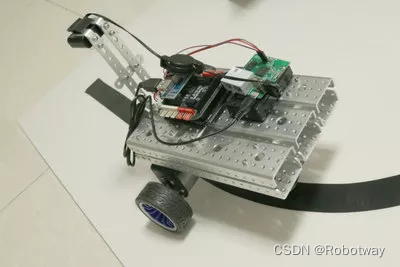
2. 电子硬件
在这个示例中,我们采用了以下硬件,请大家参考:
| 主控板 | Basra(兼容Arduino Uno) |
| 扩展板 | Bigfish2.1 |
| 电池 | 7.4V锂电池 |
| 通信 | 2510通信转接板 |
| WiFi路由器 | |
| 其它 | 摄像头x1、计算机x1 |
3. 功能实现
视觉小车巡黑线工作原理:
(1) 摄像头采集图像信息;
(2) 通过 WiFi 将图像信息传递给 PC 端(VS2015 配置的 OpenCV 环境);
(3) 在 PC 端使用 OpenCV 对摄像头读取到的视频进行灰度化、高斯滤波、腐蚀、膨胀等处理,使图像分为黑白两色,采用 RGB 颜色模型作为黑白颜色判断;
(4) 将图像对称分成左右两半,分别判断左、右计算检测在显示的摄像范围内的黑色像素区域所占比例=黑色像素范围/显示的摄像范围;
(5) 比较两侧黑色像素区域所占比例大小确定前进方向,如果左侧比例大于右侧,则小车左偏离,进行右转;
(6) PC端进行图像信息处理,将处理结果传递为下位机,下位机控制小车进行相应的运动;
3.1硬件连接
接线说明:
① 将2510通信转接板连接到扩展板的扩展坞上面;
② 用3根母对母杜邦线将2510通信转接板与WiFi路由器连接起来,GND-GND、RX-RX、TX-TX;
③ 找到1根USB线,一端连接到2510通信转接板接口上,另一端连接到WiFi路由器USB接口上;
④ 将摄像头线连接到WiFi路由器接口上。
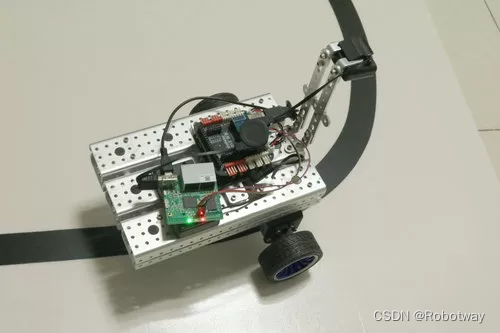
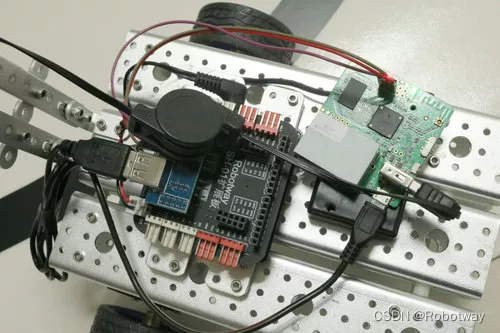
3.2示例程序
编程环境:Arduino 1.8.19
① 下位机例程:
下位机接收上位机处理的图像信息结果控制小车相应运动,小车运动包含前进、左转、右转、停止。
参考例程代码(car.ino)如下:
/*------------------------------------------------------------------------------------版权说明:Copyright 2023 Robottime(Beijing) Technology Co., Ltd. All Rights Reserved.Distributed under MIT license.See file LICENSE for detail or copy athttps://opensource.org/licenses/MITby 机器谱 2023-02-02 https://www.robotway.com/-----------------------------------------------------------------------------------/*wift car:2019/08/19:JNleft: 9, 5;right: 10, 6; */const String FORWARD = "F";const String BACK = "B";const String LEFT = "L";const String RIGHT = "R";const String STOP = "S";int speed_left = 41;int speed_right = 41;void setup() {Serial.begin(9600);pinMode(5, OUTPUT);pinMode(6, OUTPUT);pinMode(9, OUTPUT);pinMode(10, OUTPUT);Stop();delay(1000);}void loop() {String data = SerialRead();//if(data != ""){ if(data == FORWARD)Forward();else if(data == BACK)Back();else if(data == LEFT)Left();else if(data == RIGHT)Right(); else if(data == STOP)Stop();// }}String SerialRead(){String str;while(Serial.available()){str += char(Serial.read());}return str;}void Forward(){analogWrite(9, speed_left);analogWrite(5, 0);analogWrite(6, 0);analogWrite(10, speed_right);}void Back(){analogWrite(9, 0);analogWrite(5, speed_left);analogWrite(6, speed_right);analogWrite(10, 0);}void Left(){analogWrite(9, 0);analogWrite(5, speed_left);analogWrite(6, 0);analogWrite(10, speed_right);}void Right(){analogWrite(9, speed_left);analogWrite(5, 0);analogWrite(6, speed_right);analogWrite(10, 0);}void Stop(){analogWrite(9, speed_left);analogWrite(5, speed_left);analogWrite(6, speed_right);analogWrite(10,speed_right);}② 上位机例程:
上位机(Visual Studio 2015.net下配置OpenCV环境)进行图像信息处理。下面提供一个参考例程(MainWindow.xaml.cs),大家可尝试根据实验效果改写。
/*******************************************************************************************版权说明:Copyright 2023 Robottime(Beijing) Technology Co., Ltd. All Rights Reserved.Distributed under MIT license.See file LICENSE for detail or copy athttps://opensource.org/licenses/MITby 机器谱 2023-02-02 https://www.robotway.com/---------------------------------------------------------------------------------------using System;using System.IO;using System.Collections.Generic;using System.Linq;using System.Text;using System.Threading.Tasks;using System.Windows;using System.Windows.Controls;using System.Windows.Data;using System.Windows.Documents;using System.Windows.Input;using System.Windows.Media;using System.Windows.Media.Imaging;using System.Windows.Navigation;using System.Windows.Shapes;using System.Windows.Media.Animation;using System.Threading;using OpenCvSharp;using System.Drawing;using System.Drawing.Imaging;using System.Net;using System.Net.Sockets;namespace Tracking_Car{/// /// Tracking_Car/// public partial class MainWindow : System.Windows.Window{//定义视频,控制地址以及控制端口变量static string CameraIp = "http://192.168.8.1:8083/?action=stream";static string ControlIp = "192.168.8.1";static string Port = "2001";//定义上位机发送的控制命令变量//定义命令变量string CMD_FORWARD = "", CMD_TURN_LEFT = "", CMD_TURN_RIGHT = "", CMD_STOP = "";/** 指针角度对应各颜色* 25 -> 红色* 90 -> 绿色* 150 -> 蓝色*/int ANGLE_LEFT = 0;int ANGLE_GO = 0;int ANGLE_RIGHT = 0;//黑色像素在左右两侧所占比例double numOfleft = 0.0;double numOfright = 0.0;//创建视频图像实例VideoCapture capture = new VideoCapture(CameraIp); //图像大小:宽度 X 长度 = 160 X 120;Mat frame = new Mat(); //存储视频每一帧图像像素Mat result = new Mat(); //存储二值化图像static byte[] kernelValues = { 0, 1, 0, 1, 1, 1, 0, 1, 0 }; // cross (+)Mat kernel = new Mat(3, 3, MatType.CV_8UC1, kernelValues);//图像中心线坐标int x1, y1, x2, y2;//窗口面积float area;//视频显示切换变量Boolean isChange = false;//循迹开始开关变量Boolean isBegin = false;public MainWindow(){InitializeComponent();}private void Window_Loaded(object sender, RoutedEventArgs e){Assignment();}//变量赋值函数private void Assignment(){ANGLE_LEFT = 25;ANGLE_GO = 90;ANGLE_RIGHT = 150;rateLeft.Height = 10;rateRight.Height = 10;x1 = 80;y1 = 0;x2 = x1;y2 = 120;area = 160 * 120 / 2;CMD_FORWARD = "F";CMD_TURN_LEFT = "L";CMD_TURN_RIGHT = "R";CMD_STOP = "S";}/// /// MatToBitmap(Mat image)/// public static Bitmap MatToBitmap(Mat image){return OpenCvSharp.Extensions.BitmapConverter.ToBitmap(image);}/// /// BitmapToBitmapImage(System.Drawing.Bitmap bitmap)/// public static BitmapImage BitmapToBitmapImage(Bitmap bitmap){using (MemoryStream stream = new MemoryStream()){bitmap.Save(stream, ImageFormat.Png); //格式选Bmp时,不带透明度stream.Position = 0;BitmapImage result = new BitmapImage();result.BeginInit();// According to MSDN, "The default OnDemand cache option retains access to the stream until the image is needed."// Force the bitmap to load right now so we can dispose the stream.result.CacheOption = BitmapCacheOption.OnLoad;result.StreamSource = stream;result.EndInit();result.Freeze();return result;}}//颜色指示动画函数int angelCurrent = 0;private void ColorIndicate(int where){RotateTransform rt = new RotateTransform();rt.CenterX = 130;rt.CenterY = 200;this.indicatorPin.RenderTransform = rt;double timeAnimation = Math.Abs(angelCurrent - where) * 5;DoubleAnimation da = new DoubleAnimation(angelCurrent, where, new Duration(TimeSpan.FromMilliseconds(timeAnimation)));da.AccelerationRatio = 0.8;rt.BeginAnimation(RotateTransform.AngleProperty, da);switch (where){case 25:dirDisplay.Content = "左转";break;case 90:dirDisplay.Content = "前进";break;case 150:dirDisplay.Content = "右转";break;default:dirDisplay.Content = "方向指示";break;}angelCurrent = where;}//检测函数private void ColorDetect() {//将摄像头RGB图像转化为灰度图,便于后续算法处理Mat gray = frame.CvtColor(ColorConversionCodes.BGR2GRAY);//进行高斯滤波Mat binary = gray.Threshold(0, 255, ThresholdTypes.Otsu | ThresholdTypes.Binary);//闭运算,先膨胀后腐蚀,消除小型黑洞Cv2.Dilate(binary, binary, null);Cv2.Erode(binary, binary, kernel);result = binary.Clone();result.Line(new OpenCvSharp.Point(x1, y1), new OpenCvSharp.Point(x2, y2), new Scalar(255, 255, 255), 1);float rateOfleft = 0, rateOfRight = 0;var indexer = result.GetGenericIndexer();for (int i = 0; i < result.Rows; i++) {for (int j = 0; j < result.Cols; j++) {int B = indexer[i, j][0];int G = indexer[i, j][1];int R = indexer[i, j][2];if (B == 0 && G == 0 && R == 0) {if (j <= x1) {numOfleft++;}else{numOfright++;}}}}rateOfleft = (float)(numOfleft) / area * 100;rateOfRight = (float)(numOfright) / area * 100;rateLeft.Height = rateOfleft;rateRight.Height = rateOfRight;numOfleft = 0;numOfright = 0;}//命令发送函数void SendData(string data){try{IPAddress ips = IPAddress.Parse(ControlIp.ToString());//("192.168.8.1");IPEndPoint ipe = new IPEndPoint(ips, Convert.ToInt32(Port.ToString()));//把ip和端口转化为IPEndPoint实例Socket c = new Socket(AddressFamily.InterNetwork, SocketType.Stream, ProtocolType.Tcp);//创建一个Socketc.Connect(ipe);//连接到服务器byte[] bs = Encoding.ASCII.GetBytes(data);c.Send(bs, bs.Length, 0);//发送测试信息c.Close();}catch (Exception e){MessageBox.Show(e.Message);}}//方向指示更新及命令发送private void CommandSend() {double l = rateLeft.Height;double r = rateRight.Height;if (isBegin) {if (Math.Abs(l - r) < 20) //两侧黑色轨迹基本相同,前进{ColorIndicate(ANGLE_GO);SendData(CMD_FORWARD);}else if ((l - r) < -50) //左侧黑色轨迹小于右侧,右转{ColorIndicate(ANGLE_RIGHT);SendData(CMD_TURN_RIGHT);}else if ((l - r) > 50) //右侧黑色轨迹小于左侧,左转{ColorIndicate(ANGLE_LEFT);SendData(CMD_TURN_LEFT);}}}//视频显示函数private void ThreadCapShow(){while (true){try{capture.Read(frame); // same as cvQueryFrameif (frame.Empty())break;this.Dispatcher.Invoke(new Action(delegate{if (isChange){//检测图像左右两侧黑色像素所占的比例,并显示图像ColorDetect();originImage.Source = BitmapToBitmapImage(MatToBitmap(result));CommandSend();result = null;}else{originImage.Source = BitmapToBitmapImage(MatToBitmap(frame));}}));//Cv2.WaitKey(100);//bitimg = null;}catch { }}}//加载视频private void loadBtn_Click(object sender, RoutedEventArgs e){if (originImage.Source != null) return;Thread m_thread = new Thread(ThreadCapShow);m_thread.IsBackground = true;m_thread.Start();}//切换视频显示,显示检测结果private void changeBtn_Click(object sender, RoutedEventArgs e){if (!isChange){isChange = true;changeBtn.Content = "返回";}else{isChange = false;changeBtn.Content = "切换";//指针角度归零ColorIndicate(0);rateLeft.Height = 10;rateRight.Height = 10;result = null;}}//循迹开始private void bgeinBtn_Click(object sender, RoutedEventArgs e){isBegin = true;}//循迹停止private void stopBtn_Click(object sender, RoutedEventArgs e){isBegin = false;SendData(CMD_STOP);}}} 4. 资料下载
资料内容:
①【R023】-视觉循迹-程序源代码
②【R023】-视觉循迹-样机3D文件
资料下载地址:https://www.robotway.com/h-col-113.html
想了解更多机器人开源项目资料请关注 机器谱网站