

十二、面向切面编程AOP
IoC使软件组件松耦合。AOP让你能够捕捉系统中经常使用的功能,把它转化成组件。
AOP(Aspect Oriented Programming):面向切面编程,面向方面编程。(AOP是一种编程技术)
AOP是对OOP的补充延伸。
AOP底层使用的就是动态代理来实现的。
Spring的AOP使用的动态代理是:JDK动态代理 + CGLIB动态代理技术。Spring在这两种动态代理中灵活切换,如果是代理接口,会默认使用JDK动态代理,如果要代理某个类,这个类没有实现接口,就会切换使用CGLIB。当然,你也可以强制通过一些配置让Spring只使用CGLIB。
1 AOP介绍
一般一个系统当中都会有一些系统服务,例如:日志、事务管理、安全等。这些系统服务被称为:交叉业务
这些交叉业务几乎是通用的,不管你是做银行账户转账,还是删除用户数据。日志、事务管理、安全,这些都是需要做的。
如果在每一个业务处理过程当中,都掺杂这些交叉业务代码进去的话,存在两方面问题:
第一:交叉业务代码在多个业务流程中反复出现,显然这个交叉业务代码没有得到复用。并且修改这些交叉业务代码的话,需要修改多处。
第二:程序员无法专注核心业务代码的编写,在编写核心业务代码的同时还需要处理这些交叉业务。
使用AOP可以很轻松的解决以上问题。
AOP的思想:
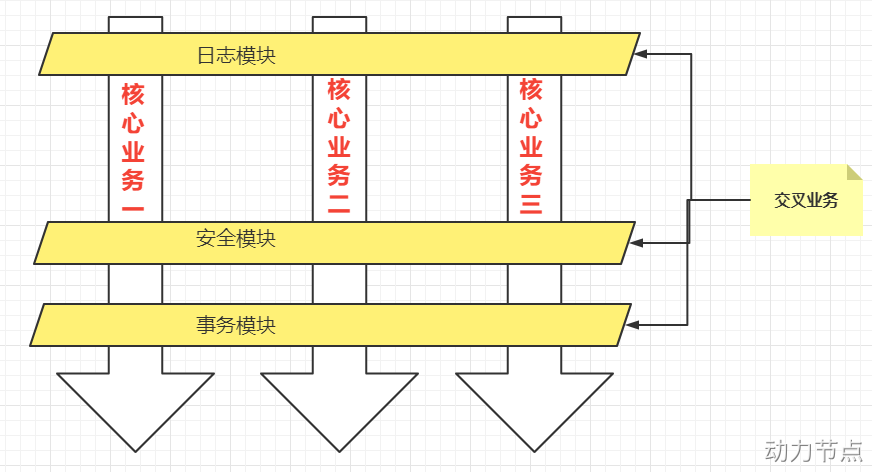
用一句话总结AOP:将与核心业务无关的代码独立的抽取出来,形成一个独立的组件,然后以横向交叉的方式应用到业务流程当中的过程被称为AOP。
AOP的优点:
● 第一:代码复用性增强。
● 第二:代码易维护。
● 第三:使开发者更关注业务逻辑。
2 AOP的七大术语
public class UserService{public void do1(){System.out.println("do 1");}public void do2(){System.out.println("do 2");}public void do3(){System.out.println("do 3");}public void do4(){System.out.println("do 4");}public void do5(){System.out.println("do 5");}// 核心业务方法public void service(){try{// Joinpoint连接点do1(); // Pointcut切点// Joinpoint连接点do2(); // Pointcut切点// Joinpoint连接点do3(); // Pointcut切点// Joinpoint连接点do5(); // Pointcut切点// Joinpoint连接点} catch (Exception e){// Joinpoint连接点} finally {// Joinpoint连接点}}
}
// 1. 连接点(Joinpoint)描述的是位置
// 2. 切点(Pointcut)本质上就是方法(真正织入切面的那个方法叫做切点)
// 3. 通知(Advice),通知又叫做增强。就是具体增强的那个代码
//           例如: 具体的事务代码, 日志代码, 安全代码
//           具体的这个代码是通知
//           通知描述的是代码
// 4. 切面: 切点 + 通知
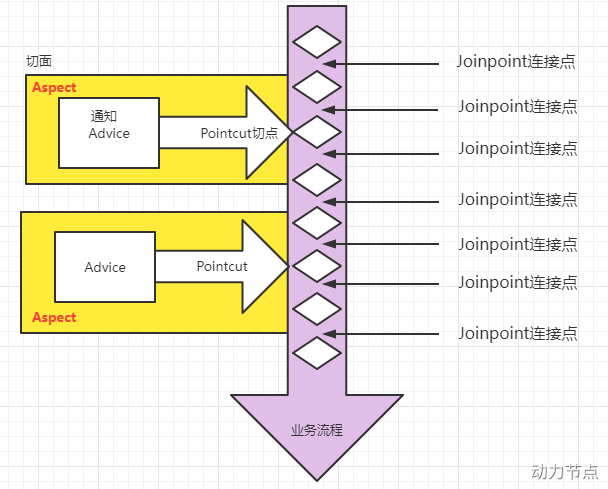
- 连接点 Joinpoint
- 在程序的整个执行流程中,可以织入切面的位置。方法的执行前后,异常抛出之后等位置。
- 切点 Pointcut
- 在程序执行流程中,真正织入切面的方法。(一个切点对应多个连接点)
- 通知 Advice
- 通知又叫增强,就是具体你要织入的代码。
- 通知包括:
- 前置通知
- 后置通知
- 环绕通知
- 异常通知
- 最终通知
- 切面 Aspect
- 切点 + 通知就是切面。
- 织入 Weaving
- 把通知应用到目标对象上的过程。
- 代理对象 Proxy
- 一个目标对象被织入通知后产生的新对象。
- 目标对象 Target
- 被织入通知的对象。
- 被织入通知的对象。
3 切点表达式
切点表达式用来定义通知(Advice)往哪些方法上切入。
切入点表达式语法格式:
execution([访问控制权限修饰符] 返回值类型 [全限定类名]方法名(形式参数列表) [异常])
访问控制权限修饰符:
- 可选项。
- 没写,就是4个权限都包括。
- 写public就表示只包括公开的方法。
返回值类型:
- 必填项。
- * 表示返回值类型任意。
全限定类名:
- 可选项。
- 两个点“..”代表当前包以及子包下的所有类。
- 省略时表示所有的类。
方法名:
- 必填项。
- *表示所有方法。
- set*表示所有的set方法。
形式参数列表:
- 必填项
- () 表示没有参数的方法
- (..) 参数类型和个数随意的方法
- (*) 只有一个参数的方法
- (*, String) 第一个参数类型随意,第二个参数是String的。
异常:
- 可选项。
- 省略时表示任意异常类型。
理解以下的切点表达式:
service包下所有的类中以delete开始的所有方法
execution(public * com.powernode.mall.service.*.delete*(..))
mall包下所有的类的所有的方法
execution(* com.powernode.mall..*(..))
所有类的所有方法
execution(* *(..))
4 使用Spring的AOP
Spring对AOP的实现包括以下3种方式:
- 第一种方式:Spring框架结合AspectJ框架实现的AOP,基于注解方式。
- 第二种方式:Spring框架结合AspectJ框架实现的AOP,基于XML方式。
- 第三种方式:Spring框架自己实现的AOP,基于XML配置方式。
使用Spring+AspectJ的AOP需要引入依赖
org.springframework spring-context 6.0.2 org.springframework spring-aspects 6.0.2 Spring配置文件中添加context命名空间和aop命名空间
1 基于AspectJ的AOP注解式开发
定义目标类以及目标方法
package com.powernode.spring6.service;import org.springframework.stereotype.Service;/*** 目标类*/
@Service("userService")
public class UserService {// 目标方法public void login(){System.out.println("正在登录");/*if (1 == 1){throw new RuntimeException("运行时异常");}*/}
}
定义切面类
通知类型
通知类型包括:
- 前置通知:@Before 目标方法执行之前的通知
- 后置通知:@AfterReturning 目标方法执行之后的通知
- 环绕通知:@Around 目标方法之前添加通知,同时目标方法执行之后添加通知。
- 异常通知:@AfterThrowing 发生异常之后执行的通知
- 最终通知:@After 放在finally语句块中的通知
package com.powernode.spring6.service;import org.aspectj.lang.ProceedingJoinPoint;
import org.aspectj.lang.annotation.*;
import org.springframework.stereotype.Component;/*** 切面*/
@Component("logAspect")
// 使用@Aspect注解标注切面类
@Aspect
public class LogAspect {// 切面 = 通知 + 切点// 通知就是增强,具体的要编写的增强代码// @Before标注的方法就是一个前置通知// 括号里写切点表达式@Before("execution(* com.powernode.spring6.service.UserService.*(..))")public void beforeAdvice(){System.out.println("前置通知");}// 后置通知@AfterReturning("execution(* com.powernode.spring6.service.UserService.*(..))")public void afterReturningAdvice(){System.out.println("后置通知");}// 环绕通知(环绕是最大的通知,在前置通知之前,在后置通知之后)@Around("execution(* com.powernode.spring6.service.UserService.*(..))")public void aroundAdvice(ProceedingJoinPoint joinPoint) throws Throwable {// 前面代码System.out.println("前环绕");// 执行目标joinPoint.proceed();// 后面代码System.out.println("后环绕");}// 异常通知@AfterThrowing("execution(* com.powernode.spring6.service.UserService.*(..))")public void afterThrowingAdvice(){System.out.println("异常通知");}// 最终通知(finally语句块中的通知)@After("execution(* com.powernode.spring6.service.UserService.*(..))")public void afterAdvice(){System.out.println("最终通知");}
}
在spring配置文件中添加组建扫描
proxy-target-class=“true” 表示采用cglib动态代理。
proxy-target-class=“false” 表示采用jdk动态代理。默认值是false。即使写成false,当没有接口的时候,也会自动选择cglib生成代理类。
测试
package com.powernode.spring6.test;import com.powernode.spring6.service.UserService;
import org.junit.Test;
import org.springframework.context.ApplicationContext;
import org.springframework.context.support.ClassPathXmlApplicationContext;public class SpringAOPTest {@Testpublic void testBefore(){ApplicationContext applicationContext = new ClassPathXmlApplicationContext("spring.xml");UserService userService = applicationContext.getBean("userService", UserService.class);userService.login();}
}
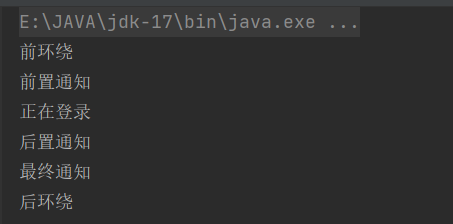
放开目标方法中的异常:
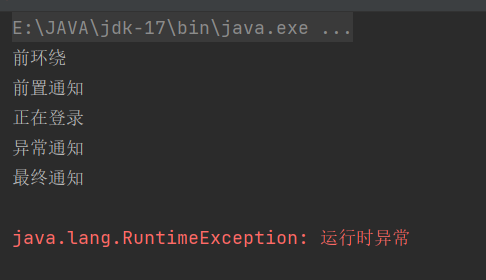
当发生异常之后,最终通知也会执行,因为最终通知@After会出现在finally语句块中。
出现异常之后,后置通知和环绕通知的结束部分不会执行。
切面的先后顺序
多个切面,可能有的切面控制事务,有的记录日志,有的进行安全控制,如果多个切面的话,顺序如何控制:可以使用@Order注解来标识切面类,为@Order注解的value指定一个整数型的数字,数字越小,优先级越高。
/*** 切面*/
@Component("logAspect")
// 使用@Aspect注解标注切面类
@Aspect
@Order(0)
public class LogAspect {
}
定义通用切点表达式
/*** 切面*/
@Component("logAspect")
// 使用@Aspect注解标注切面类
@Aspect
@Order(0)
public class LogAspect {// 定义通用的切点表达式@Pointcut("execution(* com.powernode.spring6.service.UserService.*(..))")public void Point(){// 这个方法只是一个标记,方法名随意,方法体也不需要写代码}// 前置通知@Before("Point()")public void beforeAdvice(){System.out.println("前置通知");}
非本类中使用
package com.powernode.spring6.service;import org.aspectj.lang.annotation.Aspect;
import org.aspectj.lang.annotation.Before;
import org.springframework.core.annotation.Order;
import org.springframework.stereotype.Component;/*** 安全切面*/
@Aspect
@Component
@Order(1)
public class SecurityAspect {@Before("com.powernode.spring6.service.LogAspect.Point()")public void beforeAdvice(){System.out.println("安全前置通知");}
}
全注解式开发AOP
就是编写一个类,在这个类上面使用大量注解来代替spring的配置文件
package com.powernode.spring6.service;import org.springframework.context.annotation.ComponentScan;
import org.springframework.context.annotation.Configuration;
import org.springframework.context.annotation.EnableAspectJAutoProxy;// 代替spring.xml文件
@Configuration
// 组件扫描
@ComponentScan({"com.powernode.spring6.service"})
// 启用aspectj的自动代理
@EnableAspectJAutoProxy(proxyTargetClass = true)
public class Spring6Config {
}
测试
@Test
public void testNoXMl(){ApplicationContext applicationContext = new AnnotationConfigApplicationContext(Spring6Config.class);UserService userService = applicationContext.getBean("userService", UserService.class);userService.login();
}
2 基于XML配置方式的AOP
编写目标类
package com.powernode.spring6.service.xml;
// 目标对象
public class OrderService {// 目标方法public void logout(){System.out.println("正在退出");}
}
编写切面类,并且编写通知
package com.powernode.spring6.service.xml;import org.aspectj.lang.ProceedingJoinPoint;// 切面
public class TimerAspect {public void aroundAdvice(ProceedingJoinPoint joinPoint) throws Throwable {// 前环绕long begin = System.currentTimeMillis();// 目标joinPoint.proceed();// 后环绕long end = System.currentTimeMillis();System.out.println("耗时"+(end - begin)+"毫秒");}
}
编写spring配置文件
测试程序
package com.powernode.spring6.test;import com.powernode.spring6.service.xml.OrderService;
import org.junit.Test;
import org.springframework.context.ApplicationContext;
import org.springframework.context.support.ClassPathXmlApplicationContext;public class SpringAOPXMLTest {@Testpublic void testXml(){ApplicationContext applicationContext = new ClassPathXmlApplicationContext("springXml.xml");OrderService orderService = applicationContext.getBean("orderService", OrderService.class);orderService.logout();}
}
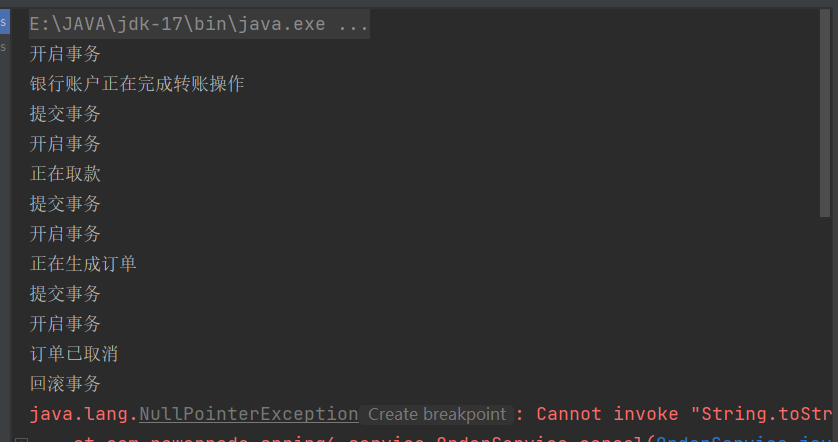
5 AOP的实际案例:事务处理
控制事务的代码就是和业务逻辑没有关系的“交叉业务”。采用AOP思想。可以把控制事务的代码作为环绕通知,切入到目标类的方法当中。
有两个业务类
package com.powernode.spring6.service;import org.springframework.stereotype.Service;
// 业务类
// 目标对象
@Service
public class AccountService {// 目标方法// 转账的业务方法public void transfer(){System.out.println("银行账户正在完成转账操作");}// 取款的业务方法public void withdraw(){System.out.println("正在取款");}
}
package com.powernode.spring6.service;import org.springframework.stereotype.Service;
// 业务类
// 目标对象
@Service
public class OrderService {// 目标方法// 生成订单的业务方法public void generate(){System.out.println("正在生成订单");}// 取消订单的业务方法public void cancel(){System.out.println("订单已取消");// 模拟异常String s = null;s.toString();}
}
给以上两个业务类的4个方法添加事务控制代码,使用AOP来完成:
package com.powernode.spring6.service;import org.aspectj.lang.ProceedingJoinPoint;
import org.aspectj.lang.annotation.Around;
import org.aspectj.lang.annotation.Aspect;
import org.springframework.stereotype.Component;
// 事务切面类
@Component
@Aspect
public class TransactionAspect {@Around("execution(* com.powernode.spring6.service..*(..))")public void aroundAdvice(ProceedingJoinPoint joinPoint){try {// 前环绕System.out.println("开启事务");// 执行目标joinPoint.proceed();// 后环绕System.out.println("提交事务");} catch (Throwable e) {System.out.println("回滚事务");e.printStackTrace();}}
}
编写spring配置文件
编写测试程序:
package com.powernode.spring6.test;import com.powernode.spring6.service.AccountService;
import com.powernode.spring6.service.OrderService;
import org.junit.Test;
import org.springframework.context.ApplicationContext;
import org.springframework.context.support.ClassPathXmlApplicationContext;public class AOPRealAppTest {@Testpublic void testTransaction(){ApplicationContext applicationContext = new ClassPathXmlApplicationContext("spring.xml");AccountService accountService = applicationContext.getBean("accountService", AccountService.class);OrderService orderService = applicationContext.getBean("orderService", OrderService.class);accountService.transfer();accountService.withdraw();orderService.generate();orderService.cancel();}
}
6 AOP的实际案例:安全日志
需求:凡事在系统中进行修改操作的,删除操作的,新增操作的,都要记录下来。因为这几个操作是属于危险行为。例如有业务类和业务方法:
package com.powernode.spring6.biz;import org.springframework.stereotype.Service;@Service
public class UserService {public void savaUser(){System.out.println("新增用户");}public void deleteUser(){System.out.println("删除用户");}public void modifyUser(){System.out.println("修改用户");}public void getUser(){System.out.println("查询用户");}
}
package com.powernode.spring6.biz;import org.springframework.stereotype.Service;@Service
public class VipService {public void savaVip(){System.out.println("新增会员");}public void deleteVip(){System.out.println("删除会员");}public void modifyVip(){System.out.println("修改会员");}public void getVip(){System.out.println("查询会员");}
}
package com.powernode.spring6.biz;import org.aspectj.lang.JoinPoint;
import org.aspectj.lang.annotation.Aspect;
import org.aspectj.lang.annotation.Before;
import org.aspectj.lang.annotation.Pointcut;
import org.springframework.stereotype.Component;import java.text.SimpleDateFormat;
import java.util.Date;
@Component
@Aspect
public class SecurityLogAspect {@Pointcut("execution(* com.powernode.spring6.biz..sava*(..))")public void savaPointcut(){}@Pointcut("execution(* com.powernode.spring6.biz..delete*(..))")public void deletePointcut(){}@Pointcut("execution(* com.powernode.spring6.biz..modify*(..))")public void modifyPointcut(){}@Before("savaPointcut() || deletePointcut() || modifyPointcut()")public void beforeAdvice(JoinPoint joinPoint){// 系统实际SimpleDateFormat sdf = new SimpleDateFormat("yyyy-MM-dd HH:mm:ss SSS");String nowTime = sdf.format(new Date());// 输出日志信息System.out.println(nowTime + " 张三操作了: " + joinPoint.getSignature().getDeclaringTypeName() + "." + joinPoint.getSignature().getName());}
}
@Test
public void testSecurityLog(){ApplicationContext applicationContext = new ClassPathXmlApplicationContext("spring.xml");UserService userService = applicationContext.getBean("userService", UserService.class);VipService vipService = applicationContext.getBean("vipService", VipService.class);userService.savaUser();userService.deleteUser();userService.modifyUser();userService.getUser();vipService.savaVip();vipService.deleteVip();vipService.modifyVip();vipService.getVip();
}