

vue里使用driver.js实现项目功能向导指引
创始人
2024-05-29 12:09:41
介绍
https://github.com/kamranahmedse/driver.js
driver.js 是一个轻量级、无依赖的原生JavaScript引擎,在整个页面中驱动用户的注意力,强大的、高度可定制的原生JavaScript引擎,无外部依赖,支持所有主流浏览器。
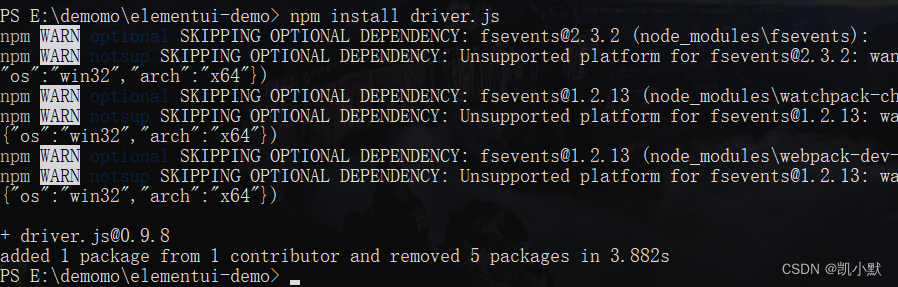
安装
npm install driver.js
使用
import Driver from 'driver.js';
import 'driver.js/dist/driver.min.css';
突出显示单个元素
const driver = new Driver();
driver.highlight('#create-post');
高亮和弹出窗口
const driver = new Driver();
driver.highlight({element: '#some-element',popover: {title: 'Title for the Popover',description: 'Description for it',}
});
定位弹出窗口
const driver = new Driver();
driver.highlight({element: '#some-element',popover: {title: 'Title for the Popover',description: 'Description for it',// position can be left, left-center, left-bottom, top,// top-center, top-right, right, right-center, right-bottom,// bottom, bottom-center, bottom-right, mid-centerposition: 'left',}
});
还可以使用offset属性为弹窗位置添加偏移量
const driver = new Driver();
driver.highlight({element: '#some-element',popover: {title: 'Title for the Popover',description: 'Description for it',position: 'bottom',// Will show it 20 pixels away from the actual position of popover// You may also provide the negative valuesoffset: 20,}
});
创建功能介绍
功能介绍在新用户入门时很有用,可以让他们了解应用程序的不同部分。您可以使用驱动程序无缝创建它们。定义步骤,并在你想开始展示时调用start。用户将能够使用键盘或使用弹出窗口上的按钮来控制步骤。
const driver = new Driver();// Define the steps for introduction
driver.defineSteps([{element: '#first-element-introduction',popover: {className: 'first-step-popover-class',title: 'Title on Popover',description: 'Body of the popover',position: 'left'}},{element: '#second-element-introduction',popover: {title: 'Title on Popover',description: 'Body of the popover',position: 'top'}},{element: '#third-element-introduction',popover: {title: 'Title on Popover',description: 'Body of the popover',position: 'right'}},
]);// Start the introduction
driver.start();
异步操作
对于转换步骤之间的任何异步操作,可以将执行延迟到操作完成。你所要做的就是在 onNext 或 onPrevious 回调函数中使用driver.preventMove() 停止过渡,并使用 driver.moveNext() 手动初始化它。这是一个示例实现,它将在第二步停止4秒钟,然后进入下一步。
const driver = new Driver();// Define the steps for introduction
driver.defineSteps([{element: '#first-element-introduction',popover: {title: 'Title on Popover',description: 'Body of the popover',position: 'left'}},{element: '#second-element-introduction',popover: {title: 'Title on Popover',description: 'Body of the popover',position: 'top'},onNext: () => {// Prevent moving to the next stepdriver.preventMove();// Perform some action or create the element to move to// And then move to that elementsetTimeout(() => {driver.moveNext();}, 4000);}},{element: '#third-element-introduction',popover: {title: 'Title on Popover',description: 'Body of the popover',position: 'right'}},
]);// Start the introduction
driver.start();
配置
const driver = new Driver({className: 'scoped-class',        // 封装driver.js弹窗的类名animate: true,                    // 是否进行动画opacity: 0.75,                    // 背景不透明度(0表示只有弹窗,没有覆盖层)padding: 10,                      // 元素到边缘的距离allowClose: true,                 // 点击覆盖层是否应该关闭overlayClickNext: false,          // 下一步点击覆盖层是否应该移动doneBtnText: 'Done',              // final按钮文本closeBtnText: 'Close',            // 关闭按钮文本stageBackground: '#ffffff',       // 高亮元素背后的舞台背景颜色nextBtnText: 'Next',              // 下一步按钮文本prevBtnText: 'Previous',          // 前一步按钮文本showButtons: false,               // 在页脚不显示控制按钮keyboardControl: true,            // 允许通过键盘控制(esc键关闭,箭头键移动)scrollIntoViewOptions: {},        // 如果可能的话,我们使用`scrollIntoView()`,如果你想要任何选项,在这里传递onHighlightStarted: (Element) => {}, // 当元素将要高亮时调用onHighlighted: (Element) => {},      // 当元素完全高亮时调用onDeselected: (Element) => {},       // 当元素被取消选择时调用onReset: (Element) => {},            // 当覆盖层即将被清除时调用onNext: (Element) => {},             // 当移动到下一个步骤时调用onPrevious: (Element) => {},         // 在任何步骤中移动到上一步时调用
});
定义步骤
定义步骤时可以传递的一组选项 defineSteps 或传递给 highlight 方法的对象:
const stepDefinition = {element: '#some-item',        // 要突出显示的查询选择器字符串或节点stageBackground: '#ffffff',   // 这将覆盖在驱动程序中设置的popover: {                    // 如果为空或未指定弹窗,则不会有弹窗className: 'popover-class', // 除了驱动程序选项中的一般类名外,还要包装这个特定步骤弹出窗口title: 'Title',             // popover 标题description: 'Description', // popover 描述showButtons: false,         // 在页脚不显示控制按钮doneBtnText: 'Done',        // 最后一个按钮文本closeBtnText: 'Close',      // 关闭按钮文本nextBtnText: 'Next',        // 下一个按钮文本prevBtnText: 'Previous',    // 上一个按钮文本},onNext: () => {},             // 从当前步骤移动到下一步时调用onPrevious: () => {},         // 从当前步骤移动到上一步时调用
};
突出显示单个元素时的效果
const driver = new Driver(driverOptions);
driver.highlight(stepDefinition);
创建一个分步指南:
const driver = new Driver(driverOptions);
driver.defineSteps([stepDefinition1,stepDefinition2,stepDefinition3,stepDefinition4,
]);
API方法
下面是可用的方法集:
const driver = new Driver(driverOptions);// 检查driver是否激活
if (driver.isActivated) {console.log('Driver is active');
}// 在步骤指南中,可以调用以下方法
driver.defineSteps([ stepDefinition1, stepDefinition2, stepDefinition3 ]);
driver.start(stepNumber = 0);  // 定义开始步骤
driver.moveNext();             // 移动到“步骤”列表中的下一步
driver.movePrevious();         // 移动到“步骤”列表中的上一步
driver.hasNextStep();          // 检查是否有下一步要移动
driver.hasPreviousStep();      // 检查是否有要移动到的上一个步骤// 阻止当前移动,如果你想,可以在`onNext`或`onPrevious`中使用,执行一些异步任务,然后手动切换到下一步
driver.preventMove();// 使用查询选择器或步骤定义突出显示元素
driver.highlight(string|stepDefinition);// 重新定位弹出窗口并突出显示元素
driver.refresh();// 重置覆盖层并清空屏幕
driver.reset();// 另外,你可以传递一个布尔参数
// 立即清除,不做动画等
// 在你运行的时候可能有用
// driver程序运行时的不同实例
driver.reset(clearImmediately = false);// 检查是否有高亮的元素
if(driver.hasHighlightedElement()) {console.log('There is an element highlighted');
}// 获取屏幕上当前高亮显示的元素,would be an instance of `/src/core/element.js`
const activeElement = driver.getHighlightedElement();// 获取最后一个高亮显示的元素, would be an instance of `/src/core/element.js`
const lastActiveElement = driver.getLastHighlightedElement();activeElement.getCalculatedPosition(); // 获取活动元素的屏幕坐标
activeElement.hidePopover();           // 隐藏弹出窗口
activeElement.showPopover();           // 显示弹出窗口activeElement.getNode();  // 获取这个元素后面的DOM元素
别忘了给触发 driver 的 click 绑定添加 e.stopPropagation()。
实战
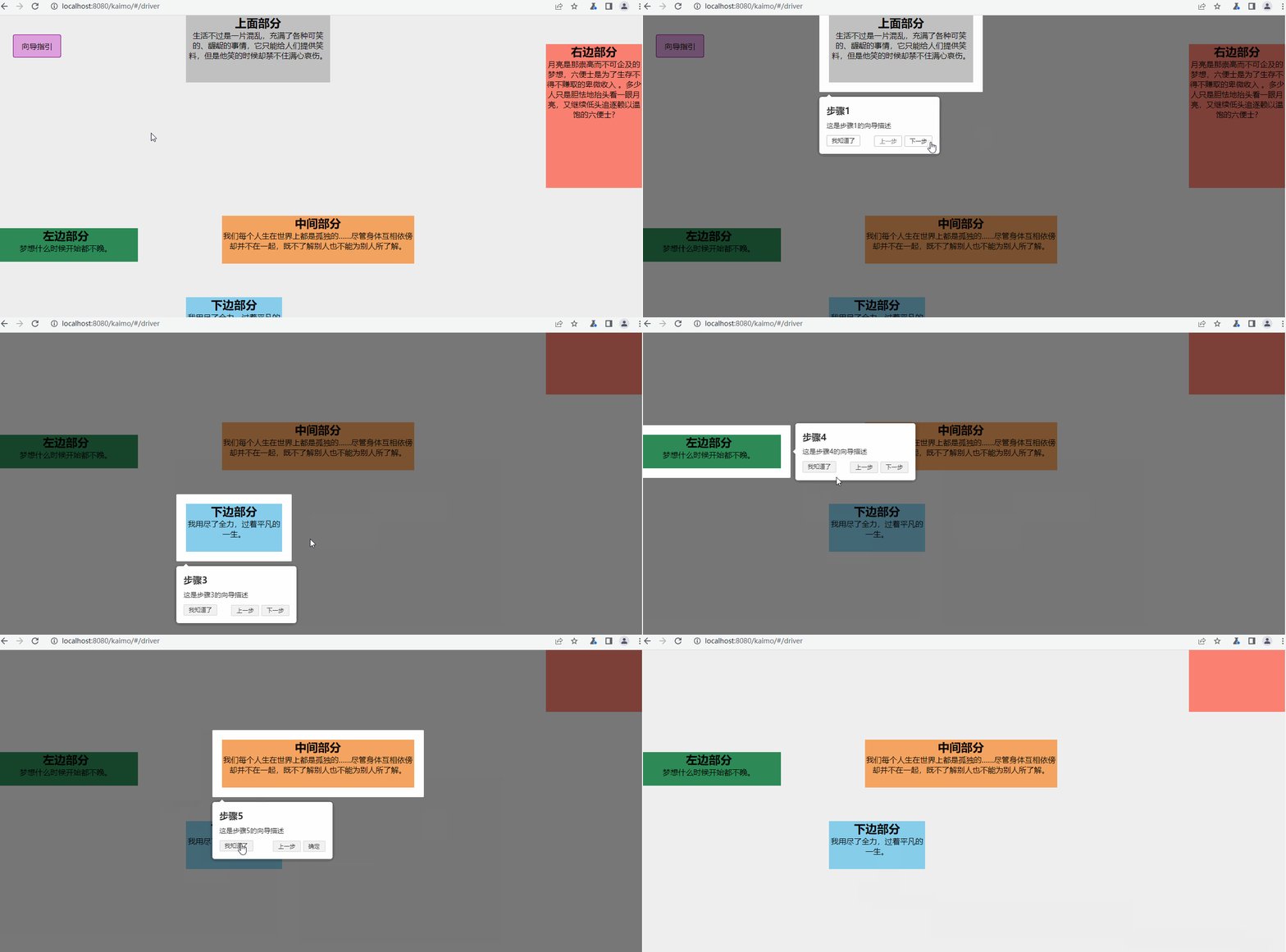
下面是我实现的一个 vue 的 demo,用的 driver.js 是 0.9.8。
向导指引上面部分
生活不过是一片混乱,充满了各种可笑的、龌龊的事情,它只能给人们提供笑料,但是他笑的时候却禁不住满心哀伤。 右边部分
月亮是那崇高而不可企及的梦想,六便士是为了生存不得不赚取的卑微收入 。多少人只是胆怯地抬头看一眼月亮,又继续低头追逐赖以温饱的六便士? 下边部分
我用尽了全力,过着平凡的一生。 左边部分
梦想什么时候开始都不晚。 中间部分
我们每个人生在世界上都是孤独的……尽管身体互相依傍却并不在一起,既不了解别人也不能为别人所了解。
效果
实现的功能向导指引效果如下:
上一篇:odoo模块结构详解
相关内容
热门资讯
埃菲尔铁塔在哪 中国仿建埃菲尔...
2019年4月26日,广西南宁市,街头惊现一座巨型山寨版埃菲尔铁塔,高约20米,白色塔身,造型逼真,...
苗族的传统节日 贵州苗族节日有...
【岜沙苗族芦笙节】岜沙,苗语叫“分送”,距从江县城7.5公里,是世界上最崇拜树木并以树为神的枪手部落...
北京的名胜古迹 北京最著名的景...
北京从元代开始,逐渐走上帝国首都的道路,先是成为大辽朝五大首都之一的南京城,随着金灭辽,金代从海陵王...
长白山自助游攻略 吉林长白山游...
昨天介绍了西坡的景点详细请看链接:一个人的旅行,据说能看到长白山天池全凭运气,您的运气如何?今日介绍...
应用未安装解决办法 平板应用未...
---IT小技术,每天Get一个小技能!一、前言描述苹果IPad2居然不能安装怎么办?与此IPad不...
脚上的穴位图 脚面经络图对应的...
人体穴位作用图解大全更清晰直观的标注了各个人体穴位的作用,包括头部穴位图、胸部穴位图、背部穴位图、胳...
猫咪吃了塑料袋怎么办 猫咪误食...
你知道吗?塑料袋放久了会长猫哦!要说猫咪对塑料袋的喜爱程度完完全全可以媲美纸箱家里只要一有塑料袋的响...
demo什么意思 demo版本...
618快到了,各位的小金库大概也在准备开闸放水了吧。没有小金库的,也该向老婆撒娇卖萌服个软了,一切只...
世界上最漂亮的人 世界上最漂亮...
此前在某网上,选出了全球265万颜值姣好的女性。从这些数量庞大的女性群体中,人们投票选出了心目中最美...
埃菲尔铁塔在哪 中国仿建埃菲尔...
2019年4月26日,广西南宁市,街头惊现一座巨型山寨版埃菲尔铁塔,高约20米,白色塔身,造型逼真,...
北京的名胜古迹 北京最著名的景...
北京从元代开始,逐渐走上帝国首都的道路,先是成为大辽朝五大首都之一的南京城,随着金灭辽,金代从海陵王...
苗族的传统节日 贵州苗族节日有...
【岜沙苗族芦笙节】岜沙,苗语叫“分送”,距从江县城7.5公里,是世界上最崇拜树木并以树为神的枪手部落...
世界上最漂亮的人 世界上最漂亮...
此前在某网上,选出了全球265万颜值姣好的女性。从这些数量庞大的女性群体中,人们投票选出了心目中最美...
应用未安装解决办法 平板应用未...
---IT小技术,每天Get一个小技能!一、前言描述苹果IPad2居然不能安装怎么办?与此IPad不...
长白山自助游攻略 吉林长白山游...
昨天介绍了西坡的景点详细请看链接:一个人的旅行,据说能看到长白山天池全凭运气,您的运气如何?今日介绍...
脚上的穴位图 脚面经络图对应的...
人体穴位作用图解大全更清晰直观的标注了各个人体穴位的作用,包括头部穴位图、胸部穴位图、背部穴位图、胳...
demo什么意思 demo版本...
618快到了,各位的小金库大概也在准备开闸放水了吧。没有小金库的,也该向老婆撒娇卖萌服个软了,一切只...
猫咪吃了塑料袋怎么办 猫咪误食...
你知道吗?塑料袋放久了会长猫哦!要说猫咪对塑料袋的喜爱程度完完全全可以媲美纸箱家里只要一有塑料袋的响...