

【JavaEE】前后端分离实现博客系统(页面构建)
文章目录
- 1 效果展示
- 1.1 博客登录页面
- 1.2 博客列表页面
- 1.3 博客详情页面
- 1.4 博客编辑页面
- 2 页面具体实现
- 2.1 博客列表页的实现
- 2.2 博客详情页的实现
- 2.3 博客登录页面的实现
- 2.4 博客编辑页面的实现
- 写在最后
1 效果展示
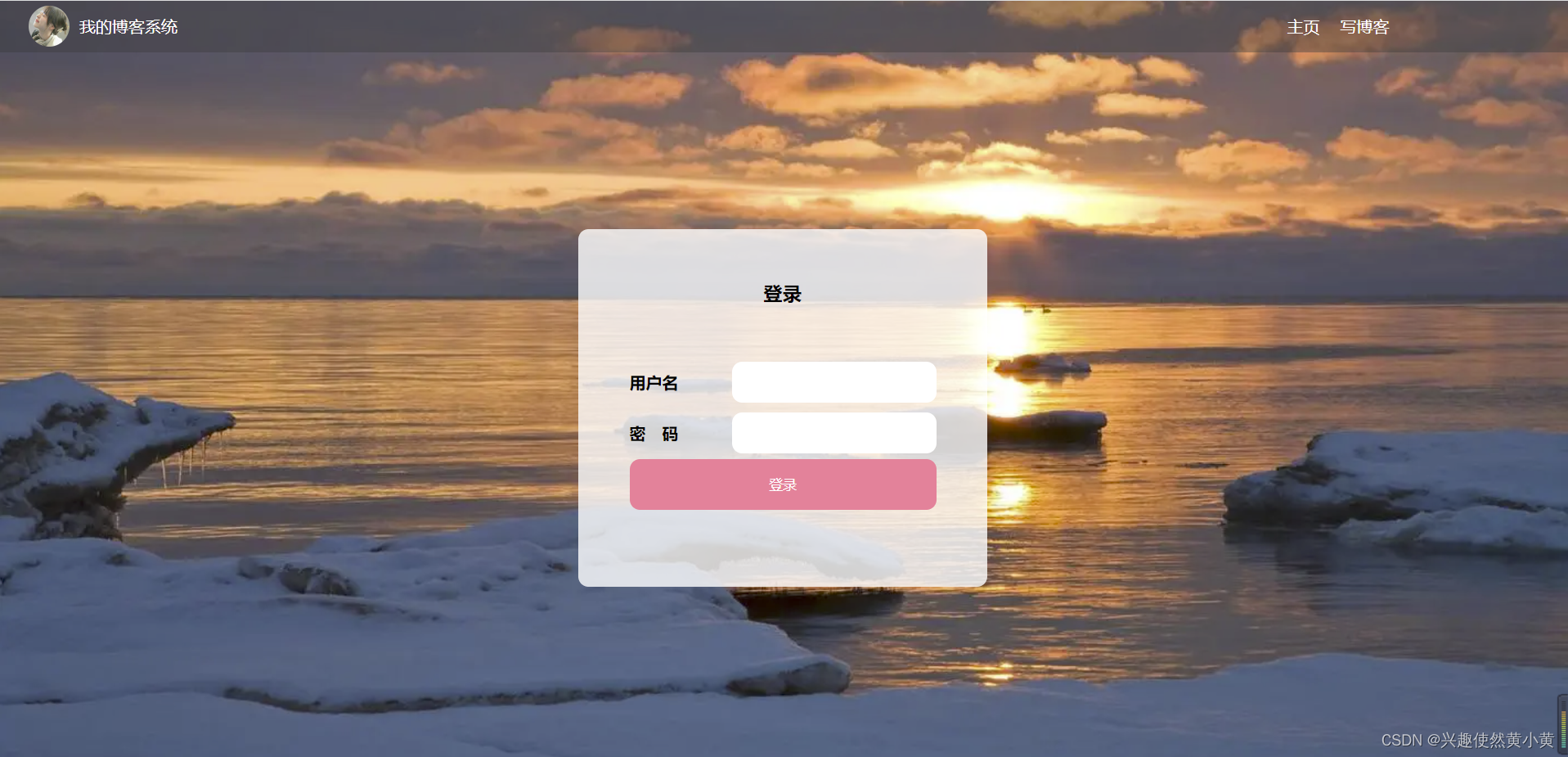
1.1 博客登录页面
用于实现用户的登录功能,并展示必要的信息。
1.2 博客列表页面
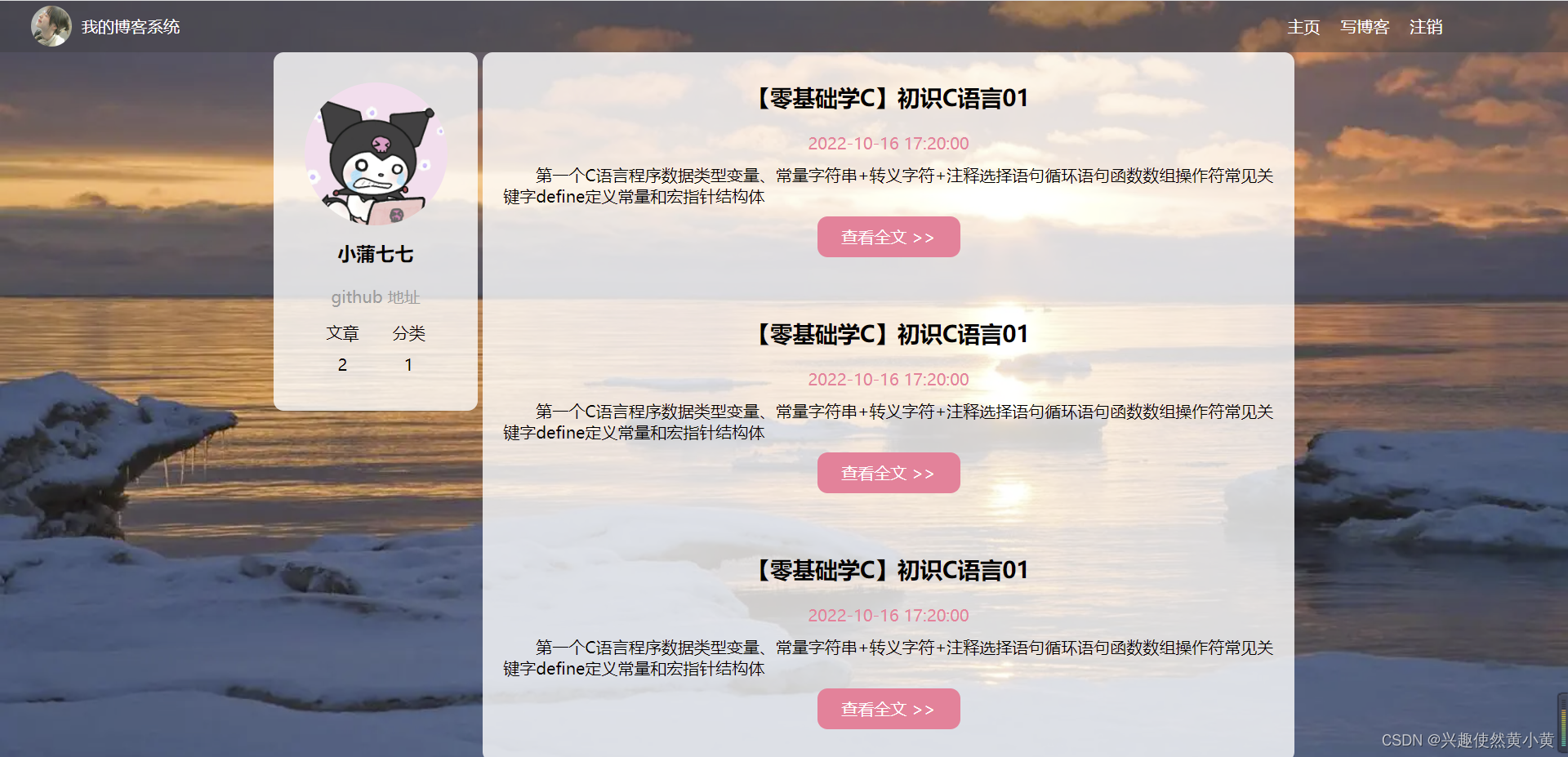
展示博客的标题,发布时间,摘要等内容,可以选择查看全文来获取博文的详细内容。
1.3 博客详情页面
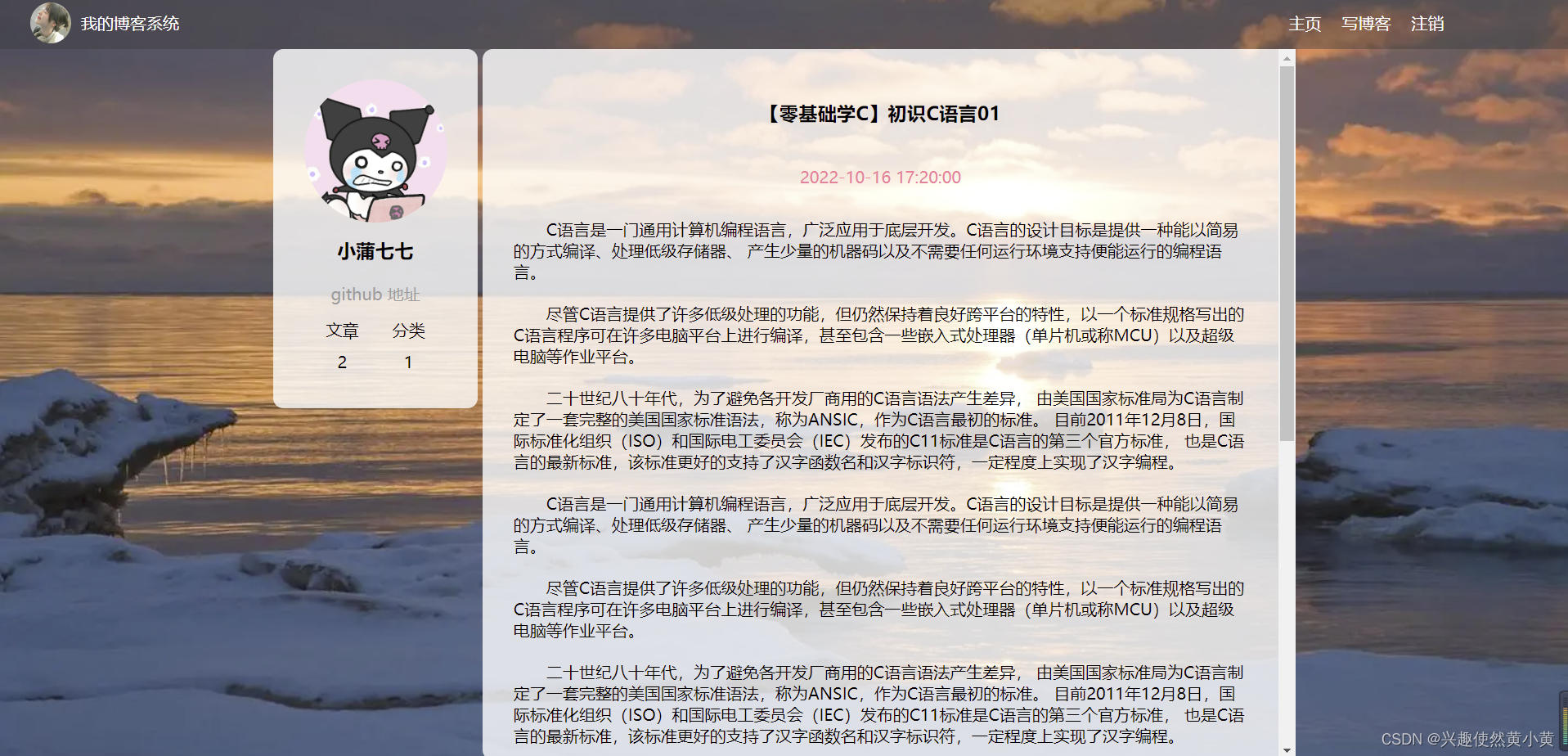
用于展示博文的具体信息。
1.4 博客编辑页面
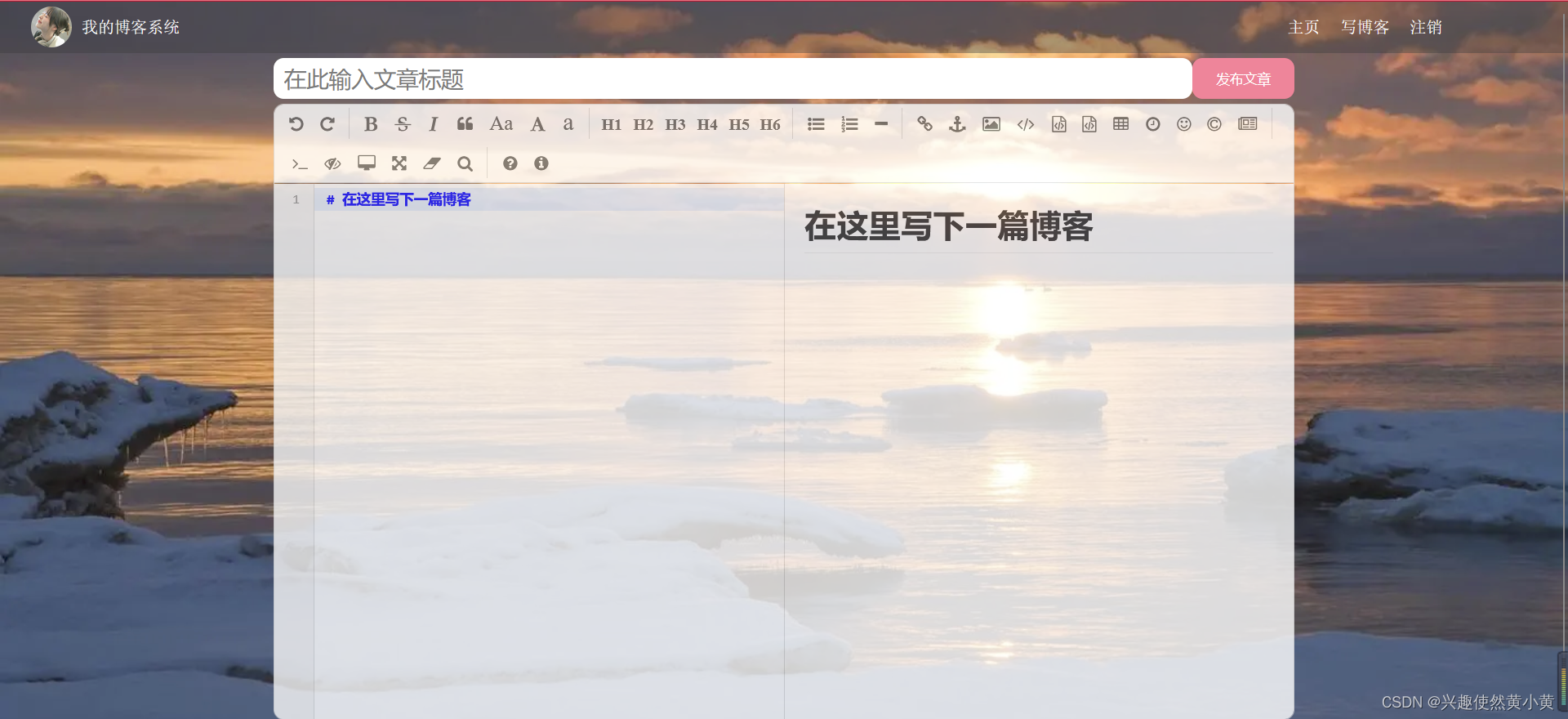
用于编辑博文与发布博文。
2 页面具体实现
2.1 博客列表页的实现
创建 blog_list.html,编写博客列表页面。
导航栏的具体实现
- 导航栏包含头像,主页,写博客,注销及一些跳转;
- spacer 空白元素,用于占位调整布局
- 观察效果展示的四个页面,均有导航栏,该代码可以复用~
由于各个页面均有导航栏,因此导航栏的样式可以提取出来,构成一个css文件,方便其他页面引入样式。
创建 common.css,其余页面引入该样式
- 清除浏览器默认样式;
- 自行准备背景图,用于博客系统的背景;
- 将 html 和 body 的高度设置为 100% ,使得背景高度和浏览器窗口高度一样;
- 导航栏 nav 内部使用 flex 布局,方便排列 logo 和 按钮;
- 该代码中也包含了个人信息和博客列表的样式。
/* 放置一些各个页面可能用到的公共样式 */* {margin: 0;padding: 0;box-sizing: border-box;
}/* 导航栏样式 */
.nav {height: 50px;background-color: rgba(51, 51, 51, 0.4);color: white;display: flex;/* 垂直居中 */align-items: center;
}/* 头像圆形 */
.nav img {width: 40px;height: 40px;border-radius: 50%;margin-left: 30px;margin-right: 10px;
}.nav .spacer {width: 70%;
}.nav a {color: white;text-decoration: none; /* 去掉下划线 */padding: 0 10px;
}/* 设置背景 */
html, body {height: 100%;
}body {background: url("../image/background.jpg") no-repeat center center;background-size: cover;
}/* 版心相关的样式 */
.container {width: 1000px;height: calc(100% - 50px);margin: 0 auto;display: flex;justify-content: space-between;
}.container .left {height: 100%;width: 200px;
}.container .right {height: 100%;width: 795px;background-color: rgba(255, 255, 255, 0.8);border-radius: 10px;
}/* card相关的样式 */
.card {background-color: rgba(255, 255, 255, 0.8);border-radius: 10px;padding: 30px;
}.card img {width: 140px;height: 140px;border-radius: 50%;
}.card h3 {text-align: center;padding: 10px;
}.card a {/* a 默认是行内元素,行内元素很多边距不生效,简便起见,直接用块级元素去处理 */display: block;text-align: center;color: #999;padding: 10px;text-decoration: none;
}.card .counter {display: flex;justify-content: space-around;padding: 5px;
}
实现版心,左侧用户信息,右侧博客列表
- container 作为版心,实现整体居中对齐的效果;
- 个人信息,博文列表的具体实现见代码注释。
【零基础学C】初识C语言012022-10-16 17:20:00第一个C语言程序数据类型变量、常量字符串+转义字符+注释选择语句循环语句函数数组操作符常见关键字define定义常量和宏指针结构体查看全文 >>
2.2 博客详情页的实现
创建 blog_detail.html,编写博客详情页面。
导航栏及个人信息部分与列表页的内容相同,直接复制代码即可。这里只对博客详情内容的代码编写进行说明。
- 博客的内容整体放到 blog-content 中;
- 博客标题使用 h3 标签;
- 博客发布时间放到 date 中;
- 博客正文使用 p 标签;
- 读者也可以根据需要自己调整。
【零基础学C】初识C语言01
2022-10-16 17:20:00C语言是一门通用计算机编程语言,广泛应用于底层开发。C语言的设计目标是提供一种能以简易的方式编译、处理低级存储器、产生少量的机器码以及不需要任何运行环境支持便能运行的编程语言。
尽管C语言提供了许多低级处理的功能,但仍然保持着良好跨平台的特性,以一个标准规格写出的C语言程序可在许多电脑平台上进行编译,甚至包含一些嵌入式处理器(单片机或称MCU)以及超级电脑等作业平台。
二十世纪八十年代,为了避免各开发厂商用的C语言语法产生差异,由美国国家标准局为C语言制定了一套完整的美国国家标准语法,称为ANSIC,作为C语言最初的标准。目前2011年12月8日,国际标准化组织(ISO)和国际电工委员会(IEC)发布的C11标准是C语言的第三个官方标准,也是C语言的最新标准,该标准更好的支持了汉字函数名和汉字标识符,一定程度上实现了汉字编程。
blog_detail.css,博客详情页的样式文件
/* 博客详情页的样式 */
.blog-content {padding: 30px;
}.blog-content h3 {text-align: center;padding: 20px 0;
}.blog-content .date {text-align: center;color: #fa8497;padding: 20px 0;
}.blog-content p {text-indent: 2em;padding: 10px 0;
}.right {/* 为right添加滚动条 */overflow: auto;
}
2.3 博客登录页面的实现
登录页面相对比较简单,需要注意的是,注销按钮在该页面没必要继续展示,其余导航栏代码与之前页面一致。
创建并编辑 blog_login.html,这里给出登录界面的核心代码
登录页面会话框
登录
用户名密 码
编辑 blog_login.css,实现登录页的样式
- 使用 .row button:active 伪类选择器, 实现点击按钮时样式切换的效果
/* 登录界面样式文件 */.login-container {width: 100%;height: calc(100% - 50px);/* 需要让里面的子元素,垂直水平居中,需要用flex布局 */display: flex;align-items: center;justify-content: center;
}.login-container .login-dialog {width: 400px;height: 350px;border-radius: 10px;background-color: rgba(255, 255, 255, 0.8);
}.login-container .login-dialog h3 {text-align: center;padding: 50px 0;
}.login-dialog .row {height: 50px;width: 100%;display: flex;align-items: center;justify-content: center;
}.login-dialog .row span {display: block;width: 100px;font-weight: 700;
}#username, #password {width: 200px;height: 40px;font-size: 22px;line-height: 40px;padding-left: 10px;border-radius: 10px;/* 去掉边框 */border: none;/* 去掉轮廓线 */outline: none;
}.row button {width: 300px;height: 50px;border-radius: 10px;color: white;background-color: #fa8497;border: none;outline: none;/*padding: 10px;*/
}.row button:active {background-color: #fc4c65;
}
2.4 博客编辑页面的实现
博客编辑页面涉及到一个 markdown 编辑器,这里我们使用 editor.md 来实现。在编辑页面引入即可~
什么是 editor.md ?
editor.md 是一个开源的页面 markdown 编辑器组件,官网参见: https://pandao.github.io/editor.md/,用法可以参考代码中的 examples 目录中的示例。
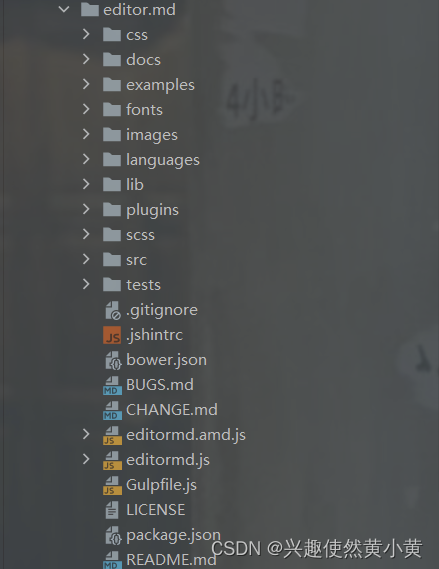
- 从官网下载压缩包,并解压,引入项目目录中,其目录结构如下图所示:
- 引入 editor.md
- 初始化编辑器
// 初始化编辑器var editor = editormd("editor", {// 这里的尺寸必须在这里设置,设置样式会被 editormd 自动覆盖width: "100%",// 设定编辑器高度height: "calc(100% - 50px)",// 编辑器的初始内容markdown: "# 在这里写下一篇博客",// 指定 editor.md 依赖的插件路径path: "editor.md/lib/"});
编辑 blog_edit.html
- 整个编辑区放到 div.blog-edit-container 中,里面包含一个标题编辑区, 和内容编辑区;
- 标题编辑区,包含一个 input,用来填写标题,以及一个 button 按钮用于提交;
- 内容编辑区先创建一个 div#editor,并使用上述 editor.md 相关代码进行初始化。
博客编辑页
写在最后
本文完整代码已上传 gitee,如有需要请自取:https://gitee.com/hxh2001/blog-system
以上便是本文的全部内容啦!创作不易,如果你有任何问题,欢迎私信,感谢您的支持!下一节,我们将继续使用 JDBC、Servlet 等内容完成该博客系统的后端逻辑。
上一篇:CSS快速入门
相关内容