

Web Components学习(2)-语法
一、Web Components 对 Vue 的影响
尤雨溪在创建 Vue 的时候大量参考了 Web Components 的语法,下面写个简单示例。
首先写个 Vue 组件 my-span.vue:
my-span
这是很标准的 Vue 组件,不过非常遗憾的是 HTML 文件并不能有效的利用这个 vue 文件,如果想让它能够正确运行,还需要下载 node、webpack、vue-loader 将其打包,而且它只能在 Vue 的项目中使用,也就是必须依赖 Vue 的安装包。如果在 React、Angular 甚至 jQuery 项目中,这个组件就不能用了。
但是以前只需要将它稍稍修改一下,它就会变成 Web Components 文件,能够直接在浏览器中运行。
只需要修改
使用 HTML Imports 在 HTML 页面中引入组件:
Document
但是现在 HTML Imports 已废弃(被 ES Modules 的代替),所以不能使用这种方式了。
如果还想要以独立模块的方式引入,那么就要通过 JS 生成 HTML 和 CSS:
// my-span.js
class MySpan extends HTMLElement {constructor() {super()this.render()}// 生成 HTML 和 CSSrender() {const shadow = this.attachShadow({ mode: 'open' })const dom = document.createElement('span')const style = document.createElement('style')dom.textContent = 'my-span'style.textContent = `span {color: purple;}`shadow.appendChild(style)shadow.appendChild(dom)}
}// 注册组件
customElements.define('my-span', MySpan)
Document
注意:使用 ES Modules 和 HTML Imports 一样,都要开启一个 Web 服务,直接打开 HTML 文件,会以文件协议(file://)的方式打开,控制台会报跨域错误。可以使用 vscode 的 Live Server 插件打开 HTML。或者不使用 ES Modules:
也可以提前在 HTML 页面中通过
原生标签写好 DOM 结构,然后在组件中通过 DOM API 获取模板内容,不过这样并没有将组件作为独立的模块分离出来。
如果想使用插槽,只需要将
const dom = document.createElement('span')
const style = document.createElement('style')
// dom.textContent = 'my-span'
dom.innerHTML = '默认内容 '
style.textContent = `span {color: purple;}
`使用上也和 Vue 一样:
自定义内容 如果想使用具名插槽(多个插槽):
const dom = document.createElement('span')
const style = document.createElement('style')
// dom.textContent = 'my-span'
dom.innerHTML = `默认内容 默认内容
`
style.textContent = `span {color: purple;}
`使用:
默认插槽
另一个插槽
Vue 新语法已经建议使用 v-slot,而 Web Components 还是 slot。
二、HTML Imports
Web Components 的历史
Web Components 不是一门单一的技术,而是四门技术的组合,这四门技术分别是:
- HTML Imports
- HTML templates
- Custom Elements
- Shadow DOM
HTML Imports
HTML Imports 就是上面示例中的 用来引入另一个 HTML 文件。
可惜 HTML Imports 已经被废弃,如果想正常使用 HTML Imports 代码查看效果,可以安装低版本浏览器,例如 Chrome 79:
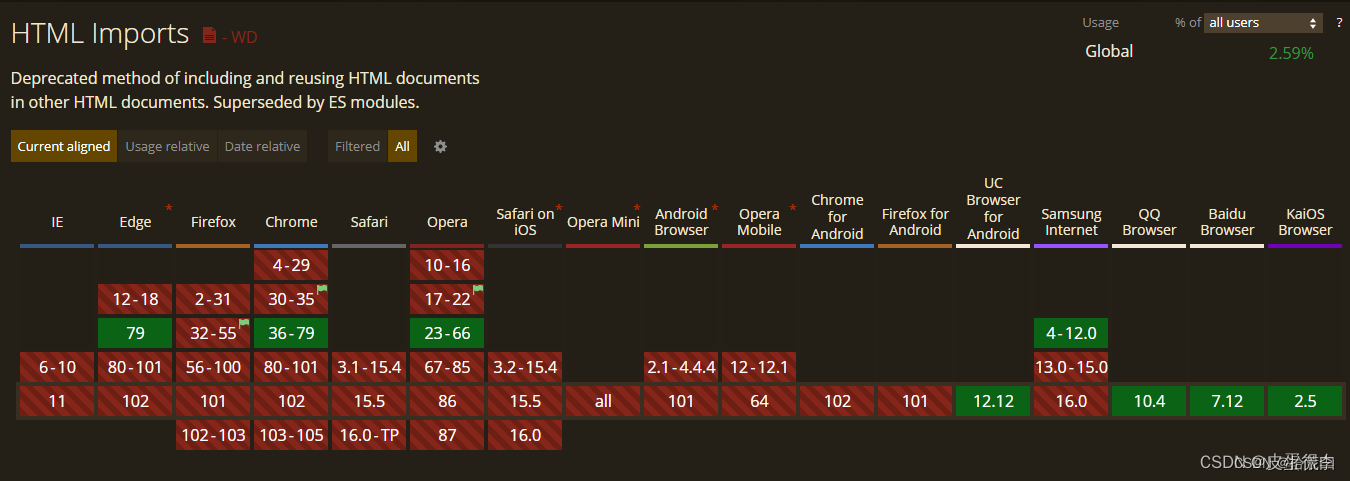
通过上面的示例可以看到 HTML Imports 很好用,为什么会被废弃?这就要讲讲 Web Components 的前世今生了。
很多人都认为 Google 是一个比 IE 还“遵纪守法”的好公民,因为它一直遵守 W3C、ECMA 的标准,才可以得以干掉 IE 成为浏览器市场的占有率之王。
其实 Google 可不老实,它经常会倒逼标准的形成。比方说 Google 自己实现了一个 CSS 属性,那时候 W3C 并没有发布标准,于是它就在自己自创的属性前加个前缀 -webkit-,这代表只是它自己浏览器的实验性属性,并没有破坏标准私自发布属性。
可是开发者觉得这个属性真的很好用,可以实现很酷炫的效果,其他浏览器的厂商有的是觉得这个属性确实很不错,而有的是感觉到了压力,总而言之,所有浏览器厂商最终都实现了这个属性,为了表示自己也没有破坏标准私自发布属性,大家都默默地在这个属性前面加上自己浏览器内核的前缀,像 -moz-、-ms-、-o-。
虽然这个属性没有在 W3C 等机构成为标准,但它已经成为了**“事实标准”**,世界各地的开发者们也都已经用这个属性实现出来成千上万个网站了,最终也不得不把它标为标准。于是 Google 最终自己研究出来的属性就这样成为了标准。大家再也不用写那么烦人的前缀了。Web Components 也正是基于这样的一种情况下诞生的。
话说在 2011 年的时候 Google 就推出了 Web Components 的概念,当时前端还没有**“模块化”的概念,甚至都没有“前端”**的概念,这个时期 Google 就已经敏锐的察觉到前端需要组件化,但最开始他们也只是提出了这个概念,并没有开发出真正能用的前端组件化。
2015 年 Web Components 终于能用了,所以网上开始有人介绍 Web Components,这也是为什么网上大部分 Web Components 文章都是 2015 - 2016 写的(内容还包括 HTML Imports)。
那么为什么这么多年过去了,Web Components 还没有火起来呢?
因为 Google 的做法引起了其他浏览器厂商的不满,凭什么这么重要的新功能就你一家说了算,平时你实现的 CSS3 属性啥的,我们睁一只眼闭一只眼也就算了,可 Web Components 是非常重大的一项功能,API 长什么样子都是你自己定,我们不同意。于是 Web Components 的第一版,也就是 V0,就只有 Google 自己实现了。
Google 也意识到,虽然自己目前市场占有率全球称霸,但只要其它浏览器不支持还是不会有人用,毕竟大家都要考虑兼容性的问题,不可能只考虑用 Google 内核的用户上网才能够看到效果,其它浏览器就不管。
所以 Google 决定,和其它主流浏览器厂商一起讨论一下,在讨论中大家就产生了激烈的分歧,比如苹果系统的浏览器 Safari 觉得 Shadow DOM 应该始终保持封闭以保证独立性,而 Google 则认为要始终保持开放,让用户能够访问到,不然 Web Components 组件库在用户的眼中始终是一个无法窥视内部构造的黑盒;还有火狐浏览器觉得马上要出 ES6 了,HTML Imports 不用实现,先看看 ES6 的模块化怎么样,感觉它也能代替 HTML Imports 的功能。
于是根据各个浏览器厂商的不满,又修订了第二个版本:V1,这正是目前使用的版本。就在各大浏览器厂商不断扯皮的过程中,三大框架崛起了:Angular、React、Vue,它们都有组件化的功能,于是其它浏览器厂商实现 Web Components 的动力就有点不足了,本来实现起来就挺复杂的,现在更不想实现了。
但是几年过后,大家发现浏览器真的需要一个原生的组件化技术,开发者们也一直都在询问到底为什么就是不实现 Web Components。
基于种种压力之下,Safari 在 2017 年实现了 Web Components,当然只实现了一部分,因为他们至今都不是很认同 Google 的 is 属性(类似 Vue 的 is 属性),所以他们就是不实现,反正 Web Components 还没有成为标准(2017 年),这也不算不遵守规范。
而火狐则是在 2018 年实现的 Web Components。
微软的 Edge 浏览器现在改用 Google 的内核了,IE 就不要提了。
Opera 也早就改用 Google 内核了。
至此所有浏览器都实现了 Web Components,不过它终究还是来的太晚了点,三大框架早已瓜分了市场,形成了三足鼎立的局面。但之后随着时间的推移,三大框架有可能会用 Web Components 去实现自己底层的组件化系统。
而 Vue CLI 早就实现了能将 Vue 组件编译成 Web Components 的功能。
而且一些组件库为了能够跨框架运行,也是采用了 Web Components 来实现,比如 Taro 3 为了能够让写不同框架的的人都能用上组件,特意采用了 Web Components 来实现的基础组件。
既然 HTML Imports 已经废弃,这里也不再学习它的具体用法。但可以介绍一下它的下一代技术 HTML Modules。
下面是一个无法运行的示例:
Document
目前还没有任何浏览器实现了这一提案,所以上例代码无法演示,而且这种写法目前来说争议非常大,因为在