

C#基础(三)
总目录
文章目录
- 总目录
- 前言
- 一、异常处理
- 1、定义
- 2、基本使用
- 3、异常
- 二、using的使用
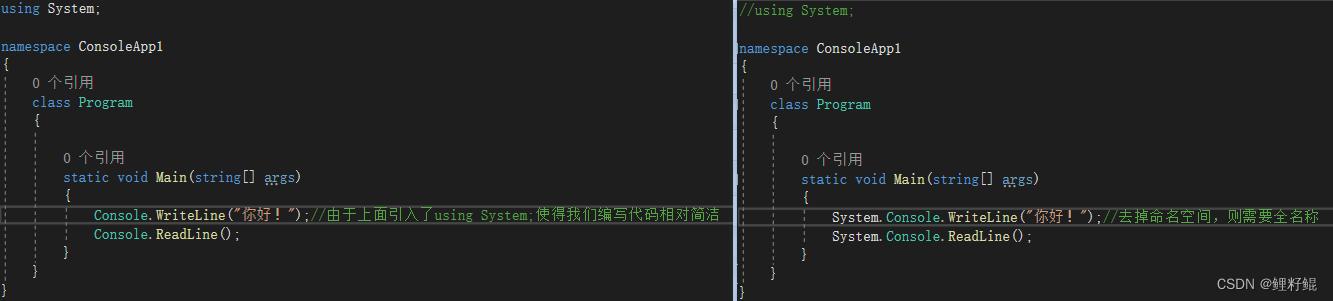
- 1、使用using引入命名空间
- 2、using指令
- 3、using别名
- 4、using语句
- 三、部分关键字的使用
- 1、checked和unchecked
- 2、extern
- 四、Random 随机数
- 五、预处理器指令
- 1、可为空上下文
- 2、定义符号和条件编译
- 3、定义区域
- 4、错误和警告信息
- 结语
前言
本文属于复习整理C#基础系列的最后一篇文章,上两篇完成了基础的语法和面向对象概念的整理,本文将会将剩余的一些必备的C#基础知识整理汇总,至此本系列完结。
一、异常处理
1、定义
异常是在程序执行期间出现的问题。
区分错误和异常:
错误:程序无法控制的(不可控,不能更改),一旦程序遇到错误,首先终止运行程序,然后将控制权交给操作系统。
异常:程序员必须控制和解决的问题。程序可以正常的运行,但是在运行的过程中出现了问题,问题包括:非法数值,死循环,数组超出索引,访问空对象,格式化转换错误…等等,异常时程序员必须处理的。
2、基本使用
处理异常使用到以下关键字:
- try:try 代码段,表示尝试运行一段代码,如果出现异样,将控制权交给catch。try后可跟一个或多个 catch 块。
- catch:程序通过异常处理程序捕获异常。catch 关键字表示异常的捕获。
- finally:finally 块用于执行给定的语句,不管异常是否被抛出都会执行。如:打开一个文件,不管是否出现异常文件都要被关闭。
- throw:当问题出现时,程序抛出一个异常。使用 throw 关键字来完成。
异常处理格式如下:
try
{// 引起异常的语句
}
catch( ExceptionName e1 ) //try后可以跟一个或多个catch
{throw new Exception("****"); //使用throw 抛出异常信息
}
catch( ExceptionName e2 )
{// 错误处理代码
}
finally //finally不是必须的,根据业务需要使用
{// 要执行的语句 ,不论是否一样都会执行这里的代码
}
3、异常
C# 中的异常类主要是直接或间接地派生于 System.Exception 类,System.ApplicationException 和 System.SystemException 类是派生于 System.Exception 类的异常类。
常见预定义异常类有:System.IO.IOException、System.IndexOutOfRangeException、System.NullReferenceException、System.OutOfMemoryException 、System.StackOverflowException
案例代码如下:
public static void Division(int num1, int num2){var result = 0;try{result = num1 / num2;}catch (DivideByZeroException e){Console.WriteLine($"【异常信息】:{e.Message}");Console.WriteLine($"【异常代码行】:{e.StackTrace}");Console.WriteLine($"【异常所有信息】: {e}"); }finally{Console.WriteLine($"Result: {result}");}}static void Main(string[] args){Program.Division(18,0);Console.ReadLine();}
二、using的使用
1、使用using引入命名空间
2、using指令
- using static
using static 指令命名了一种类型,无需指定类型名称即可访问其静态成员和嵌套类型
案例如下:
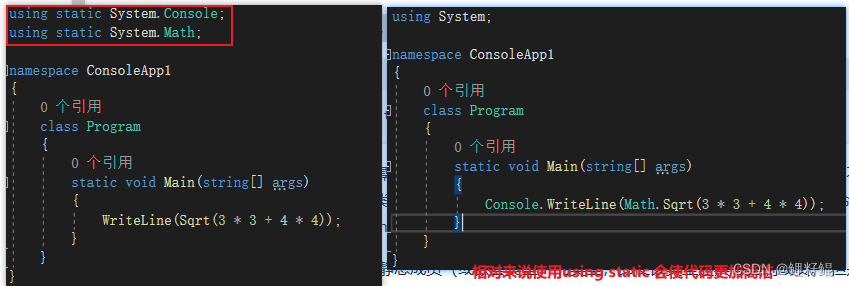
平常工作中我们可以将将一些路径比较长的类使用 using static 进行简化,但是代码过于简洁可能会影响可读性,这个具体情况具体分析。
using static Color;enum Color
{Red,Green,Blue
}class Program
{public static void Main(){Color color = Green;}
}
3、using别名
using 别名需要注意
using s = System.Text;
 using 指令的声明中不能使用 using 别名。
using s.RegularExpressions; // 这样使用会报错
如何为命名空间定义和使用 using 别名 案例如下:
namespace PC
{// Define an alias for the nested namespace.using Project = PC.MyCompany.Project;class A{void M(){// Use the aliasvar mc = new Project.MyClass();}}namespace MyCompany{namespace Project{public class MyClass { }}}
}
4、using语句
using 语句提供可确保正确使用 IDisposable 对象的方便语法。
using语句具有即开即关的功能,当using中的代码运行完会自动释放资源
string manyLines = @"This is line one
This is line two
Here is line three
The penultimate line is line four
This is the final, fifth line.";using (var reader = new StringReader(manyLines))
{string? item;do{item = reader.ReadLine();Console.WriteLine(item);} while (item != null);
}
using 声明不需要大括号:
string manyLines = @"This is line one
This is line two
Here is line three
The penultimate line is line four
This is the final, fifth line.";using var reader = new StringReader(manyLines);
string? item;
do
{item = reader.ReadLine();Console.WriteLine(item);
} while (item != null);
使用try 和finally 可以实现using相同的结果,代码如下:
string manyLines = @"This is line one
This is line two
Here is line three
The penultimate line is line four
This is the final, fifth line.";
//请注意,使用额外的大括号为对象创建有限范围
{var reader = new StringReader(manyLines);try{string? item;do{item = reader.ReadLine();Console.WriteLine(item);} while (item != null);}finally{reader?.Dispose();}
}
这里通过一个小案例补充说明一下 大括号的作用:
static void Main(string[] args){{var str = "abcdefg";int length= str.Length ;}//在大括号{ }外我们是无法访问到 str 这个变量的//这就是大括号的作用:创建有限范围}
可在单个 using 语句中声明一个类型的多个实例,如下面的示例中所示。 注意,在单个语句中声明多个变量时,不能使用隐式类型的变量 (var):
string numbers = @"One
Two
Three
Four.";
string letters = @"A
B
C
D.";using (StringReader left = new StringReader(numbers),right = new StringReader(letters))
{string? item;do{item = left.ReadLine();Console.Write(item);Console.Write("    ");item = right.ReadLine();Console.WriteLine(item);} while (item != null);
}/*  以上代码如果不要大括号则如下:
using StringReader left = new StringReader(numbers),right = new StringReader(letters);
string? item;
do
{item = left.ReadLine();Console.Write(item);Console.Write("    ");item = right.ReadLine();Console.WriteLine(item);
} while (item != null);
*/
三、部分关键字的使用
1、checked和unchecked
checked 和 unchecked 语句指定整型类型算术运算和转换的溢出检查上下文。
具体使用见下面案例:
static void Main(string[] args){uint a = uint.MaxValue;//【一】检查代码段 unchecked{ }unchecked{Console.WriteLine(a + 1); // output: 0}try{checked{Console.WriteLine(a + 1);}}catch (OverflowException e){Console.WriteLine(e.Message); // output: 算术运算导致溢出。}//由上可知,当我们使用checked的时候会做溢出检查,会抛出异常// 当我们使用unchecked的时候不会做溢出检查,不会有异常//【二】检查表达式 unchecked()double d = double.MaxValue;int i = unchecked((int)d);Console.WriteLine(i); // output: -2147483648try{i = checked((int)d);}catch (OverflowException e){Console.WriteLine(e.Message); // output: 算术运算导致溢出。}Console.ReadLine();}
2、extern
extern 修饰符用于声明在外部实现的方法。 extern 修饰符的常见用法是在使用 Interop 服务调入非托管代码时与 DllImport 特性一起使用。 在这种情况下,还必须将方法声明为 static,如下面的示例所示:
[DllImport("avifil32.dll")]
private static extern void AVIFileInit();
程序使用从 User32.dll 库导入的 MessageBox 方法。
//using System.Runtime.InteropServices;
class ExternTest
{[DllImport("User32.dll", CharSet=CharSet.Unicode)]public static extern int MessageBox(IntPtr h, string m, string c, int type);//注意,在C#中使用extern引入外部实现的方法的时候,参数列表和返回值要一一对应static int Main(){string myString;Console.Write("Enter your message: ");myString = Console.ReadLine();return MessageBox((IntPtr)0, myString, "My Message Box", 0);}
}
四、Random 随机数
random是伪随机,同一秒创建的随机对象,所生成的随机队列是一样的,除非不是同一时间产生
static void Main(string[] args){Random random = new Random();Random random2 = new Random();Place://random.Next(最小值,最大值),随机数可取最小值,但是不可取最大值int num = random.Next(0, 11);int num2 = random2.Next(0, 11);Console.WriteLine($"num={num},num2={num2}");/* 输出信息:num=7,num2=7num=7,num2=7num=1,num2=1num=8,num2=8num=2,num2=2num=7,num2=7num=0,num2=0*///这也说明了Random是一个伪随机数生成器,//同一秒创建的随机对象,所生成的随机队列是一样的,除非不是同一时间产生Thread.Sleep(1000);goto Place;//Console.ReadLine();}
五、预处理器指令
所有的预处理器指令都是以 # 开始。且在一行上,只有空白字符可以出现在预处理器指令之前。预处理器指令不是语句,所以它们不以分号(;)结束。
1、可为空上下文
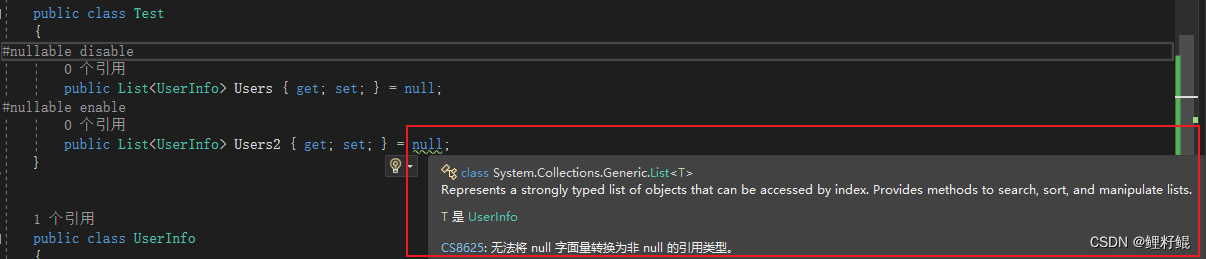
#nullable 预处理器指令将设置可为空注释上下文和可为空警告上下文 。 此指令控制是否可为空注释是否有效,以及是否给出为 Null 性警告。 每个上下文要么处于已禁用状态,要么处于已启用状态 。
2、定义符号和条件编译
使用以下两个预处理器指令来定义或取消定义条件编译的符号:
- #define:定义符号。
- #undef:取消定义符号。
- 文件中必须先出现 #define 指令,才能使用并非同时也是预处理器指令的任何指示。
使用四个预处理器指令来控制条件编译:
- #if:打开条件编译,其中仅在定义了指定的符号时才会编译代码。
- #elif:关闭前面的条件编译,并基于是否定义了指定的符号打开一个新的条件编译。
- #else:关闭前面的条件编译,如果没有定义前面指定的符号,打开一个新的条件编译。
- #endif:关闭前面的条件编译。
条件编译在编译调试版本的代码或编译特定配置的代码时会很有用。
- 以 #if 指令开头的条件指令必须以 #endif 指令显式终止
- C# 中的 #if 语句是布尔值,且仅测试是否已定义该符号
#define TEST //#define 定义符号需要在文件的第一行,否则会报错
using System;namespace ConsoleApp1
{class Program{static void Main(string[] args){
#if TEST//注意【#if】和【#endif】需要一起使用,成对的Console.WriteLine("TEST version");
#endif#if RunOnLineConsole.WriteLine("RunOnLine version");
#endif#if !MyTest//表示当没有定义MyTest时,编译里面的代码Console.WriteLine("MyTest version");
#endifConsole.ReadLine();/*  运行结果:TEST versionMyTest version*///C# 中的 #if 语句是布尔值,且仅测试是否已定义该符号//通过上面的案例我们就知道:当我们使用#define 定义了TEST符号的时候,#if TEST 为true,就执行里面的代码//当使用#if TEST 的意思就是 判断当前文件是否定义了TEST符号,如果定义了则执行里面的代码,反之就不会执行//就如 #if RunOnLine 一样,因为没有定义没有不会执行里面的代码}}
}
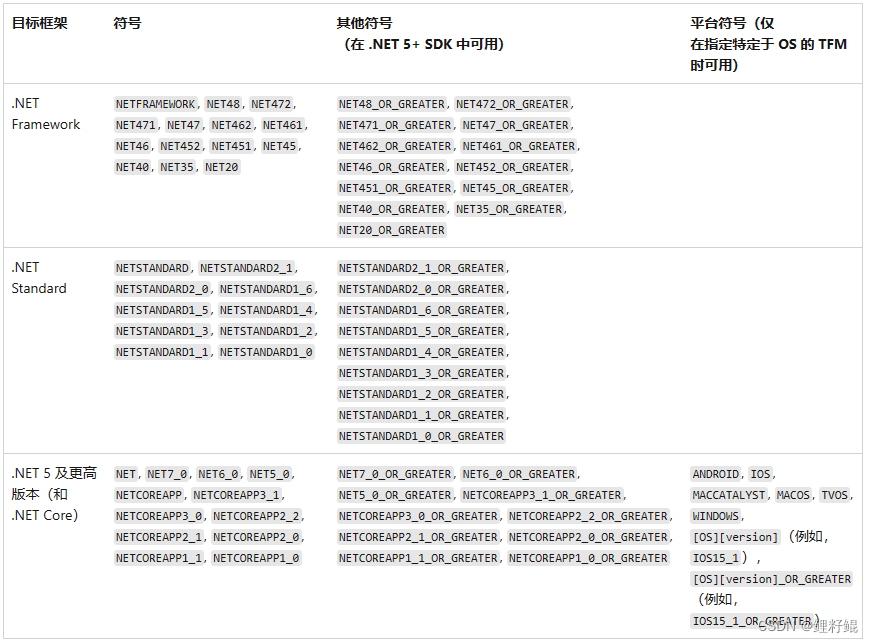
在创建可以面向多个 .NET 版本的应用程序时,这些符号会很有用。
public class MyClass
{static void Main(){
#if NET40WebClient _client = new WebClient();
#elseHttpClient _client = new HttpClient();
#endif}//...
}
其他预定义符号包括 DEBUG 和 TRACE 常数。 你可以使用 #define 替代项目的值集。 例如,会根据生成配置属性(“调试”或者“发布”模式)自动设置 DEBUG 符号。
下例显示如何在文件上定义 MYTEST 符号,然后测试 MYTEST 和 DEBUG 符号的值。 此示例的输出取决于是在“调试”还是“发布”配置模式下生成项目 。
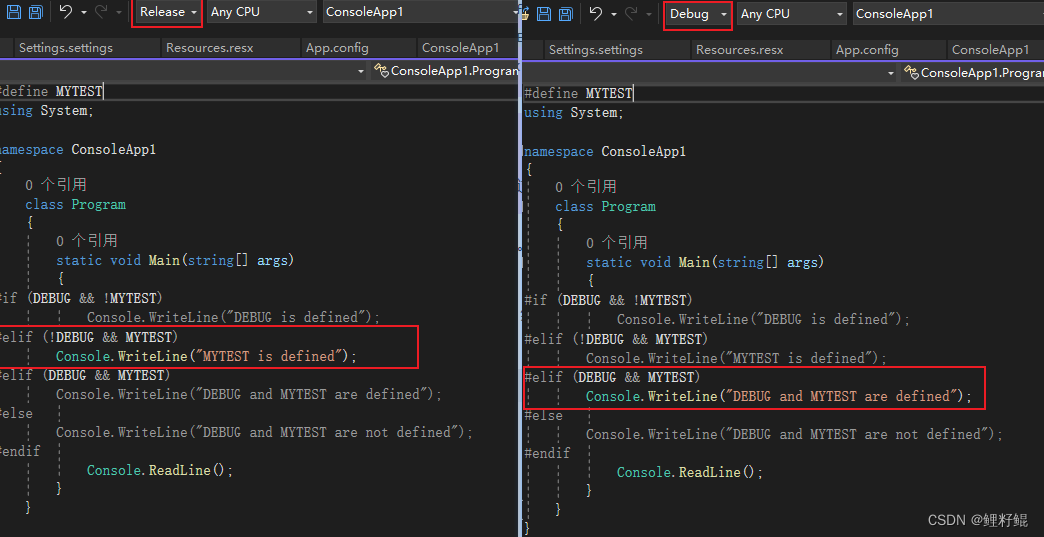
通过以上案例,我们需要理解到:
- 使用define定义Debug和Release等常数 ,其效用和在VS配置管理器中选择Debug效果相同
- 逻辑运算符在条件编译中的运用是怎样的
3、定义区域
可以使用以下两个预处理器指令来定义可在大纲中折叠的代码区域:
- #region:启动区域。
- #endregion:结束区域。
#region MyClass definition
public class MyClass
{static void Main(){}
}
#endregion
4、错误和警告信息
使用以下指令指示编译器生成用户定义的编译器错误和警告,并控制行信息:
- #error:使用指定的消息生成编译器错误。
- #warning:使用指定的消息生成编译器警告。
- #line:更改用编译器消息输出的行号。
#define OnLine
using System;namespace ConsoleApp1
{class Program{static void Main(string[] args){
#if DEBUG   //调试版本
#warning "注意,当前版本是调试版本,如果需要发布注意切换版本!"  Console.WriteLine("DEBUG Version");
#elif (Release&&OnLine)     //发布线上版本Console.WriteLine("Release&&OnLine Version");
#elif Test      //测试版本
#error "错误:前切换到线上版本";
#endifConsole.WriteLine("项目部署完毕!");Console.ReadLine();}}
}
#error 和#warning 可以让我们在做版本切换和发布相关的操作的时候,多一个提醒警示的作用,避免我们做出错误的操作。
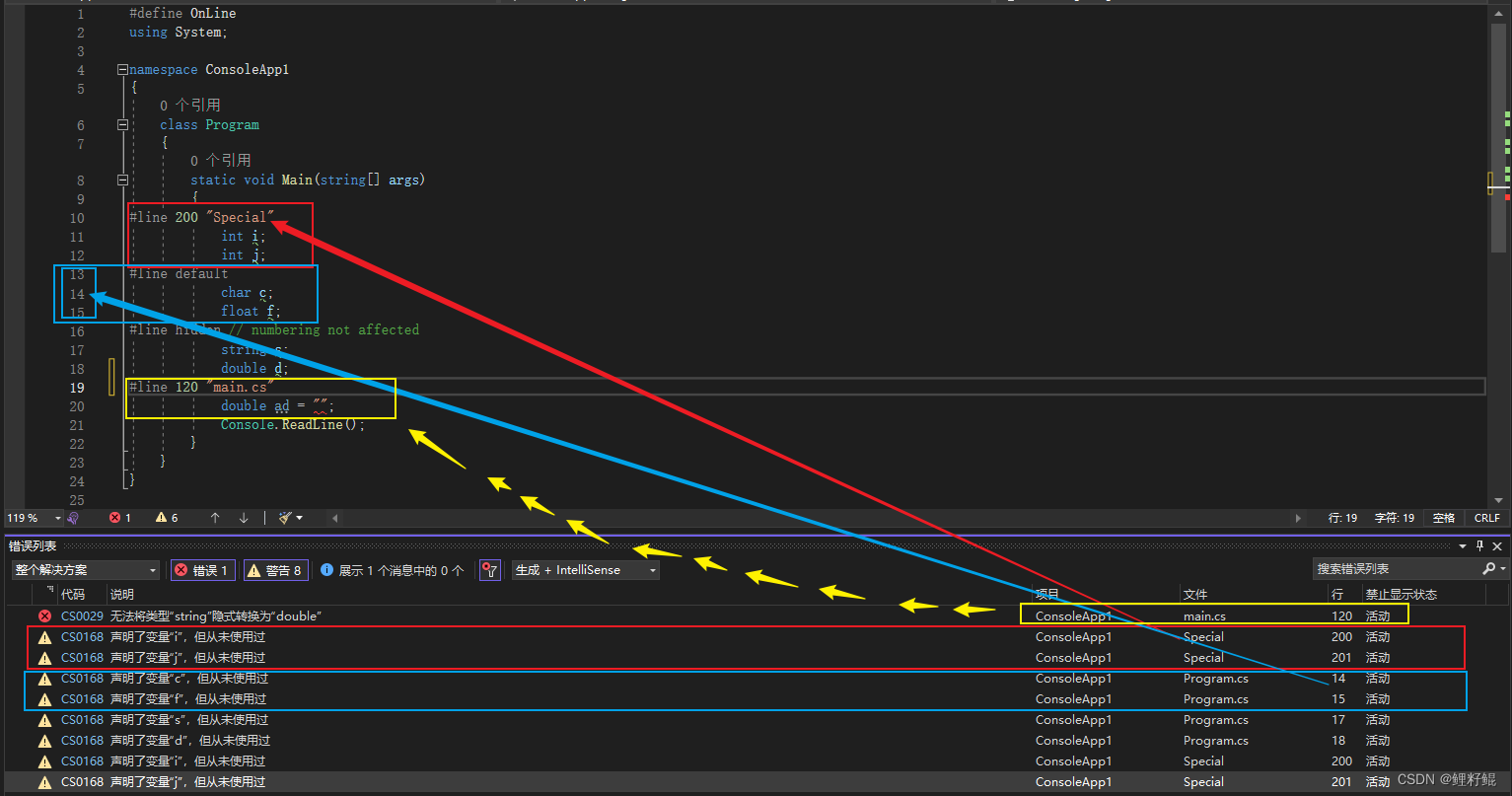
借助 #line,可修改编译器的行号及(可选)用于错误和警告的文件名输出。
#line hidden 指令能对调试程序隐藏连续行,当开发者逐行执行代码时,介于 #line hidden 和下一 #line 指令(假设它不是其他 #line hidden 指令)间的任何行都将被跳过。
具体使用可查看下面案例:
结语
以上就是本文的内容,希望以上内容可以帮助到您,如文中有不对之处,还请批评指正。
参考文档:
C#文档 - 语言参考 - using
C#命名空间
C#文档 - 预处理器指令
C# 预处理器指令