

面试知识点梳理及相关面试题(十二)-- linux
创始人
2024-06-03 17:01:36
1. linux目录结构
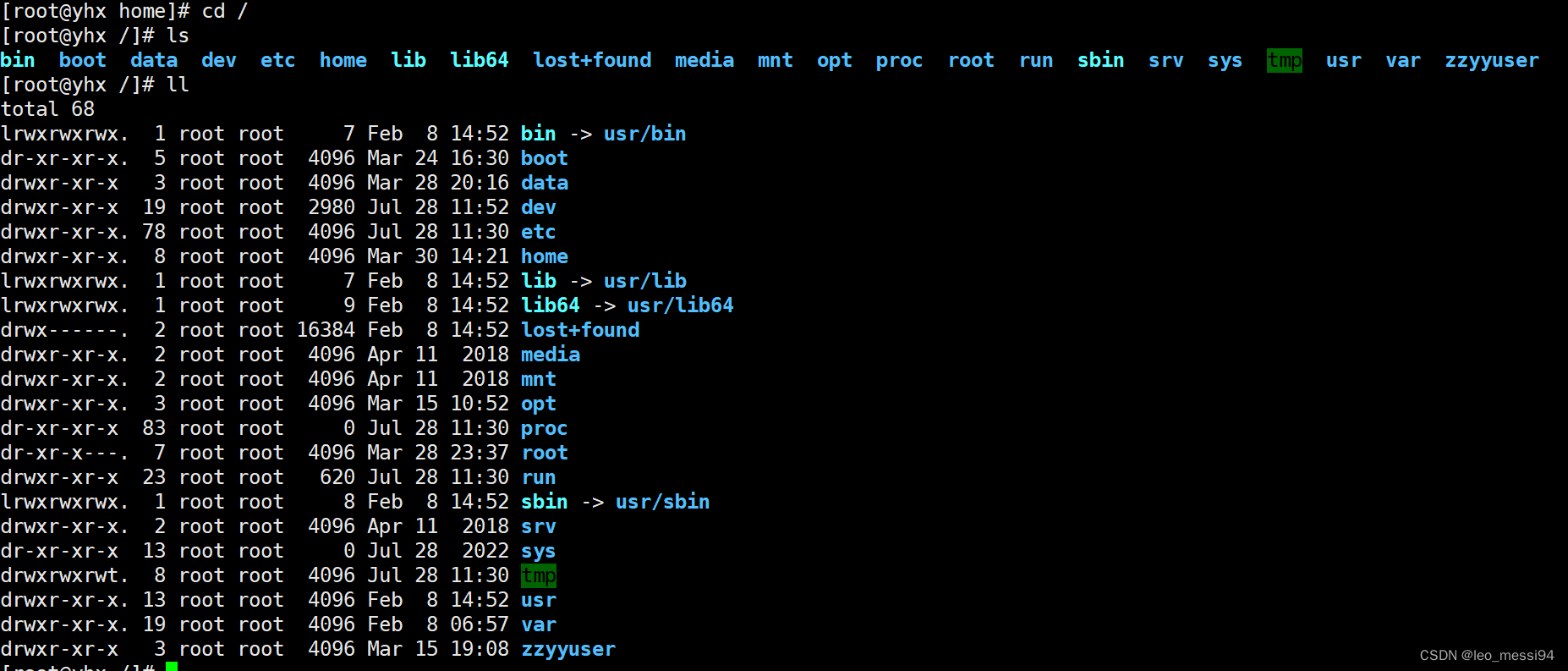
其中:
- bin、lib、lib64、sbin是一个链接,指向其他的目录地址如/usr/bin,从目录的颜色也可以看出来。
- 不要动的:proc、run、sys、boot、dev、srv
- 常用的但是不要删除的:bin、sbin、lib
- 随便用的:root、opt、home、tmp
- bin:是binary的缩写,这个目录存放着最经常使用的命令,可以看到这个目录是淡绿色,通过ll,我们也可以看到这个目录是一个链接目录,链接到的是/usr/bin
- sbin:s就是super user的意思,这里存放的是系统管理员使用的系统管理程序,同样的也是链接目录,链接到的是usr/sbin
- home:存放普通用户的主目录,在linux中每个用户都有一个自己的目录,一般该目录名是以用户的账号命名的
- root:该目录为系统管理员,也称作超级权限者的用户主目录
- lib:系统开机所需要的最基本的动态连接共享库,其作用类似于windows里的dll文件。几乎所有的应用程序都需要用到这些共享库
- lost+found:这个目录一般情况下是空的,当系统非法关机后,这里旧存放了一些文件
- etc:所有的系统管理所需要的配置文件和子目录
- usr:这是一个非常重要的目录,用户的所有应用程序和文件都放在这个目录下,类似于windows下的program files目录
- boot:这里粗发囊的是启动linux时使用的一些核心文件,包括一些连接文件以及镜像文件,自己的安装别放这里
- proc:单词process,这个目录是一个虚拟的目录,它是系统内存的映射,我们可以通过直接访问这个目录来获取系统信息
- srv:service缩写,该目录存放一些服务启动之后需要提取的数据
- sys:这是linux2.6内核的一个很大的变化。该目录下安装了2.6内核中新出现的一个文件系统sysfs
- tmp:这个目录用来存放一些临时文件
- dev:单词device,类似windows的设备管理器,把所有的硬件用文件的形式存储
- media:Linux系统会自动识别一些设备,如U盘、光驱等,当识别后,linux会吧识别的设备挂载到这个目录下。(centos7迁移到/run/media)
- mnt:系统提供改目录是为了让用户临时挂在别的文件系统,我们可以将外部的存储挂载到mnt上,然后进入该目录就可以查看里面的内容了
- opt:单词optional,这是给主机额外安装软件所摆放的目录。比如你安装一个mysql数据库就可以放到这个目录下,默认是空的
- var:单词variable,这个目录中存放着不断扩充着的东西,我们习惯讲那些将常备修改的目录放在这个目录下。包括各种日志文件
- run:系统运行起来的临时信息
2. vim编辑器相关命令
2.1 命令模式下:
- i:切换至输入模式
- x:删除光标所在出的字符
- ::切换至底线命令模式
- G:移动到文档的最后一行
- nG:移动到这个文档的第n行
- gg:移动到文档的第一行,相当于1G
- n:光标向下移动n行
- /word:向下搜索名称为word的字符串
- n:继续搜索下一个
- N:搜索前一个
- x、X:向后/向前删除一个字符
- nx:向后删除n个字符串
- dd:删除一行
- dG:删除光标所在处到最后一行的所有数据
- yy:复制光标所在行
- nyy:向下复制n行的数据
- yG:复制光标行到最后一行的数据
- p、P:p为将复制的数据粘贴到光标下一行,P为粘贴到上一行
- u:复原前一个动作
- [ctrl] + r:重复上一个动作
2.2 输入模式:
- HOME/END,移动光标到行首/行尾
- Page Up/Page Down,上/下翻页
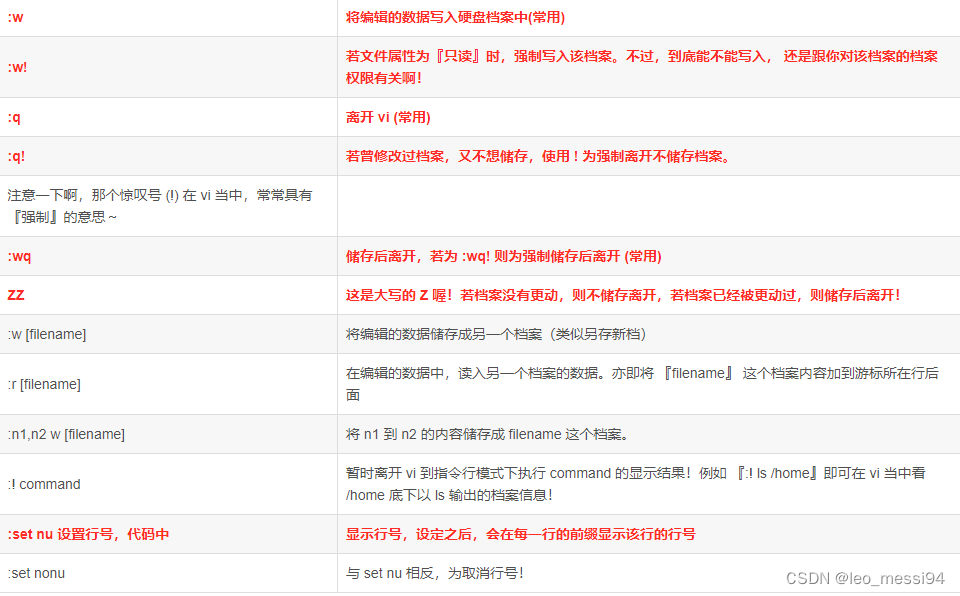
2.3 底线命令模式:
3. 系统服务相关:systemctl
systemctl start/stop/restart/status 服务名
操作的是/usr/lib/systemd/system目录下的服务
设置服务后台自启:
systemctl list-unit-files:查看服务开机启动状态systemctl disable service_name:关掉指定服务的自动启动systemctl enable service_name:开启指定服务的自动启动
4. 目录文件相关命令:
4.1 目录操作相关:
- pwd:显示当前工作目录的绝对路径
- ls:列出目录
- cd:切换目录
- mkdir:创建一个新的目录
- rmdir:删除一个空的目录
4.2 文件操作类:
- touch 创建空文件
- cp 复制文件或目录
- rm 删除文件或目录
- mv 移动文件与目录或重命名
4.3 文件查看类:
- cat 由第一行开始显示文件内容 用来读取文章,或者读取配置文件
- 一般查看比较小的文件,一屏幕能显示全的。
- cat 只能浏览文件,而不能修改文件。
- 会打开整个文件,直接跑到最后面
- tac 从最后一行开始显示,可以看出 tac 是 cat 的倒着写!
- nl 显示的时候,顺道输出行号! 看代码
- more 一页一页的显示文件内容(空格翻页,enter向下看一行,:f显示行号)
- more 指令是一个基于 VI 编辑器的文本过滤器
- 以全屏幕的方式按页显示文本文件的内容,一次展示文件全部内容
- more指令中内置了若干快捷键
- 可以上下翻页,上下行移动显示,分屏显示
- less 与 more 类似,但是比 more 更好的是,他可以往前翻页! (空格翻页,上下键翻页,退出 q命令,查找字符串 / 向下查询的字符 ?向上查询 n搜寻下一个 N像上)
- 和more类似,但功能更强大,支持各种显示终端
- 在显示文件内容时,并不是一次将整个文件加载之后才显示,而是根据显示需要加载内容,对于显示大型文件具有较高的效率。
- head 只看头几行 -n控制行数
- tail 只看尾巴几行 -n控制行数
- 主要用实时查看日志输出
4.4 链接
4.4.1 硬链接:
A—B,假设B是A的硬链接,那么他们两个指向了同一个文件!允许一个文件拥有多个路径,用户可以通过这种机制建立硬链接到一些重要文件上,防止误删!
4.4.2 软链接:
软链接也称为符号链接,类似于 windows 里的快捷方式,有自己的数据块,主要存放了链接其他文件的路径
- 基本语法:
ln -s [原文件或目录] [软链接名]:给原文件创建一个软链接
5. 权限相关命令:
5.1 用户权限相关:
- useradd 添加新用户
- userdel 删除用户
- usermod 修改用户
- passwd 选项 用户名
- id 查看用户是否存在
- su 切换用户
- who 查看登陆用户信息
- sudo 设置普通用户具有 root 权限
5.2 用户组权限相关
- groupadd 新增组
- groupdel 删除组
- groupmod 修改组
- cat /etc/group 查看创建了哪些组
5.3 文件权限相关
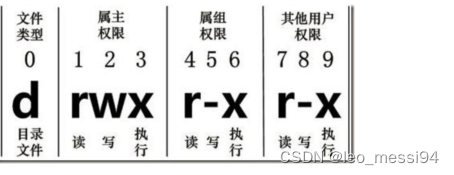
- chmod修改文件权限:
- chown 改变所有者
- chgrp 改变所属组
6. 压缩解压类命令:
6.1 gzip/gunzip 压缩
- 基本语法:
- 压缩文件:
gzip 文件 - 解压缩:
gunzip 文件.gz
- 压缩文件:
- 经验技巧:
- 只能压缩文件不能压缩目录
- 不保留原来的文件
- 同时多个文件会产生多个压缩包
6.2 zip/unzip 压缩
- 基本语法:
- 压缩文件:
zip [选项] 压缩后名称 压缩的内容 - 解压缩:
unzip [选项] XXX.zip
- 压缩文件:
- 经验技巧:zip 压缩命令在windows/linux都通用,可以压缩目录且保留源文件
- 选项说明:
- 压缩命令:-r压缩目录
- 解压缩命令:-d<目录> 指定解压后文件的存放目录
6.3 tar打包
本身并不做压缩,只是打包归档;需要配合-z才能进行压缩,即先打包再压缩。
- 基本语法:
tar [选项] XXX.tar.gz 将要打包进去的内容 - 选项说明:
- -c 产生.tar 打包文件
- -v 显示详细信息
- -f 指定压缩后的文件名
- -z 打包同时压缩
- -x 解包.tar 文件
- -C 解压到指定目录
7. 定时任务相关命令:
7.1 crontab 服务管理
- 基本语法:
- 重新启动crond服务:
systemctl restart crond
- 重新启动crond服务:
7.2 crontab 定时任务设置
- 基本语法:
crontab [选项] - 选项说明:
- -e:编辑 crontab 定时任务
- -l:查询 crontab 任务
- -r:删除当前用户所有的 crontab 任务
- 实操:每隔 1 分钟,向/root/bailongma.txt 文件中添加一个 11 的数字
- 输入
crontab -e命令进入vim编辑器 - 输入
*/1 * * * * /bin/echo ”11” >> /root/bailongma.txt
- 输入
8. 进程管理类
8.1 ps 查看当前系统进程状态
ps含义:process status 进程状态
- 基本语法:
ps 选项- 查看系统中所有进程:
ps aux - 查看子父进程之间的关系:
ps -ef
- 查看系统中所有进程:
- 选项说明:
- a:列出带有终端的所有用户的进程
- x:列出当前用户的所有进程,包括没有终端的进程
- u:面向用户友好的显示风格
- -e:列出所有进程
- -u:列出某个用户关联的所有进程
- -f:显示完整格式的进程列表
- 经验技巧
- 如果想查看进程的 CPU 占用率和内存占用率,可以使用 aux;
- 如果想查看进程的父进程 ID 可以使用 ef
8.2 kill 终止进程
- 基本语法:
- 通过进程号杀死进程:
kill [选项] 进程号 - 通过进程名称杀死进程,也支持通配符,这 在系统因负载过大而变得很慢时很有用:
killall 进程名称
- 通过进程号杀死进程:
- 选项说明:-9 表示强迫进程立即停止
8.3 top 实时监控系统进程状态
- 基本语法:
top [选项] - 选项说明:
- -d 秒数:指定 top 命令每隔几秒更新。默认是 3 秒在 top 命令的交互模式当 中可以执行的命令:
- -i:使 top 不显示任何闲置或者僵死进程。
- -p:通过指定监控进程 ID 来仅仅监控某个进程的状态
- 操作说明:
- P:以CPU使用率排序,默认就是此项
- M:以内存的使用率排序
- N:以 PID 排序
- q:退出 top
8.3.1 结果说明:
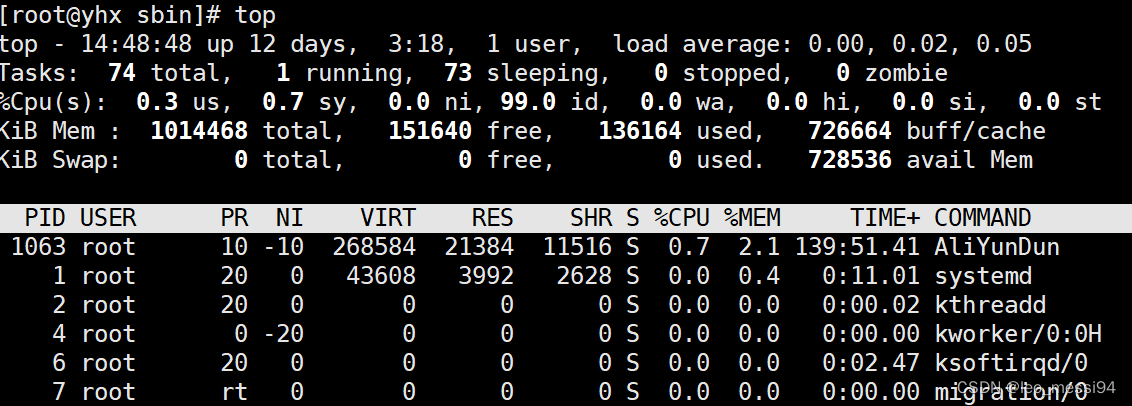
- 第一行:任务队列信息
- top - :
- 14:49:48:系统当前时间
- up 12 days, 3:18,:系统的运行时间,本机已经运行12天3小时18分钟
- 1 user,:当前登录了1个用户
- load average: 0.00, 0.01, 0.05:系统在之前 1 分钟,5 分钟,15 分钟的平均负载。一般认为小于1时负载较小;如果大于1,系统已经超出负荷
- 第二行:进程信息
- Tasks:本行是任务相关信息
- 74 total:系统中的进程总数
- 1 running:正在运行的进程数
- 73 sleeping:睡眠的进程
- 0 stopped:正在停止的进程
- 0 zombie:僵尸进程。如果不是 0,需要手工检查僵尸进程
- 第三行:CPU 信息
- %:符号
- Cpu(s): 本行是cpu相关信息
- 0.3 us:用户模式占用的 CPU 百分比
- 0.7 sy:系统模式占用的 CPU 百分比
- 0.0 ni:改变过优先级的用户进程占用的 CPU 百分比
- 99.0 id:空闲 CPU 的 CPU 百分比
- 0.1 wa:等待输入/输出的进程的占用 CPU 百分比
- 0.0 hi:硬中断请求服务占用的 CPU 百分比
- 0.1 si:软中断请求服务占用的 CPU 百分比
- 0.0 st:st(Steal time)虚拟时间百分比。就是当有虚拟机时,虚拟 CPU 等待实际 CPU 的时间百分比
- 第四行:物理内存信息
- KiB:单位 KB
- Mem: 本行是物理内存信息
- 1014468 total:物理内存的总量
- 151640 free:空闲的物理内存数量
- 136164 used:已经使用的物理内存数量
- 726664 buffer/cache:作为缓冲的内存数量
- 第五行:交换分区(swap)信息
- KiB:单位 KB
- Swap: 本行是交换分区信息
- 0 total:交换分区(虚拟内存)的总大小
- 0 free:空闲交换分区的大小
- 0 used:已经使用的交互分区的大小
- 728536 avail mem:作为缓存的交互分区的大小
- 进程信息第一行解释:
- PID:进程id
- USER:进程调用用户
- PR:系统任务调度优先级
- NI:用户指定的调度优先级
- VIRT:虚拟内存占用大小
- RES:实际内存占用大小
- SHR:共享内存占用大小
- S:进程状态
- %CPU:CPU运行时间占比
- %MEM:内存占用占比
- TIME+:进程运行时间
- COMMAND:生成当前进程的命令
8.4 netstat 显示网络状态和端口占用信息
- 基本语法:
- 查看进程网络信息:
netstat -anp | grep 进程号 - 查看网络端口号占用情况:
netstat –nlp | grep 端口号
- 查看进程网络信息:
- 选项说明:
- -a:显示所有正在监听(listen)和未监听的套接字(socket)
- -n:拒绝显示别名,能显示数字的全部转化成数字
- -l:仅列出在监听的服务状态
- -p:表示显示哪个进程在调用
- 表头名称解释:
- Proto:当前协议(tcp、udp)
- Recv-Q:连接到当前的socket已经接收到的但是还没有拷贝的字节数
- Send-Q:已经发出去,但是远程主机还没有确认接收的字节数
- Local Address:本地地址
- 0.0.0.0:表示本地所有地址
- 127.0.0.1:表示本地主机
- Foreign Address:远程地址
- 122.224.175.218:远程连接本机的计算机ip,从远程机器的26359和1830端口连接到本机22端口
- State:
- PID/Program name:
9. 防火墙相关命令
9.1 iptables和firewall的区别
firewall是centos7里面的新的防火墙命令,它底层还是使用 iptables 对内核命令动态通信包过滤的,简单理解就是firewall是centos7下管理iptables的新命令
9.2 iptables相关操作
2.1 基本操作
# 查看防火墙状态
service iptables status
# 停止防火墙
service iptables stop
# 启动防火墙
service iptables start
# 重启防火墙
service iptables restart# 永久关闭防火墙
chkconfig iptables off
# 永久关闭后重启
chkconfig iptables on
2.2 开启80端口
# 1.编辑iptables文件vim /etc/sysconfig/iptables
# 2.加入如下代码
-A INPUT -m state --state NEW -m tcp -p tcp --dport 80 -j ACCEPT
# 3.保存退出后重启防火墙
service iptables restart
9.3 firewall防火墙
# 1、查看firewall服务状态
systemctl status firewalld# 2、查看firewall的状态
firewall-cmd --state# 3、开启、重启、关闭、firewalld.service服务
# 开启
service firewalld start
# 重启
service firewalld restart
# 关闭
service firewalld stop# 4、查看防火墙规则
firewall-cmd --list-all# 5、查询、开放、关闭端口
# 查询端口是否开放
firewall-cmd --query-port=8080/tcp
# 开放80端口
firewall-cmd --permanent --add-port=80/tcp
# 移除端口
firewall-cmd --permanent --remove-port=8080/tcp# 6、重启防火墙(修改配置后要重启防火墙)
firewall-cmd --reload# 参数解释
1、firwall-cmd:是Linux提供的操作firewall的一个工具;
2、--permanent:表示设置为持久;
3、--add-port:标识添加的端口;
9. 其他命令
- find 查找文件或者目录
- locate 快速定位文件路径
- grep 过滤查找及“|”管道符
- 管道符“|”表示将前一个命令的处理结果输出传递给后面的命令处理
- df 查看磁盘空间使用情况
- du 查看文件和目录占用的磁盘空间
- Linux du命令也是查看使用空间的,但是与df命令不同的是Linux du命令是对文件和目录磁盘使用的空间的查看
- free 查看内存占用情况
相关内容
热门资讯
埃菲尔铁塔在哪 中国仿建埃菲尔...
2019年4月26日,广西南宁市,街头惊现一座巨型山寨版埃菲尔铁塔,高约20米,白色塔身,造型逼真,...
苗族的传统节日 贵州苗族节日有...
【岜沙苗族芦笙节】岜沙,苗语叫“分送”,距从江县城7.5公里,是世界上最崇拜树木并以树为神的枪手部落...
北京的名胜古迹 北京最著名的景...
北京从元代开始,逐渐走上帝国首都的道路,先是成为大辽朝五大首都之一的南京城,随着金灭辽,金代从海陵王...
应用未安装解决办法 平板应用未...
---IT小技术,每天Get一个小技能!一、前言描述苹果IPad2居然不能安装怎么办?与此IPad不...
长白山自助游攻略 吉林长白山游...
昨天介绍了西坡的景点详细请看链接:一个人的旅行,据说能看到长白山天池全凭运气,您的运气如何?今日介绍...
脚上的穴位图 脚面经络图对应的...
人体穴位作用图解大全更清晰直观的标注了各个人体穴位的作用,包括头部穴位图、胸部穴位图、背部穴位图、胳...
demo什么意思 demo版本...
618快到了,各位的小金库大概也在准备开闸放水了吧。没有小金库的,也该向老婆撒娇卖萌服个软了,一切只...
猫咪吃了塑料袋怎么办 猫咪误食...
你知道吗?塑料袋放久了会长猫哦!要说猫咪对塑料袋的喜爱程度完完全全可以媲美纸箱家里只要一有塑料袋的响...
世界上最漂亮的人 世界上最漂亮...
此前在某网上,选出了全球265万颜值姣好的女性。从这些数量庞大的女性群体中,人们投票选出了心目中最美...
埃菲尔铁塔在哪 中国仿建埃菲尔...
2019年4月26日,广西南宁市,街头惊现一座巨型山寨版埃菲尔铁塔,高约20米,白色塔身,造型逼真,...
苗族的传统节日 贵州苗族节日有...
【岜沙苗族芦笙节】岜沙,苗语叫“分送”,距从江县城7.5公里,是世界上最崇拜树木并以树为神的枪手部落...
北京的名胜古迹 北京最著名的景...
北京从元代开始,逐渐走上帝国首都的道路,先是成为大辽朝五大首都之一的南京城,随着金灭辽,金代从海陵王...
应用未安装解决办法 平板应用未...
---IT小技术,每天Get一个小技能!一、前言描述苹果IPad2居然不能安装怎么办?与此IPad不...
脚上的穴位图 脚面经络图对应的...
人体穴位作用图解大全更清晰直观的标注了各个人体穴位的作用,包括头部穴位图、胸部穴位图、背部穴位图、胳...
长白山自助游攻略 吉林长白山游...
昨天介绍了西坡的景点详细请看链接:一个人的旅行,据说能看到长白山天池全凭运气,您的运气如何?今日介绍...
demo什么意思 demo版本...
618快到了,各位的小金库大概也在准备开闸放水了吧。没有小金库的,也该向老婆撒娇卖萌服个软了,一切只...
世界上最漂亮的人 世界上最漂亮...
此前在某网上,选出了全球265万颜值姣好的女性。从这些数量庞大的女性群体中,人们投票选出了心目中最美...
猫咪吃了塑料袋怎么办 猫咪误食...
你知道吗?塑料袋放久了会长猫哦!要说猫咪对塑料袋的喜爱程度完完全全可以媲美纸箱家里只要一有塑料袋的响...