

【jsdoc-to-markdown】一步步实现js文件的文档生成
文章目录
- 导读
- 开发环境
- 安装Vs code插件:Doxygen Documentation Generator
- 效果
- 优势
- jsdoc-to-markdown的使用
- 了解 jsdoc
- jsdoc-to-markdown安装
- 创建测试文件example.js
- jsdoc-to-markdown使用
- jsdoc-to-markdown踩坑!!!
- 参考资料
导读
这个需求有点怪,之前基本都是后台生成文档,前端对接就行了。
不过当团队大了,或者异地办公等原因,导致前端也需要进行对接,因此有了这篇文章。
开发环境
| 版本号 | 描述 | |
|---|---|---|
| 文章日期 | 2022-10-27 | |
| 操作系统 | Win10-1607 | |
| nvm version | 1.1.9 | |
| node -v | v12.22.12 | npm -v (6.14.16) |
| IDEA | 2021.3 | |
安装Vs code插件:Doxygen Documentation Generator
插件安装后,直接输入
/**,会自动弹出注释的选项,我们选择Document This的选项。如下图:

效果
/*** 功能设置:** @example* await setValue('mega_money', true);* @param {*} target* @param {*} arg* @param {string} [source='']* @param {number} [cheatId=0]* @returns undefined* @memberof Trainer*/async setValue(target, arg, source='', cheatId=0) {
优势
- 支持多种语言
- 自动识别参数及类型
jsdoc-to-markdown的使用
了解 jsdoc
jsdoc-to-markdown基于jsdoc实现的,可以参考文章《jsdoc接口文档生成器》https://blog.csdn.net/youlinhuanyan/article/details/105667770
jsdoc-to-markdown安装
全局安装:
npm install -g jsdoc-to-markdown
创建测试文件example.js
/*** A quite wonderful function.* @param {object} - Privacy gown* @param {object} - Security* @returns {survival}*/
function protection (cloak, dagger) {}
jsdoc-to-markdown使用
单文件:
jsdoc2md example.js
多文件:jsdoc2md -f example.js example2.js > all.md
编程方式实现
https://github.com/jsdoc2md/jsdoc-to-markdown/wiki/How-to-create-one-output-file-per-class
'use strict'
const jsdoc2md = require('jsdoc-to-markdown')
const fs = require('fs')
const path = require('path')/* input and output paths */
const inputFile = 'example.js'
const outputDir = __dirname/* get template data */
const templateData = jsdoc2md.getTemplateDataSync({ files: inputFile })/* reduce templateData to an array of class names */
const classNames = templateData.reduce((classNames, identifier) => {if (identifier.kind === 'class') classNames.push(identifier.name)return classNames
}, [])/* create a documentation file for each class */
for (const className of classNames) {const template = `{{#class name="${className}"}}{{>docs}}{{/class}}`console.log(`rendering ${className}, template: ${template}`)const output = jsdoc2md.renderSync({ data: templateData, template: template })fs.writeFileSync(path.resolve(outputDir, `${className}.md`), output)
}
jsdoc-to-markdown踩坑!!!
上面说的是官网教程,不过执行完后,小编的电脑会报下面的错误:
JSDOC_ERROR: There are no input files to process.

众里寻他千百度,终于在stackoverflow上找到了答案:
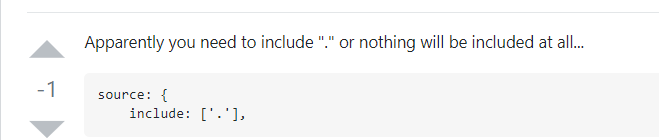
我的jsdoc是全局安装的,配置文件所在目录为
J:\Users\Administrator\AppData\Roaming\nvm\v12.22.12\node_modules\jsdoc-to-markdown\node_modules\jsdoc。
|
everything全局搜索文件jsdoc\conf.json.EXAMPLE所在目录就是了,创建个文件名为conf.json的配置,填入下面配置:
{"tags": {"allowUnknownTags": true},"source": {"include": ["."]},"plugins": [],"templates": {"cleverLinks": false,"monospaceLinks": false,"default": {"outputSourceFiles": true}}
}
参考资料
- Vs code自动生成Doxygen格式注释 https://www.cnblogs.com/silencehuan/p/11875958.html
- jsdoc-to-markdown官网 https://github.com/jsdoc2md/jsdoc-to-markdown
- 踩坑原文 https://stackoverflow.com/questions/64978721/js-includepattern-not-working-there-are-no-input-files-to-process
下一篇:《蜀黍韩太尉书》