

Springboot 结合 MQTT、Redis ,对接硬件以及做消息分发,最佳实践
创始人
2024-01-25 16:01:23
Springboot 结合 mqtt、redis对接硬件以及做消息分发,最佳实践
一,认识
需要了解EMQX 基本知识原理,不了解的可以查看我之间的博客,以及网上的资料,这里不在过多撰述。
二,开发思路
这里以对接雷达水位计为例:
说一下思路, 这里场景各种设备连接 EMQX ,然后通过 EMQX 上报数据,和接收服务器下发的指令。
我们需要部署一个 EMQX 服务器, 设备配置我们的服务器ip和端口连接到 EMQX 。
那么我们开发EMQX 的思路应该是什么样子的。
mqtt 客户端订阅相关主题;
数据库保存数据设备产品项目定义主题,存到redis;
通过主题做出相关数据分析;
三,准备工作
3.1 引入Springboot-mqtt依赖
Springboot 依赖, MQTT依赖
org.springframework.boot spring-boot-starter-parent 2.1.3.RELEASE org.springframework.boot spring-boot-starter-integration org.springframework.integration spring-integration-stream org.springframework.integration spring-integration-mqtt 其他相关依赖 不在撰写, 数据库依赖以及 工具类依赖 ,自己按需引用
四,编写代码
4.1 编写MQTT配置类
不在过多解释代码,每行都有注释
import lombok.Data;
import org.springframework.boot.context.properties.ConfigurationProperties;
import org.springframework.context.annotation.Configuration;
import org.springframework.context.annotation.PropertySource;
import org.springframework.stereotype.Component;/*** 功能描述: 配置类** @Author keLe* @Date 2022/10/31*/
@Data
@Component
@Configuration
@PropertySource("classpath:application.yml")
@ConfigurationProperties(prefix = "mqtt")
public class MqttProperties {/**服务器地址url*/private String host;/**客户端唯一ID*/private String clientId;/**用户名*/private String userName;/**密码*/private String passWord;/**超时时间*/private Integer timeOut;/**保活时间*/private Integer keepaLive;/**是否清除会话*/private boolean clearSession;
}
appliction.yml
mqtt:host: tcp://xx.xx.xx.xx:1883 #MQTT-服务器连接地址,如果有多个,用逗号隔开,如:tcp://127.0.0.1:61613,tcp://192.168.2.133:61613clientId: ${random.int} #MQTT-连接服务器默认客户端IDuserName: admin #MQTT-用户名passWord: admin #MQTT-密码default-topic: test #MQTT-默认的消息推送主题,实际可在调用接口时指定timeOut: 1000 #连接超时keepaLive: 30 #设置会话心跳时间clearSession: true #清除会话(设置为false,断开连接,重连后使用原来的会话 保留订阅的主题,能接收离线期间的消息)4.2 编写MQTT客户端,处理创建,连接,订阅,发布等功能
import com.joygis.mqtt.MqttProperties;
import lombok.extern.slf4j.Slf4j;
import org.eclipse.paho.client.mqttv3.*;
import org.eclipse.paho.client.mqttv3.persist.MemoryPersistence;
import org.springframework.stereotype.Component;import javax.annotation.Resource;
import java.util.Arrays;/*** 功能描述: mqtt客户端** @Author keLe* @Date 2022/10/31*/
@Slf4j
@Component
public class MqttCustomerClient {@Resourceprivate MqttCallback mqttCallback;@Resourceprivate MqttProperties mqttProperties;/*** 连接配置*/private MqttConnectOptions options;/*** MQTT异步客户端*/public static MqttAsyncClient client;/*** 功能描述: 客户端连接** @Author keLe* @Date 2022/10/31*/public void connect() {if (mqttProperties == null) {log.error("【mqtt异常】:连接失败,配置文件缺失。");return;}//设置配置if (options == null) {setOptions();}//创建客户端if (client == null) {createClient();}while (!client.isConnected()) {try {IMqttToken token = client.connect(options);token.waitForCompletion();} catch (Exception e) {log.error("【mqtt异常】:mqtt连接失败,message={}", e.getMessage());}}}/*** 功能描述: 创建客户端** @Author keLe* @Date 2022/10/31*/private void createClient() {if (client == null) {try {/*host为主机名,clientId是连接MQTT的客户端ID,MemoryPersistence设置clientId的保存方式默认是以内存方式保存*/client = new MqttAsyncClient(mqttProperties.getHost(), mqttProperties.getClientId(), new MemoryPersistence());//设置回调函数client.setCallback(mqttCallback);log.info("【mqtt】:mqtt客户端启动成功");} catch (MqttException e) {log.error("【mqtt异常】:mqtt客户端连接失败,error={}", e.getMessage());e.printStackTrace();}}}/*** 功能描述: 设置连接属性** @Author keLe* @Date 2022/10/31*/private void setOptions() {if (options != null) {options = null;}if (mqttProperties == null) {log.error("【mqtt异常】连接失败,失败原因:配置文件缺失。");return;}options = new MqttConnectOptions();options.setCleanSession(true);options.setUserName(mqttProperties.getUserName());options.setPassword(mqttProperties.getPassWord().toCharArray());options.setConnectionTimeout(mqttProperties.getTimeOut());options.setKeepAliveInterval(mqttProperties.getKeepaLive());//设置自动重新连接options.setAutomaticReconnect(true);options.setCleanSession(mqttProperties.isClearSession());}/*** 功能描述: 断开与mqtt的连接** @Author keLe* @Date 2022/10/31*/public synchronized void disconnect() {//判断客户端是否null 是否连接if (client != null && client.isConnected()) {try {IMqttToken token = client.disconnect();token.waitForCompletion();} catch (MqttException e) {log.error("【mqtt异常】: 断开mqtt连接发生错误,message={}", e.getMessage());}}client = null;}/*** 功能描述: 重新连接MQTT** @Author keLe* @Date 2022/10/31*/public synchronized void refresh() {disconnect();setOptions();createClient();connect();}/*** 功能描述: 发布* @param qos         连接方式* @param retained    是否保留* @param topic       主题* @param pushMessage 消息体* @Author keLe* @Date 2022/10/31*/public void publish(int qos, boolean retained, String topic, String pushMessage) {log.info("【mqtt】:发布主题" + topic);MqttMessage message = new MqttMessage();message.setQos(qos);message.setRetained(retained);message.setPayload(pushMessage.getBytes());try {IMqttDeliveryToken token = client.publish(topic,message);token.waitForCompletion();} catch (MqttPersistenceException e) {e.printStackTrace();} catch (MqttException e) {log.error("【mqtt异常】: 发布主题时发生错误 topic={},message={}",topic,e.getMessage());}}/*** 功能描述: 订阅某个主题* @param topic 主题* @param qos   消息质量*              Qos1:消息发送一次,不确保*              Qos2:至少分发一次,服务器确保接收消息进行确认*              Qos3:只分发一次,确保消息送达和只传递一次* @Author keLe* @Date 2022/10/31*/public void subscribe(String topic, int qos){log.info("【mqtt】:订阅了主题 topic={}",topic);try {IMqttToken token = client.subscribe(topic, qos);token.waitForCompletion();}catch (MqttException e){log.error("【mqtt异常】:订阅主题 topic={} 失败 message={}",topic,e.getMessage());}}/*** 功能描述: 订阅某些主题* @param topic 主题* @param qos   消息质量*              Qos1:消息发送一次,不确保*              Qos2:至少分发一次,服务器确保接收消息进行确认*              Qos3:只分发一次,确保消息送达和只传递一次* @Author keLe* @Date 2022/10/31*/public void subscribe(String[] topic,int[] qos){log.info("【mqtt】:订阅了主题 topic={}", Arrays.toString(topic));try {IMqttToken token = client.subscribe(topic,qos);token.waitForCompletion();}catch (MqttException e){log.error("【mqtt异常】:订阅主题 topic={} 失败 message={}",topic,e.getMessage());}}/**是否处于连接状态*/public boolean isConnected(){return client != null && client.isConnected();}
}
4.3 编写MQTT 回调监听器
/*** 功能描述: 消费监听** @Author keLe* @Date 2022/10/31*/
@Slf4j
@Component
public class MqttCallback implements MqttCallbackExtended {@Resourceprivate MqttService mqttService;@Overridepublic void connectionLost(Throwable throwable) {log.error("【mqtt异常】:断开连接....");}@Overridepublic void messageArrived(String topic, MqttMessage message) throws Exception {mqttService.subscribeCallback(topic,message);}/*** 功能描述: 发布消息后,到达MQTT服务器,服务器回调消息接收* @param token  Mqtt传递令牌* @Author keLe* @Date 2022/10/31*/@Overridepublic void deliveryComplete(IMqttDeliveryToken token) {log.info("【mqtt】交付完成:{}",token.isComplete());}/*** 功能描述: 监听mqtt连接消息* @param reconnect 是否重连* @param serverUrl 服务地址* @Author keLe* @Date 2022/10/31*/@Overridepublic void connectComplete(boolean reconnect, String serverUrl) {log.info("mqtt已经连接!!");//连接后,可以在此做初始化事件,或订阅try {mqttService.subscribe(MqttCustomerClient.client);} catch (MqttException e) {log.error("======>>>>>订阅主题失败 error={}",e.getMessage());}}
}
4.4 编写MQTT 业务接口,处理订阅发布
import cn.hutool.core.collection.CollectionUtil;
import com.alibaba.fastjson.JSON;
import com.joygis.common.constant.Constants;
import com.joygis.common.core.redis.RedisCache;
import com.joygis.mqtt.client.MqttCustomerClient;
import com.joygis.mqtt.domian.SubscribeConfig;
import lombok.extern.slf4j.Slf4j;
import org.eclipse.paho.client.mqttv3.MqttAsyncClient;
import org.eclipse.paho.client.mqttv3.MqttException;
import org.eclipse.paho.client.mqttv3.MqttMessage;
import org.springframework.beans.factory.annotation.Autowired;
import org.springframework.scheduling.annotation.Async;
import org.springframework.stereotype.Service;import javax.annotation.Resource;
import java.util.List;@Slf4j
@Service
public class MqttService {@Resourceprivate MqttCustomerClient mqttCustomerClient;@Autowiredprivate RedisCache redisCache;/*** 功能描述: 订阅主题* @param client MQTT异步客户端* @Author keLe* @Date 2022/10/31*/public void subscribe(MqttAsyncClient client) throws MqttException {//获取主题List cacheList = redisCache.getCacheList(Constants.SUB_CONFIG_KEY + "topic");if(CollectionUtil.isEmpty(cacheList)){log.error("【mqtt异常】:redis缓存中,无法获取主题相关信息!");return;}String[] topicFilters = cacheList.toArray(new String[cacheList.size()]);int[] qos = new int[cacheList.size()];for(int i = 0 ; iqos[i] = 1;}// 订阅client.subscribe(topicFilters, qos);log.info("mqtt订阅了设备信息和物模型主题");}/*** 功能描述: 消息回调方法* @param topic  主题* @param mqttMessage 消息体* @Author keLe* @Date 2022/10/31*/@Asyncpublic void subscribeCallback(String topic, MqttMessage mqttMessage) throws InterruptedException {/**测试线程池使用*/log.info("====>>>>线程名--{}",Thread.currentThread().getName());/**模拟耗时操作*/// Thread.sleep(1000);// subscribe后得到的消息会执行到这里面String message = new String(mqttMessage.getPayload());log.info("接收消息主题 : " + topic);log.info("接收消息Qos : " + mqttMessage.getQos());log.info("接收消息内容 : " + message);String key = Constants.SUB_CONFIG_KEY+topic;SubscribeConfig subscribeConfig = redisCache.getCacheObject(key);//TODO 这里使用通过数据取到相应的bean 动态去调用接口解析数据}/*** 功能描述: 发布设备状态* @Author keLe* @Date 2022/10/31* @param  productId 产品id* @param  deviceNum 设备编号* @param  deviceStatus 设备状态* @param  isShadow 影子模式* @param  rssi 编号*/public void publishStatus(Long productId, String deviceNum, int deviceStatus, int isShadow,int rssi) {String message = "{\"status\":" + deviceStatus + ",\"isShadow\":" + isShadow + ",\"rssi\":" + rssi + "}";mqttCustomerClient.publish(1, false, "/" + productId + "/" + deviceNum + "", message);}/*** 功能描述: 发布设备状态* @Author keLe* @Date 2022/10/31* @param  productId 产品id* @param  deviceNum 设备编号*/public void publishInfo(Long productId, String deviceNum) {mqttCustomerClient.publish(1, false, "/" + productId + "/" + deviceNum + "", "");}/*** 功能描述: 发布设备状态* @Author keLe* @Date 2022/10/31* @param  productId 产品id* @param  deviceNum 设备编号*/public void publishFunction(Long productId, String deviceNum, List thingsList) {if (thingsList == null) {mqttCustomerClient.publish(1, true, "/" + productId + "/" + deviceNum + "", "");} else {mqttCustomerClient.publish(1, true, "/" + productId + "/" + deviceNum + "", JSON.toJSONString(thingsList));}}
}
4.5 Redis初始化,加载数据库 topic
@Service
public class SubscribeConfigServiceImpl implements ISubscribeConfigService {@Autowiredprivate RedisCache redisCache;@Resourceprivate SubscribeConfigMapper subscribeConfigMapper;@PostConstructpublic void init() {loadingConfigCache();}@Overridepublic void loadingConfigCache() {List configsList = subscribeConfigMapper.selectSubscribeConfigList(new SubscribeConfig());if(CollectionUtil.isNotEmpty(configsList)){for (SubscribeConfig config : configsList) {redisCache.setCacheObject(getCacheKey(config.getTopic()), config);}List topicList = configsList.stream().map(SubscribeConfig::getTopic).collect(Collectors.toList());redisCache.deleteObject(getCacheKey("topic"));redisCache.setCacheList(getCacheKey("topic"), topicList);}}/*** 设置cache key** @param configKey 参数键* @return 缓存键key*/private String getCacheKey(String configKey) {return Constants.SUB_CONFIG_KEY + configKey;}}
4.6 Springboot 启动,MQTT也自启动,任务定时器池也启动
package com.joygis.iot.config;
import com.joygis.mqtt.client.MqttCustomerClient;
import org.springframework.boot.ApplicationArguments;
import org.springframework.boot.ApplicationRunner;
import org.springframework.core.annotation.Order;
import org.springframework.stereotype.Component;import javax.annotation.Resource;/*** 功能描述: spring 容器创建完成之后,开始创建mqtt客户端** @Author keLe* @Date 2022/10/31*/
@Order(value = 1 )
@Component
public class MqttStart implements ApplicationRunner {@Resourceprivate MqttCustomerClient mqttCustomerClient;@Overridepublic void run(ApplicationArguments args) throws Exception {mqttCustomerClient.connect();}
}
五 ,测试
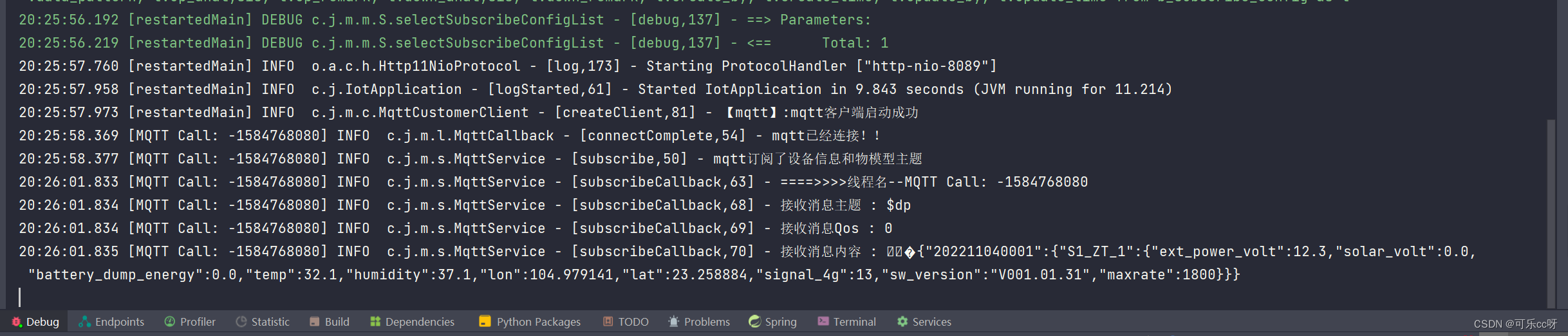
启动服务
上一篇:mmlab花朵分类结果展示(2)
下一篇:比喻救不了命比上天的一句话还惨
相关内容
热门资讯
埃菲尔铁塔在哪 中国仿建埃菲尔...
2019年4月26日,广西南宁市,街头惊现一座巨型山寨版埃菲尔铁塔,高约20米,白色塔身,造型逼真,...
苗族的传统节日 贵州苗族节日有...
【岜沙苗族芦笙节】岜沙,苗语叫“分送”,距从江县城7.5公里,是世界上最崇拜树木并以树为神的枪手部落...
北京的名胜古迹 北京最著名的景...
北京从元代开始,逐渐走上帝国首都的道路,先是成为大辽朝五大首都之一的南京城,随着金灭辽,金代从海陵王...
超纤皮是什么皮 超纤皮好不好
相信大家买车的时候,很多人都会选择皮座椅,因为不但有档次,而且手感也会比织物的好。但是大家想过没有,...
应用未安装解决办法 平板应用未...
---IT小技术,每天Get一个小技能!一、前言描述苹果IPad2居然不能安装怎么办?与此IPad不...
脚上的穴位图 脚面经络图对应的...
人体穴位作用图解大全更清晰直观的标注了各个人体穴位的作用,包括头部穴位图、胸部穴位图、背部穴位图、胳...
长白山自助游攻略 吉林长白山游...
昨天介绍了西坡的景点详细请看链接:一个人的旅行,据说能看到长白山天池全凭运气,您的运气如何?今日介绍...
猫咪吃了塑料袋怎么办 猫咪误食...
你知道吗?塑料袋放久了会长猫哦!要说猫咪对塑料袋的喜爱程度完完全全可以媲美纸箱家里只要一有塑料袋的响...
世界上最漂亮的人 世界上最漂亮...
此前在某网上,选出了全球265万颜值姣好的女性。从这些数量庞大的女性群体中,人们投票选出了心目中最美...
埃菲尔铁塔在哪 中国仿建埃菲尔...
2019年4月26日,广西南宁市,街头惊现一座巨型山寨版埃菲尔铁塔,高约20米,白色塔身,造型逼真,...
超纤皮是什么皮 超纤皮好不好
相信大家买车的时候,很多人都会选择皮座椅,因为不但有档次,而且手感也会比织物的好。但是大家想过没有,...
苗族的传统节日 贵州苗族节日有...
【岜沙苗族芦笙节】岜沙,苗语叫“分送”,距从江县城7.5公里,是世界上最崇拜树木并以树为神的枪手部落...
北京的名胜古迹 北京最著名的景...
北京从元代开始,逐渐走上帝国首都的道路,先是成为大辽朝五大首都之一的南京城,随着金灭辽,金代从海陵王...