

SpringBoot自定义banner,如何定制炫酷的banner提升项目B格?
文章目录
- 写在前面
- 自定义banner
- 使用banner.txt文件
- 使用图片
- 手写一个banner
- banner参数
- 在 application.properties 文件中可以配置banner其他属性
- banner自身参数
- 源码分析
- 在线生成banner
写在前面
Springboot启动的时候默认是有一套自己的banner的:
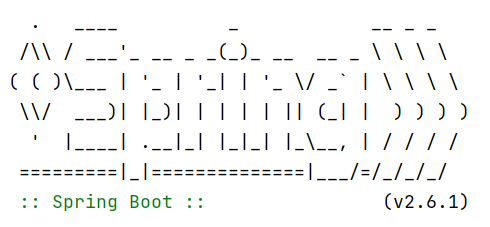
我们如何自定义这个banner呢?
自定义banner
使用banner.txt文件
在Spring Boot工程的/src/main/resources目录下创建一个banner.txt文件,然后将ASCII字符画复制进去,就能替换默认的banner了。
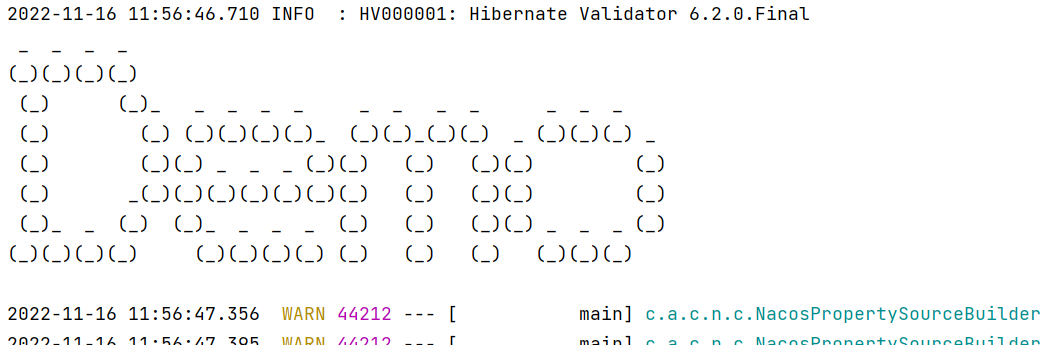
banner.txt:
 _  _  _  _
(_)(_)(_)(_)(_)      (_)_   _  _  _  _     _  _   _  _      _  _  _(_)        (_) (_)(_)(_)(_)_  (_)(_)_(_)(_)  _ (_)(_)(_) _(_)        (_)(_) _  _  _ (_)(_)   (_)   (_)(_)         (_)(_)       _(_)(_)(_)(_)(_)(_)(_)   (_)   (_)(_)         (_)(_)_  _  (_)  (_)_  _  _  _  (_)   (_)   (_)(_) _  _  _ (_)
(_)(_)(_)(_)     (_)(_)(_)(_) (_)   (_)   (_)   (_)(_)(_)
启动后的打印效果:
使用图片
在Spring Boot工程的/src/main/resources目录下,放置一张图片,起名为banner.xxx(其中xxx为gif、jpg、png格式),在项目启动时会自动解析该图片。
banner.jpg:

启动后的打印效果:
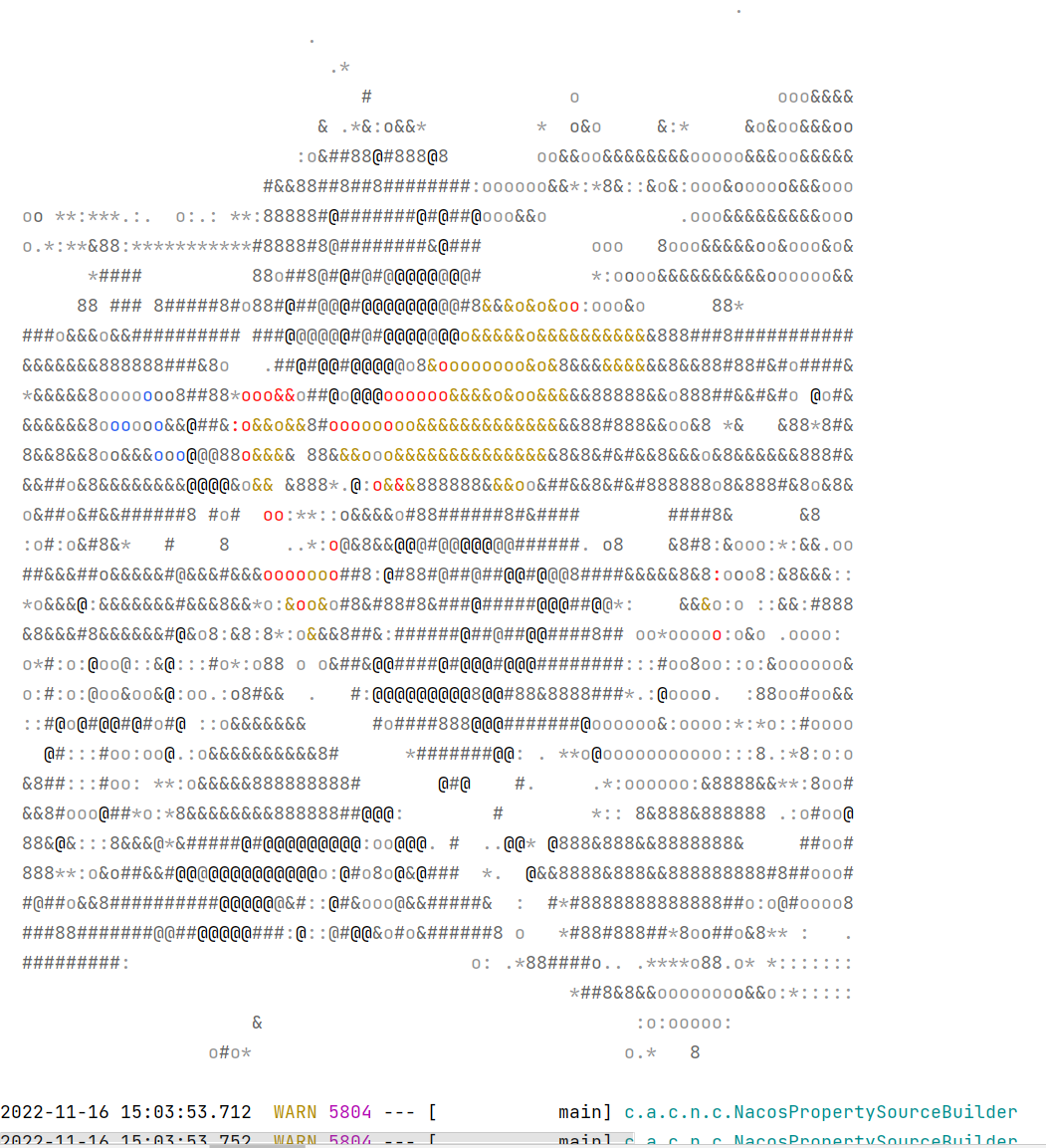
注意:图片如果太花了,效果可能并不会很好。
手写一个banner
import org.springframework.boot.Banner;
import org.springframework.boot.ansi.AnsiColor;
import org.springframework.boot.ansi.AnsiOutput;
import org.springframework.boot.ansi.AnsiStyle;
import org.springframework.core.env.Environment;
import java.io.PrintStream;
/** 自定义banner类*/
public class MyBanner implements Banner {private static final String[] BANNER = new String[]{"", "  .   ____          _            __ _ _", " /\\\\ / ___'_ __ _ _(_)_ __  __ _ \\ \\ \\ \\", "( ( )\\___ | '_ | '_| | '_ \\/ _` | \\ \\ \\ \\", " \\\\/  ___)| |_)| | | | | || (_| |  ) ) ) )", "  '  |____| .__|_| |_|_| |_\\__, | / / / /", " =========|_|==============|___/=/_/_/_/"};public MyBanner() {}@Overridepublic void printBanner(Environment environment, Class sourceClass, PrintStream out) {String[] bannerArray = BANNER;int bannerLength = bannerArray.length;for(int i = 0; i < bannerLength; ++i) {String line = bannerArray[i];out.println(line);}out.println(AnsiOutput.toString(new Object[]{AnsiColor.GREEN, " :: Spring Boot :: ", AnsiColor.DEFAULT,  AnsiStyle.FAINT}));out.println();}
}// 启动类中加入banner即可
@SpringBootApplication
public class DemoApplication {public static void main(String[] args) {SpringApplication springApplication = new SpringApplication(DemoApplication.class);//添加自定义bannerspringApplication.setBanner(new MyBanner());springApplication.run(args);}}
banner参数
在 application.properties 文件中可以配置banner其他属性
# 来确定横幅是必须在控制台(console)上打印、发送到配置的记录器(log)还是根本不生成(off)。
spring.main.banner-mode=off
# 在 application.properties 文件中可以配置banner属性
spring.banner.charset=UTF-8
spring.banner.location=classpath:banner.txt
#在 application.properties 文件中可以配置图片的高度、宽度、颜色深度
spring.banner.image.width=100
spring.banner.image.height=20
spring.banner.image.bitdepth=4
# 是否应该为黑暗终端主题反转图像
spring.banner.image.invert=true
# banner图片的位置
spring.banner.image.location=classpath:banner.jpg
# banner右移字符数
spring.banner.image.margin=2
banner自身参数
| 参数 | 描述 |
|---|---|
| ${application.version} | MANIFEST.MF中声明的应用程序的版本号 |
| ${application.formatted-version} | MANIFEST.MF声明的应用程序的版本号并格式化以供显示(用括号括起来并以v为前缀)。比如(v1.0)。 |
| ${spring-boot.version} | 你正在使用的Spring Boot版本 |
| ${Ansi.NAME} (or ${AnsiColor.NAME}, ${AnsiBackground.NAME}, ${AnsiStyle.NAME}) | 其中NAME是ANSI转义码的名称 |
| ${application.title} | 在MANIFEST.MF中声明的应用程序的标题。 |
| ${AnsiColor.BRIGHT_RED} | 设置控制台中输出内容的颜色 |
| ${…} | 其他任意配置信息,比如说${server.port}获取端口 |
源码分析
1、在SpringApplication的run方法中,一直点进去,可以看到这样一段逻辑:
// org.springframework.boot.SpringApplication#run(java.lang.String...)
public ConfigurableApplicationContext run(String... args) {long startTime = System.nanoTime();DefaultBootstrapContext bootstrapContext = createBootstrapContext();ConfigurableApplicationContext context = null;configureHeadlessProperty();SpringApplicationRunListeners listeners = getRunListeners(args);listeners.starting(bootstrapContext, this.mainApplicationClass);try {ApplicationArguments applicationArguments = new DefaultApplicationArguments(args);ConfigurableEnvironment environment = prepareEnvironment(listeners, bootstrapContext, applicationArguments);configureIgnoreBeanInfo(environment);// 打印bannerBanner printedBanner = printBanner(environment);context = createApplicationContext();context.setApplicationStartup(this.applicationStartup);prepareContext(bootstrapContext, context, environment, listeners, applicationArguments, printedBanner);refreshContext(context);afterRefresh(context, applicationArguments);Duration timeTakenToStartup = Duration.ofNanos(System.nanoTime() - startTime);if (this.logStartupInfo) {new StartupInfoLogger(this.mainApplicationClass).logStarted(getApplicationLog(), timeTakenToStartup);}listeners.started(context, timeTakenToStartup);callRunners(context, applicationArguments);}catch (Throwable ex) {handleRunFailure(context, ex, listeners);throw new IllegalStateException(ex);}try {Duration timeTakenToReady = Duration.ofNanos(System.nanoTime() - startTime);listeners.ready(context, timeTakenToReady);}catch (Throwable ex) {handleRunFailure(context, ex, null);throw new IllegalStateException(ex);}return context;
}
其中printBanner就是打印banner的代码。
2、printBanner方法
// org.springframework.boot.SpringApplication#printBanner
private Banner printBanner(ConfigurableEnvironment environment) {// 判断banner的模式if (this.bannerMode == Banner.Mode.OFF) {return null;}ResourceLoader resourceLoader = (this.resourceLoader != null) ? this.resourceLoader: new DefaultResourceLoader(null);SpringApplicationBannerPrinter bannerPrinter = new SpringApplicationBannerPrinter(resourceLoader, this.banner);if (this.bannerMode == Mode.LOG) {return bannerPrinter.print(environment, this.mainApplicationClass, logger);}return bannerPrinter.print(environment, this.mainApplicationClass, System.out);
}
3、控制台print方法
// org.springframework.boot.SpringApplicationBannerPrinter#print(org.springframework.core.env.Environment, java.lang.Class, java.io.PrintStream)Banner print(Environment environment, Class sourceClass, PrintStream out) {// 获取BannerBanner banner = getBanner(environment);// 打印Bannerbanner.printBanner(environment, sourceClass, out);return new PrintedBanner(banner, sourceClass);}
4、getBanner
// org.springframework.boot.SpringApplicationBannerPrinter#getBanner
private Banner getBanner(Environment environment) {SpringApplicationBannerPrinter.Banners banners = new SpringApplicationBannerPrinter.Banners();//先获取image类型的bannerbanners.addIfNotNull(this.getImageBanner(environment));//在获取text类型的bannerbanners.addIfNotNull(this.getTextBanner(environment));if (banners.hasAtLeastOneBanner()) {// 如果至少有一个,则返回// Banners 也实现了 Banner 接口,运用了组合模式,实际上可同时打印图片和文本 banner。return banners;} else {// 返回自定义的banner(this.fallbackBanner) 或者 springboot默认的banner(DEFAULT_BANNER)// 默认的banner类:SpringBootBanner。// 自定义的banner:需要我们仿照SpringBootBanner去自定义一个类//this.fallbackBanner: 表示自定义的banner,此参数可在springboot启动类的main方法中设置,后续会介绍//   public static void main(String[] args) {//        SpringApplication springApplication = new SpringApplication(Application.class);//        springApplication.setBanner(new MyBanner());//自定义的banner//        springApplication.run(args);//   }return this.fallbackBanner != null ? this.fallbackBanner : DEFAULT_BANNER;}
}
banner的获取方式有两种,先获取image类型的banner,然后获取text类型的banner,如果至少有一个,则执行该banner,如果没有,返回自定义的banner,如果自定义也没有,则返回默认
5、获取banner
//获取Text类型的banner
private Banner getTextBanner(Environment environment) {//先从spring.banner.location路径中去取,如果没有,默认banner.txtString location = environment.getProperty("spring.banner.location", "banner.txt");Resource resource = this.resourceLoader.getResource(location);try {if (resource.exists() && !resource.getURL().toExternalForm().contains("liquibase-core")) {return new ResourceBanner(resource);}} catch (IOException var5) {}return null;
}//获取image类型的banner
private Banner getImageBanner(Environment environment) {String location = environment.getProperty("spring.banner.image.location");if (StringUtils.hasLength(location)) {Resource resource = this.resourceLoader.getResource(location);return resource.exists() ? new ImageBanner(resource) : null;} else {String[] var3 = IMAGE_EXTENSION;int var4 = var3.length;for(int var5 = 0; var5 < var4; ++var5) {String ext = var3[var5];// static final String[] IMAGE_EXTENSION = { "gif", "jpg", "png" };Resource resource = this.resourceLoader.getResource("banner." + ext);if (resource.exists()) {return new ImageBanner(resource);}}return null;}
}
在线生成banner
这里提供了几个在线生成banner的网址:
https://www.bootschool.net/ascii
http://www.network-science.de/ascii/
http://patorjk.com/software/taag/
http://www.degraeve.com/img2txt.php
上一篇:描述的金四军的组成是400字
下一篇:SQL 的执行流程是什么样的