

【搭建NextCloud私有云盘服务】采用docker在linux上进行部署,内含nextCloud移植(迁移服务器)方法
1、前言
完成的效果: 在linux上搭建NextCloud云盘服务,可以通过域名访问到云盘服务,并且安装有SSL证书,可进行https访问。
例如:
服务器公网ip为47.110.66.88
域名为:test.huahua.com
可直接通过访问https://cloud.huahua.com访问到私有云盘。
本实例的配置:
-
服务器厂商:阿里云服务器
-
linux系统:Alibaba Cloud Linux 3.2104 LTS 64位
-
使用到的工具:宝塔面板(主要做Nginx反向代理还有安装Docker管理面板,不用面板问题也不大,会Nginx就行)
-
服务器安装有Docker和Nginx服务
架构图
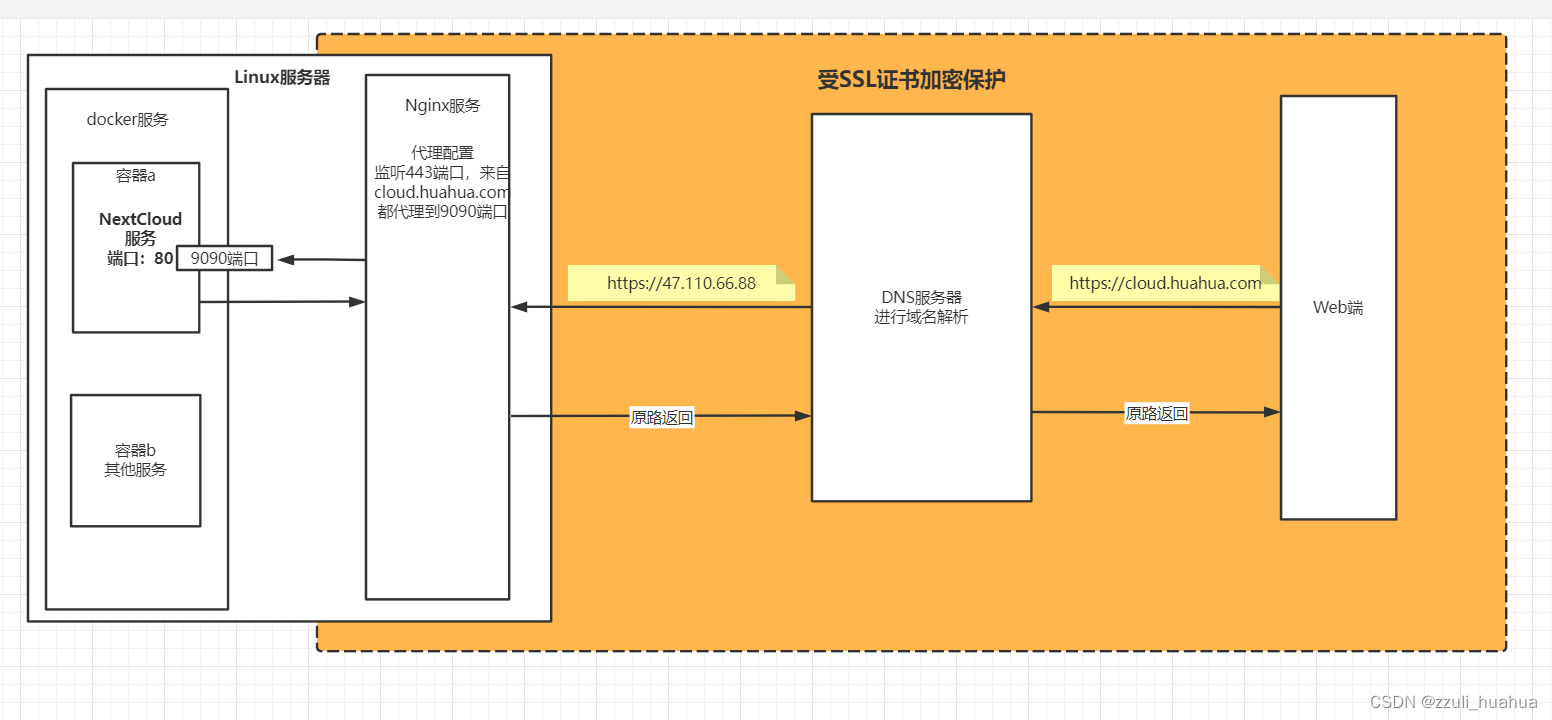
2、首次搭建NextCloud
(1)查询并下载NextCloud镜像
docker search nextcloud
docker pull nextcloud
(2)创建并启动NextCloud容器
docker images	# 查询镜像
docker run -d --restart=always --name nextcloud -p 9090:80 nextcloud:latest
解释:
-d 表示在后台运行
nextcloud 自定义容器的名字,
nextcloud:latest 是镜像的名字,冒号后面表示版本号
9090:80 表示服务器访问端口是9090,容器内部的端口是80,就是说要访问容器内部的80端口的时候,直接访问服务器的9090端口才可以访问到。
(3)访问地址
公网:端口号形式例如
http://47.110.66.88:9090
温馨提示: 记得把公网ip的9090端口打开,在安全组那里可以添加设置。
(4)连接mysql数据库
自行创建一个数据库
数据库名:nextCloud
用户名:root
密码:f35765c5f33ed13c(自定义)
注意:
字符集选 utf8mb4
排序规则选 utf8mb4_general_ci
使用 Navicat 数据库工具创建如下
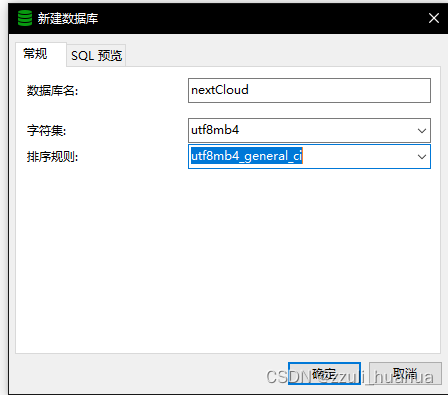
如果是使用宝塔创建数据库,一定要设置访问权限为本地ip或者所有人,不要设置为本地服务器,会安装失败的,因为访问权限不足,docker服务与linux服务隔开,所以docker里面的NextCloud服务准确来说不属于linux内部服务,我这里推荐使用本地ip也就是47.110.66.88
**特别注意:**在nextcloud页面上安装的时候需要填写数据库连接,
连接主机和端口号应该写(假设服务器地址是47.110.66.88):
47.110.66.88:3306
因为这是docker容器内部访问的linux数据库,如果填写localhost就相当于是docker容器内部的数据库了。
数据目录不用改,默认就好。
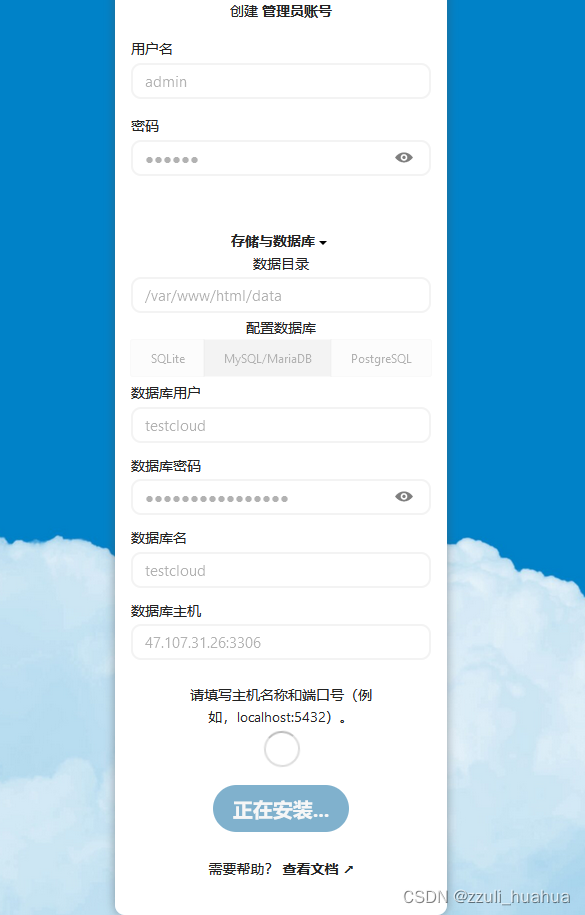
顺利的话会有一个安装成功页面,然后让你选择安装一些应用,可以跳过,如果时间允许也可以选择安装。之后进行下一步。
(5)添加Nginx反向代理以及SSL证书
可以通过域名进行访问
1.配置nginx代理模式以及添加SSL证书
在宝塔上新建一个PHP项目的网站,修改Nginx配置文件即可,主要添加的地方只有一个:
location ^~ /
{proxy_pass http://127.0.0.1:9090;proxy_set_header Host $host;proxy_set_header X-Real-IP $remote_addr;proxy_set_header X-Forwarded-For $proxy_add_x_forwarded_for;proxy_set_header REMOTE-HOST $remote_addr;proxy_set_header Upgrade $http_upgrade;proxy_set_header Connection $connection_upgrade;# proxy_hide_header Upgrade;add_header X-Cache $upstream_cache_status;#Set Nginx Cacheif ( $uri ~* "\.(gif|png|jpg|css|js|woff|woff2)$" ){expires 1m;}proxy_ignore_headers Set-Cookie Cache-Control expires;proxy_cache cache_one;proxy_cache_key $host$uri$is_args$args;proxy_cache_valid 200 304 301 302 1m;
}
或者 在宝塔网站里面自动生成反向代理,先创建一个PHP网站,然后在网站里面更改反向代理配置,贼方便。不过有一个条件:
安装宝塔的时候需要选择使用 LNMP环境 安装才行。
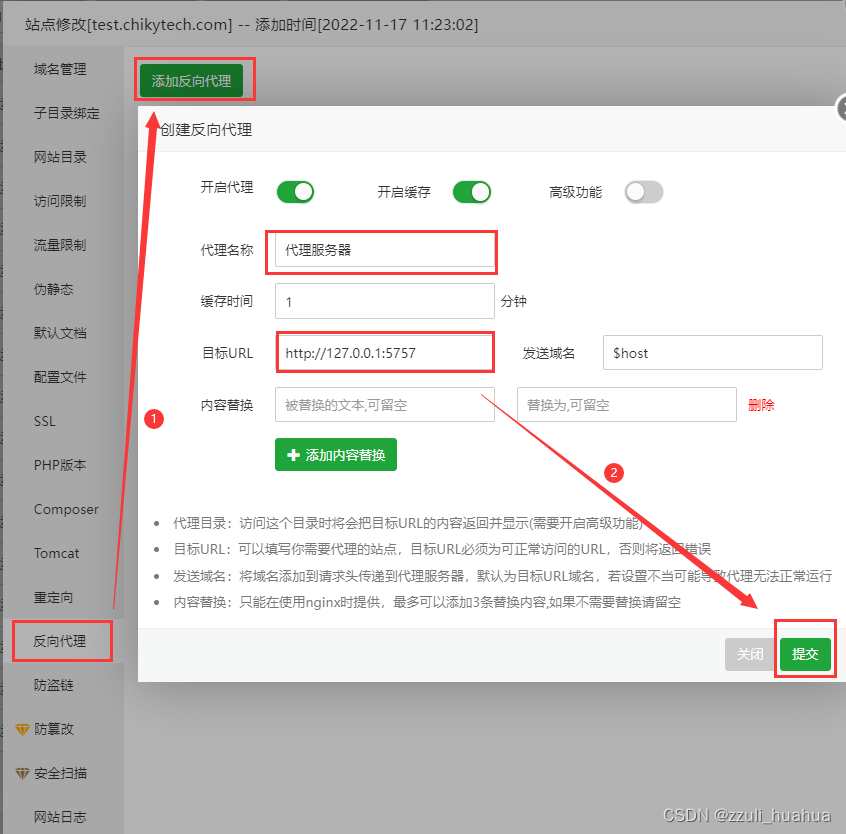
注意: 图片中的端口是写错的,正确应该是9090,自行更一下哈。
2.在docker里面的NextCloud配置文件(config/config.php)中设置访问白名单
方法一(linux手动添加):
docker ps # 查询docker运行的容器id
docker exec -it cce072c1a50c bash	# 进入docker cce072c1a50c这个是docker的id
在docker里面安装vim,如果执行不成功可重复执行,因为服务器在国外,下载难免会中断。目的在于安装vim,用来编辑config.php文件
apt-get update
apt-get install vim
编辑config/config.php配置文件
vim config/config.php # 编辑docker里面的文件
添加访问的域名,找到下面的代码,把1添加进去,初始化的时候只有0 => ‘localhost’
'trusted_domains' =>array (0 => 'localhost',1 => 'cloud.huahua.com',
),
方法二(宝塔手动添加):
安装Docker管理器
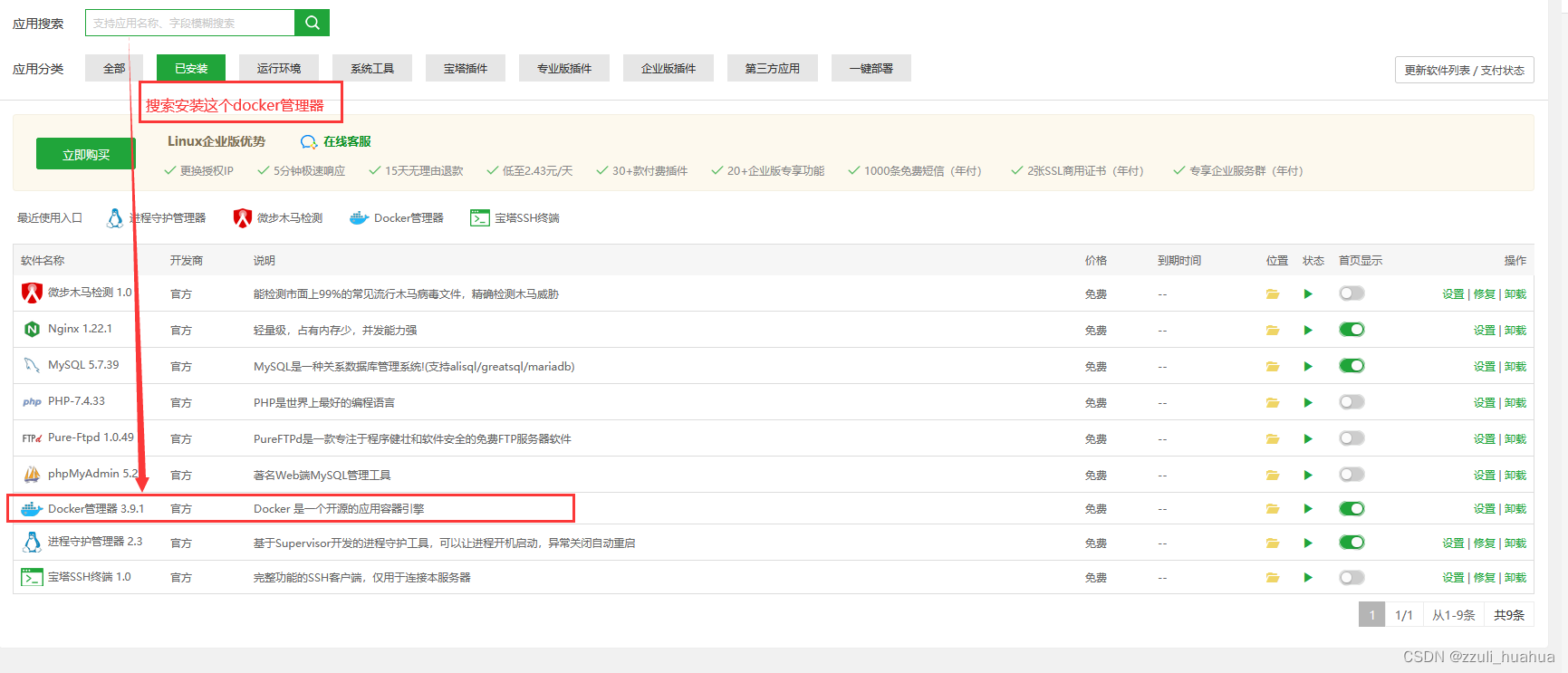
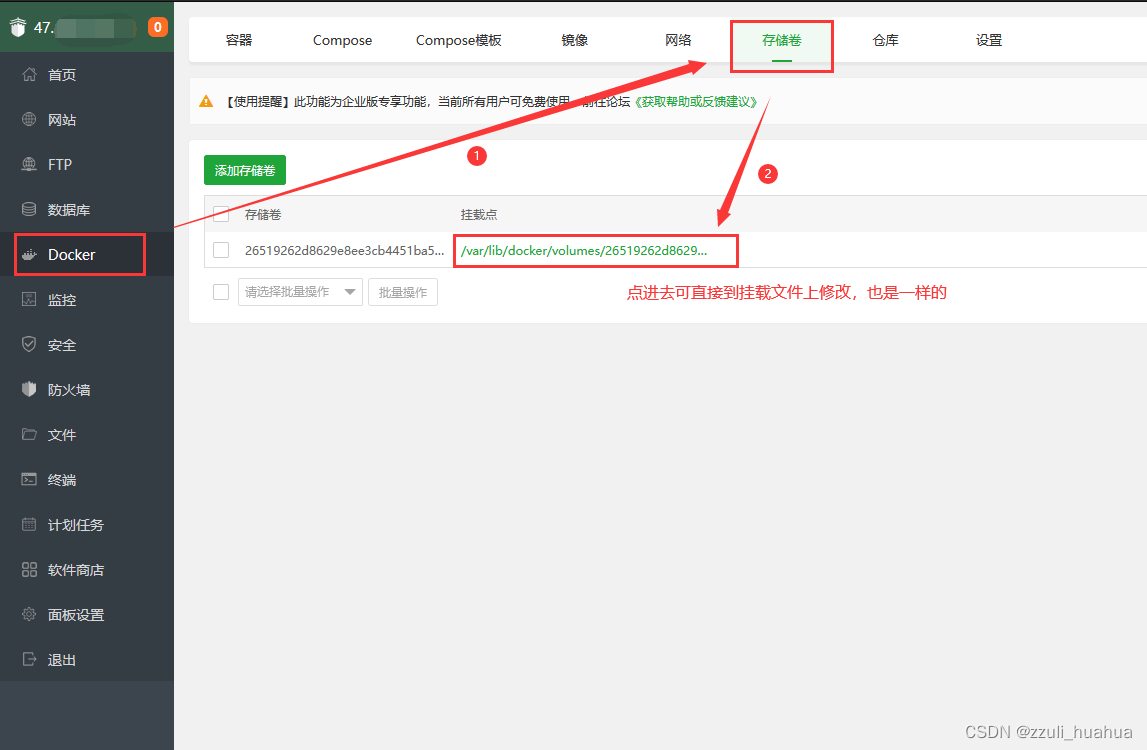
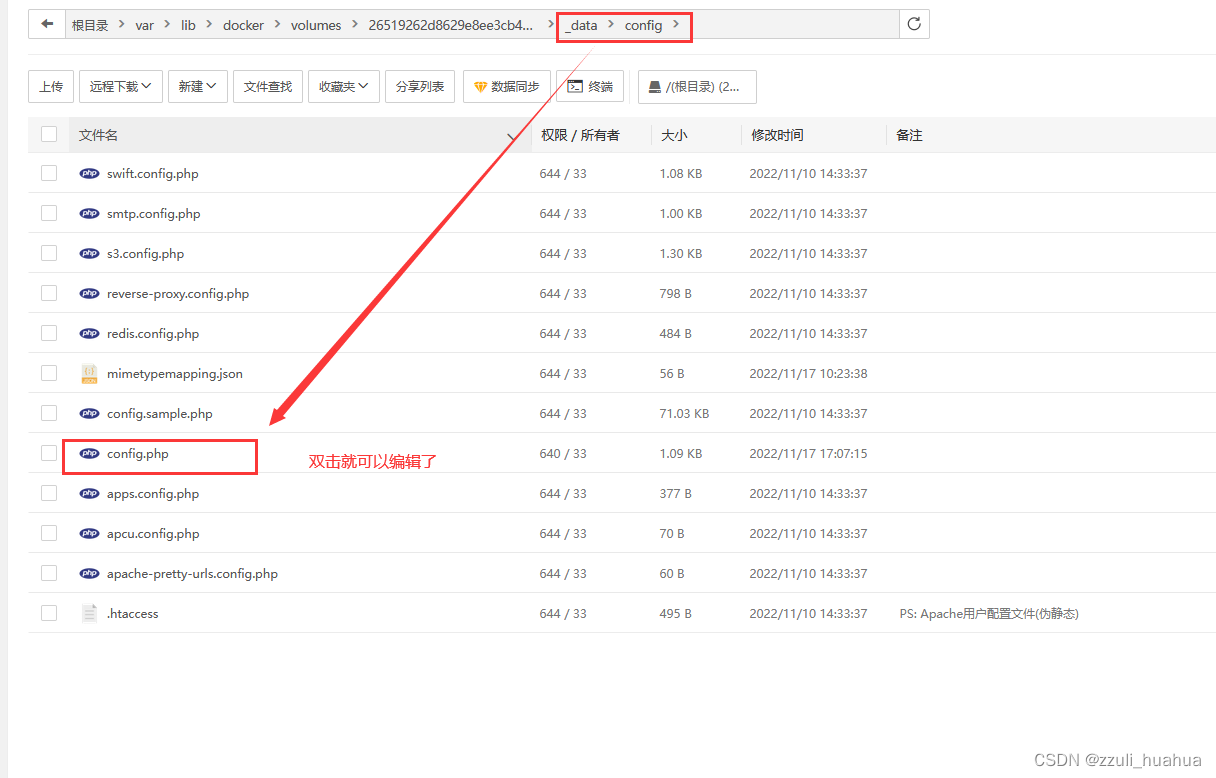
然后通过域名 cloud.huahua.com 就可以访问了
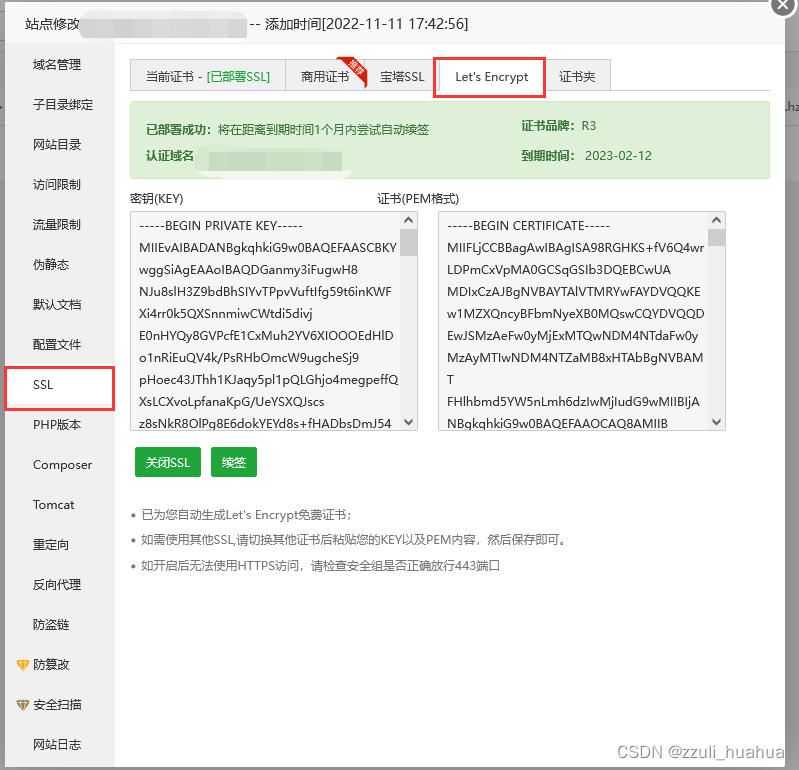
配置SSL证书,可以用宝塔一键自签证书,很方便的。
收尾工作:
使用Nginx代理之后,就可以在安全组上关闭9090端口了,避免不必要的端口暴露。
使用推荐:
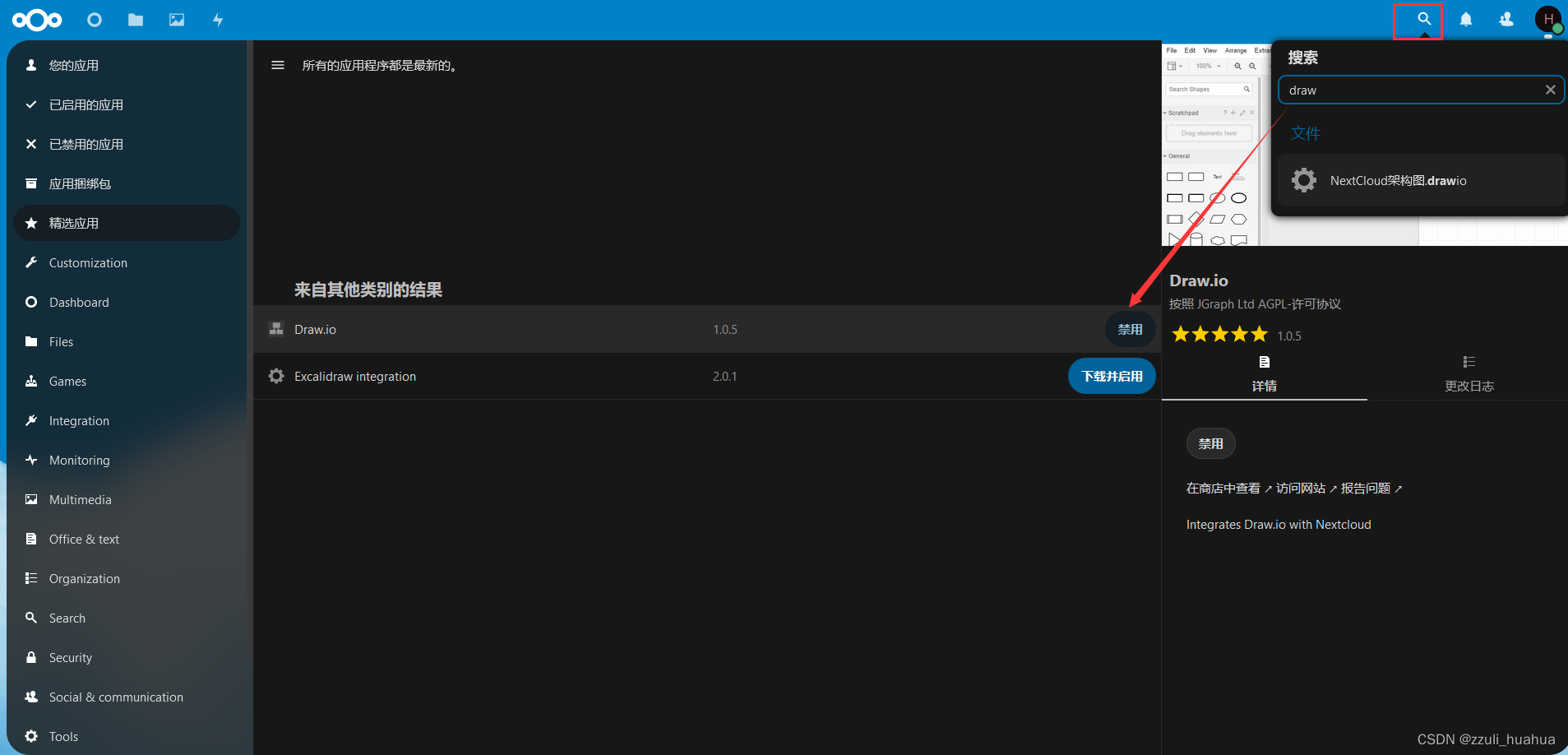
在nextcloud上推荐安装的几款应用,在nextcloud右上角搜索即可
Draw.io (画图软件,可以画流程图)
Mind Map(思维导图软件)
Notes(做笔记软件)
3、NextCloud移植
希望此项目永远都不要用到这个移植功能,从艰辛到成果有太多的摸索了。
(1)移植的思路:
1、在MySQL数据库拿到完整备份文件。
2、在新的服务器上搭建一个新的nextcloud云服务,全部安装正常流程走,添加到一个新的数据库,设置管理账号的时候随便写(导入数据库的时候会覆盖掉的)其他的不动。还有另一种方法就是把旧的镜像拿到新的服务器上,或者把旧的容器打包成镜像移植过新的服务器上,这样就不会有版本的误差了。
3、把步骤1中的的数据库备份移植到步骤2新数据库中。
4、把docker容器中的数据文件拿出来,拷贝到对应的文件。数据文件位置例如:
/var/lib/docker/volumes/26519262d8629e8ee3cb4451ba5a3690e327e64ef8c9bac72bb9b9aa551781fc/_data/data
因为这个文件就是全部的数据文件,数据库存放的是路径,在nextcloud上真正打开或者下载文件的时候需要真实数据文件,也就是说如果没有这个数据文件的话,就会出现一个现象:移植之后的云盘是可以看见文件的,但是要查看文件的时候会报一个错误:
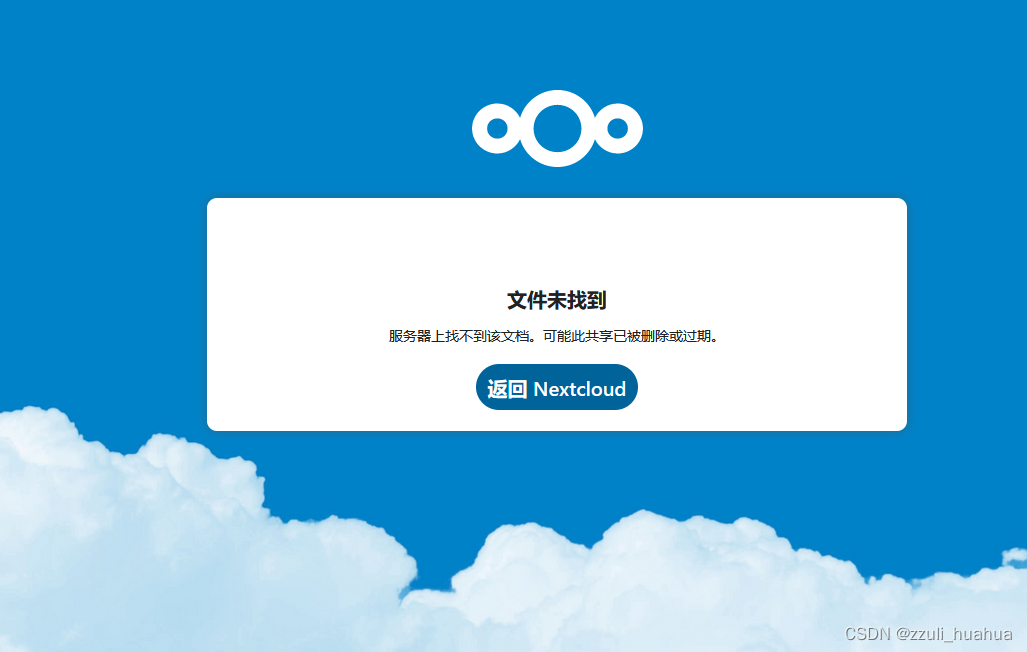
因为在根据数据库的文件路径去找服务器路径的时候会找不到此文件。
(2)详细步骤:
1、数据库文件拿到完整备份文件。
可以使用宝塔导出数据库完整备份文件,也可以使用原生sql语句导出。自行选择即可。
2、在新服务器上搭建新的nextcloud
docker pull nextcloud	# 拉取最新的镜像
docker run -d --restart=always --name nextcloud -p 9090:80 nextcloud:latest	# 运行容器
通过域名加端口号的形式访问:47.110.66.66:9090,然后进行数据库配置、安装。数据库需要新建一个数据库。
3、把步骤1中的的数据库备份移植到步骤2中的新数据库。
4、把docker容器中的数据文件拿出来,拷贝到对应的文件。
在旧服务器上查看旧版本的数据文件(挂载目录文件):
docker ps # 查出来的容器id为cce0(取前4个字符即可)
docker inspect cce0
[外链图片转存失败,源站可能有防盗链机制,建议将图片保存下来直接上传(img-W1ukrgSs-1668735689461)(./img/image-20221115143414705.png)]
然后拿_data/data文件夹内的所有文件到新服务器上,把对应的文件进行覆盖即可。怎么拿都可以,可以通过宝塔或者ftp服务,或者Samba,还可以使用U盘,或者上传到自己的git仓库(这个当心有容量上限哈),再从新服务器上拉下来都可以。姿势万千,只要思想不滑坡,办法从比困难多。
注意: 我们在云盘存储的数据文件是_data/data,只要拿到里面这个数据文件就可以了,外面的是云盘的代码文件。
5、最后访问云盘即可。最后可以了再配置nginx反向代理,还有设置ssl证书。大功告成!
担心出现的问题: 可能在其他的文件也存在用户数据,比如用户的主题格式这些,如果不放心的话,也可以把整个_data文件给覆盖。
到这里已经完成了,下面是一点笔记。(感谢观看)
4、常用的命令
进入docker
docker ps
docker exec -it cce072c1a50c bash
删除镜像
docker rmi 镜像id
NextCloud官方配置(Nginx)文件(没用过,作个参考吧)
upstream php-handler {server 127.0.0.1:9000;#server unix:/var/run/php/php7.4-fpm.sock;
}# Set the `immutable` cache control options only for assets with a cache busting `v` argument
map $arg_v $asset_immutable {"" "";default "immutable";
}server {listen 80;listen [::]:80;server_name cloud.example.com;# Prevent nginx HTTP Server Detectionserver_tokens off;# Enforce HTTPSreturn 301 https://$server_name$request_uri;
}server {listen 443      ssl http2;listen [::]:443 ssl http2;server_name cloud.example.com;# Path to the root of your installationroot /var/www/nextcloud;# Use Mozilla's guidelines for SSL/TLS settings# https://mozilla.github.io/server-side-tls/ssl-config-generator/ssl_certificate     /etc/ssl/nginx/cloud.example.com.crt;ssl_certificate_key /etc/ssl/nginx/cloud.example.com.key;# Prevent nginx HTTP Server Detectionserver_tokens off;# HSTS settings# WARNING: Only add the preload option once you read about# the consequences in https://hstspreload.org/. This option# will add the domain to a hardcoded list that is shipped# in all major browsers and getting removed from this list# could take several months.#add_header Strict-Transport-Security "max-age=15768000; includeSubDomains; preload" always;# set max upload size and increase upload timeout:client_max_body_size 512M;client_body_timeout 300s;fastcgi_buffers 64 4K;# Enable gzip but do not remove ETag headersgzip on;gzip_vary on;gzip_comp_level 4;gzip_min_length 256;gzip_proxied expired no-cache no-store private no_last_modified no_etag auth;gzip_types application/atom+xml application/javascript application/json application/ld+json application/manifest+json application/rss+xml application/vnd.geo+json application/vnd.ms-fontobject application/wasm application/x-font-ttf application/x-web-app-manifest+json application/xhtml+xml application/xml font/opentype image/bmp image/svg+xml image/x-icon text/cache-manifest text/css text/plain text/vcard text/vnd.rim.location.xloc text/vtt text/x-component text/x-cross-domain-policy;# Pagespeed is not supported by Nextcloud, so if your server is built# with the `ngx_pagespeed` module, uncomment this line to disable it.#pagespeed off;# The settings allows you to optimize the HTTP2 bandwitdth.# See https://blog.cloudflare.com/delivering-http-2-upload-speed-improvements/# for tunning hintsclient_body_buffer_size 512k;# HTTP response headers borrowed from Nextcloud `.htaccess`add_header Referrer-Policy                      "no-referrer"   always;add_header X-Content-Type-Options               "nosniff"       always;add_header X-Download-Options                   "noopen"        always;add_header X-Frame-Options                      "SAMEORIGIN"    always;add_header X-Permitted-Cross-Domain-Policies    "none"          always;add_header X-Robots-Tag                         "none"          always;add_header X-XSS-Protection                     "1; mode=block" always;# Remove X-Powered-By, which is an information leakfastcgi_hide_header X-Powered-By;# Specify how to handle directories -- specifying `/index.php$request_uri`# here as the fallback means that Nginx always exhibits the desired behaviour# when a client requests a path that corresponds to a directory that exists# on the server. In particular, if that directory contains an index.php file,# that file is correctly served; if it doesn't, then the request is passed to# the front-end controller. This consistent behaviour means that we don't need# to specify custom rules for certain paths (e.g. images and other assets,# `/updater`, `/ocm-provider`, `/ocs-provider`), and thus# `try_files $uri $uri/ /index.php$request_uri`# always provides the desired behaviour.index index.php index.html /index.php$request_uri;# Rule borrowed from `.htaccess` to handle Microsoft DAV clientslocation = / {if ( $http_user_agent ~ ^DavClnt ) {return 302 /remote.php/webdav/$is_args$args;}}location = /robots.txt {allow all;log_not_found off;access_log off;}# Make a regex exception for `/.well-known` so that clients can still# access it despite the existence of the regex rule# `location ~ /(\.|autotest|...)` which would otherwise handle requests# for `/.well-known`.location ^~ /.well-known {# The rules in this block are an adaptation of the rules# in `.htaccess` that concern `/.well-known`.location = /.well-known/carddav { return 301 /remote.php/dav/; }location = /.well-known/caldav  { return 301 /remote.php/dav/; }location /.well-known/acme-challenge    { try_files $uri $uri/ =404; }location /.well-known/pki-validation    { try_files $uri $uri/ =404; }# Let Nextcloud's API for `/.well-known` URIs handle all other# requests by passing them to the front-end controller.return 301 /index.php$request_uri;}# Rules borrowed from `.htaccess` to hide certain paths from clientslocation ~ ^/(?:build|tests|config|lib|3rdparty|templates|data)(?:$|/)  { return 404; }location ~ ^/(?:\.|autotest|occ|issue|indie|db_|console)                { return 404; }# Ensure this block, which passes PHP files to the PHP process, is above the blocks# which handle static assets (as seen below). If this block is not declared first,# then Nginx will encounter an infinite rewriting loop when it prepends `/index.php`# to the URI, resulting in a HTTP 500 error response.location ~ \.php(?:$|/) {# Required for legacy supportrewrite ^/(?!index|remote|public|cron|core\/ajax\/update|status|ocs\/v[12]|updater\/.+|oc[ms]-provider\/.+|.+\/richdocumentscode\/proxy) /index.php$request_uri;fastcgi_split_path_info ^(.+?\.php)(/.*)$;set $path_info $fastcgi_path_info;try_files $fastcgi_script_name =404;include fastcgi_params;fastcgi_param SCRIPT_FILENAME $document_root$fastcgi_script_name;fastcgi_param PATH_INFO $path_info;fastcgi_param HTTPS on;fastcgi_param modHeadersAvailable true;         # Avoid sending the security headers twicefastcgi_param front_controller_active true;     # Enable pretty urlsfastcgi_pass php-handler;fastcgi_intercept_errors on;fastcgi_request_buffering off;fastcgi_max_temp_file_size 0;}location ~ \.(?:css|js|svg|gif|png|jpg|ico|wasm|tflite|map)$ {try_files $uri /index.php$request_uri;add_header Cache-Control "public, max-age=15778463, $asset_immutable";access_log off;     # Optional: Don't log access to assetslocation ~ \.wasm$ {default_type application/wasm;}}location ~ \.woff2?$ {try_files $uri /index.php$request_uri;expires 7d;         # Cache-Control policy borrowed from `.htaccess`access_log off;     # Optional: Don't log access to assets}# Rule borrowed from `.htaccess`location /remote {return 301 /remote.php$request_uri;}location / {try_files $uri $uri/ /index.php$request_uri;}
}
下一篇:励志名言集锦