

ubuntu搭建Elasticsearch过程与问题
目录
一.下载Elasticsearh
二.解压 创建需要的文件目录
三.修改配置文件
四.遇到的问题
1.root账号启动问题
2.创建文件不授权切换到非root用户test的时候报错
3.启动最后还是报错
4.浏览器请求http://localhost:9200 报错:received plaintext http traffic on an https channel, closing connection Netty4HttpChannel
一.下载Elasticsearh
Download Elasticsearch | Elastic
自己下载的 8.0.0 https://artifacts.elastic.co/downloads/elasticsearch/elasticsearch-8.0.0-linux-x86_64.tar.gz
wget https://artifacts.elastic.co/downloads/logstash/logstash-8.0.0-linux-x86_64.tar.gz二.解压 创建需要的文件目录
tar -zxvf elasticsearch-8.0.0-linux-x86_64.tar.gz mkdir /data/elasticsearch/data /data/elasticsearch/logschmod 777 /data/elasticsearch三.修改配置文件
jvm.options 具体要不要添加不知道,看网上说要加就加,用的虚拟机所有用的1g,其他根据实际情况修改
################################################################
-Xms1g
-Xmx1g################################################################
elasticsearch.yml 下面的地址用的是第二点创建的地址,修改xpack.security.enabled: false,修改enabled: false 否则访问的时候时候报错,文章最后会列出来遇到的报错
# ----------------------------------- Paths ------------------------------------
#
# Path to directory where to store the data (separate multiple locations by comma):
#
path.data: /data/elasticsearch/data
#
# Path to log files:
#
path.logs: /data/elasticsearch/logs
#
# ----------------------------------- Memory -----------------------------------
#
# Lock the memory on startup:
#
#bootstrap.memory_lock: true
#
# Make sure that the heap size is set to about half the memory available
# on the system and that the owner of the process is allowed to use this
# limit.
#
# Elasticsearch performs poorly when the system is swapping the memory.
#
# ---------------------------------- Network -----------------------------------
#
# By default Elasticsearch is only accessible on localhost. Set a different
# address here to expose this node on the network:
#
network.host: 192.168.208.112
#
# By default Elasticsearch listens for HTTP traffic on the first free port it
# finds starting at 9200. Set a specific HTTP port here:
#
http.port: 9200
#
# For more information, consult the network module documentation.
#
# --------------------------------- Discovery ----------------------------------
#
# Pass an initial list of hosts to perform discovery when this node is started:
# The default list of hosts is ["127.0.0.1", "[::1]"]
#
#discovery.seed_hosts: ["host1", "host2"]
#
# Bootstrap the cluster using an initial set of master-eligible nodes:
#
#cluster.initial_master_nodes: ["node-1"]
# For more information, consult the discovery and cluster formation module documentation.
#
# ---------------------------------- Various -----------------------------------
#
# Allow wildcard deletion of indices:
#
#action.destructive_requires_name: false#----------------------- BEGIN SECURITY AUTO CONFIGURATION -----------------------
#
# The following settings, TLS certificates, and keys have been automatically
# generated to configure Elasticsearch security features on 18-11-2022 06:54:11
#
# --------------------------------------------------------------------------------# Enable security features
xpack.security.enabled: falsexpack.security.enrollment.enabled: true# Enable encryption for HTTP API client connections, such as Kibana, Logstash, and Agents
xpack.security.http.ssl:enabled: falsekeystore.path: certs/http.p12# Enable encryption and mutual authentication between cluster nodes
xpack.security.transport.ssl:enabled: trueverification_mode: certificatekeystore.path: certs/transport.p12truststore.path: certs/transport.p12
# Create a new cluster with the current node only
# Additional nodes can still join the cluster later
cluster.initial_master_nodes: ["ubuntu"]
以上配置还不能正常请求
四.遇到的问题
1.root账号启动问题
[2022-11-18T14:57:35,662][ERROR][o.e.b.ElasticsearchUncaughtExceptionHandler] [ubuntu] uncaught exception in thread [main]
org.elasticsearch.bootstrap.StartupException: java.lang.RuntimeException: can not run elasticsearch as root
at org.elasticsearch.bootstrap.Elasticsearch.init(Elasticsearch.java:170) ~[elasticsearch-8.0.0.jar:8.0.0]
at org.elasticsearch.bootstrap.Elasticsearch.execute(Elasticsearch.java:157) ~[elasticsearch-8.0.0.jar:8.0.0]
解决办法:
adduser test
passwd test
chown -R test:test elasticsearch-8.0.0/
chmod 770 elasticsearch-8.0.0/
参考了:java.lang.RuntimeException: can not run elasticsearch as root_wkCaeser_的博客-CSDN博客
注意里面的第一种方法./elasticsearch -Des.insecure.allow.root=true
试过了不行报错如下,最后还是改成了切换用户启动 :
ERROR: D is not a recognized option
2.创建文件不授权切换到非root用户test的时候报错
2022-11-18 15:04:53,121 main ERROR RollingFileManager (/data/elasticsearch/logs/elasticsearch_server.json) java.io.FileNotFoundException:
/data/elasticsearch/logs/elasticsearch_server.json (Permission denied) java.io.FileNotFoundException: /data/elasticsearch/logs/elasticsearch_server.json (Permission denied)
3.启动最后还是报错
ERROR: [1] bootstrap checks failed. You must address the points described in the following [1] lines before starting Elasticsearch.
bootstrap check failure [1] of [1]: max virtual memory areas vm.max_map_count [65530] is too low, increase to at least [262144]
ERROR: Elasticsearch did not exit normally - check the logs at /data/elasticsearch/logs/elasticsearch.log
[2022-11-18T15:08:24,009][INFO ][o.e.n.Node ] [ubuntu] stopping ...
[2022-11-18T15:08:24,047][INFO ][o.e.n.Node ] [ubuntu] stopped
[2022-11-18T15:08:24,047][INFO ][o.e.n.Node ] [ubuntu] closing ...
[2022-11-18T15:08:24,058][INFO ][o.e.n.Node ] [ubuntu] closed
[2022-11-18T15:08:24,060][INFO ][o.e.x.m.p.NativeController] [ubuntu] Native controller process has stopped - no new native processes can be started
解决办法:
vi /etc/security/limits.conf追加以下内容:
* soft    nofile  65536
* hard    nofile  65536
* soft    nproc   4096
* hard    nproc   4096
注意:此文件修改后需要重新登录用户,才会生效
4.浏览器请求http://localhost:9200 报错:received plaintext http traffic on an https channel, closing connection Netty4HttpChannel
received plaintext http traffic on an https channel, closing connection Netty4HttpChannel{localAddress=/[0:0:0:0:0:0:0:1]:9200解决办法, 修改两个如下:
# Enable security features
xpack.security.enabled: falsexpack.security.enrollment.enabled: true# Enable encryption for HTTP API client connections, such as Kibana, Logstash, and Agents
xpack.security.http.ssl:enabled: falsekeystore.path: certs/http.p12
最后输入locahost:9200出现如下表示OK
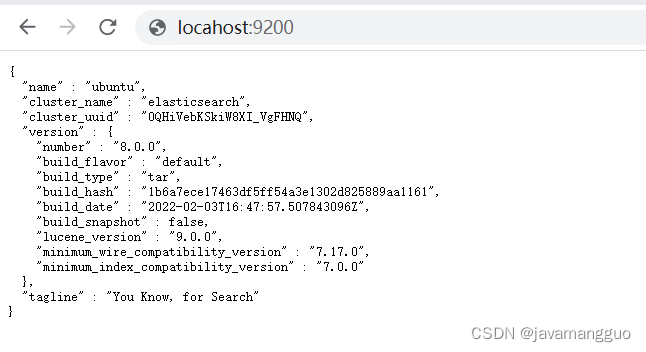
报错参考:Elasticsearch报错: received plaintext http traffic on an https channel, closing connection ..._zhangphil的博客-CSDN博客
Elasticsearch报错: received plaintext http traffic on an https channel, closing connection ..._zhangphil的博客-CSDN博客
上一篇:描述优步的句子