pytest常用插件使用大全

文章目录
- 一.pytest-sugar
- 二.pytest-rerunfailures
- 案例1
- 三.pytest-repeat
- 案例1:
- 案例2
- 案例3:测试方法中添加装饰器
- 案例4:存在多个module执行其中一个module,可以加装饰器
- 四.pytest-xdist
- 案例1
- 案例2:默认使用多进程执行用用例
- 案例2:自定义启动多个CPU执行用用例
- 五.pytest-timeout
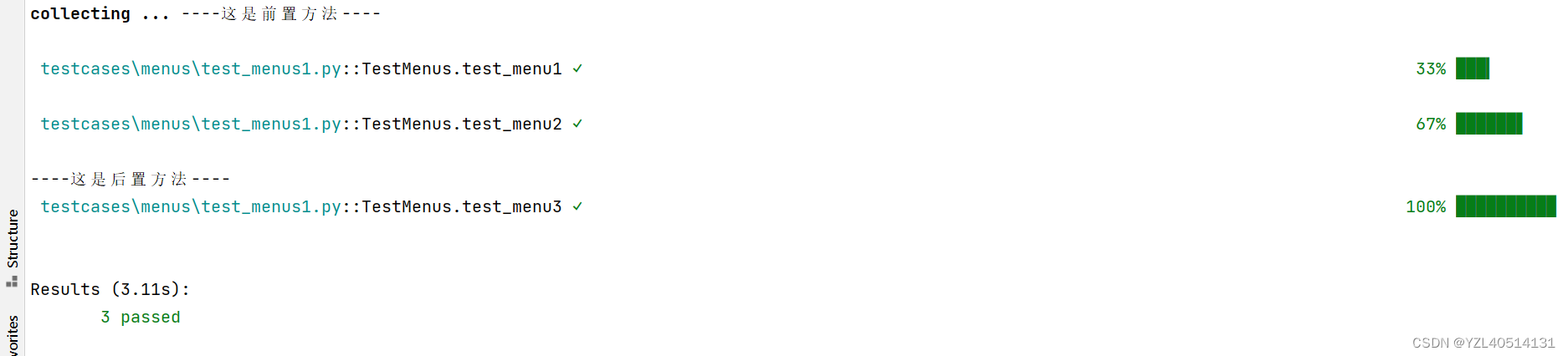
- 案例1:没有加用例超时报错
- 案例2:加用例超时报错
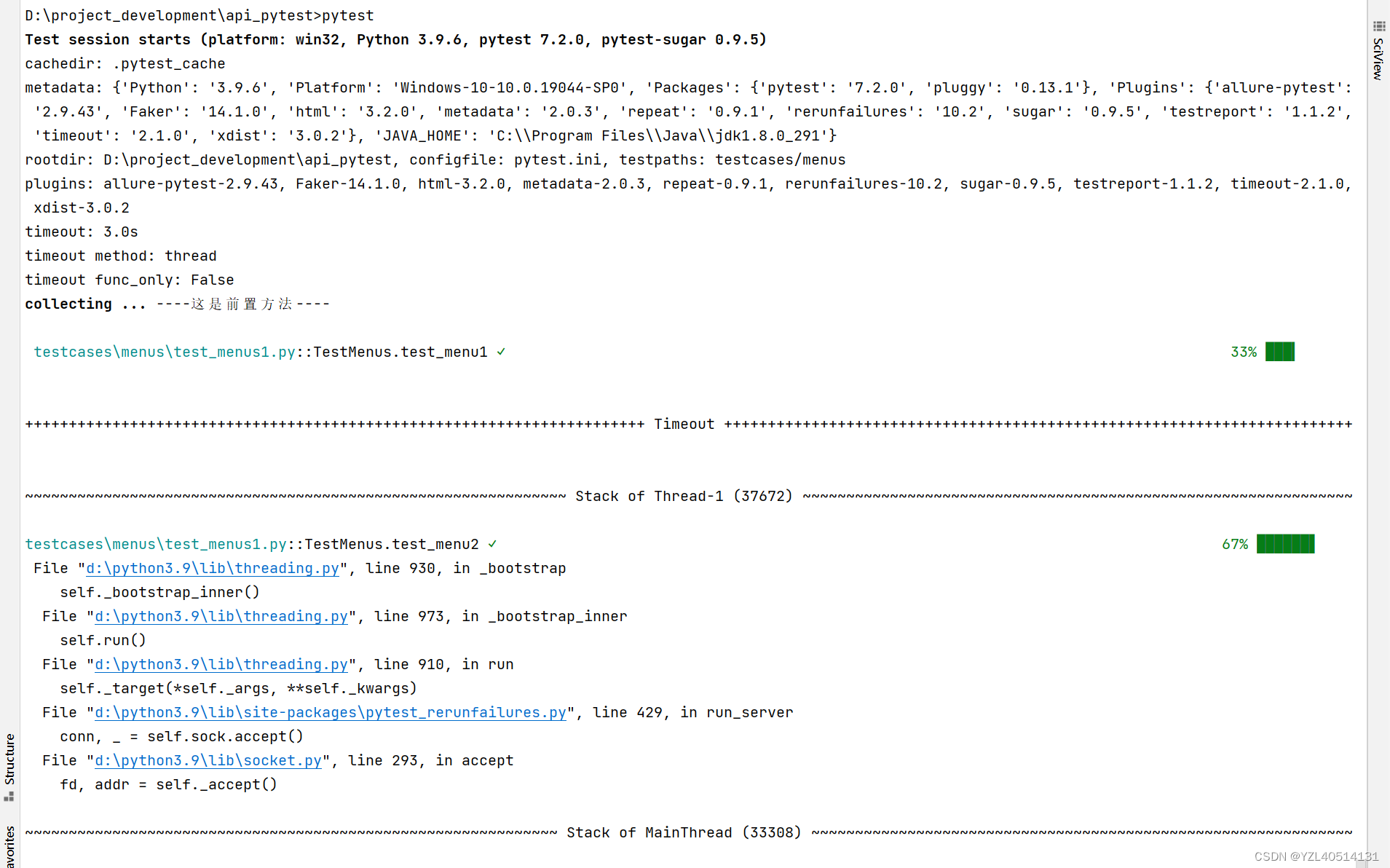
- 案例3:pytest.ini文件中配置超时选项
- 六.pytest-ordering
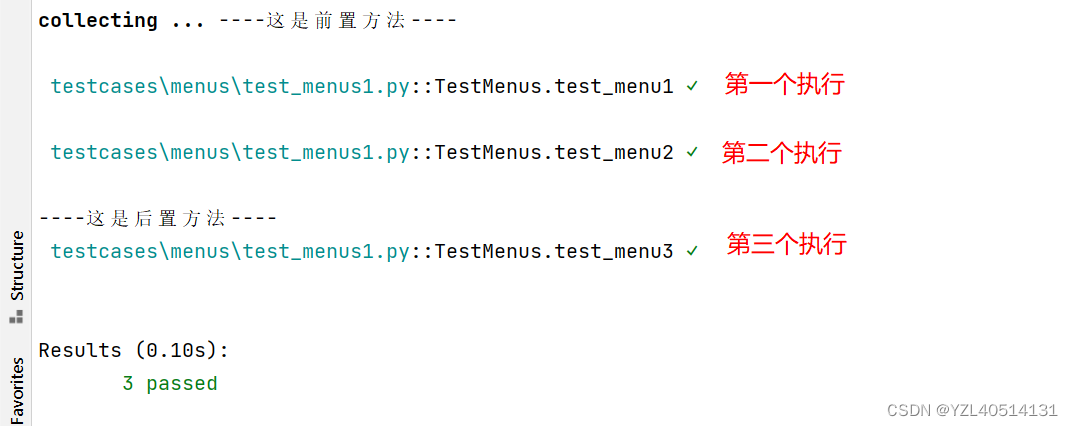
- 案例1:正常顺序执行
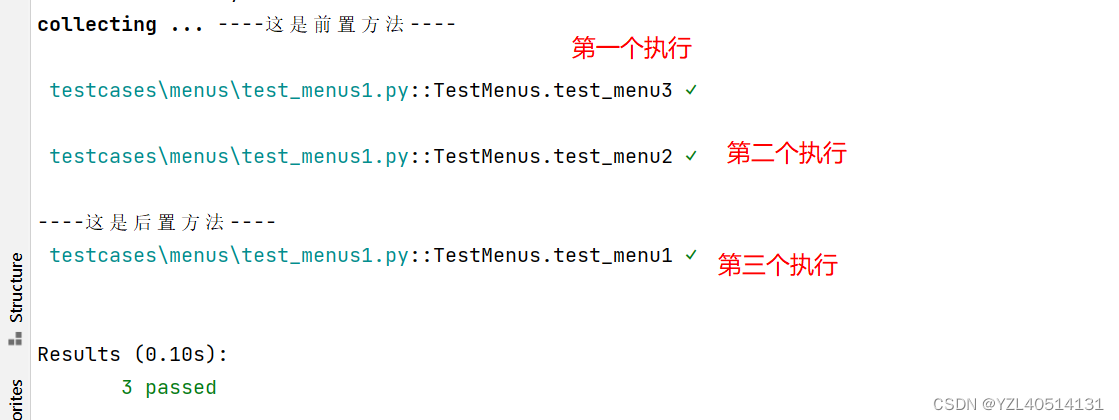
- 案例2:自定义用例执行顺序
- 案例3:也可以通过这种方式自定义用例执行顺序
- 七.pytest-dependency
- 案例1
一.pytest-sugar
pytest-sugar插件可以输出彩色字符。它也能在运行过程中显示错误和失败用例的堆栈回溯信息,而且还能在屏幕右侧显示进度条。
安装pytest sugar:
pip install pytest-sugar
然后使用以下命令运行测试:
pytest
二.pytest-rerunfailures
失败重跑,这个插件非常实用,比如做自动化的时候,有些接口由于网络的原因,不稳定,就要多次运行。
安装:
pip install pytest-rerunfailures
案例1
test_menus1.py
# encoding=utf-8
import pytest
import logging
import randomclass TestMenus:@pytest.mark.smokedef test_menu1(self):logging.info('执行测试用例1')assert 2 == random.randint(1,3)@pytest.mark.smokedef test_menu2(self):logging.info('执行测试用例2')assert 1 == 1def test_menu3(self):logging.info('执行测试用例3')assert 2 == 2if __name__ == '__main__':pytest.main()
执行命令:pytest --reruns 3
表示失败重运行3次
特别注意
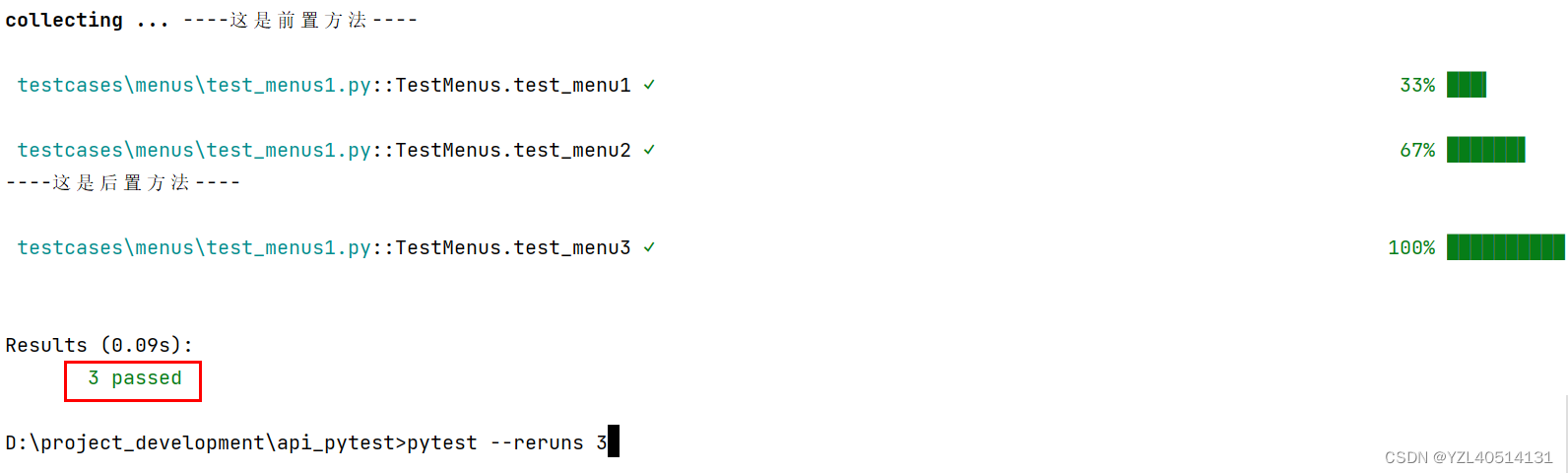
如果用例1次性全部运行通过,不会触发失败重运行机制。
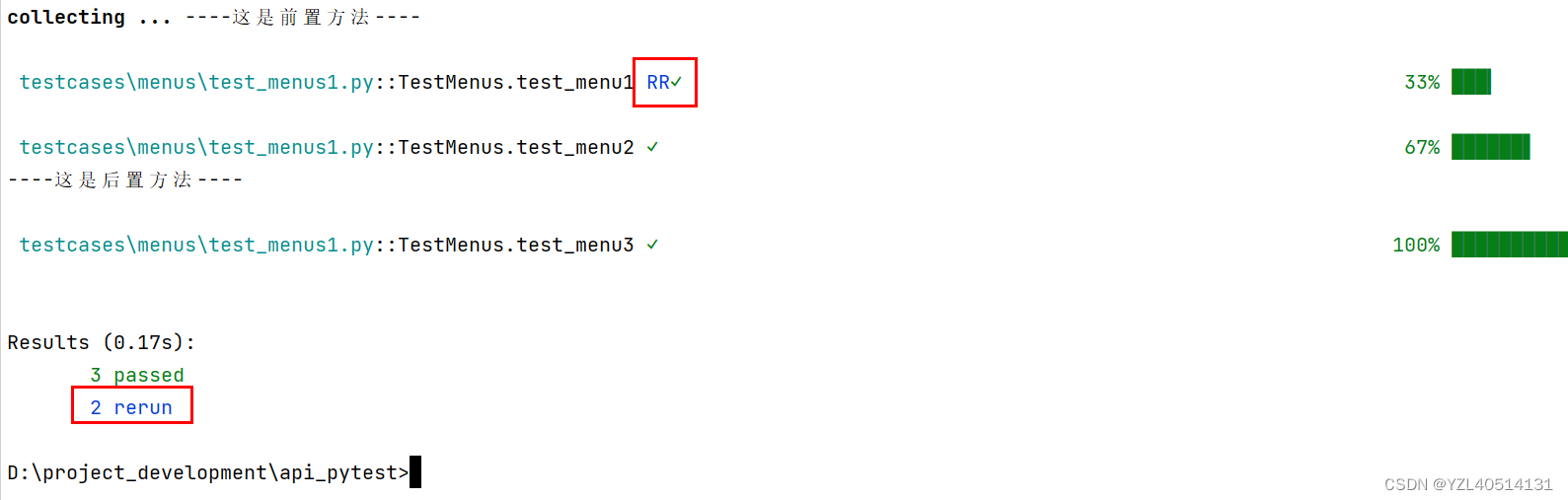
2 rerun:表示失败重运行2次。
如果失败重新运行的次数内,用例还没有执行成功,该条用例标记x,
三.pytest-repeat
如果你希望在一个会话中重复运行测试,则可以使用pytest-repeat插件。如果测试总是断断续续的失败,那么这个插件很有用
安装
pip install pytest-repeat
有了pytest-repeat插件后,可以使用–count来指定每个测试用例运行多次
案例1:
# encoding=utf-8
import pytest
import logging
import randomclass TestMenus:@pytest.mark.smokedef test_menu1(self):logging.info('执行测试用例1')assert 2 == random.randint(1,3)@pytest.mark.smokedef test_menu2(self):logging.info('执行测试用例2')assert 1 == 1def test_menu3(self):logging.info('执行测试用例3')assert 2 == 2if __name__ == '__main__':pytest.main()
执行命令:
pytest --count=3
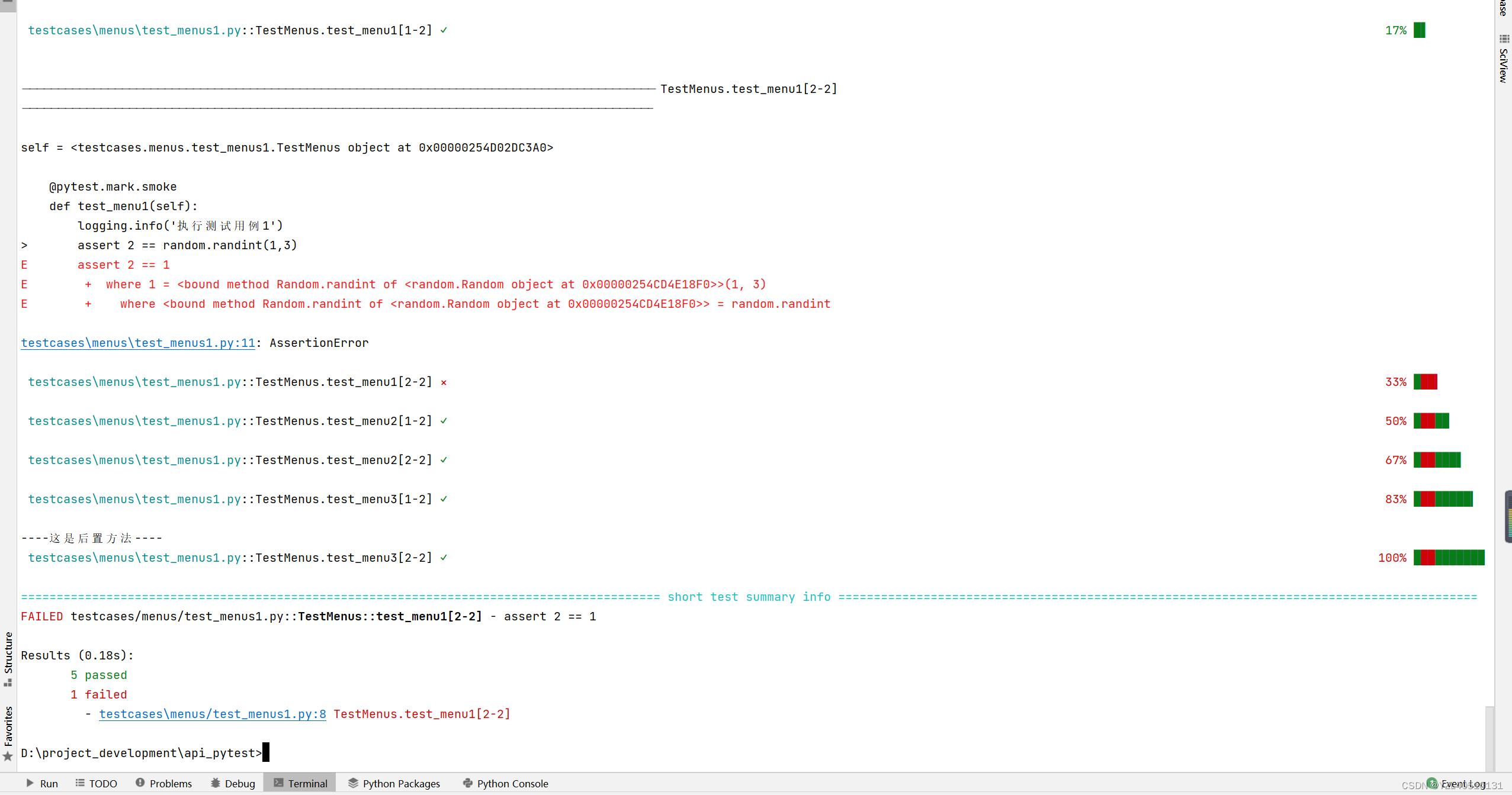
特别注意:
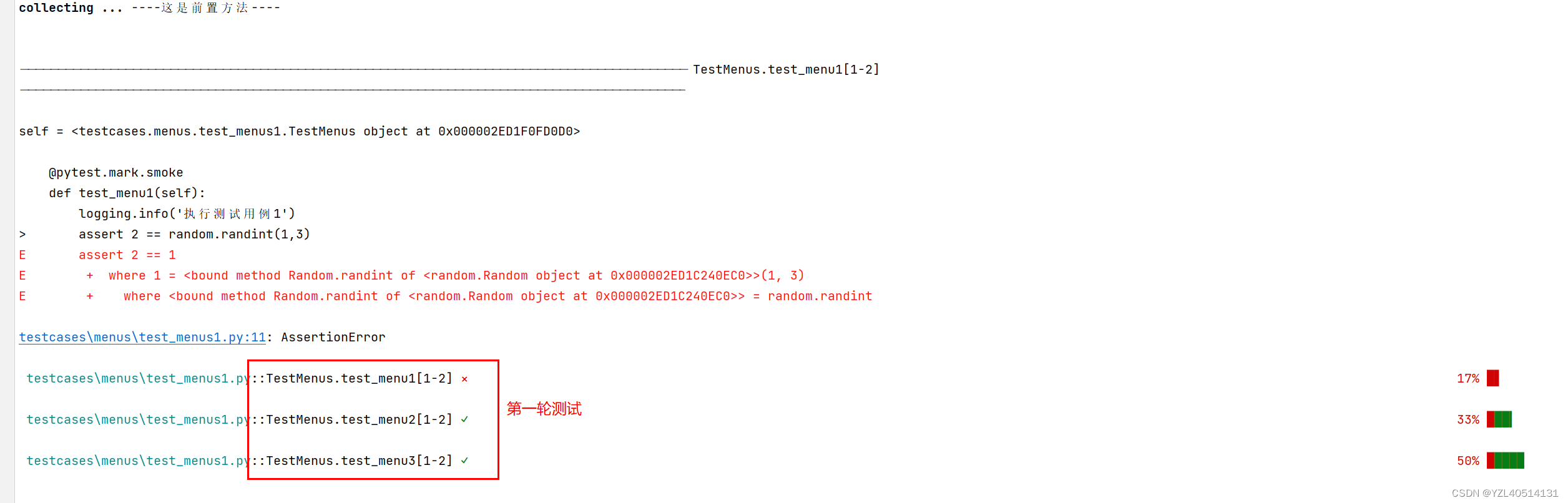
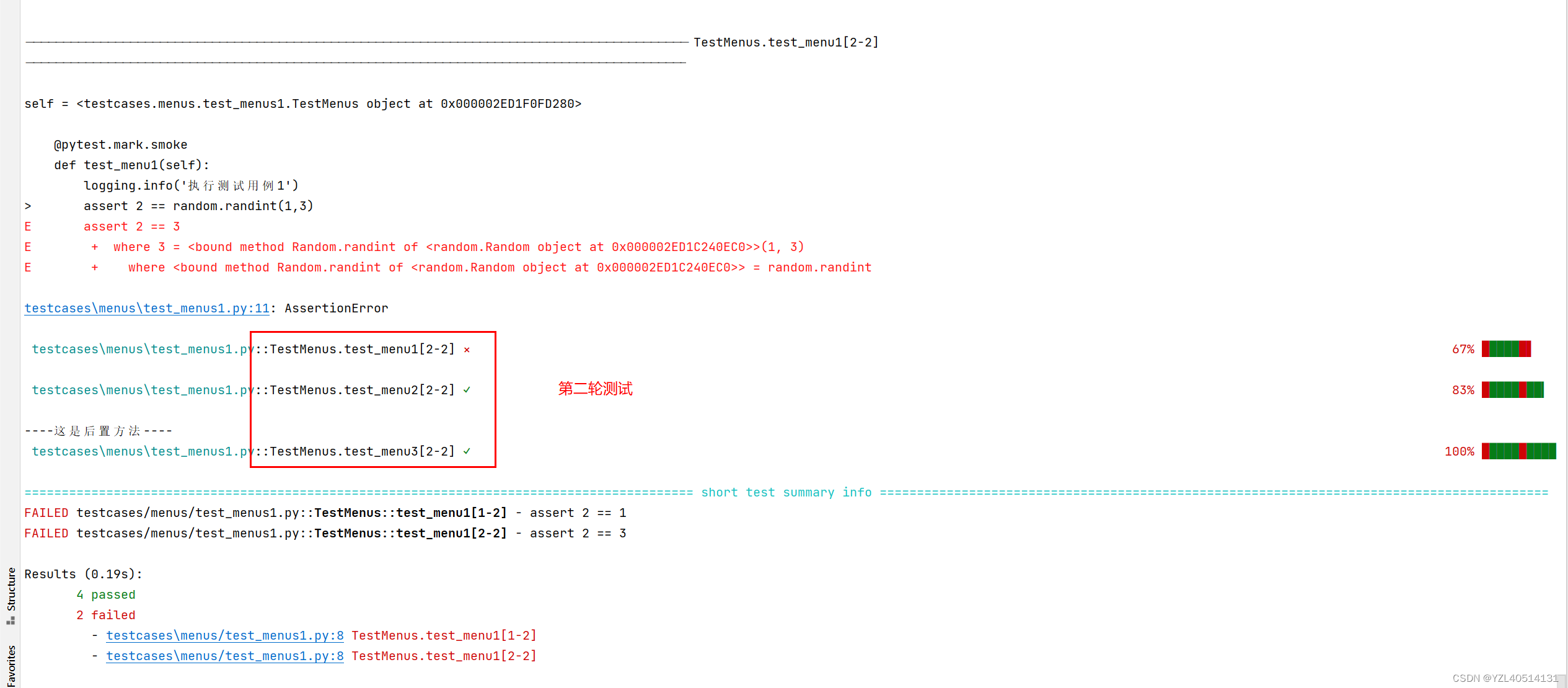
上面的结果是一个执行三次之后再执行下一个用例三次,但有时我们想一个用例执行完一次后执行下一个,在执行第二次。这时候就要加上–repeat-scope参数。
可以通过加参数-x来实现有失败就停止运行
–repeat-scope的参数有function(默认参数)、class、module、session
function:每个用例重复运行,全部运行结束后在执行下一个用例
class:以class为用例集合单位,重复执行class里的用例,在执行下一个
module:以模块为单位,重复执行模块里面的用例,在执行下一个
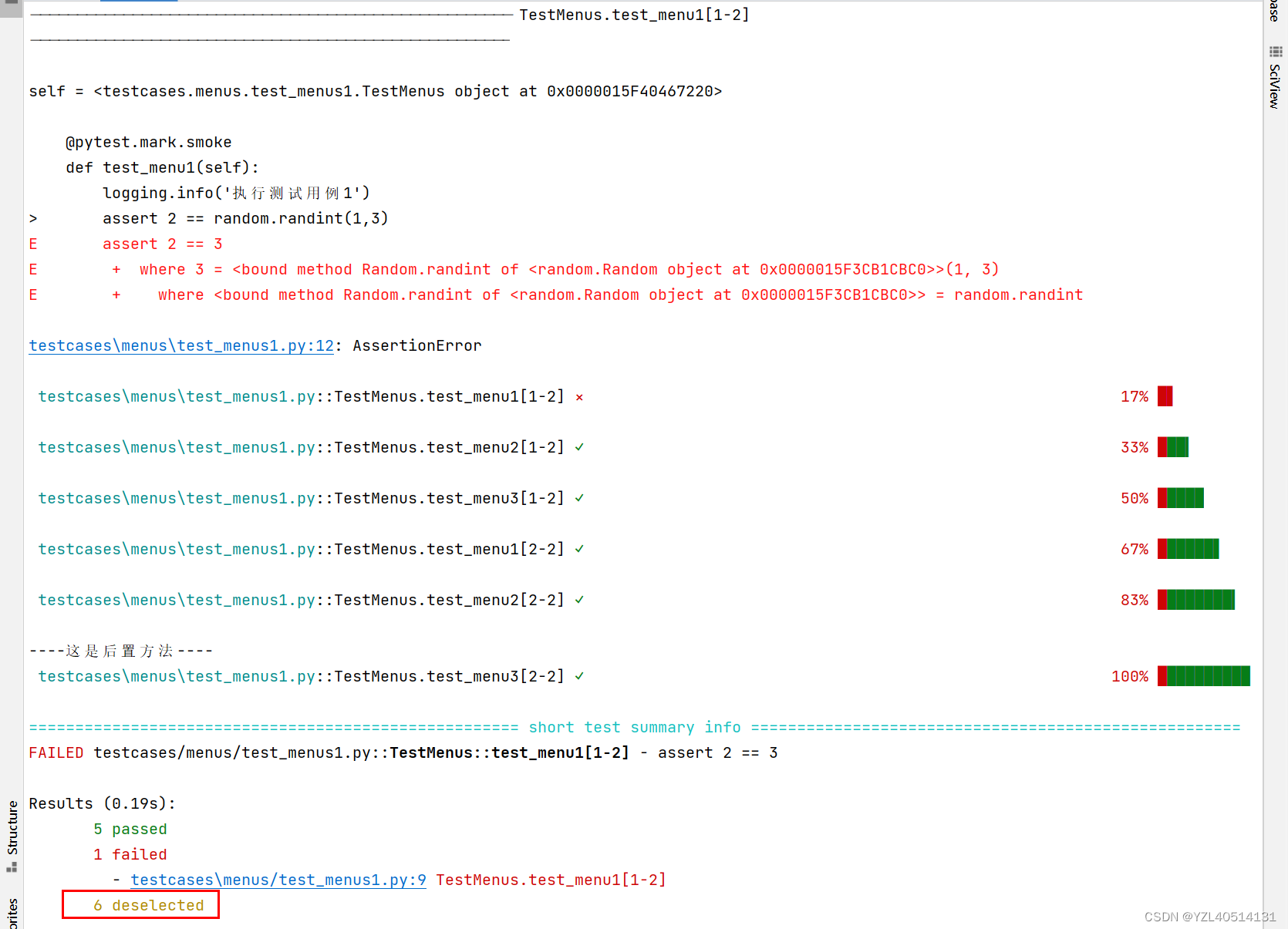
session:重复整个测试会话,既所有的测试用例执行一次,然后再执行第二次
案例2
# encoding=utf-8
import pytest
import logging
import randomclass TestMenus:@pytest.mark.smokedef test_menu1(self):logging.info('执行测试用例1')assert 2 == random.randint(1,3)@pytest.mark.smokedef test_menu2(self):logging.info('执行测试用例2')assert 1 == 1def test_menu3(self):logging.info('执行测试用例3')assert 2 == 2if __name__ == '__main__':pytest.main()
执行命令:
pytest --count=2 --repeat-scope=session
案例3:测试方法中添加装饰器
在函数里使用装饰器@pytest.mark.repeat(number)实现多次运行
@pytest.mark.repeat(3):表示特定的测试用例执行3次
# encoding=utf-8
import pytest
import logging
import randomclass TestMenus:@pytest.mark.smokedef test_menu1(self):logging.info('执行测试用例1')assert 2 == random.randint(1,3)@pytest.mark.repeat(3)@pytest.mark.smokedef test_menu2(self):logging.info('执行测试用例2')assert 1 == 1def test_menu3(self):logging.info('执行测试用例3')assert 2 == 2if __name__ == '__main__':pytest.main()
案例4:存在多个module执行其中一个module,可以加装饰器
# encoding=utf-8
import pytest
import logging
import random@pytest.mark.smoke
class TestMenus:@pytest.mark.smokedef test_menu1(self):logging.info('执行测试用例1')assert 2 == random.randint(1,3)@pytest.mark.repeat(2)@pytest.mark.smokedef test_menu2(self):logging.info('执行测试用例2')assert 1 == 1def test_menu3(self):logging.info('执行测试用例3')assert 2 == 2if __name__ == '__main__':pytest.main()
执行命令
pytest -m smoke --count=2 --repeat-scope=session
四.pytest-xdist
并行运行测试。通常测试都是依次执行的,如果你的测试不需要访问共享资源,并且用例与用例之间没有依赖关系,那么就可以通过并行运行来提速。
安装
pip install pytest-xdist
案例1
# encoding=utf-8
import pytest
import logging
import random
import time@pytest.mark.smoke
class TestMenus:@pytest.mark.smokedef test_menu1(self):time.sleep(2)logging.info('执行测试用例1')assert 2 == random.randint(1,3)#@pytest.mark.repeat(2)@pytest.mark.smokedef test_menu2(self):time.sleep(2)logging.info('执行测试用例2')assert 1 == 1def test_menu3(self):time.sleep(2)logging.info('执行测试用例3')assert 2 == 2if __name__ == '__main__':pytest.main()
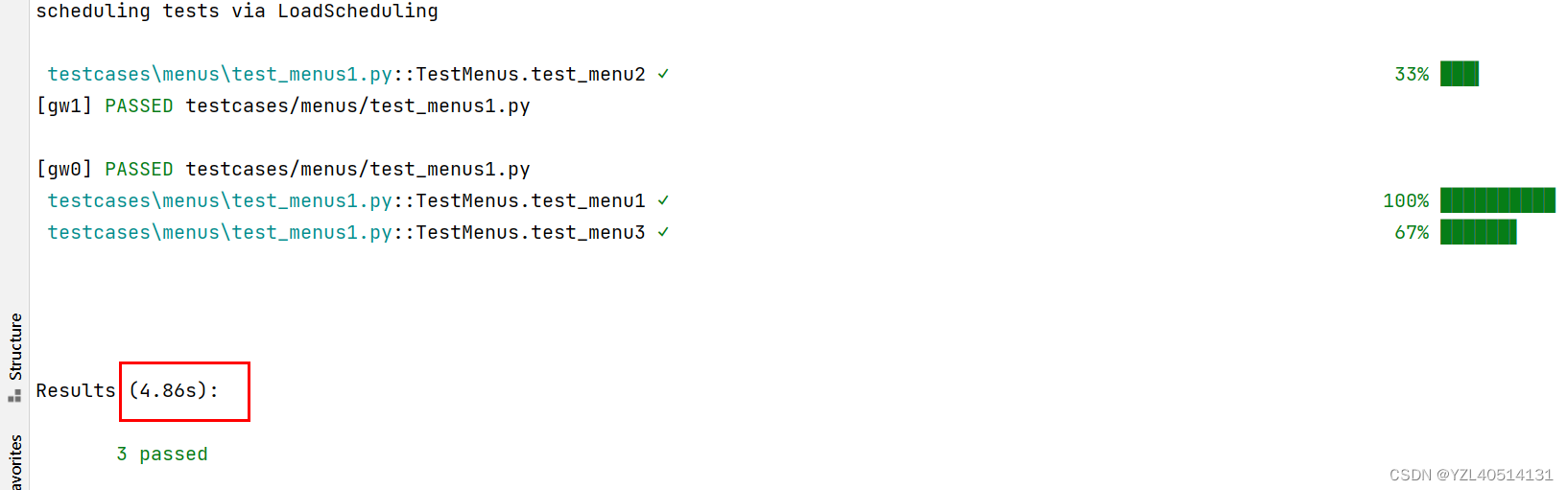
上面的代码如果正常运行,最少需要6s才能执行完毕
pytest-xdist插件的-n numprocesses选项可以指定运行测试的处理器进程数,-n auto选项可以自动侦测系统里的CPU数目。
案例2:默认使用多进程执行用用例
# encoding=utf-8
import pytest
import logging
import random
import time@pytest.mark.smoke
class TestMenus:@pytest.mark.smokedef test_menu1(self):time.sleep(2)logging.info('执行测试用例1')assert 2 == random.randint(1,3)#@pytest.mark.repeat(2)@pytest.mark.smokedef test_menu2(self):time.sleep(2)logging.info('执行测试用例2')assert 1 == 1def test_menu3(self):time.sleep(2)logging.info('执行测试用例3')assert 2 == 2if __name__ == '__main__':pytest.main()
执行命令
可以看到,时间比刚才快了很对。
pytest -n auto
案例2:自定义启动多个CPU执行用用例
pytest -v -n 10 auto
五.pytest-timeout
正常情况下,pytest里的测试是没有时间限制的。如果测试中涉及会消失的资源,比如web服务,那么最好为测试加上时间限制
pytest-timeout插件就提供了这个功能,它允许你在命令行指定超时时间。或者直接在测试代码中标记超时时间。
安装
pip install pytest-timeout
案例1:没有加用例超时报错
# encoding=utf-8
import pytest
import logging
import random
import time@pytest.mark.smoke
class TestMenus:@pytest.mark.smokedef test_menu1(self):logging.info('执行测试用例1')assert 2 == random.randint(1,3)#@pytest.mark.repeat(2)@pytest.mark.smokedef test_menu2(self):time.sleep(3)logging.info('执行测试用例2')assert 1 == 1def test_menu3(self):logging.info('执行测试用例3')assert 2 == 2if __name__ == '__main__':pytest.main()
执行结果
案例2:加用例超时报错
特别注意:
如果加了用例超时选项,当执行某条用例超时报错时,后面的用例将停止执行
# encoding=utf-8
import pytest
import logging
import random
import time@pytest.mark.smoke
class TestMenus:@pytest.mark.smokedef test_menu1(self):logging.info('执行测试用例1')assert 2 == 2#@pytest.mark.repeat(2)@pytest.mark.smokedef test_menu2(self):time.sleep(3)logging.info('执行测试用例2')assert 1 == 1def test_menu3(self):logging.info('执行测试用例3')assert 2 == 2if __name__ == '__main__':pytest.main()
执行命令:
pytest --timeout=3
案例3:pytest.ini文件中配置超时选项
pytest.ini
addopts = -v -s --capture=no --timeout=3
执行命令
pytest
六.pytest-ordering
pytest-ordering:自定义用例执行顺序
pytest默认按字母顺序去执行的(小写英文—>大写英文—>0-9数字);
用例之间的顺序是文件之间按照ASCLL码排序;
文件内的用例按照从上往下执行;
但可以通过第三方插件pytest-ordering实现自定义用例执行顺序。
安装
pip install pytest-ordering
test_menus1.py
案例1:正常顺序执行
# encoding=utf-8
import pytest
import logging
import random
import time@pytest.mark.smoke
class TestMenus:@pytest.mark.skipif(24<8,reason='版本不匹配')@pytest.mark.smokedef test_menu1(self):logging.info('执行测试用例1')assert 2 == 2#@pytest.mark.repeat(2)@pytest.mark.smokedef test_menu2(self):logging.info('执行测试用例2')assert 1 == 1def test_menu3(self):logging.info('执行测试用例3')assert 2 == 2if __name__ == '__main__':pytest.main()
执行结果
案例2:自定义用例执行顺序
test_menus1.py
# encoding=utf-8
import pytest
import logging
import random
import time@pytest.mark.smoke
class TestMenus:@pytest.mark.run(order=3)@pytest.mark.skipif(24<8,reason='版本不匹配')@pytest.mark.smokedef test_menu1(self):logging.info('执行测试用例1')assert 2 == 2@pytest.mark.run(order=2)#@pytest.mark.repeat(2)@pytest.mark.smokedef test_menu2(self):logging.info('执行测试用例2')assert 1 == 1@pytest.mark.run(order=1)def test_menu3(self):logging.info('执行测试用例3')assert 2 == 2if __name__ == '__main__':pytest.main()
执行结果
案例3:也可以通过这种方式自定义用例执行顺序
第一个执行:@pytest.mark.first 或者 @pytest.mark.run(‘first’)
第二个执行:@pytest.mark.second 或者 @pytest.mark.run(‘second’)
最后一个执行:@pytest.mark.last 或者 @pytest.mark.run(‘last’)
# encoding=utf-8
import pytest
import logging
import random
import time@pytest.mark.smoke
class TestMenus:@pytest.mark.last@pytest.mark.skipif(24<8,reason='版本不匹配')@pytest.mark.smokedef test_menu1(self):logging.info('执行测试用例1')assert 2 == 2@pytest.mark.second#@pytest.mark.repeat(2)@pytest.mark.smokedef test_menu2(self):logging.info('执行测试用例2')assert 1 == 1@pytest.mark.firstdef test_menu3(self):logging.info('执行测试用例3')assert 2 == 2if __name__ == '__main__':pytest.main()
七.pytest-dependency
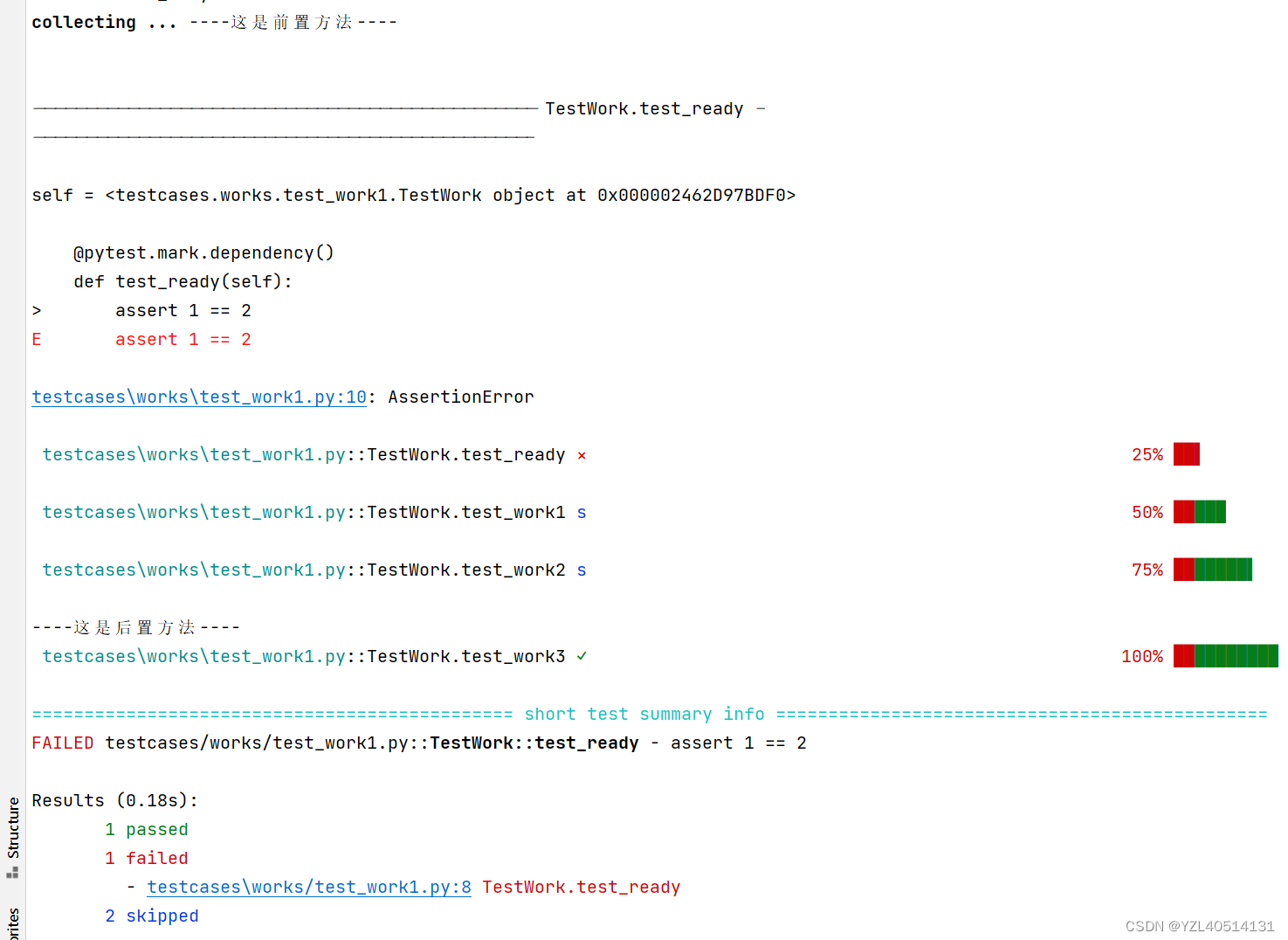
使用该插件可以标记一个testcase作为其他testcase的依赖,当依赖项执行失败时,那些依赖它的test将会被跳过。
安装 :
pip install pytest-dependency
使用方法: 用 @pytest.mark.dependency()对所依赖的方法进行标记,使用@pytest.mark.dependency(depends=[“test_name”])引用依赖,test_name可以是多个。
案例1
test_work1.py
#encoding=utf-8import pytest#@pytest.mark.skip()
class TestWork:@pytest.mark.dependency()def test_ready(self):assert 1 == 2@pytest.mark.dependency(depends=['test_ready'])@pytest.mark.smokedef test_work1(self,home_url):print("用例:%s" % home_url)@pytest.mark.skipif(8<24,reason='版本不匹配')def test_work2(self):assert 1 == 1def test_work3(self):assert 1 == 1if __name__ == '__main__':pytest.main()
执行结果